Lesson 0.3: Web Architecture, Same-Origin Policy and Cookie Attributes

By the end of this lesson you can picture the layers of a modern web app (browser, server, API, database), you understand what the same-origin policy (SOP) protects inside the browser, you know the HttpOnly, Secure and SameSite cookie attributes, and you have a general grasp of CORS. This is the framework that lets you later know which layer each vulnerability attacks.
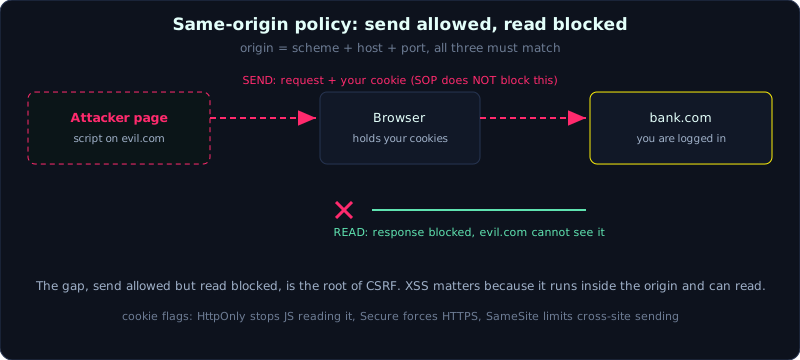 The same-origin policy allows a cross-origin request to be sent with its cookie, but blocks the attacker script from reading the response.
| Part: 0 (Intro to Web Hacking) | Time: about 45 minutes | Difficulty: easy |
Prerequisites: Lesson 0.2 (HTTP and HTTPS core).
Tools: a browser with DevTools, and curl.
Goals
After this lesson you can draw the layers of a typical web app, explain the same-origin policy and how an origin is defined, state correctly what HttpOnly, Secure and SameSite do on a cookie, and understand how CORS relaxes SOP for APIs and why it is often misconfigured.
1. Theory
1.1. The layers of a web app
A modern web application usually splits into layers, with data flowing in from the browser and back out again:
1
2
3
4
5
6
7
8
9
10
11
  Browser (client)
        |  HTTP/HTTPS request
        v
  Web server / reverse proxy   (nginx, Apache, Caddy)
        |
        v
  Application layer            (Flask, Express, Spring, Laravel...)
        |            |
        |            +--> calls to external services (third-party API, cloud metadata)
        v
  Database                     (MySQL, PostgreSQL, MongoDB...)
- Client (browser side): runs HTML, CSS, JavaScript. The user controls everything here, so none of it can be trusted. Client-side validation is for user experience, not for security.
- Web server / reverse proxy: accepts connections, serves static files, forwards dynamic requests into the application layer, and handles TLS.
- Application layer: where business logic runs. Most server-side vulnerabilities live here, injection, access control, SSRF, deserialization.
- Database: where data is stored. It is the target of SQL injection, and the place data leaks from when a vulnerability exists.
1.2. APIs, when client and server talk in data
Web apps today often split in two, the frontend (for example React) runs in the browser and calls an API on the backend to fetch and send data. An API (Application Programming Interface) is a set of endpoints that return plain data, usually JSON, instead of HTML.
Two common styles:
- REST: each resource is a path, and the method distinguishes the action. For example
GET /api/users/1fetches user id 1, andDELETE /api/users/1deletes it. You will find this is fertile ground for IDOR (Lesson 5.1) and BOLA (Lesson 9.1). - GraphQL: a single endpoint, where the client sends a query describing exactly the data it needs. It has its own security specifics (Lesson 9.2).
For a tester, APIs matter because they are often where the real logic lives, and sometimes their access control is looser than the interface, because the developer assumed “only the frontend will call this”. That is an illusion, anyone can call the API directly with curl.
1.3. Same-origin policy (SOP)
A browser opens many tabs and runs scripts from many sites at once. If a script from site A could freely read data from site B (where you are logged into your bank), it would be a disaster. The same-origin policy is the barrier that prevents this. By default, a script from one origin can only read response data from that same origin.
An origin is defined by three parts, scheme (protocol) plus host (domain name) plus port. All three must match to be same-origin:
1
2
3
4
5
6
7
8
Base URL:  https://shop.example.com:443/path

Compared to the base:
  https://shop.example.com/other       -> SAME origin (443 is the default for https)
  http://shop.example.com/             -> DIFFERENT (scheme http vs https)
  https://api.example.com/             -> DIFFERENT (different subdomain host)
  https://shop.example.com:8443/       -> DIFFERENT (different port)
  https://example.com/                 -> DIFFERENT (different host)
Remember this, SOP limits a script from READING a cross-origin response. It does not stop a cross-origin request from being SENT. The browser still sends the request (and attaches the cookie) to the other origin normally, it is only that the script cannot read the result. This gap, where you can send but cannot read, is the basis of CSRF (Lesson 5.3), while “being able to read the result” is what XSS exploits.
1.4. Cookie attributes, HttpOnly, Secure, SameSite
When the server sets a cookie, it attaches attributes that adjust how the browser handles it. Three attributes matter for security:
- HttpOnly: JavaScript cannot read this cookie through
document.cookie. The point is that if the site is hit by XSS, the attacker still cannot steal the session cookie with a script. A session cookie should always have HttpOnly. - Secure: the cookie is only sent over an HTTPS connection, never over plain HTTP. This prevents leaking the cookie over an unencrypted link.
- SameSite: decides whether the cookie is sent along with a cross-site request. This is the main CSRF shield in modern browsers:
SameSite=Strict: never sends the cookie on a request originating from another site.SameSite=Lax(the default in many browsers): only sends it on top-level navigation such as clicking a GET link, not on a cross-site POST.SameSite=None: sends it in every cross-site context, and must be paired withSecure.
Look back at the Set-Cookie from Lesson 0.2:
1
Set-Cookie: session=s3ss10n-demo-abc123; HttpOnly; Path=/; SameSite=Lax
This cookie has HttpOnly (XSS theft protection) and SameSite=Lax (CSRF reduction), but lacks Secure because the lab app runs on local HTTP. On production over HTTPS it must have Secure. A habit when testing, always inspect the Set-Cookie of the session cookie, and write down any flag that is missing, because each missing flag opens one attack direction (details in Lesson 4.2).
1.5. CORS, relaxing SOP under control
SOP blocks a script from reading a cross-origin response, but in practice a frontend at https://app.example.com often needs to call an API at https://api.example.com, which is cross-origin. CORS (Cross-Origin Resource Sharing) is the mechanism that lets a server deliberately allow some other origins to read its responses.
How it works, in short, the browser attaches an Origin header saying where the request came from. The server, if it agrees, returns an Access-Control-Allow-Origin header listing the allowed origin. Only then does the browser let the script read the result.
1
2
3
Request:   Origin: https://app.example.com
Response:  Access-Control-Allow-Origin: https://app.example.com
           Access-Control-Allow-Credentials: true
One point to keep straight, CORS is a relaxation mechanism, not a protection mechanism. It decides who may read a response, it does not protect the server from a request. A wrong CORS configuration, for example reflecting any Origin together with Allow-Credentials: true, turns it into a vulnerability that lets the attacker’s site read the victim’s sensitive data. The exploit is detailed in Lesson 9.3.
2. Demo
We observe origins and cookie attributes with tools you already have.
See the origin of the current page in DevTools (open the browser, press F12, go to the Console tab):
1
2
3
4
5
> location.origin
"https://portswigger.net"

> document.cookie          // only shows cookies WITHOUT HttpOnly
"_ga=GA1.2...."            // an HttpOnly session cookie will NOT appear here
The document.cookie line directly shows what HttpOnly does, a session cookie with HttpOnly is absent from this list, so a script (and XSS) cannot read it.
Inspect cookie attributes with curl against lab app 0.2 (after running labs/0.2/app.py):
1
2
$ curl -i -s -X POST -d "user=admin&pass=admin" http://127.0.0.1:8010/login | grep -i set-cookie
Set-Cookie: session=s3ss10n-demo-abc123; HttpOnly; Path=/; SameSite=Lax
Read this line, a cookie named session, with HttpOnly, scope Path=/, and SameSite=Lax. No Secure (reasonable since it is HTTP). In the browser, the same information is visible in DevTools under the Application tab, Cookies section, with columns marking each flag.
Check the same-origin rule in the Console (for example while on https://portswigger.net):
1
2
3
4
5
6
> new URL("https://portswigger.net/path").origin === location.origin
true
> new URL("http://portswigger.net/").origin === location.origin
false                      // different scheme -> different origin
> new URL("https://api.portswigger.net/").origin === location.origin
false                      // different host -> different origin
3. Lab
This lesson has no separate attack lab, we reuse the labs/0.2/ app:
- Tasks:
- Run
labs/0.2/app.py, log in, and usecurl -ito list all attributes on thesessioncookie. Write down which flags are present and which are missing. - Open the app in a browser at
http://127.0.0.1:8010, go to DevTools, the Application tab, the Cookies section, and compare with the curl result. - In the Console, run
document.cookieand confirm the session cookie (HttpOnly) does not appear. - Answer for yourself, if this app went to a real production HTTPS setup, which attribute does the session cookie need added?
- Run
- Hint: the attribute missing compared to an ideally safe session cookie is
Secure. - Answers: compare with
labs/0.2/transcript.txt(theSet-Cookieline) and section 1.4 above.
4. Key takeaways
- A web app is layered, client (not trustable), web server, application layer (where many vulnerabilities live), and database.
- The API is where the real logic lives, anyone can call it directly with curl, so do not trust “only the frontend calls it”.
- Origin = scheme + host + port, all three must match to be same-origin.
- SOP blocks a script from READING a cross-origin response, but does not block SENDING a cross-origin request (the root of CSRF).
- HttpOnly stops cookie theft via XSS, Secure forces HTTPS, SameSite reduces CSRF.
- CORS is a controlled relaxation mechanism, and a wrong configuration turns it into a vulnerability.
5. Common pitfalls
- Thinking the same domain means the same origin.
httpandhttpson the same domain are still different origins. - Thinking SOP blocks sending the request too. It does not, it only blocks reading the response, the request (with its cookie) is still sent.
- Trusting client-side validation. A user bypasses it easily by calling the API directly.
- Treating CORS as a firewall protecting the server. It only governs who may read the response.
- Forgetting
Secureon a session cookie on an HTTPS site, so the cookie can leak over a stray HTTP connection.
6. Further reading
- MDN Same-origin policy: https://developer.mozilla.org/en-US/docs/Web/Security/Same-origin_policy
- MDN Set-Cookie: https://developer.mozilla.org/en-US/docs/Web/HTTP/Headers/Set-Cookie
- MDN CORS: https://developer.mozilla.org/en-US/docs/Web/HTTP/CORS
- web.dev on SameSite cookies: https://web.dev/articles/samesite-cookies-explained