Lesson 1.3: MBR and GPT partition tables
The first time I had to deal with an image that “looked corrupted”, the truth turned out to be almost funny: the mount tool reported no file system, but that was because I kept trying to mount from sector 0. The real file system was far away at sector 2048. What sat at sector 0 was not a file system, it was the map that tells you where the partitions are. That map is the partition table. Reading it is a foundational skill, without it every tool downstream is just a black box. After this lesson you can open the first 512 bytes of an image, point out the signature and a partition entry, compute which sector and which byte a partition starts at, then use mmls to check the numbers you just computed.
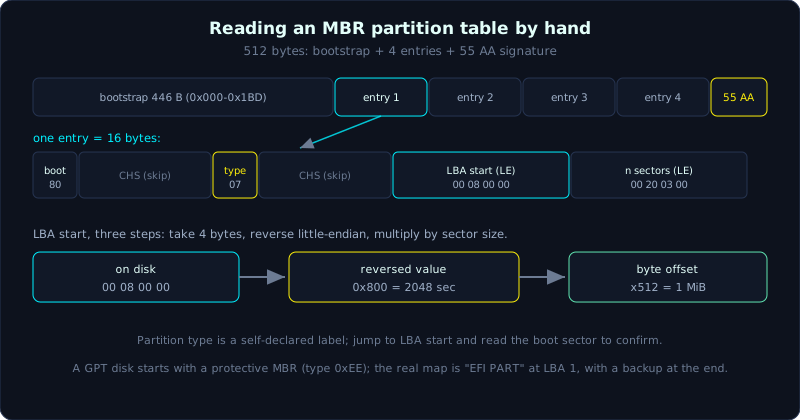 An MBR is 446 bytes of code, four 16-byte entries and a 55 AA signature; the LBA start takes three steps to decode.
Level: medium, about 55 minutes. Prerequisite: Lesson 1.2. Tools: xxd, mmls (Sleuth Kit), fdisk/gdisk, Python.
Goals
After this lesson you can describe the 512-byte layout of an MBR (bootstrap, partition table, the 0x55AA signature), decode a 16-byte partition entry by hand and read the partition type and LBA start correctly, convert the LBA start into an absolute byte offset to jump straight to the partition, explain why MBR holds only 4 primary partitions and up to 2TB and how an extended partition solves it, read the GPT layout (protective MBR, header, entry array, backup at the end of the disk) and know why you always check the backup, and read the output of mmls and gdisk fluently, telling meta regions apart from real partitions.
Theory
There are two kinds of map you will meet almost daily: MBR (the old style, from the DOS era) and GPT (the new style, that comes with UEFI). We dissect both.
MBR: the first 512 bytes of the disk
The MBR (Master Boot Record) sits at LBA 0, the first sector of the disk, and fits in exactly 512 bytes. It holds both boot code and the partition table, packed in one place. The fixed layout:
1
2
3
4
5
6
7
8
Offset        Size         Content
0x000 - 0x1BD    446 bytes   Bootstrap code (BIOS boot code)
0x1BE - 0x1CD     16 bytes   Partition entry #1
0x1CE - 0x1DD     16 bytes   Partition entry #2
0x1DE - 0x1ED     16 bytes   Partition entry #3
0x1EE - 0x1FD     16 bytes   Partition entry #4
0x1FE - 0x1FF      2 bytes   Signature 0x55 0xAA
                             total: 446 + 64 + 2 = 512
Four entries, 16 bytes each, together a 64-byte partition table. A spot people often misremember: the two signature bytes on disk are 55 AA (byte 0x1FE = 0x55, byte 0x1FF = 0xAA). People often say “magic 0xAA55” because reading those two bytes as a little-endian WORD gives 0xAA55. The two statements point to the same thing from a different byte-order viewpoint (review Lesson 1.1). If you do not see 55 AA at the end of sector 0, it is not a valid MBR.
Dissecting a 16-byte partition entry
This is the most valuable part of the lesson. Each 16-byte entry has this layout:
1
2
3
4
5
6
7
Byte    Size        Meaning
0        1 byte      Boot flag (0x80 = active/bootable, 0x00 = not)
1 - 3    3 byte      CHS start (Cylinder-Head-Sector, obsolete, skip)
4        1 byte      Partition type
5 - 7    3 byte      CHS end (obsolete, skip)
8 - 11   4 byte      LBA start   (DWORD little-endian)
12 - 15  4 byte      Sector count (DWORD little-endian, total length)
The three things you really care about in an investigation: the partition type (byte 4), the LBA start (bytes 8 to 11) and the sector count (bytes 12 to 15). The two CHS groups are a legacy of the time disks were addressed by Cylinder-Head-Sector; the OS has dropped them and uses LBA (Logical Block Addressing, sectors numbered linearly from 0). Many tools write CHS as the saturated value FE FF FF when a partition is beyond CHS range, so do not bother decoding them.
Partition type is one byte; look it up in a table to find the expected file system. A few values you meet all the time:
| Type | Meaning |
|---|---|
0x00 | Empty entry (unused) |
0x07 | NTFS or exFAT (and a few others, this byte does not distinguish cleanly) |
0x0B | FAT32 (CHS) |
0x0C | FAT32 (LBA, more common) |
0x83 | Linux native (ext2/3/4, xfs…) |
0x82 | Linux swap |
0x05 | Extended partition (CHS) |
0x0F | Extended partition (LBA) |
0xEE | GPT protective (a sign this is actually a GPT disk) |
0xEF | EFI System Partition (MBR style) |
Remember one thing that matters for forensics: the partition type is only a hint, not the truth. Someone hiding data can set a wrong type so tools skip the partition. This byte says “I claim to be NTFS”, and whether it really is NTFS you only know by jumping to the LBA start and reading the boot sector. Do not trust the label alone.
Reading the LBA start by hand, a full example
Suppose you hexdump sector 0 and read entry #1 (16 bytes) as:
1
80 20 21 00 07 DF 13 0C 00 08 00 00 00 20 03 00
Break it down by layout:
- Byte 0 =
80: boot flag, this partition is active (bootable). - Bytes 1 to 3 =
20 21 00: CHS start, skip. - Byte 4 =
07: partition type, recognized as NTFS or exFAT. - Bytes 5 to 7 =
DF 13 0C: CHS end, skip. - Bytes 8 to 11 =
00 08 00 00: LBA start, this is where you must be careful. - Bytes 12 to 15 =
00 20 03 00: sector count.
The LBA start is stored little-endian, meaning the low byte comes first. The four bytes 00 08 00 00 must be reversed when joining into a number:
1
2
3
4
Bytes on disk:    00  08  00  00
Weight:           2^0 2^8 2^16 2^24
Joined correctly: 0x00000800
0x00000800 = 8 * 256 = 2048  (sector)
So the partition starts at sector 2048. To get the absolute byte offset on the image (to jump straight to the boot sector with xxd or dd), multiply by the sector size:
1
2048 sectors * 512 bytes/sector = 1 048 576 bytes = 0x100000 = exactly 1 MiB
That 2048 is not random: modern OSes align the first partition to the 1 MiB mark to match the SSD erase block and the RAID stripe, so seeing “2048” becomes a reflex.
Do the sector count to finish the set: 00 20 03 00 reversed little-endian is 0x00032000 = 204800 sectors, that is 204800 * 512 = 104 857 600 bytes = exactly 100 MiB. The partition runs from sector 2048 to sector 2048 + 204800 - 1 = 206847.
The short procedure, memorize the three steps: take 4 bytes, reverse little-endian, multiply by sector size. Get one of the three wrong and you get a meaningless number.
Why MBR holds only 4 partitions and 2TB
These two limits are why GPT exists.
First, the table has only 4 entries so a maximum of 4 primary partitions. People work around it with an extended partition: one of the 4 entries carries type 0x05 or 0x0F, and it is not a data partition but a “box” holding a chain of logical partitions inside. Each logical partition is described by an EBR (Extended Boot Record), a miniature MBR at its start, and the EBRs are chained into a linked list: each EBR points to the next. The forensic consequence: if you read only the 4 entries in the MBR and stop, you miss all the logical partitions. You have to follow the EBR chain, or let mmls do it for you.
Second, the LBA start and sector count fields are both 32-bit DWORDs. The largest sector count representable is 2^32 - 1. With 512-byte sectors, the capacity ceiling is 2^32 * 512 = 2 TiB (precisely 2 TiB minus one sector). A disk larger than 2TB cannot have its excess addressed by MBR. This is a hard wall, not something you can work around within MBR.
GPT: the map of the UEFI era
GPT (GUID Partition Table) was created to break those two limits. Its layout spans the LBAs at the start of the disk (512-byte sectors):
1
2
3
4
5
6
7
LBA 0        Protective MBR (a fake MBR, one entry of type 0xEE covering the whole disk)
LBA 1        Main GPT Header (signature "EFI PART")
LBA 2 - 33   Main partition entry array (128 entries * 128 bytes = 16 KiB)
LBA 34 ...   Data region, the real partitions
...
end - 33     Backup partition entry array
LBA last     Backup GPT Header
A few core points:
- Protective MBR at LBA 0. GPT still keeps a fake MBR so old tools (that only understand MBR) see the disk as “already having a strange partition covering everything” (type
0xEE) and do not dare to format over it. This is purely a protective layer, the real partition data is not there. Seeing a single entry of type0xEEin the MBR means: do not read this MBR further, jump to the GPT. - GPT Header at LBA 1, starting with 8 ASCII bytes
EFI PART(hex45 46 49 20 50 41 52 54). The header records the location of the entry array, the number of entries, the size of each entry, the disk GUID, and a CRC32 for self-integrity checking. - Entry array defaults to 128 entries, each 128 bytes, so GPT allows up to 128 partitions without the extended trick. Each entry holds: a partition type GUID (a 16-byte GUID in place of the MBR type byte, for example Linux filesystem is
0FC63DAF-8483-4772-8E79-3D69D8477DE4, Microsoft basic data isEBD0A0A2-B9E5-4433-87C0-68B6B72699C7), a unique partition GUID (the identifier of that partition itself, very useful for tracing), first LBA, last LBA (both 64-bit so the capacity ceiling goes into the zettabyte range), attribute flags, and a partition name in UTF-16. - Backup at the end of the disk. GPT stores a copy of the header and entry array in the last sector. The CRC32 in the header protects both the header and the array, so if the main copy is damaged, the OS (and the forensic tool) rebuilds from the backup.
A small point that trips up newcomers: the GUIDs in GPT are stored mixed-endian. The first three GUID fields (4 bytes, 2 bytes, 2 bytes) are stored little-endian, the last three are stored in order. So the raw bytes of a GUID on disk do not match the text form if you read them sequentially, you have to reverse the first three fields.
Hybrid MBR and why you always check the GPT backup
Two forensic traps worth remembering:
Hybrid MBR. Some disks (often seen on Boot Camp era Macs) have a protective MBR that is no longer truly “protective”: it contains real entries pointing to the same region GPT describes, so both old-style Windows and the GPT system can boot. The consequence: MBR and GPT tell two different stories about the same disk. When investigating, read both and compare, do not trust one side alone.
Always check the GPT backup. An anti-forensics actor can edit the main GPT to hide a partition but forget the backup at the end of the disk. Comparing the main GPT with the backup and finding a mismatch is a strong sign worth digging into: either the disk is damaged or someone tampered with it. Some tools read only the main GPT and stay silent, so a good habit is to actively probe the last sector.
What mmls says
mmls from the Sleuth Kit is the fastest way to let the machine read the map so you can compare with your hand work. It prints these columns:
- Slot: the entry’s ordinal in the table. A
Metarow is a management structure (the partition table itself, the GPT header), not a data partition. A row shaped000:000is a real partition. - Start / End: the start and end sector, counted from the start of the image.
- Length: the sector count.
- Description: the partition type mmls guessed.
The important thing: mmls counts everything in sectors, not bytes. To jump to a partition’s boot sector with dd, take the Start column times the sector size. And watch the Unallocated rows wedged in between, that is exactly where to look for a deleted partition or hidden data (continuing the idea of slack space and unallocated space in Lesson 1.2).
Demo
Always work on a copy of the image, record the hash before and after. Here I work read-only so the hash does not change, but building the habit is still good.
Look at the first 512 bytes with xxd
Dump sector 0 and cut out the end region where the partition table and signature are:
1
2
3
4
5
6
$ xxd -l 512 evidence-mbr.dd | tail -n 5
000001b0: 0000 0000 0000 0000 a31c f56b 0000 8020  ...........k...
000001c0: 2100 07df 130c 0008 0000 0020 0300 0000  !.......... ....
000001d0: 0000 0000 0000 0000 0000 0000 0000 0000  ................
000001e0: 0000 0000 0000 0000 0000 0000 0000 0000  ................
000001f0: 0000 0000 0000 0000 0000 0000 0000 55aa  ..............U.
Read from the bottom up:
- Line
0x1f0, the last two bytes55aa: a valid MBR signature. Good, this is a real MBR. - The 4 bytes at
0x1b8(a3 1c f5 6b): the disk signature Windows writes, not a partition, ignore it. - Partition entry #1 starts at
0x1be. Byte0x1be=80, byte0x1bf=20, then it wraps to line0x1c0. Collect the 16 consecutive bytes from0x1be:
1
80 20 21 00 07 DF 13 0C 00 08 00 00 00 20 03 00
Exactly the entry we dissected earlier. Entries #2, #3, #4 (from 0x1ce onward) are all 00, meaning empty: this disk has only one partition.
Decode the entry with Python for safety
After computing by hand, let the machine check the numbers. This small script reads exactly 16 bytes at offset 0x1be and breaks out the fields:
1
2
3
4
5
6
7
8
9
10
11
12
13
14
15
import struct

with open("evidence-mbr.dd", "rb") as f:
    f.seek(0x1be)
    e = f.read(16)

boot = e[0]
ptype = e[4]
lba_start, nsec = struct.unpack("<II", e[8:16])   # "<II" = 2 DWORD little-endian

print(f"boot flag   : 0x{boot:02x}")
print(f"type        : 0x{ptype:02x}")
print(f"LBA start   : {lba_start} sector  -> byte {lba_start*512} (0x{lba_start*512:x})")
print(f"so sector   : {nsec} sector -> {nsec*512/1024/1024:.0f} MiB")
print(f"LBA end     : {lba_start + nsec - 1}")
It prints:
1
2
3
4
5
6
$ python3 parse_mbr.py
boot flag   : 0x80
type        : 0x07
LBA start   : 2048 sector  -> byte 1048576 (0x100000)
so sector   : 204800 sector -> 100 MiB
LBA end     : 206847
struct.unpack("<II", ...) is exactly the little-endian reversal we did by hand, just handed to the library. The < is little-endian, each I is a 4-byte unsigned int.
Confirm with mmls
1
2
3
4
5
6
7
8
9
$ mmls evidence-mbr.dd
DOS Partition Table
Offset Sector: 0
Units are in 512-byte sectors

      Slot      Start        End          Length       Description
000:  Meta      0000000000   0000000000   0000000001   Primary Table (#0)
001:  -------   0000000000   0000002047   0000002048   Unallocated
002:  000:000   0000002048   0000206847   0000204800   NTFS / exFAT (0x07)
Every number matches: Start 2048, End 206847, Length 204800, type 0x07. The 001 Unallocated row is the 1 MiB gap between the MBR and the partition, a place where hidden data can sit. To open the file system with the Sleuth Kit, pass the sector offset to the -o parameter, for example fls -o 2048 evidence-mbr.dd.
What a GPT disk looks like
For a GPT image, first look at the fake boot sector and the header:
1
2
$ xxd -l 16 -s 0x1c2 evidence-gpt.dd
000001c2: ee ff ff ff 01 00 00 00 ff ff ff ff ff ff ff ff  ................
Byte 0x1c2 = ee: this is a protective MBR, do not read the MBR further, this disk is GPT. Now dump LBA 1 (offset 512 = 0x200) to find the header signature:
1
2
$ xxd -l 16 -s 0x200 evidence-gpt.dd
00000200: 4546 4920 5041 5254 0000 0100 5c00 0000  EFI PART....\...
EFI PART confirms the GPT header. The four bytes 00 00 01 00 are revision 1.0, 5c 00 00 00 is the header size = 92 bytes. gdisk reads it in full for us:
1
2
3
4
5
6
7
8
9
10
11
12
13
14
15
16
17
18
19
20
21
$ gdisk -l evidence-gpt.dd
GPT fdisk (gdisk) version 1.0.9

Partition table scan:
  MBR: protective
  BSD: not present
  APM: not present
  GPT: present

Found valid GPT with protective MBR; using GPT.
Disk evidence-gpt.dd: 2097152 sectors, 1.0 GiB
Sector size (logical): 512 bytes
Disk identifier (GUID): 0FAE2D7C-1A3B-4C55-9E21-77C0A9D3E401
Partition table holds up to 128 entries
Main partition table begins at sector 2 and ends at sector 33
First usable sector is 34, last usable sector is 2097118
Partitions will be aligned on 2048-sector boundaries

Number  Start (sector)    End (sector)  Size       Code  Name
   1            2048          264191   128.0 MiB   0700  Basic data partition
   2          264192         2095103   894.0 MiB   8300  Linux filesystem
Note gdisk says “Main partition table begins at sector 2 and ends at sector 33”: exactly 32 sectors, equal to 128 entries * 128 bytes / 512 = 32. mmls also reads GPT and points out the meta regions:
1
2
3
4
5
6
7
8
9
10
11
12
13
$ mmls evidence-gpt.dd
GUID Partition Table (EFI)
Offset Sector: 0
Units are in 512-byte sectors

      Slot      Start        End          Length       Description
000:  Meta      0000000000   0000000000   0000000001   Safety Table
001:  -------   0000000000   0000002047   0000002048   Unallocated
002:  Meta      0000000001   0000000001   0000000001   GPT Header
003:  Meta      0000000002   0000000033   0000000032   Partition Table
004:  000       0000002048   0000264191   0000262144   Basic data partition
005:  001       0000264192   0002095103   0001830912   Linux filesystem
006:  -------   0002095104   0002097151   0000002048   Unallocated
Rows 002 and 003 are the header and entry array (meta regions), rows 004 and 005 are the real partitions. To inspect the GPT backup, it is at the last sector (2097151), dump it out to check EFI PART again and compare with the main copy.
Lab
A runnable lab (Linux, no root needed). Run bash solve.sh to build valid MBR and GPT images with Python struct then parse them back with mmls and xxd.
Tasks:
- Pen-and-paper exercise (see
solution.md): parse a given 64-byte partition table, split out two entries, read the boot flag, type, LBA start, sector count, convert to byte offset, compute the LBA end, and check whether there is an unallocated gap. - Run the MBR lab: use
mkmbr.py, view the partition table withxxd -s 0x1b0, parse the LBA yourself then compare withmmls. - Run the GPT lab: use
mkgpt.py, find theEFI PARTsignature at LBA 1, compare withmmls, and find the backup header at the last sector.
Common pitfalls
- Reading the LBA start but forgetting to reverse little-endian:
00 08 00 00is not 0x00080000, it is 0x00000800 = 2048. Reversing it wrong is off by a thousand times. - Computing the LBA but forgetting to multiply by the sector size, then using the sector count as a byte offset: dd jumps to the wrong place and you think the file system is corrupted.
- Reading only the 4 entries in the MBR and stopping, missing all the logical partitions inside the extended partition (type 0x05/0x0F). When you see an extended partition you must follow the EBR chain.
- Reading only the main GPT and not checking the backup at the last sector. A mismatch between the two is a sign of a damaged disk or someone editing to hide a partition.
- Mistaking a protective MBR (a single entry of type 0xEE) for a real MBR disk and trying to parse its 4 entries. When you see 0xEE, switch immediately to reading GPT.
- Trusting the partition type absolutely: that byte is only a self-declared label, you have to jump to the LBA start and read the boot sector to know the real file system.
Further reading
- Brian Carrier, “File System Forensic Analysis”, chapter 5 (DOS partition) and chapter 6 (GPT): the reference for this part.
- Microsoft, the GPT documentation in the UEFI Specification (the GUID Partition Table part, the header and entry structure).
- The Sleuth Kit wiki: the
mmlspage and the volume system tools. - The man pages for
fdisk,gdisk,sgdiskfor practical work on Linux. - Lesson 1.1 (hex, endianness, magic bytes) and Lesson 1.2 (sector, cluster, slack) to connect the foundations.
Key takeaways
- MBR at LBA 0, 512 bytes: 446 bytes bootstrap + 64 bytes partition table (4 entries x 16 bytes) + the
55 AAsignature. - In an entry: byte 0 boot flag, byte 4 partition type, bytes 8..11 LBA start, bytes 12..15 sector count (the last two little-endian).
- Convert LBA to a byte: reverse little-endian then multiply by sector size. Three steps, one wrong breaks it.
- A bare MBR holds 4 primary partitions and about 2TB (32-bit LBA); extended plus the EBR chain adds more logical partitions.
- GPT: protective MBR (type 0xEE) at LBA 0, header
EFI PARTat LBA 1, entry array 128 x 128 bytes, backup at the end of the disk, CRC32 protection. - mmls and gdisk count in sectors, tell Meta rows apart from real partitions, always inspect the Unallocated regions.