Lesson 1.4: FAT and exFAT file systems
FAT is the simple file system you meet everywhere. After this lesson you can read a FAT volume from the boot sector down to each directory entry, understand the cluster chain, and recover a deleted file by hand, answering the question “what is this file called, which cluster is it in, is the content still there”.
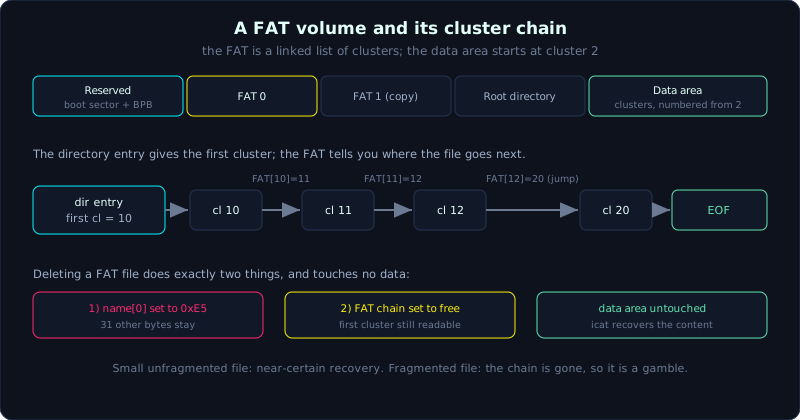 The FAT is a linked list of clusters; deleting a file frees the chain and marks the name, but leaves the data in place.
Level: medium, about 75 minutes. Prerequisite: Lesson 1.3. Tools: fsstat, istat, fls, icat (The Sleuth Kit), xxd, Python.
Goals
After this lesson you can draw the layout of a FAT volume (reserved area, FAT area, root directory, data area), tell FAT12, FAT16 and FAT32 apart by the number of cluster address bits and how they store the root directory, read a 32-byte directory entry by hand (the 8.3 name, attribute, timestamp, first cluster, size), follow the cluster chain in the FAT table to know where a file is, explain exactly what happens when a FAT file is deleted and why it can be recovered, and state the forensic differences of exFAT.
Theory
Why you still learn FAT in 2026
Once I was handed an SD card pulled from a dashcam, with the task of recovering a clip the driver deleted before returning the car. The card was formatted FAT32. Another time it was a USB stick in evidence, also FAT32. Then router firmware, IP camera recorders, camera memory cards, even the EFI System Partition (ESP) on the very laptop you are using, all FAT. NTFS and ext4 rule operating system drives, but in the world of small and embedded devices, FAT is still the standard because it is simple enough that a chip costing a few dollars can run a driver for it.
For a forensics person, FAT has double value. First, you meet it for real, often. Second, it is the perfect beginner exercise to understand what a file system actually does: no journaling to hide behind, no tangled B-tree, everything laid bare. Once you understand FAT, NTFS and ext4 will look like FAT wrapped in extra layers.
The name FAT stands for File Allocation Table, and that table is the center of the system, so we will spend a lot of time on it.
The layout of a FAT volume
A FAT partition splits into four regions, laid next to each other in this order:
1
2
3
4
5
6
7
8
9
10
11
12
13
14
15
16
17
sector 0
+--------------------------------------------------+
| Reserved area                                    |
|   boot sector (holds BPB) + FSInfo + backup boot |
+--------------------------------------------------+
| FAT area                                         |
|   FAT 0  (main copy)                             |
|   FAT 1  (backup copy, usually identical)        |
+--------------------------------------------------+
| Root directory                                   |
|   FAT12/16: fixed, right after FAT, fixed size.  |
|   FAT32: lives in the data area like any file.   |
+--------------------------------------------------+
| Data area                                        |
|   split into clusters, numbered from cluster 2   |
|   holds file content and subdirectories          |
+--------------------------------------------------+
The reserved area starts with the boot sector. Inside the boot sector is a structure called the BPB (BIOS Parameter Block): it declares every number needed to read the volume, bytes/sector, sectors/cluster, number of reserved sectors, number of FAT copies, number of sectors per FAT, the starting cluster of the root directory (FAT32 only). To parse a FAT volume by hand, read the BPB first, it is the map.
The FAT area usually holds two identical FAT copies. The second is a backup: if the main one is damaged, in theory the driver can use the copy. In practice most drivers do not self-repair, but for forensics the FAT 1 copy sometimes holds a different state from FAT 0 and is worth comparing.
The data area is the largest part, split into equal blocks called clusters (also allocation units, the smallest allocation unit). One thing to remember carefully: clusters are numbered starting from 2, not 0. Cluster 0 and 1 are reserved numbers, they do not point to any real data region. So when converting “which sector is cluster N”, the formula always has a subtraction of 2.
How FAT12, FAT16 and FAT32 differ
The numbers 12, 16, 32 are the number of bits used to address a cluster in the FAT table. They decide the maximum number of clusters, and from that how large the volume can be.
| Cluster address bits | Max clusters | Used for | |
|---|---|---|---|
| FAT12 | 12 | about 4 thousand | floppy disks, very small volumes |
| FAT16 | 16 | about 65 thousand | small USB, old cards |
| FAT32 | 28 (28, not 32) | about 268 million | common USB, SD cards |
FAT32 sounds like 32 bits but in fact each 32-bit entry uses only the low 28 bits for addressing, the top 4 bits are dropped (reserved). This is a classic trap when parsing by hand: remember to mask the low 28 bits, do not use all 32.
The second difference, also important for forensics, is how the root directory is stored. FAT12 and FAT16 put the root directory in a fixed region right after the FAT, with a fixed size (the entry count is declared in the BPB), outside the data area. FAT32 drops that: the root directory becomes a normal cluster chain in the data area, usually starting at cluster 2, and can be any size. The consequence is that on FAT32 the root directory can also fragment and grow like any other directory.
The 32-byte directory entry, field by field
Each file or directory in FAT is described by a record exactly 32 bytes long called a directory entry. This is where the file name, attributes, times, and most importantly the pointer to the first cluster are stored. The layout of those 32 bytes:
1
2
3
4
5
6
7
8
9
10
11
12
13
14
offset  size  meaning
0        8     main name (8 chars, padded with 0x20 spaces)
8        3     extension (3 chars)
11       1     attribute byte (the attribute bits)
12       1     reserved (Windows uses it for name case)
13       1     create time, tenths of 10 ms (0-199)
14       2     create time (hour/minute/second/2)
16       2     create date (year from 1980/month/day)
18       2     last access date (date ONLY, no time)
20       2     first cluster HIGH word (FAT32 only)
22       2     write time (last modified)
24       2     write date
26       2     first cluster LOW word
28       4     file size (bytes), DWORD little-endian
The three details most easily gotten wrong:
The attribute byte at offset 11 is a bitmask. The bits: 0x01 READ_ONLY, 0x02 HIDDEN, 0x04 SYSTEM, 0x08 VOLUME_ID (this entry is the volume label, not a file), 0x10 DIRECTORY (this is a directory), 0x20 ARCHIVE (an ordinary file, the archive bit). There is one special combination: the value 0x0F (READ_ONLY + HIDDEN + SYSTEM + VOLUME_ID all set at once) is not a real file, it marks an LFN entry, discussed below.
The first cluster is split in two. On FAT32, the file’s first cluster number is kept in two separate places: the high word at offset 20-21 and the low word at offset 26-27. To get the real cluster number you have to join them: cluster = (high << 16) | low. FAT12 and FAT16 have no high word (offset 20-21 is always 0), you read only the low word. Forgetting to join the high word is the most common bug when writing a FAT32 parser, and it makes every file from cluster 65536 onward read wrong.
The timestamp has three different resolutions, note them on purpose: create time is accurate to 10 ms (there is even a fractional byte at offset 13), write time is accurate only to 2 seconds (because the seconds field stores seconds divided by 2, and 5 bits only count 0-29), and last access is the worst, storing only the date, no time. That “2 seconds” detail is very useful for detecting a forged timestamp: if you see a write time with an odd number of seconds, it is almost certainly hand-edited rather than written by the system.
FAT dates and times are packed into 2 bytes as bit fields. For date: bits 15-9 are the year from 1980, bits 8-5 are the month, bits 4-0 are the day. For time: bits 15-11 hour, bits 10-5 minute, bits 4-0 seconds divided by 2. We will decode a real value by hand in a moment.
The FAT table and the cluster chain
Now the center. Picture the FAT table as an array of integers, element N corresponding to cluster N in the data area. The value of that element tells you “after this cluster, where does the file go next”:
- 0x00000000: the cluster is free, not allocated to anyone.
- a valid cluster number: this is the next pointer, the file continues into that cluster.
- an EOF value (on FAT32 it is 0x0FFFFFF8 or higher, often 0x0FFFFFFF): this is the file’s last cluster.
- 0x0FFFFFF7: a bad cluster, the driver avoids it.
The directory entry only gives you the first cluster. From there you look up the FAT table to go on, like following a linked list:
1
2
3
4
5
6
Directory entry says: file starts at cluster 10.
FAT[10] = 11   -> read cluster 10, then go to cluster 11
FAT[11] = 12   -> read cluster 11, then go to 12
FAT[12] = 20   -> file jumps (fragmentation), go to cluster 20
FAT[20] = EOF  -> cluster 20 is the last, end of file
Result: the file is in clusters 10, 11, 12, 20
When the file’s clusters are not adjacent (like 12 jumping to 20 above), we say the file is fragmented. For a live file this is no problem, the cluster chain leads the way fully. The trouble only breaks out when the file is deleted, the next part shows why.
What happens when you delete a FAT file
This is the most valuable part of the lesson, because it is the basis of every recovery technique on FAT.
When you delete a file (a real delete, not into the Recycle Bin), FAT does exactly two things, and deliberately does as little as possible for speed:
- Overwrites the first byte of the 8.3 name in the directory entry with the value 0xE5. This byte is the flag “entry deleted, this slot is reusable”. The whole remaining 31 bytes of the entry, including attribute, timestamp, first cluster, size, stay in place.
- Sets all the FAT elements in the file’s cluster chain to 0x00000000, that is, returns those clusters to the free state.
Notice it does not touch the data area. The file content stays in the old clusters until the system allocates those clusters to a new file and writes over them. This is why recovery works.
But look carefully at step 2: it erases the whole cluster chain. The directory entry still has the first cluster, so you know where the file starts. From the file size, you know how many clusters the file spans. If the file was contiguous while alive (not fragmented), you just read from the first cluster for the right number of clusters and you are done, 100% accurate. That is the nice case, and most small files fall into it.
The trouble is a fragmented file. The chain was erased from the FAT, so you no longer know where the file jumped after its first cluster. A recovery tool has to guess, usually assuming contiguous clusters. If the file actually jumped around, you recover a file correct at the start then wrong afterward, or mixed with fragments of another file. For a JPG or a video, the symptom is that the top half opens then breaks. Remember this: on FAT, recovering a small unfragmented file is good, recovering a large fragmented file is a gamble.
LFN, long file names
A 32-byte entry can only hold an 8.3 name (8 characters of name, 3 of extension, uppercase). A long name like Investigation report October.docx does not fit. FAT’s solution is LFN (Long File Name): add one or more extra entries right BEFORE the main 8.3 entry, each extra entry having the attribute byte exactly 0x0F so the driver knows it is not a file. Each LFN entry holds 13 Unicode (UTF-16) characters of the name, in reverse order. The 8.3 entry behind them keeps a checksum, and each LFN entry repeats that checksum to bind them to the same file and avoid wrong joins. In an investigation, this LFN chain sometimes survives even when the 8.3 entry has been reused, and vice versa, so always read the whole cluster of entries.
exFAT, the FAT for large cards
exFAT (Extended FAT) was born when SDXC cards and USB jumped to tens and hundreds of GB, at which point FAT32 struggled (the 4GB file limit is the most famous). Microsoft designed exFAT to keep FAT’s simple spirit but fix a few points, and those points change how we investigate:
- An allocation bitmap instead of scanning the FAT. exFAT has a special file, the allocation bitmap, where each bit represents whether a cluster is free or used. To know if a cluster is free, the driver checks the bitmap rather than walking the FAT table. The FAT table in exFAT still exists, but is only used to store the chain for fragmented files. An unfragmented file is marked “no FAT chain” and read straight through from the first cluster. This makes recovery of contiguous files on exFAT fairly easy, but for a fragmented file you still have to read the FAT.
- No journaling. Like FAT32, exFAT has no change log. A power loss mid-operation can corrupt the structure, and for forensics it means no log to rebuild the history of operations like the NTFS $LogFile.
- Directory entry set style. Instead of one 32-byte entry holding everything, exFAT describes each file with a cluster of several 32-byte entries: a File Directory Entry (holding attribute and timestamp), a Stream Extension Entry (holding first cluster, length, the no-FAT-chain flag), then one or more File Name Entries (holding the Unicode name). Parsing exFAT means reading the whole set to get one file.
- Timestamps with a timezone offset. This is the most valuable forensic upgrade. FAT32 stores times as bare local time, saying nothing about which timezone, so you are always uncertain. exFAT adds a UTC offset byte for each timestamp, so in theory you can normalize to UTC. Still be careful, because not every device writes this byte correctly.
In one sentence: when you see a large memory card or USB formatted at the factory, it is likely exFAT, and you need to remember it uses a bitmap, has a chain only when fragmented, and has timestamps with a timezone offset.
Demo
We will create a real FAT32 image, drop a few files in, then dissect it with The Sleuth Kit and xxd. All output below is real, run on Linux. If you cannot mount via loop (no permission), use the Python library pyfatfs to write files into the image, with equivalent results.
Create and load data:
1
2
3
4
5
6
7
8
9
10
11
12
13
14
# Create an empty 64MB image then format FAT32, label the volume EVIDENCE
dd if=/dev/zero of=fat.img bs=1M count=64 status=none
mkfs.vfat -F 32 -n "EVIDENCE" fat.img

# Write files into the image (use pyfatfs when there is no mount permission)
python3 - <<'PY'
from pyfatfs.PyFatFS import PyFatFS
fs = PyFatFS("fat.img")
fs.writetext("/NOTE.TXT",   "Bang chung so 1: nhat ky dieu tra. Khong sua file goc.\n")
fs.writetext("/SECRET.TXT", "SECRET-FLAG{fat_recovery_works}\n")
fs.writetext("/PHOTO.JPG",  "du lieu anh gia lap cho photo 0001\n")
fs.makedir("/DCIM")
fs.close()
PY
Read the volume layout with fsstat. This is the first step with any unfamiliar volume: it translates the BPB into plain terms for you.
1
2
3
4
5
6
7
8
9
10
11
12
13
14
15
16
17
18
19
20
21
22
23
24
25
26
$ fsstat fat.img
FILE SYSTEM INFORMATION
--------------------------------------------
File System Type: FAT32
OEM Name: mkfs.fat
Volume ID: 0x75224e9b
Volume Label (Boot Sector): EVIDENCE
File System Type Label: FAT32

File System Layout (in sectors)
Total Range: 0 - 131071
* Reserved: 0 - 31
** Boot Sector: 0
** FS Info Sector: 1
** Backup Boot Sector: 6
* FAT 0: 32 - 1040
* FAT 1: 1041 - 2049
* Data Area: 2050 - 131071
** Cluster Area: 2050 - 131071
*** Root Directory: 2050 - 2050

CONTENT INFORMATION
--------------------------------------------
Sector Size: 512
Cluster Size: 512
Total Cluster Range: 2 - 129023
Read exactly what the theory says: reserved 0-31, two FAT copies (FAT 0 and FAT 1) next to each other, then the data area starting at sector 2050, and the FAT32 root directory sitting right in the data area at cluster 2 (sector 2050). In this small image the cluster size equals 1 sector (512 bytes).
List files with fls. The left column is the type (r/r is an ordinary file, d/d a directory, v/v a virtual TSK metadata entry), the number is the metadata address (on FAT, TSK uses the directory entry ordinal as the inode):
1
2
3
4
5
6
7
8
$ fls fat.img
r/r 3:	EVIDENCE    (Volume Label Entry)
r/r 4:	NOTE.TXT
r/r 5:	SECRET.TXT
r/r 6:	PHOTO.JPG
d/d 7:	DCIM
v/v 2064356:	$FAT1
v/v 2064357:	$FAT2
View the details of a file with istat, for example SECRET.TXT is inode 5:
1
2
3
4
5
6
7
8
9
10
11
12
13
14
$ istat fat.img 5
Directory Entry: 5
Allocated
File Attributes: File, Archive
Size: 32
Name: SECRET.TXT

Directory Entry Times:
Written:	2026-10-08 00:54:56 (+07)
Accessed:	2026-10-08 00:00:00 (+07)
Created:	2026-10-08 00:54:56 (+07)

Sectors:
2052
Notice last access has only a date, the time is 00:00:00, exactly as the theory said last access does not store a time. The file is at sector 2052, that is cluster 4 (because cluster 2 is sector 2050, cluster 3 is 2051, cluster 4 is 2052).
Now dissect by hand. The root directory is at sector 2050, so the byte offset = 2050 * 512 = 1049600 = 0x100400. Dump it:
1
2
3
4
5
6
7
8
9
10
11
$ xxd -s 0x100400 -l 160 fat.img
00100400: 4556 4944 454e 4345 2020 2008 0000 cd06  EVIDENCE   .....
00100410: 485d 485d 0000 cd06 485d 0000 0000 0000  H]H]....H]......
00100420: 4e4f 5445 2020 2020 5458 5420 0000 dc06  NOTE    TXT ....
00100430: 485d 485d 0000 dc06 485d 0300 3700 0000  H]H]....H]..7...
00100440: 5345 4352 4554 2020 5458 5420 0000 dc06  SECRET  TXT ....
00100450: 485d 485d 0000 dc06 485d 0400 2000 0000  H]H]....H].. ...
00100460: 5048 4f54 4f20 2020 4a50 4720 0000 dc06  PHOTO   JPG ....
00100470: 485d 485d 0000 dc06 485d 0500 2300 0000  H]H]....H]..#...
00100480: 4443 494d 2020 2020 2020 2010 0000 dc06  DCIM       .....
00100490: 485d 485d 0000 dc06 485d 0600 0000 0000  H]H]....H]......
Each xxd line is 16 bytes, each entry is 32 bytes so it takes exactly 2 lines. Decode the SECRET.TXT entry (the two lines at 0x100440 and 0x100450):
1
2
3
4
5
6
7
8
9
10
11
byte 0-7   : 53 45 43 52 45 54 20 20  ->  "SECRET  "  (main name, space padded)
byte 8-10  : 54 58 54                 ->  "TXT"       (extension)  => SECRET.TXT
byte 11    : 20                       ->  attribute = ARCHIVE (ordinary file)
byte 14-15 : dc 06  -> 0x06dc         ->  write time
byte 16-17 : 48 5d  -> 0x5d48         ->  create date
byte 18-19 : 48 5d  -> 0x5d48         ->  last access date
byte 20-21 : 00 00                    ->  first cluster HIGH = 0x0000
byte 22-23 : dc 06  -> 0x06dc         ->  write time
byte 24-25 : 48 5d  -> 0x5d48         ->  write date
byte 26-27 : 04 00  -> 0x0004         ->  first cluster LOW = 0x0004
byte 28-31 : 20 00 00 00 -> 0x00000020 = 32  ->  file size = 32 byte
Join the first cluster: (0x0000 << 16) | 0x0004 = 4. Matches istat reporting sector 2052 (cluster 4). The size of 32 bytes matches too. Decode the date 0x5d48 for practice:
1
2
3
4
5
6
0x5d48 = 0101 1101 0100 1000
         yyyyyyy mmmm ddddd
year  = 0101110 = 46  -> 1980 + 46 = 2026
month = 1010    = 10  -> month 10
day   = 01000   = 8   -> day 8
=> 2026-10-08, all correct.
Note two other attributes in the same dump: the EVIDENCE entry at 0x100400 has byte offset 11 = 0x08 (VOLUME_ID, this is the volume label not a file), and the DCIM entry at 0x100480 has byte offset 11 = 0x10 (DIRECTORY). One dump, all three attribute kinds to recognize.
Now the best part: delete a file then recover it. FAT deletes a file with exactly the two operations mentioned, we simulate exactly what the driver does, setting the entry’s first byte to 0xE5 and returning cluster 4 to free in both FAT copies:
1
2
3
4
5
6
7
8
9
10
python3 - <<'PY'
ENTRY=0x100440        # directory entry of SECRET.TXT
FAT0=32*512           # FAT 0 starts at sector 32
FAT1=1041*512         # FAT 1 starts at sector 1041
CL=4                  # the file's first cluster
with open("fat.img","r+b") as f:
    f.seek(ENTRY); f.write(b"\xE5")                         # 1) set tombstone 0xE5
    for fat in (FAT0, FAT1):
        f.seek(fat + CL*4); f.write(b"\x00\x00\x00\x00")    # 2) free cluster 4
PY
Look at the entry after the delete, the first byte becomes 0xE5, the other 31 bytes are intact:
1
2
3
$ xxd -s 0x100440 -l 32 fat.img
00100440: e545 4352 4554 2020 5458 5420 0000 dc06  .ECRET  TXT ....
00100450: 485d 485d 0000 dc06 485d 0400 2000 0000  H]H]....H].. ...
fls -rd lists only the deleted entries (the * flag). The first character of the name is gone so TSK replaces it with an underscore:
1
2
$ fls -rd fat.img
r/r * 5:	_ECRET.TXT
istat now reports Not Allocated, but the first cluster and size are still readable:
1
2
3
4
5
6
7
8
9
$ istat fat.img 5
Directory Entry: 5
Not Allocated
File Attributes: File, Archive
Size: 32
Name: _ECRET.TXT
...
Sectors:
2052
And because the data area was not touched, icat reads straight from cluster 4 for the full 32 bytes, recovering the deleted file’s content completely:
1
2
$ icat fat.img 5
SECRET-FLAG{fat_recovery_works}
That is the whole of FAT recovery, packed into one command sequence. The small file sat in one cluster, unfragmented, not yet overwritten, so recovery is perfect.
Lab
A runnable lab (Linux, no root needed). The environment has no mtools and cannot mount, so files are copied into FAT with fatput.py (writing the directory entry + FAT + cluster directly per the BPB); reading and recovery use the Sleuth Kit directly on the file image. Run bash make.sh then bash solve.sh.
Tasks:
- Parse a 32-byte directory entry by hand (see
solution.md): the full name, attribute, first cluster (joining the high and low word), file size; watch the high word trap. - Run the lab:
fsstatto read the layout,xxdto read the BPB,flsto list files,istatto read the first cluster + sector + size. - Recover a deleted file: delete with the 0xE5 method,
fls -rdto see the replaced first name character,icatto retrieve the content,md5sumto prove it matches byte for byte.
Common pitfalls
- Forgetting to join the first cluster high word on FAT32. Every file from cluster 65536 onward reads the wrong address, carving out garbage. Always join
(high << 16) | low. - Assuming 0xE5 always means “deleted”. It is true that a first byte of 0xE5 marks a deleted entry, but 0xE5 is also a valid character in some code pages, so when the original file name started with that character, the driver stores it as 0x05 in the first byte. Do not conclude from a single byte, look at the whole entry.
- Misreading the timezone of a FAT timestamp. FAT32 stores bare local time with no timezone information, so a write time of “00:54” could be any timezone depending on the machine that wrote it. Record the timezone assumption in the report, and prefer to cross-check against another time source. exFAT has a timezone offset byte, but not every device fills it correctly.
- Seconds are always even. A FAT write time is accurate only to 2 seconds, so the seconds are always even. An odd seconds value in a write time is a sign of a hand-edited timestamp.
- Recovering a fragmented file by reading contiguously. Because the cluster chain was erased, the tool assumes adjacent clusters. For large files (video, RAW images) that fragment easily, the recovery will break at the back. When recovering, open and check it, do not trust the tool’s “recovered” count.
- Operating on the original image. Every delete or byte patch demo above must be done on a copy. Record the hash before and after, keep the original read-only. In this lesson we patch bytes directly to illustrate, but in the field you never do that to evidence.
Further reading
- The Microsoft FAT Specification (the original “Microsoft Extensible Firmware Initiative FAT32 File System Specification”), the authoritative reference on the BPB and directory entry.
- Brian Carrier, “File System Forensic Analysis”, the FAT chapter, a classic for forensics people, explaining the cluster chain and the delete mechanism in detail.
- The Sleuth Kit wiki, the FAT section, explaining how TSK numbers metadata for FAT.
- The Microsoft exFAT file system specification (publicly released), the directory entry set and timestamps with a UTC offset.
Key takeaways
- A FAT volume has four regions: reserved (holds the boot sector and BPB), FAT area (usually 2 copies), root directory, data area.
- Clusters are numbered from 2, every cluster-to-sector conversion subtracts 2.
- FAT32 uses only the low 28 bits to address a cluster, not 32.
- A 32-byte directory entry: the 8.3 name, attribute at offset 11, first cluster split into high (20-21) and low (26-27), size at 28-31.
- The FAT table is a linked list of clusters: 0 is free, a number is next, a high value is EOF.
- Deleting a FAT file = change the first name byte to 0xE5 and free the cluster chain, the data area is untouched.
- A small unfragmented file recovers almost certainly, a fragmented file recovers as a gamble because the chain is gone.
- exFAT uses an allocation bitmap, the FAT only for fragmented files, no journaling, and timestamps with a timezone offset.