Lesson 1.2: Sectors, clusters, LBA and slack space
The first time I carved a FAT32 image and pulled out an old chat sitting right behind a perfectly ordinary image file, I was stunned. The image was new, but its tail was data from a different file that had been deleted long ago. That is slack space. To understand why it happens you have to work from the bottom up: the physical bytes on disk, then how the file system groups them. After this lesson you understand the path from a physical byte on disk to the cluster the file system allocates, you know where slack space and unallocated space live and why they hold old data, and you can compute the offset of any sector by hand.
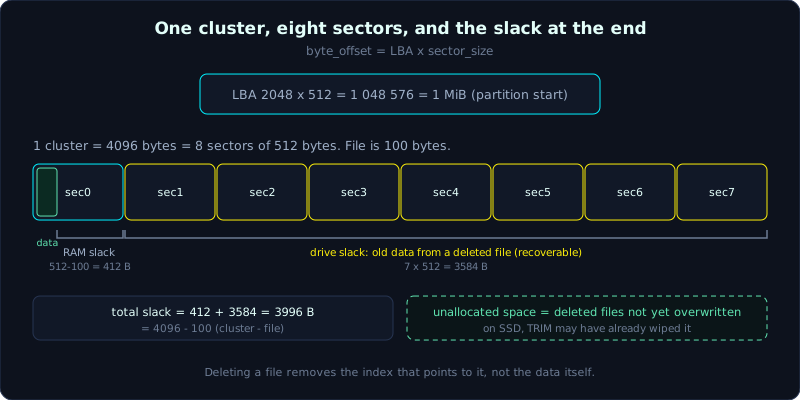 A 100-byte file fills one 8-sector cluster; the leftover becomes RAM slack and drive slack holding old data.
Level: basic, about 45 minutes. Prerequisite: Lesson 1.1. Tools: dd, mmls, fsstat, Python.
Goals
After this lesson you can tell how HDD and SSD store data at the level forensics cares about, you understand what a sector is and why its size (512 or 4096) changes every offset calculation, you can use LBA and the formula byte offset = LBA times sector_size to jump to the right position on an image, you can explain cluster, slack space (RAM slack and drive slack) and unallocated space and compute them numerically, and you can say why TRIM on an SSD makes recovering deleted files nearly hopeless.
Theory
Physical disk: HDD and SSD
An HDD (hard disk drive) stores data on round metal platters coated with magnetic material. Each platter surface is divided into concentric rings called tracks, and each track is cut into small arcs called sectors. A head scans the surface to read or write. In the old days data was located with the CHS triple (Cylinder, Head, Sector), naming which track, which surface, which arc. CHS is now only of historical meaning, but you will still meet it in the MBR partition table in the next lesson.
An SSD (solid state drive) has no moving parts. It stores data in NAND flash chips. The write unit of NAND is a page (usually 4 KB to 16 KB), and many pages make a block (usually 128 to 256 pages). There is an awkward property: NAND can write per page, but erasing has to erase a whole block. A controller chip sits in between, hides all that complexity, and pretends to the operating system that it is a neat row of 512-byte sectors like an HDD. This pretending layer (together with TRIM, below) is why an SSD is much harder to investigate than an HDD.
At the forensics level you rarely touch CHS or a NAND page directly. But remember one thing: with an HDD, data you delete usually stays on the disk until it is overwritten. With an SSD, the controller may have quietly erased it already.
Sector: the device’s smallest unit
A storage device does not let you read or write individual bytes. It works in fixed blocks called sectors. For decades the standard sector was 512 bytes. To change 1 byte, the device still has to read a whole 512-byte sector, change it, then write the whole sector back.
From around 2010, large-capacity drives moved to Advanced Format with a 4096-byte physical sector (4K for short). There are two kinds:
- 4Kn (4K native): physical and logical sectors are both 4096 bytes. The OS sees 4096.
- 512e (512 emulation): physical sector is 4096 bytes, but firmware emulates a 512-byte logical sector for compatibility with old software. The OS still sees 512.
Why do forensics people care about sector size? Because every address on disk counts in sectors. If you assume a sector is 512 when it is really 4096, every offset you compute is off by a factor of 8, and you will read entirely the wrong place. Always confirm the sector size before calculating, do not guess.
LBA: linear addressing
CHS is complex and limits capacity, so it was replaced by LBA (Logical Block Addressing). The idea is very simple: number every sector from 0 to N in one straight run. The first sector is LBA 0, the next is LBA 1, and so on. There is no need to know which track or surface, you just give the number and the controller finds it.
The golden formula, which you will use for the rest of your forensics life:
1
byte_offset = LBA * sector_size
For example a partition starting at LBA 2048, with 512-byte sectors, sits at byte 2048 times 512 = 1,048,576, which is exactly the 1 MB mark from the start of the disk. That 1 MB number is not random, it is the standard alignment position that modern partitioning tools choose.
Cluster: the file system’s allocation unit
If the file system managed every 512-byte sector individually, the tracking table would be huge and slow. So it groups a few adjacent sectors into a larger lump called a cluster (or allocation unit). This is the smallest unit the file system gives to a file. The file system only speaks in clusters, it never gives you half a cluster.
A common cluster size is 4096 bytes, that is 8 sectors (with 512-byte sectors). Depending on the file system and the partition size, a cluster can be 512, 1024, 2048, 4096, 8192 bytes or larger.
An important consequence: a file occupies a whole number of clusters, rounded up. A 1-byte file still eats a full 4096-byte cluster. A 5000-byte file takes 2 clusters (8192 bytes). The leftover is the source of slack space.
1
2
3
4
5
6
7
8
9
Sector (device)        : 512 bytes, smallest read/write unit
Cluster (file system)  : groups N sectors, smallest allocation unit
LBA                    : sector ordinal, 0..N, linear address

One 4096-byte cluster = 8 sectors of 512 bytes:
+------+------+------+------+------+------+------+------+
| sec0 | sec1 | sec2 | sec3 | sec4 | sec5 | sec6 | sec7 |
+------+------+------+------+------+------+------+------+
 \__________________ 1 cluster ___________________/
Slack space: a rich source for investigators
This is the most useful part. Suppose the file system has 4096-byte clusters, 512-byte sectors, and you save a file of only 100 bytes. The file takes a whole cluster but uses only 100 bytes. So what is in the remaining 3996 bytes?
The answer is whatever was already sitting there. When the file system allocates this cluster to the new file, it usually overwrites only the real data (100 bytes) and leaves the rest with its old content, possibly a fragment of a deleted file. That leftover is called slack space. It is split into two kinds:
RAM slack: the leftover in the last sector that holds file data, from the end of file (EOF) to the end of that sector. In the example, the file uses 100 bytes of sector 0, so RAM slack = 512 - 100 = 412 bytes. The name RAM slack comes from old operating systems (DOS, Windows 9x) that filled this part with content from RAM at the time of writing, sometimes leaking sensitive data that was in memory. From Windows NT onward it is usually filled with zeros, so modern RAM slack is less valuable than it once was.
Drive slack (or the trailing file slack): the remaining sectors in the cluster that the file never touches. In the example, the cluster has 8 sectors, the file uses only sector 0, leaving 7 sectors = 7 times 512 = 3584 bytes. The file system does not touch these sectors when writing the new file, so they keep the data of the old file that used to be here.
Adding up: 412 + 3584 = 3996 bytes of slack, matching 4096 - 100. Cross-check like this so you are sure you did not miscount.
Because drive slack holds data from an old file that was not cleaned, it is valuable. Investigators have many times found a fragment of a password, a fragment of a chat, a fragment of a deleted document in the slack of a harmless file. Note: slack only appears when the file data does not fill the last cluster. A file that fits exactly a multiple of the cluster size has no drive slack.
1
2
3
4
5
6
7
8
9
10
11
Cluster 4096 bytes, file 100 bytes, sector 512:

sector 0: [ 100 bytes DATA | 412 bytes RAM slack ]
sector 1: [ 512 bytes drive slack (old data)     ]
sector 2: [ 512 bytes drive slack (old data)     ]
...
sector 7: [ 512 bytes drive slack (old data)     ]

RAM slack   = 512 - 100          = 412  bytes
drive slack = 7 sectors * 512    = 3584 bytes
total slack = 412 + 3584         = 3996 bytes
Unallocated space
Slack is inside a cluster already allocated to a file. The clusters not yet allocated to any file are called unallocated space. When you delete a file, most file systems do not erase the data, they only mark the file’s clusters as “free, reusable”. The real data stays in place in unallocated space until another file is written over it.
This is the basis of all deleted-file recovery and file carving (reassembling a file from raw data using magic bytes, see Lesson 1.1 and the carving technique in Lesson 3.2). In short, deleting a file does not destroy the data, it only loses the index that points to it.
Why SSD breaks this nice story
Everything above is true for HDD: deleting only removes the index, the data is still there to pick up. SSD is different, and different in a way that is bad for the investigator.
NAND has to erase a whole block before rewriting it, so in-place overwrite is very slow. To stay fast, the controller uses wear leveling (spreading wear evenly, always writing to a new area instead of overwriting) and garbage collection (gathering still-live data then erasing whole old blocks while idle). The most important one is TRIM: when the OS deletes a file, it tells the SSD those clusters are no longer in use, and the controller actively wipes them in the background to prepare for the next write.
The forensic consequence is harsh: on an SSD with TRIM enabled, within seconds to minutes of a delete, the data in unallocated space may already be wiped to zero permanently, even if you pulled the power and connected it through a write blocker. Slack space is also unreliable because wear leveling mixes data around. In other words, many recovery and carving techniques that are reliable on HDD become a gamble or hopeless on SSD. When you meet an SSD, write clearly in the report that recoverability is limited by TRIM and garbage collection, and do not promise something you are not sure you can retrieve.
Demo
I will create a small image so I do not touch real evidence, then inspect sector size, cluster size, and prove slack numerically. Work on Linux (or the SIFT Workstation). Remember the principle: always work on a copy.
Create an inspectable FAT image
1
2
3
4
5
6
# Create an empty 16 MB file as a "virtual disk"
dd if=/dev/zero of=/tmp/demo.img bs=1M count=16

# Format FAT with an explicit cluster (sectors-per-cluster):
# -F 16 : FAT16, -s 8 : 8 sectors per cluster, -S 512 : 512-byte sector
mkfs.vfat -F 16 -s 8 -S 512 /tmp/demo.img
View sector size and cluster size with fsstat
fsstat (from The Sleuth Kit) prints the file system parameters, including exactly the two numbers we need:
1
fsstat /tmp/demo.img
1
2
3
4
5
6
7
8
9
10
FILE SYSTEM INFORMATION
--------------------------------------------
File System Type: FAT16
...
CONTENT INFORMATION
--------------------------------------------
Sector Size: 512
Cluster Size: 4096
Total Cluster Range: 2 - 4077
...
Sector Size 512, Cluster Size 4096. This matches the format option (8 sectors times 512 = 4096). For an image with a partition table, use mmls to see which LBA each partition starts at:
1
mmls /tmp/disk-with-partitions.img
1
2
3
4
      Slot      Start        End          Length       Description
000:  Meta      0000000000   0000000000   0000000001   Primary Table (#0)
001:  -------   0000000000   0000002047   0000002048   Unallocated
002:  000:000   0000002048   0000032767   0000030720   NTFS / exFAT (0x07)
The Start column is the partition’s starting LBA. Here it is 2048, so the partition’s byte offset = 2048 times 512 = 1,048,576 (1 MB). To inspect the file system inside, point fsstat at that offset: fsstat -o 2048 /tmp/disk-with-partitions.img (-o takes an offset in sectors).
Read exactly one sector at a given LBA with dd
To pull out sector LBA 100 on its own:
1
2
# bs = sector size, skip = sectors to skip (the LBA itself), count = 1 sector
dd if=/tmp/demo.img bs=512 skip=100 count=1 2>/dev/null | xxd | head -4
skip=100 with bs=512 means skip the first 100 sectors, that is start reading at byte 100 times 512 = 51,200, then read 1 sector. If you wrongly assumed a 4096 sector and typed bs=4096 skip=100, you would read at byte 409,600, completely off. This is exactly pitfall number one below.
Prove slack with Python
This script computes slack for any file, and builds the 100-byte example above to verify:
1
2
3
4
5
6
7
8
9
10
11
12
13
14
15
16
17
18
19
20
21
22
23
24
25
26
#!/usr/bin/env python3
# tinh_slack.py: compute RAM slack and drive slack for a file
import sys

def tinh_slack(file_size, sector=512, cluster=4096):
    sectors_per_cluster = cluster // sector
    # clusters the file occupies (rounded up)
    clusters = (file_size + cluster - 1) // cluster
    allocated = clusters * cluster
    # bytes used in the last sector that holds data
    trong_sector_cuoi = file_size % sector
    if trong_sector_cuoi == 0:
        ram_slack = 0            # file fits the sector boundary, no RAM slack
    else:
        ram_slack = sector - trong_sector_cuoi
    drive_slack = allocated - file_size - ram_slack
    return clusters, allocated, ram_slack, drive_slack

if __name__ == "__main__":
    size = int(sys.argv[1]) if len(sys.argv) > 1 else 100
    c, a, ram, drive = tinh_slack(size)
    print(f"File size     : {size} byte")
    print(f"So cluster    : {c}  (cap phat {a} byte)")
    print(f"RAM slack     : {ram} byte")
    print(f"Drive slack   : {drive} byte")
    print(f"Tong slack    : {ram + drive} byte")
1
2
3
4
5
6
$ python3 tinh_slack.py 100
File size     : 100 byte
So cluster    : 1  (cap phat 4096 byte)
RAM slack     : 412 byte
Drive slack   : 3584 byte
Tong slack    : 3996 byte
This matches the hand calculation in the slack section. Try python3 tinh_slack.py 4096 and you will see slack is 0 because the file fits a cluster exactly.
Lab
A runnable lab (Linux, no root needed, using debugfs on an unmounted ext4 image). Run bash make.sh then bash solve.sh.
Tasks:
- Compute by hand (see
solution.md): sector 512 bytes, cluster 8192 bytes, file 20000 bytes, find the number of clusters, the allocated bytes, RAM slack, drive slack, and the absolute offset of a partition starting at LBA 2048. - Run the lab: use
fsstatto get the block size,istatto see that a small file occupies a whole block (the nature of file slack). - Extract the whole unallocated region with
blkls, usestringsto find the pattern of a deleted file, andblkcatto read an old block directly.
Common pitfalls
- Confusing a 512-byte sector with a 4096-byte one when computing offsets: off by a factor of 8 and reading the wrong place entirely. Always check the real logical sector size with fsstat or
blockdev --getss, do not default to 512. - Mixing cluster with sector: a cluster is a file system concept, a sector is a device concept.
ddworks in sectors,istatreports in clusters, you have to convert correctly. - Assuming an SSD recovers like an HDD: TRIM may have erased data in the background before you did anything. Do not promise recovery on an SSD before verifying.
- Assuming every file has slack: a file that fits a multiple of the cluster size has no drive slack, and one that fits a multiple of the sector size has no RAM slack.
- Forgetting that modern RAM slack (Windows NT onward) is usually filled with zeros, so do not expect it to always hold RAM data the way old books describe.
Further reading
- Brian Carrier, “File System Forensic Analysis” (the chapter on volume and disk layout explains slack in detail).
- The Sleuth Kit documentation: the man pages for
fsstat,mmls,istat,blkcat. - NIST SP 800-88 Rev.1 “Guidelines for Media Sanitization” (to understand TRIM and why SSD is hard to recover).
- The Advanced Format specification (IDEMA) on 4Kn and 512e sectors.
Key takeaways
- A sector is the device’s smallest read/write unit (512 or 4096 bytes); a cluster is the file system’s smallest allocation unit (usually 4096 bytes, a multiple of the sector).
- byte_offset = LBA times sector_size. Always confirm the real sector_size with fsstat before calculating.
- A file occupies a whole number of clusters, rounded up; the leftover is slack space.
- RAM slack is the leftover in the last sector holding data; drive slack is the remaining whole sectors in the cluster, holding old file data.
- Unallocated space holds deleted files not yet overwritten, the place carving exploits.
- On an SSD, TRIM and garbage collection may already have wiped slack and unallocated space: the report must state this limit.