Lesson 11.1: Solving CTF forensics challenges
Forensics in a CTF is a condensed version of the job. The challenge author hides a flag somewhere in a file, and you have to find it. It differs from a real investigation in that there is always a solution and usually one central trick. The skills are the same though: you read file structure, carve, follow network flows, and inspect RAM. Playing CTF is the cheapest way to build hands-on skill before you meet a real case (Lesson 11.2).
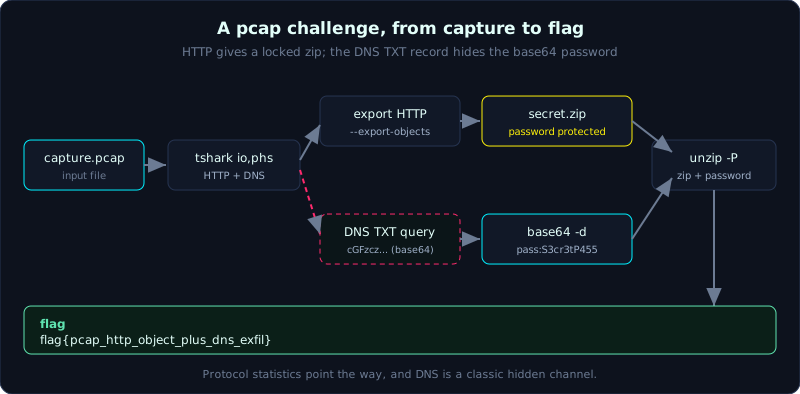 A pcap walkthrough, from protocol statistics to HTTP object export to a locked zip whose password is hidden in a DNS TXT record.
Part: 11 · Reading time: ~75 minutes · Difficulty: medium
Prerequisites: the disk and carving material (Part 3), networking (Part 7), memory (Part 6), and basic stego (Lesson 3.4).
Tools: binwalk, foremost, Wireshark/tshark, Volatility, zsteg, steghide, exiftool, strings, file, CyberChef.
Goals
After this lesson you can quickly classify a forensics challenge and know where to start, follow a general workflow (identify the file, extract, find the anomaly, pull the flag), know the opening toolset for each type (carving, pcap, memory, stego), know where to practice (picoCTF, HTB Sherlocks, CyberDefenders), and work through a complete real pcap walkthrough.
Theory
Common challenge types
1
2
3
4
5
6
7
8
9
10
File carving / unknown file   An unknown file type with another file embedded (a zip inside an image).
                              First tools: file, binwalk, foremost, strings, exiftool.
Pcap / network                A network capture, the flag is in a stream, a downloaded object, or DNS.
                              First tools: Wireshark, tshark, "Export Objects", follow stream.
Memory dump                   A RAM image, the flag is in a process, clipboard, command history, or a file in RAM.
                              First tools: Volatility (pslist, cmdline, filescan, dumpfiles).
Stego                         Data hidden in images or audio (LSB, metadata, color channels, spectrogram).
                              First tools: exiftool, zsteg (PNG), steghide (JPG), Audacity (audio).
Disk image                    A small image, the flag is in a deleted file, slack space, ADS, hidden partition.
                              First tools: Autopsy/TSK, mmls, fls, carving.
Most challenges mix two types. For example a PNG (stego) hides a zip (carving) whose password is in the metadata (exif).
The general workflow, observe before you guess
Beginners jump straight to a random tool. Experienced people follow an observation sequence first:
1
2
3
4
5
6
1. file <name>           What the file really is (do not trust the extension).
2. strings -a | less     Any easy to spot strings (flag{...}, http, PK, a password).
3. xxd | head            Look at the magic bytes and first few bytes, any embedded file marker.
4. exiftool              Metadata (comment, GPS, creating software) often hides a hint.
5. binwalk               Is there any file embedded inside.
6. Only with a lead      pick a format specific tool (zsteg, Volatility, Wireshark).
The biggest trap in CTF forensics is spending hours trying every stego tool at random while the flag sits in plain strings output. Observing first is cheap, and guessing randomly wastes time.
Practice sources by level
1
2
3
4
5
picoCTF             Easy to medium, guided, good for beginners. The Forensics section is solid.
HTB Sherlocks       Simulates real investigations (artifacts, logs, pcap), close to the DFIR job.
CyberDefenders      Blue team, cases with image/pcap/memory and step by step investigation questions.
TryHackMe           Guided forensics paths, good to start with.
DFIR CTF (AboutDFIR, Magnet) Real forensics competitions, many Windows artifacts.
Advice: when you start out, work through all of picoCTF Forensics, then move to CyberDefenders and HTB Sherlocks to get used to data that looks like the real thing.
Demo: a mini pcap challenge walkthrough
The task: a file capture.pcap, with the hint “An employee downloaded a file by mistake. Recover the secret content.” The flag has the form flag{...}.
Overall observation
1
2
3
4
5
6
file capture.pcap
# capture.pcap: pcap capture file ... -> it really is a pcap

# count the protocols to see what is inside
tshark -r capture.pcap -q -z io,phs
# shows: ethernet > ip > tcp (http), and a little udp (dns)
There is HTTP and DNS. Following the hint about “downloading a file”, HTTP is the place to start.
Pull the file out of HTTP
1
2
3
4
5
6
7
8
9
10
11
# list the HTTP requests
tshark -r capture.pcap -Y http.request -T fields -e http.host -e http.request.uri
# result:
#   files.example.ctf   /download/secret.zip
#   files.example.ctf   /favicon.ico

# export every HTTP object to a directory
mkdir objs
tshark -r capture.pcap --export-objects http,objs
ls objs
# secret.zip  favicon.ico
In the Wireshark GUI this is File > Export Objects > HTTP, select secret.zip, and Save.
The zip file is password protected
1
2
3
file objs/secret.zip        # Zip archive data
unzip objs/secret.zip
# [objs/secret.zip] flag.txt password:   -> there is a password
Where is the password? The hint says “by mistake”, and there was DNS traffic earlier. Challenge authors often hide a password in a DNS TXT query, a channel that is easy to overlook.
The password is in DNS
1
2
3
4
5
# inspect the DNS queries, look for an odd record
tshark -r capture.pcap -Y "dns" -T fields -e dns.qry.name -e dns.txt
# shows a query to:
#   cGFzczpTM2NyM3RQNDU1.files.example.ctf
#   and a TXT reply: "zippw=S3cr3tP455"
The subdomain label cGFzczpTM2NyM3RQNDU1 looks like base64. Decode it:
1
2
echo 'cGFzczpTM2NyM3RQNDU1' | base64 -d
# pass:S3cr3tP455
Both the DNS label and the TXT record point to the same password S3cr3tP455. (CyberChef also decodes base64 in two clicks if you prefer a GUI.)
Unzip to get the flag
1
2
3
unzip -P 'S3cr3tP455' objs/secret.zip
cat flag.txt
# flag{pcap_http_object_plus_dns_exfil}
This walkthrough packs the three core skills of the pcap type. You use protocol statistics to get your bearings, you export objects from HTTP, and you remember that DNS is a classic channel for hiding data. The same sequence repeats in a real case when investigating exfiltration (Lesson 11.2).
Lab
The runnable lab is in labs/11.1/, a self-contained mini challenge. make_artifacts.py (using scapy) builds capture.pcap containing an HTTP session that downloads a password-protected secret.zip and a DNS TXT query carrying the base64 password; solve.sh walks the whole walkthrough with tshark --export-objects http, reads DNS, base64 -d, unzip -P, and gets the flag. transcript.txt is the real output with the flag. See labs/11.1/README.md.
1
2
3
cd labs/11.1
python3 -I make_artifacts.py chal
bash solve.sh chal
- Optional extra build: run a small HTTP server that serves a password-protected zip, download it with
curl, send a DNS query carrying the base64 password, and capture withtcpdump -w capture.pcap; or play a few Forensics challenges directly on picoCTF. - Task:
- Use
tshark -z io,phsto identify which protocols the challenge contains. - Export the HTTP objects, notice the protected file.
- Find the password in another channel (DNS, an HTTP comment, or stego).
- Unzip to get the flag, writing down each step as a mini report.
- Do one more memory challenge (Volatility
windows.cmdlineto find a command with the flag) and one stego challenge (zsteg on a PNG) to get used to the other two types.
- Use
- Hint: always run
file,strings,exiftoolbefore opening a specialized tool. - Answer: the walkthrough and flag are in
labs/11.1/README.md, the real output inlabs/11.1/transcript.txt.
Common pitfalls
- Trusting the file extension instead of running
fileto learn the real type. - Jumping straight to a random stego tool while the flag sits in plain
stringsoutput. - Ignoring DNS and ICMP, two classic channels for hiding data in a pcap.
- Using the wrong profile or symbols with Volatility, then assuming the dump is broken.
- Forgetting base64/hex/rot13: many flags are only lightly encoded, and CyberChef decodes them in seconds.
- Not writing down what you already tried, so you restart from scratch every time you get stuck.
Further reading
- picoCTF (play.picoctf.org), the Forensics section, and picoGym for extra practice.
- CyberDefenders (cyberdefenders.org) blue team labs.
- HTB Sherlocks (app.hackthebox.com/sherlocks).
- “CTF Field Guide” and forensics writeups on CTFtime.
- CyberChef (gchq.github.io/CyberChef) for fast decoding.
Key takeaways
- Classify the challenge type first, pick the tool after.
- Observation workflow: file, strings, xxd, exiftool, binwalk, then a format specific tool.
- Pcap: protocol statistics, export objects, follow stream, inspect DNS.
- Memory: pslist, cmdline, filescan, dumpfiles.
- Stego: exiftool, zsteg (PNG), steghide (JPG), Audacity (audio).
- Many challenges mix types (stego hiding a zip, a zip locked by a password in DNS).
- Practice by level: picoCTF, then CyberDefenders and HTB Sherlocks.