Lesson 11.2: Investigating a malware infected image end to end
You have learned each artifact already. This lesson answers the real question of the job. You are handed an infected image, so where do you start, in what order do you proceed, and how do you know when you have done enough. We go through one case following the scenario WIN10-ACCT01 that appeared in Part 9, but this time from the point of view of an investigator opening the image for the first time, knowing nothing.
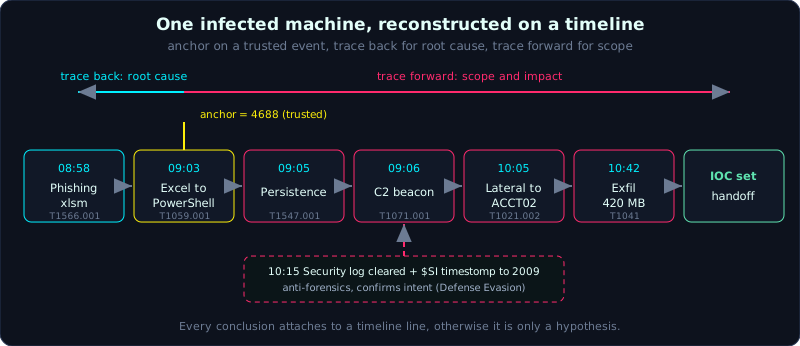 The reconstructed attack chain on a timeline. Anchor on a trusted event (4688 at 09:03), trace back to the root cause, then trace forward to scope and impact.
Part: 11 · Reading time: ~90 minutes · Difficulty: advanced
Prerequisites: almost the whole series: triage (Part 2), disk (Part 3), Windows artifacts (Part 4), memory (Part 6), network (Part 7), timeline and ATT&CK (Lesson 9.1, Lesson 9.2), IOC/YARA (Lesson 9.3).
Tools: KAPE, Autopsy, EvtxECmd/Chainsaw, MFTECmd, PECmd, RegRipper, plaso/Timesketch, Volatility, Wireshark, yara.
Goals
After this lesson you have a seven-step process for investigating an infected machine and know the priority order, you triage to find hotspots before digging in, you trace backward from a trace to initial access (root cause), you list persistence, lateral movement, and C2 in full, and you extract a complete set of IOCs for a fleet-wide scan and handoff.
Theory
The seven steps of an infected-machine case
1
2
3
4
5
6
7
1. Prepare & verify      Have the image, record the hash, work on a copy. Write down the questions to answer.
2. Triage                Fast scan for hotspots (time window, process, odd file).
3. Root cause            Trace back to initial access: how did it get in.
4. Persistence           What does it hold on with (Run key, service, task, WMI).
5. Lateral & scope       Which machines did it spread to, how far does the infection reach.
6. C2 & exfil            The control channel, and whether data was lost.
7. IOC & handoff         Mint the IOCs, write the report (Lesson 11.3), propose remediation.
Two directions of tracing, backward and forward
- Backward (root cause analysis): start from a clear trace (an odd process, an alert) and walk back along the parent process and time to find where it started. This answers “why is this thing here”.
- Forward (from initial access): once the entry point is found, move forward to list every consequence. This answers “what did it do”.
In practice you do both: trace backward to find the root, then trace forward from the root so you miss no branch.
Anchoring to the timeline
The core of the whole case is one trustworthy timeline. Pick a solid event (for example a 4688 with a command line, or a prefetch first-run) as the anchor, then open a window around it in the super timeline. Every inference must attach to the timeline, otherwise it is only a guess.
Demo: walkthrough of the WIN10-ACCT01 case
Handoff context: the SOC reports that the accounting machine WIN10-ACCT01 has a connection to an unknown IP 185.x.x.x on the morning of March 14. We receive the image WIN10-ACCT01.E01 (and a RAM dump taken during triage) with the questions: was the machine compromised, how did it get in, what data was lost, and which other machines are affected.
Step 1: verify and prepare
1
2
3
4
5
# confirm the hash matches the one recorded at collection
sha256sum WIN10-ACCT01.E01        # compare against chain of custody

# mount read-only, create a case directory
mkdir case-0314 && cd case-0314
Step 2: triage for hotspots
1
2
3
4
5
6
7
# run Chainsaw/Hayabusa over the logs to catch alerts fast (Lesson 4.2)
chainsaw hunt /mnt/evi/Windows/System32/winevt/Logs -s sigma/ -r rules/ --csv

# the hotspots surface:
#   09:03  Sigma "Office spawns PowerShell" : EXCEL.EXE -> powershell.exe -enc
#   10:15  Sigma "Security log cleared"      : event 1102
#   09:06  Sysmon 3                          : svc_host.exe -> 185.x.x.x:443
We now have three hotspots and a time window (09:03 to 10:4x). This is the moment to build a super timeline around that window (Lesson 9.1) to get one continuous picture.
Step 3: trace backward to initial access
Anchor on the 4688 at 09:03. The parent of powershell.exe is EXCEL.EXE. So the question is: why did Excel run, and which file was opened?
1
2
3
4
5
6
7
# LNK / RecentDocs / Office MRU tell us the Excel file that was just opened (Lesson 4.4)
# RegRipper on NTUSER.DAT:
rip.pl -r NTUSER.DAT -p recentdocs
#   .xlsm MRU: Invoice_0314.xlsm (09:01)

# where did this file come from? The Zone.Identifier ADS (MOTW) says it was downloaded from the Internet
# and WebCache/Outlook show it was an email attachment at 08:58
Root cause conclusion: an email with the attachment Invoice_0314.xlsm, the user opened it, the macro ran, and it spawned PowerShell. Initial Access is T1566.001 (Lesson 9.2). This is the answer to “how did it get in”.
Step 4: list persistence
1
2
3
4
5
6
7
8
9
10
# RegRipper scans the autorun points
rip.pl -r NTUSER.DAT -p runmru -p run
#   HKCU\...\Run\Updater = C:\Users\Public\svc_host.exe   -> T1547.001

# scheduled task (Lesson 4.5)
EvtxECmd.exe -f "...TaskScheduler%4Operational.evtx" --csv out
#   4698: task "SysUpdate" runs svc_host.exe every 30 minutes  -> T1053.005

# service (System 7045)
#   not on this machine, but on the target machine (step 5)
Two persistence mechanisms on this machine: a Run key and a scheduled task. Record both so remediation removes all of them, because missing one lets the machine get reinfected.
Step 5: lateral movement and scope
1
2
3
4
5
6
7
8
9
# Discovery before lateral: 4688 for network survey commands
#   09:52  net view / nltest /dclist / net group "Domain Admins"   -> T1087/T1018

# credential access as the stepping stone (Lesson 9.2 GT1)
#   09:40  4688: rundll32 comsvcs.dll MiniDump -> C:\Users\Public\l.dmp  -> T1003.001

# lateral: explicit creds then a network logon to another machine
#   10:05  4648 (explicit creds) + 4624 type 3 to WIN10-ACCT02       -> T1021.002
#   on ACCT02: System 7045 service with a random name (PsExec)
The scope extends to WIN10-ACCT02. We request an image/triage of ACCT02 and scan its memory with the AcctLoader family YARA rule (Lesson 9.3): the rule matches in ACCT02 RAM even though the on-disk file was already deleted. So two machines are certainly infected. Keep scanning the fleet with YARA to lock down the scope.
Step 6: C2 and exfiltration
1
2
3
4
5
6
7
8
9
10
# from the RAM dump: processes and connections (Part 6)
vol -f WIN10-ACCT01.mem windows.pstree       # svc_host.exe child of explorer, suspicious
vol -f WIN10-ACCT01.mem windows.netscan      # svc_host.exe -> 185.x.x.x:443

# pcap (if available, Part 7): follow stream, a steady beacon + User-Agent "Mozilla/5.0 (AcctL)"
#   -> C2 T1071.001

# exfil: Collection then upload
#   10:30  4104: Compress-Archive \\ACCT02\Finance -> C:\Users\Public\x.zip  -> T1560.001
#   10:42  pcap: upload 420 MB to 185.x.x.x:443                              -> T1041
The answer to “what data was lost”: the Finance folder on ACCT02, about 420 MB, pushed out at 10:42. This is the most important part for the client, because it decides the data breach notification obligation.
Step 7: extract IOCs and anti-forensics traces
Before closing, check what the attacker deleted to cover their tracks (Lesson 10.1): the $SI of svc_host.exe was timestomped back to 2009 (the $FN gives 2024), and the Security log was cleared at 10:15 (event 1102). Record both as Defense Evasion, and they confirm this is a deliberate, targeted attack.
The IOC set for handoff:
1
2
3
4
5
6
Host:    C:\Users\Public\svc_host.exe (sha256 ...), l.dmp, x.zip
         HKCU\...\Run\Updater ; task "SysUpdate"
         mutex Global\AcctLdr_7f3a ; PDB acctldr\loader.pdb
Network: 185.x.x.x:443 ; User-Agent "Mozilla/5.0 (AcctL)"
Email:   subject "Invoice 0314", file Invoice_0314.xlsm (sha256 ...)
Rule:    YARA AcctLoader_Family ; Sigma "Office spawns PowerShell -enc"
This is enough to answer all four original questions. The whole chain and the IOCs go straight into the report (Lesson 11.3).
Lab
The runnable lab is in labs/11.2/, a simulated and already-infected Linux “system”, self-contained and compact. make_artifacts.py builds logs (nginx/auth/syslog), a webshell, an ELF implant (with IOCs in its strings, mtime timestomped back to 2009), an exfil staging area, and persistence (cron + systemd); solve.py investigates through the seven steps, from triage to IOC extraction, and writes iocs.json. transcript.txt is the real output. See labs/11.2/README.md.
1
2
3
cd labs/11.2
python3 -I make_artifacts.py case-host
python3 -I solve.py case-host
- Optional extra: repeat the seven steps on an image + RAM dump you built in Lesson 9.1/9.2, or a CyberDefenders / HTB Sherlocks case that simulates an infected Windows machine.
- Task: go through all seven steps and write the result of each.
- Triage with Chainsaw/Hayabusa, list the hotspots and the time window.
- Trace backward to initial access, state the root cause with evidence.
- List every persistence you find.
- Determine lateral movement and scope (which machines are affected), confirm with YARA.
- Determine the C2 and the volume of data exfiltrated.
- Extract the full IOC set and state the anti-forensics traces.
- Hint: always attach each conclusion to a specific timeline line; if you cannot attach it, it is still a hypothesis, not a conclusion.
- Answer: the “Short answer” section in
labs/11.2/README.mdandlabs/11.2/transcript.txt.
Common pitfalls
- Digging deep into one artifact from the start and skipping triage, so you lose direction.
- Finding one persistence and stopping, while another task or service remains.
- Concluding only one machine is infected because you have not scanned the fleet; missing lateral means missing scope.
- Forgetting to scan RAM: fileless malware, or malware already deleted on disk, still lives in memory.
- Skipping the exfil question and only focusing on removing the malware, while the client needs to know what was lost.
- Not checking anti-forensics (Part 10), missing the very evidence of intent.
- Inferring without attaching to the timeline, which turns the report into guesswork.
Further reading
- SANS FOR508, the “Hunt Evil” poster, and the APT investigation process.
- CyberDefenders and HTB Sherlocks, work through a few full infected-machine cases.
- “Incident Response & Computer Forensics” (Luttgens, Pepe, Mandia).
- Public IR reports (Mandiant M-Trends) to see how a real case is presented.
- Lesson 11.3 of this series to turn this case into a standard report.
Key takeaways
- Seven steps: verify, triage, root cause, persistence, lateral/scope, C2/exfil, IOC.
- Triage for hotspots first, dig deep later.
- Trace backward to find the root, trace forward to list the consequences.
- Attach every conclusion to a timeline line.
- List ALL persistence, missing one means reinfection.
- Determine scope with a fleet-wide YARA/IOC scan, including RAM.
- Answer “what data was lost” clearly, because it decides the legal obligation.