Lesson 10.2: Full Disk Encryption and Investigation Strategy
You image a disk, open it, and instead of the familiar file system you see nothing but random bytes. That is full disk encryption (FDE). It can be a legitimate security measure by the victim, or it can be anti-forensics by the attacker. Either way, if you handle it wrong at the scene by shutting down a running machine, you can turn a readable disk into a block of bytes that is never read again. This lesson is about that.
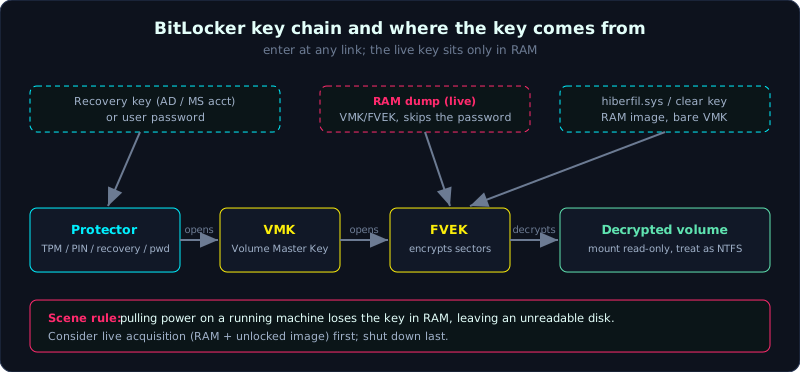 A protector opens the VMK, the VMK opens the FVEK, the FVEK decrypts sectors; the live key lives only in RAM.
| Part: 10 (Anti-Forensics) | Time: about 80 minutes | Difficulty: advanced |
Prerequisites: you know the partition table (Lesson 1.3), the order of volatility and live/dead acquisition (Lesson 2.1), and capturing RAM (Lesson 2.3).
Tools: dislocker, bitlocker2john, cryptsetup, luks2john, john/hashcat, FTK Imager, Volatility, mmls/fsstat (TSK).
Goals
After this lesson you can recognize a BitLocker, LUKS or FileVault partition from its signature and layout. You understand the key chain: password/recovery -> VMK -> FVEK -> data (and the equivalents in LUKS and FileVault). You can use bitlocker2john plus john and dislocker to open BitLocker, and cryptsetup plus luks2john for LUKS. You know the sources for a key (AD/MBAM, a user recovery key, RAM, hiberfil, a clear key). And you know the scene procedure when you meet FDE: live acquisition first, shut down last.
1. Theory
1.1. Why FDE breaks the dead acquisition procedure
The standard procedure is to shut down, image, and analyze offline. With FDE, if the machine is running then the disk is already unlocked in memory (the key is in RAM) and you read files normally. Shut it down and the key in RAM is gone, leaving an encrypted disk that you cannot enter without the password/recovery key. So FDE reverses the priority: when you suspect encryption, consider live acquisition (capturing RAM and/or imaging the disk in its unlocked state) BEFORE pulling the power.
1.2. The BitLocker key architecture
BitLocker does not encrypt data directly with the password you type. It uses two layers of keys:
1
2
3
4
5
6
7
8
9
FVEK (Full Volume Encryption Key)   the key that actually encrypts each sector of the volume.
VMK  (Volume Master Key)            the intermediate key, used to encrypt/decrypt the FVEK.
Protector                           the thing used to open the VMK, of several kinds:
    - TPM                           the TPM chip releases the VMK at boot (nothing to type)
    - TPM + PIN                     a PIN is needed at boot
    - Password                      the user's password
    - Recovery Key (48 digits)      the rescue key, usually stored in AD / Microsoft account / MBAM
    - Startup Key (.bek on USB)
    - Clear Key                     a "bare" VMK (often seen while BitLocker is suspended)
The opening chain: protector -> open VMK -> open FVEK -> decrypt sectors. The investigator can enter at any link: with a recovery key you open the VMK; if you capture the VMK/FVEK in RAM you skip the password entirely.
On-disk recognition: a BitLocker partition begins with the signature -FVE-FS- in the metadata area, and the BIOS/boot sector carries that string. FTK Imager and mmls/fsstat report the volume as BitLocker.
1.3. LUKS (Linux)
LUKS (Linux Unified Key Setup) is the common FDE standard on Linux, sitting on top of dm-crypt.
1
2
3
4
The LUKS header is at the start of the partition, magic "LUKS\xba\xbe".
The master key encrypts the data.
Up to 8 key slots, each slot holds the master key wrapped by a passphrase (via PBKDF2/Argon2).
cryptsetup luksDump shows the version (LUKS1/LUKS2), the cipher, and which slot is in use.
Opening any one slot gives the master key. luks2john extracts the part to crack from the header so you can try the passphrase offline.
1.4. FileVault (macOS)
FileVault 2 encrypts the volume on CoreStorage (or an APFS encrypted container on newer machines). The recovery key can be a recovery key, or it can be escrowed to iCloud / MDM. On an unlocked Mac the key is in RAM like BitLocker. Tools: diskutil, fvdemount (libfvde) to mount if you have the password/recovery key.
1.5. The table of key sources (the most important part)
1
2
3
4
5
6
7
8
9
10
SOURCE                         APPLIES TO       NOTE
Recovery key in AD/AzureAD      BitLocker        ask IT, usually available in an enterprise
MBAM / Intune escrow            BitLocker        enterprise key management system
Microsoft account               BitLocker        account.microsoft.com/devices/recoverykey
User password                   all              ask, or crack if weak
VMK/FVEK in RAM                 BitLocker        capture RAM while the machine is unlocked (Volatility)
Master key in RAM              LUKS/FileVault   similar
Clear key on disk              BitLocker        when the volume is suspended, the VMK is bare
hiberfil.sys                   all              a RAM image from hibernation, may hold the key
Startup key .bek              BitLocker        a file on USB
This is the map that decides the whole investigation. Before thinking about cracking (slow, usually fails), walk through all these easy key sources.
2. Hands-on (demo): handling an image with a BitLocker partition
Case: a running-then-powered-off corporate laptop is seized, and the image LAPTOP01.E01 is made. Opening it shows an unreadable partition. Suspect BitLocker.
2.1. Recognition
1
2
3
4
5
6
7
8
# list partitions, see the type
mmls LAPTOP01.E01

# check the BitLocker signature in the metadata area of the suspect partition
fsstat -o 2048 LAPTOP01.E01        # reports "Bitlocker" if recognized
# or look at the magic directly:
#   dd if=LAPTOP01.E01 bs=512 skip=2048 count=1 | xxd | grep -i FVE
#   seeing the string "-FVE-FS-" means BitLocker
2.2. Go find the key before cracking
By table 1.5, the practical order:
1
2
3
4
1. Ask IT/AD: export the 48-digit recovery key by the volume's RecoveryKeyID.
   The RecoveryKeyID is readable from the BitLocker metadata (repair-bde -rp or dislocker -V).
2. Check whether there is a RAM dump / hiberfil.sys of this machine (if live acquisition was done).
3. If there is nothing, only then consider cracking the password/PIN (feasible only if the password is weak).
Suppose IT provides the recovery key 123456-...-654321.
2.3. Open with dislocker (with a recovery key)
1
2
3
4
5
6
7
8
9
10
# split the BitLocker partition into a file (offset from mmls, for example sector 206848)
dd if=LAPTOP01.E01 of=bde.img bs=512 skip=206848

# decrypt with the recovery key, output a "transparent" file
mkdir /mnt/bde /mnt/clear
dislocker -V bde.img -p123456-234567-...-654321 -- /mnt/bde

# /mnt/bde/dislocker-file is now the decrypted NTFS volume, mount it read-only
mount -r -o loop /mnt/bde/dislocker-file /mnt/clear
ls /mnt/clear          # the file system appears normally
From here on you investigate it like a normal NTFS disk (Part 3, Part 4). If you have a password instead of a recovery key use -u<password>; if you have a .bek file use -f key.bek.
2.4. When you only have a weak password: bitlocker2john plus john
1
2
3
4
5
6
7
8
# extract the hash from the BitLocker partition
bitlocker2john -i bde.img > bde.hashes

# the file has several lines by protector type ($bitlocker$0$ for password,
# $bitlocker$2$ for recovery...). Choose the password line then crack:
john --wordlist=rockyou.txt bde.hashes
# or hashcat (-m 22100 for BitLocker)
hashcat -m 22100 bde.hashes rockyou.txt
To be blunt: cracking BitLocker with a strong password is nearly hopeless, the PBKDF is slow on purpose. This is the last option, not the first.
2.5. Get the key from RAM (when you have a dump from while the machine was unlocked)
If the scene still had a running machine and you captured RAM (Lesson 2.3), Volatility can extract the FVEK:
1
2
3
# Volatility 3 has a plugin to extract the BitLocker key from RAM
vol -f LAPTOP01.mem windows.bitlocker
# returns the FVEK; use it with dislocker -K or other offline decryption tools
This is why live acquisition matters. One RAM capture at the right moment saves weeks of useless cracking.
2.6. LUKS for comparison
1
2
3
4
5
6
7
8
9
10
# view the header
cryptsetup luksDump /dev/loop0        # or on the partition image file

# open with a passphrase (if known)
cryptsetup open luks.img secure       # maps to /dev/mapper/secure
mount -r /dev/mapper/secure /mnt/clear

# if you must crack
luks2john luks.img > luks.hash
john --wordlist=rockyou.txt luks.hash
3. Lab
The FDE RECOGNITION step (the signature) runs for real in labs/10.2/: make_sig_samples.py builds a few signature stubs (only a few header bytes, NOT a real encrypted container), and identify_fde.py scans for the magic LUKS\xba\xbe and -FVE-FS- to recognize the FDE type. The create/open/crack steps are an exercise because cryptsetup is not available (and dm-crypt needs root), and BitLocker/dislocker need Windows. transcript.txt is the real output of the recognition step. No output is fabricated. See labs/10.2/README.md.
1
2
3
4
cd labs/10.2
bash solve.sh      # build the signature stubs then recognize; check whether cryptsetup is present
# on a real image:
python3 -I identify_fde.py /evidence/disk.raw
- Task (with a real part):
- Run
identify_fde.pyto recognize LUKS (magicLUKS\xba\xbe, read the version) and BitLocker (-FVE-FS-). On a real image, cross-check withmmls/fsstat.
- Run
- Task as an exercise (needs cryptsetup/dislocker/BitLocker, the real commands are in the README):
- LUKS:
cryptsetup luksFormat luks.img(weak password),cryptsetup luksDumpto read the cipher/slot (no mount, no root needed),luks2john luks.img | johnto crack the passphrase. - BitLocker: extract the partition with
dd, open withdislocker -V bde.img -p<recovery>then mount; with only a weak passwordbitlocker2john -i bde.img | john(or hashcat -m 22100). - Extract the FVEK/master key from a RAM dump with Volatility (
windows.bitlocker) when there is a live acquisition. - Write 5 lines of scene strategy: why you consider live acquisition before shutting down.
- LUKS:
- Answers: the “Short answers” section in
labs/10.2/README.mdandlabs/10.2/transcript.txt.
4. Key takeaways
- FDE reverses the priority: consider live acquisition before shutting down.
- The BitLocker key chain: protector -> VMK -> FVEK -> sector.
- Recognize BitLocker by
-FVE-FS-, LUKS by the magic “LUKS”, through mmls/fsstat. - Walk through all the key sources (AD, MBAM, Microsoft account, RAM, hiberfil) before thinking about cracking.
- dislocker opens BitLocker, cryptsetup opens LUKS when you have the key/passphrase.
- Cracking is feasible only with a weak password; a strong password is effectively impossible.
- Volatility can extract the FVEK/master key from a RAM dump.