Lesson 11.3: Writing a standard forensics report
A good investigation with a bad report is wasted: nobody can act on it, and in court it is dismissed. The report is the only product other people see. It has to tell the story correctly, completely, honestly, and reproducibly (someone else following it reaches the same result). This final lesson teaches how to write that report, using the WIN10-ACCT01 case from Lesson 11.2 as a running example.
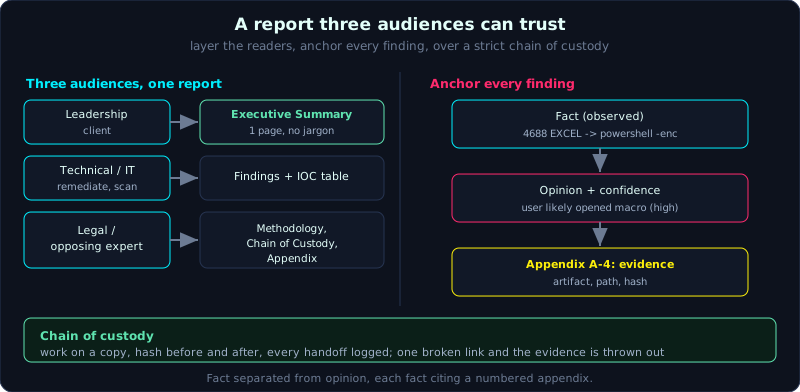 Three audiences read one report, and every finding is anchored down a fact to opinion to evidence chain, over a strict chain of custody.
Part: 11 · Reading time: ~80 minutes · Difficulty: medium
Prerequisites: a full investigation case already done (Lesson 11.2), an understanding of chain of custody and the legal basics (Part 0), and the ability to build a timeline and ATT&CK map (Part 9).
Tools: a text editor, a report template, an IOC table, ATT&CK Navigator, and a hashing tool to seal the appendix.
Goals
After this lesson you know the standard structure of a forensics report and can write each part, you can write an executive summary for a non-technical reader, you present a finding anchored to evidence and a confidence level, you build and maintain a chain of custody, you present evidence so it is reproducible and not misleading, and you have a reusable sample report outline.
Theory
Who the report is written for
A report usually has three kinds of readers, and you have to serve all three:
1
2
3
Leadership / client   Reads only the Executive Summary. Needs: what happened, how serious, what to do next.
Technical / IT        Reads Findings and IOC. Needs: detail to remediate and scan fleet-wide.
Legal / opposing      Scrutinizes Methodology, Chain of Custody, Appendix. Needs: every conclusion backed by evidence, reproducible.
A common mistake is writing the whole report in a technical voice, so leadership cannot read it; or writing it thinly, so an opposing expert dismisses it easily. The solution is layering: a summary first for busy readers, detail later for those who scrutinize.
Principles for presenting evidence
1
2
3
4
5
6
7
Fact vs opinion   Separate "what was observed" from "what was inferred". Seeing 4688 EXCEL -> powershell is a fact;
                  "the user was tricked into enabling the macro" is an opinion based on that fact.
Backed by evidence Each conclusion points to a source artifact, path, and timeline line.
Confidence level  Use tiered language: "confirmed", "likely", "possible", "insufficient evidence".
Honesty           Record both what was not found and the limits of the investigation. Do not exaggerate.
Reproducible      Someone following your method reaches the same result.
Neutral           An objective voice, no emotional attribution, no inflammatory language.
Chain of custody
Chain of custody is the record of who held the evidence, when, and what they did with it, from collection to presentation. One broken link and all the evidence can be thrown out. Each evidence item needs a line:
1
2
3
ID       Description          Collected when/by whom   Hash at collection      Stored where      Handoff
EVD-01   WIN10-ACCT01 disk    2024-03-14 14:20, A.N     SHA256: 7f3a...          Evidence locker #3  A.N -> B.L (03/15)
EVD-02   RAM dump 16GB        2024-03-14 11:05, A.N     SHA256: 9c2d...          NAS case-0314       ...
The golden rule: always work on a copy, record the hash before and after each operation, and if the hash changes you must be able to explain why (for example, mounting read-write by mistake is an error to avoid, see Part 0 and Part 2).
The standard structure
1
2
3
4
5
6
7
8
9
10
1. Cover page & case info     title, case number, investigator, date, classification (TLP).
2. Executive Summary          1 page, no jargon, for leadership.
3. Scope & investigation questions   what you were asked to do, which questions to answer, limits.
4. Methodology                tools, versions, collection method, analysis environment.
5. Findings                   each finding, backed by evidence, by theme or by time.
6. Timeline                   a consolidated timeline of the key events.
7. IOC                        an IOC table for a fleet-wide scan.
8. Conclusion & recommendations   answer the questions, propose remediation.
9. Chain of custody           the evidence table.
10. Appendix                  screenshots, tool output, hashes, ATT&CK mapping.
Demo: a sample report outline for the WIN10-ACCT01 case
Below is an outline filled with the content of the Lesson 11.2 case, usable as a template.
Executive Summary (sample)
1
2
3
4
5
6
7
On 14/03/2024, the accounting workstation WIN10-ACCT01 was compromised through a phishing email
with an attachment containing a malicious macro. Within about two hours, the attacker took control,
stole credentials, spread to the machine WIN10-ACCT02, and took out about 420 MB of data from the
Finance folder. Two machines are confirmed infected; no third machine has been found. The attacker
deleted logs and altered timestamps to hide, which indicates deliberate action. Recommendations:
isolate the two machines, change all related passwords, run a fleet-wide scan with the attached IOC
set, and assess the data breach notification obligation.
Note: none of the terms above is left unexplained, there is no T-number, and no tool name. Leadership reads it and can understand and decide.
A sample finding (backed by evidence)
1
2
3
4
5
6
7
8
9
10
11
12
13
14
15
Finding F-01: Initial Access via a phishing attachment (ATT&CK T1566.001)

Observation (fact):
  - 08:58 UTC, Outlook records the file Invoice_0314.xlsm saved to the Downloads folder
    (source: WebCache, path ...; appendix A-1).
  - The file carries the ADS Zone.Identifier ZoneId=3, meaning it was downloaded from the Internet (source: MFT $J; A-2).
  - 09:01, RecentDocs records the file opened with Excel (source: NTUSER.DAT; A-3).
  - 09:03, event 4688: EXCEL.EXE spawns powershell.exe with the -enc argument (A-4).

Assessment (opinion):
  The user most likely opened the attachment and enabled the macro, leading to PowerShell being
  executed. Confidence: high, based on four independent artifacts matching in time.

Limits:
  The original email was not recovered from the mail server; the content is based on endpoint traces.
This is the model for a finding: fact separated from opinion, each fact citing a source and an appendix, a stated confidence level and the limits. An opposing expert opening appendix A-1 through A-4 can reproduce it.
Consolidated timeline (excerpt)
1
2
3
4
5
6
7
8
9
10
08:58  Download Invoice_0314.xlsm (phishing)                 T1566.001   A-1,A-2
09:03  Macro -> PowerShell -enc                              T1059.001   A-4
09:04  Drop and run svc_host.exe (C:\Users\Public)           Execution   A-5
09:05  Create Run key "Updater" (persistence)                T1547.001   A-6
09:06  Connect to C2 185.x.x.x:443                           T1071.001   A-7
09:40  Dump LSASS via comsvcs (credential access)            T1003.001   A-8
10:05  Spread to WIN10-ACCT02 (SMB)                          T1021.002   A-9
10:30  Compress the Finance folder                           T1560.001   A-10
10:42  Exfil 420 MB over C2                                  T1041       A-11
10:15  Clear the Security log (hiding)                       T1070.001   A-12
The last column points to the appendix holding the evidence for each event. This timeline is the condensed form of the super timeline (Lesson 9.1), keeping only the core events so the reader can follow.
IOC table (excerpt)
1
2
3
4
5
6
7
8
9
Type      Value                                     Note
sha256    7f3a...  (svc_host.exe)                   main payload
path      C:\Users\Public\svc_host.exe              drop location
reg       HKCU\...\Run\Updater                      persistence
task      SysUpdate                                 persistence
mutex     Global\AcctLdr_7f3a                        identifies the AcctLoader family
ip        185.x.x.x:443                              C2
ua        Mozilla/5.0 (AcctL)                        C2 User-Agent
yara      AcctLoader_Family                          rule attached in appendix C
Conclusion and recommendations (sample)
1
2
3
4
5
6
7
8
9
Conclusion: Machine WIN10-ACCT01 was compromised on 14/03 through phishing, leading to lateral
movement to WIN10-ACCT02 and exfil of ~420 MB. Log clearing and timestomp indicate intent.

Recommendations (decreasing priority):
  1. Isolate WIN10-ACCT01 and ACCT02 from the network, preserve them for deeper investigation if needed.
  2. Reset the passwords of every account that logged on to the two machines, admin accounts first.
  3. Block 185.x.x.x at the firewall; scan the whole fleet with YARA AcctLoader_Family.
  4. Block macros from the Internet via GPO; enable command-line auditing and Sysmon fleet-wide.
  5. Assess the data breach notification obligation with the legal team.
Lab
The lab is in labs/11.3/ and it is an EXERCISE: the prose (executive summary, findings, conclusion) still has to be written by hand. The lab provides report_template.md (the 10-section frame) and gen_report.py, which generates a report skeleton from an IOC file (ioc.json, which is the output of Lesson 11.2), filling in the timeline, IOC table, appendix, and metadata, and leaving [TODO] markers for the sections you write by hand. transcript.txt is the real generated report skeleton. See labs/11.3/README.md.
1
2
cd labs/11.3
python3 -I gen_report.py ioc.json --analyst "HaiND" --tlp AMBER > bao-cao.md
- You can take
ioc.jsondirectly from theiocs.jsonthat the Lesson 11.2solve.pyproduces. - Task: write a complete report following the 10 sections.
- A one-page executive summary; hand it to a non-technical reader and revise it until they understand.
- At least five findings in the fact/opinion/limits model, each fact pointing to an appendix.
- A consolidated timeline of the key events with an ATT&CK column and the appendix.
- A full IOC table.
- A chain of custody table for every evidence item, with hashes.
- Appendix: screenshots of tool output and a hash table, numbered to match the findings.
- Hint: reread and strike out every assertion that cannot point to evidence; turn them into opinions with a confidence level, or remove them.
- Answer: the generated sample report skeleton in
labs/11.3/transcript.txt;report_template.mdis the frame to fill in the remaining[TODO]sections.
Common pitfalls
- Writing the whole report in a technical voice, so leadership cannot read it.
- Asserting without pointing to evidence, which an opposing expert dismisses immediately.
- Mixing fact with opinion, turning an inference into a fact.
- Skipping the limits and what was not found, losing honesty.
- A chain of custody with a missing link or missing hash, so the evidence is thrown out.
- Exaggerating the confidence (“100% certain”) when the evidence is only at the “likely” level.
- An unnumbered appendix, so the reader cannot trace back from a finding to the evidence.
- Leaking sensitive data in the report (passwords, PII) without redaction or a TLP marking.
Further reading
- SANS “Intrusion Discovery” and the IR report template; the FOR508 reporting section.
- NIST SP 800-86, the guide to integrating forensics into incident response.
- ACPO Good Practice Guide for Digital Evidence (principles for handling evidence).
- Mandiant M-Trends and public APT reports, to learn how to present a case.
- Community report templates (for example from AboutDFIR) for layout reference.
Key takeaways
- Write in layers: a summary for leadership, detail for technical readers and opposing experts.
- Separate fact and opinion, each fact pointing to evidence.
- State the confidence level and the limits, record what was not found as well.
- A full chain of custody, hash before and after, work on a copy.
- The timeline and the IOC table are the two tables readers use most.
- A numbered appendix matching the findings so it is reproducible.
- A neutral, objective voice, no exaggeration.