Lesson 2.1: Order of volatility, live and dead acquisition

By the end of this lesson you know which data to collect first before it disappears, when you are allowed to pull the power and when you must never do it, and why one wrong decision in the first five minutes can wipe out the most important evidence.
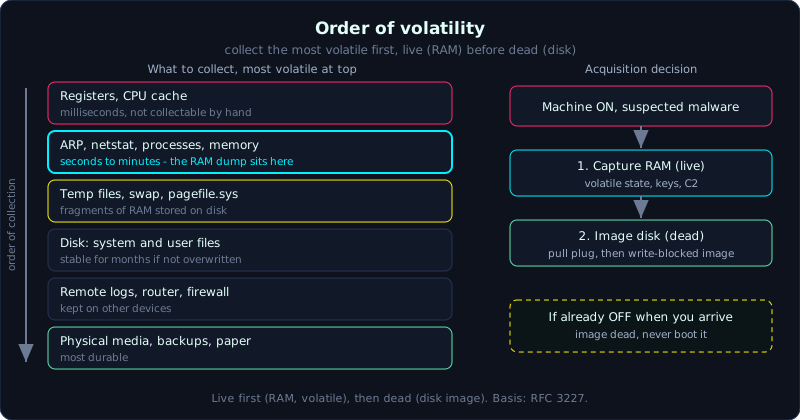 Collect the most volatile data first, capture RAM while the machine is live, then image the disk dead.
| Part: 2 (Evidence Acquisition) | Time: about 35 minutes | Difficulty: basic |
Prerequisites: a basic grasp of how a machine stores data (sector, cluster, slack space) and of chain of custody. See Part 0 and Part 1.
Tools: mostly theory and process. Later lessons use the tools in the toolkit.
Goals
After this lesson you can explain the order of volatility (the collection priority from most to least volatile) and put a list of data sources in the right order. You can tell live acquisition (collecting while the machine is running) apart from dead acquisition (collecting after it is off), and pick the right one for the situation. You can decide whether to pull the plug or shut down normally without destroying evidence.
1. Theory
Data does not live equally long
When you walk up to a machine suspected of being the victim (or the source) of an incident, it holds many kinds of data, and they do not last equally long. CPU register and cache contents change billions of times per second. The ARP table, the routing table and the list of open network connections survive seconds to minutes. RAM holds its contents as long as the machine has power. The hard disk sits unchanged for months if nobody overwrites it.
Order of volatility is the principle of collecting the easily lost data first and the durable data later. This principle is written into RFC 3227 (Guidelines for Evidence Collection and Archiving) and is still the reference today. The reason is practical. If you spend three hours imaging a 2TB disk first, then all of RAM, all network connections and all running processes vanished long ago. If instead you capture RAM first (5 to 15 minutes), the disk still sits there waiting for you.
The standard order, from volatile to durable
Sorted by decreasing volatility, a practical list for a running machine:
1
2
3
4
5
6
7
8
9
1. Registers, CPU cache             (milliseconds, almost impossible to collect by hand)
2. Routing table, ARP cache,
   process list, kernel stats,
   open network connections, memory (seconds to minutes)  <- the RAM dump sits here
3. Temporary data on disk           (temp files, swap/pagefile, spool)
4. Data on disk                     (system files, user files)
5. Remote config, network topology  (logs on other devices, router, firewall)
6. Physical storage media,
   backups, paper                   (most durable)
A few points people get wrong:
- Registers and cache are the most volatile in theory, but in practice you never dump CPU registers by hand. They only appear in a RAM snapshot if you capture it correctly. Do not waste time on this item.
- ARP cache, netstat, process list change constantly. If you need to capture the network and process state quickly with commands (volatile data collection), do it before dumping RAM, because the dump itself changes a small part of the state.
- Swap and pagefile (
pagefile.syson Windows, the swap partition on Linux) sit on disk but hold fragments of RAM. They are more durable than RAM but can still be overwritten quickly, so treat them as high priority.
Live and dead acquisition
Two collection philosophies:
Dead acquisition (collecting after the machine is off): turn the machine off (or it is already off), remove the disk, connect it through a write blocker (a hardware device that blocks writes) to the analysis machine, then create the image. This is the cleanest approach legally. You run nothing on the suspect system, you change nothing, and the image is a perfect static snapshot of the disk. The drawback is that you lose everything that only lived in RAM. Fileless malware (running directly in memory, never dropping to disk), the decryption key of an encrypted disk, open C2 connections and running processes all evaporate when the power is cut.
Live acquisition (collecting while the machine runs): capture RAM, collect volatile data, and sometimes image the disk on the running machine because it cannot be turned off (for example a production server that must not stop, or a BitLocker disk for which you do not yet have the key). The advantage is that you keep the live state. The drawback is that every command you type changes the system (writes to RAM, sometimes to disk), so you must record exactly what you ran, and use portable tools (run from USB, not installed) to reduce your footprint.
Modern practice is almost always this: live first (RAM and volatile data), then dead (disk image). The days of advising an immediate power pull are over, because skipping RAM means skipping half the case in malware incidents.
Pull the plug or shut down?
The classic question when you arrive and the machine is on:
- Pulling the plug (sudden power cut): avoids malware running a script on shutdown (for example a wiper that erases traces, or an anti-forensics trigger on power off), and freezes the disk state immediately. But pulling power loses RAM and can corrupt files being written and the file system (especially mid-transaction).
- Normal shutdown: clean for the file system, but it lets any shutdown script run, and still loses RAM.
A practical rule for most Windows workstation cases: capture RAM first, then pull the plug. Capturing RAM preserves the live state, and pulling the plug (instead of shutting down) afterward avoids shutdown scripts and freezes the disk. Servers, encrypted laptops and industrial systems (ICS/SCADA) are different, need their own judgment, and usually have an organizational SOP (standard operating procedure).
If the machine is already off when you arrive: do not turn it on. Turning it on means overwriting, updating timestamps and letting software run on its own. Remove the disk and image it dead.
The principles underneath
Whichever direction you choose, three principles do not change:
- Work only on a copy. Hash the original image and seal it, then do all analysis on a copy whose hash has been verified to match.
- Record everything. Time (UTC and local), who did it, what they did, which machine, the disk serial, the hash. This is chain of custody.
- Least possible impact (ACPO Principles 1 and 2): if you must touch the original (live acquisition), the person doing it must be competent and able to explain what each action did.
2. Hands-on (demo)
This section shows how to collect volatile data before touching the RAM dump or the disk image. The point is to record the live state, with time and hashes, before anything changes.
On a suspect Windows machine (running portable tools from USB, all output written to an external drive E:):
1
2
3
4
5
6
7
8
9
10
11
12
13
14
15
16
17
18
19
# Record the start timestamp (both local time and UTC)
date /t  &  time /t
powershell -Command "Get-Date -Format o"      # ISO 8601, with timezone offset

# Live network state (capture this before dumping RAM)
arp -a                 > E:\collect\arp.txt
ipconfig /all          > E:\collect\ipconfig.txt
netstat -anob          > E:\collect\netstat.txt    # connections + owning process
route print            > E:\collect\route.txt

# Running processes and services
tasklist /v            > E:\collect\tasklist.txt
powershell -Command "Get-Process | Sort CPU -desc" > E:\collect\proc.txt

# Logon sessions, logged-on users
query user             > E:\collect\sessions.txt

# Hash everything just collected to seal it
powershell -Command "Get-FileHash E:\collect\*.txt -Algorithm SHA256" > E:\collect\HASHES.txt
On Linux the idea is identical, only the commands change:
1
2
3
4
5
6
7
8
9
10
11
12
13
# Time first
date -u +"%Y-%m-%dT%H:%M:%SZ" | tee /mnt/usb/collect/time_start.txt

# Volatile: network, processes, connections
ip neigh            > /mnt/usb/collect/arp.txt      # replaces arp -a
ip addr; ip route   > /mnt/usb/collect/net.txt
ss -tunap           > /mnt/usb/collect/sockets.txt  # sockets + process
ps auxww            > /mnt/usb/collect/ps.txt
lsof -n             > /mnt/usb/collect/lsof.txt      # open files
who; last           > /mnt/usb/collect/logins.txt

# Seal with hashes
sha256sum /mnt/usb/collect/* > /mnt/usb/collect/HASHES.txt
The key point: all output goes to an external drive, never to the suspect machine’s own disk. Only after this step do you move on to the RAM dump (Lesson 2.3), then the disk image (Lesson 2.2).
A sample chain of custody line to go with it:
1
2
3
4
5
2026-10-08 09:14 ICT (02:14 UTC) | Volatile data collection
Machine: WIN10-KETOAN-03, disk S/N: WD-XXXXXX
Operator: <name>, witness: <name>
Actions: ran portable toolset from USB (USB hash: ...), output to E:\collect
Note: machine powered on, one unusual connection to 185.x.x.x:443 in netstat
3. Lab
- Data: create it yourself on a Windows or Linux virtual machine (VM) of your own, no prepared image needed. Put the results in
labs/2.1/. - Tasks:
- In the VM, open a browser, an SSH or ncat connection to the outside, and a few processes. This is your simulated live state.
- Write a script that collects volatile data (based on the demo), writing everything to an external directory, with a start and end timestamp and with hashes.
- Open the netstat/ss file you just collected, find the outbound connection you created, and record the PID and the name of the process that owns it.
- Sort the following list by order of volatility (from most easily lost to most durable):
pagefile.sys, ARP cache, a Word file in My Documents, the routing table, the contents of RAM, a log on the firewall in the server room.
- Hint: open network connections disappear the moment you close the application, so collect them before doing anything else. Remember to annotate the timezone.
- Answer: see
labs/2.1/solution.md(write it yourself). The correct order for question 4: ARP cache and routing table and RAM (the most volatile, roughly equal), thenpagefile.sys, then the Word file, then the firewall log (most durable, because it lives on another device and is rarely overwritten).
4. Common pitfalls
- Imaging the hard disk first and only then remembering RAM: by then RAM is gone, and the fileless malware and decryption keys go with it.
- Shutting down a suspected-malware machine normally: this accidentally lets a wiper or anti-forensics script run on power off.
- Turning on a powered-off machine “just to look”: this overwrites timestamps, runs scheduled tasks and damages evidence.
- Running tools from the suspect disk itself (leaving a footprint on the evidence) instead of from a portable USB with output written externally.
- Forgetting to record the timezone, then later mixing up UTC with local time and skewing the whole timeline.
- Dumping a VM’s RAM by snapshotting the VM while forgetting that the snapshot file is itself evidence that must be hashed and sealed.
5. Further reading
- RFC 3227, Guidelines for Evidence Collection and Archiving (the origin of order of volatility).
- ACPO Good Practice Guide for Digital Evidence (the 4 principles for handling digital evidence).
- NIST SP 800-86, Guide to Integrating Forensic Techniques into Incident Response.
- SANS Windows Forensic Analysis poster (the live response section).
6. Key takeaways
- Collect the easily lost data first: volatile data and RAM before disk.
- Machine on and suspected malware: capture RAM first, then consider pulling the plug (not shutting down).
- Machine already off: do not turn it on, image it dead through a write blocker.
- All output goes to an external drive, never to the suspect disk.
- Record the timestamp (UTC and local) and a hash for everything you collect.