Lesson 3.1: The Sleuth Kit and Autopsy
After this lesson you can open a disk image, read the partition table, list files (including deleted ones), extract a file’s contents by inode, and build a basic timeline, using The Sleuth Kit command set and the Autopsy interface.
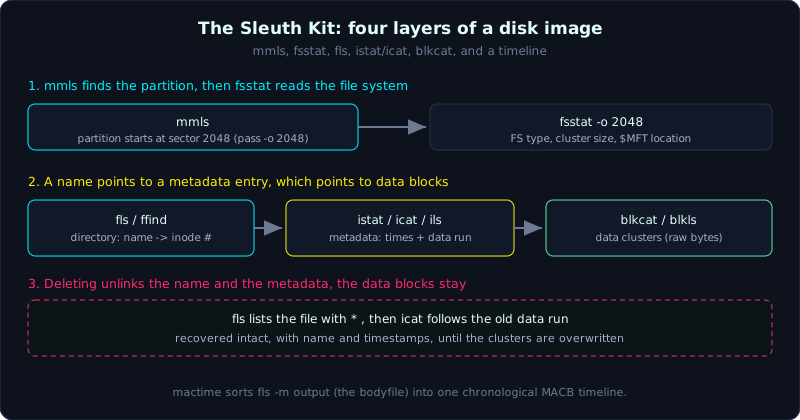 The Sleuth Kit resolves a name to a metadata entry to data blocks; deleting unlinks the first two and leaves the blocks.
Theory
What The Sleuth Kit is
The Sleuth Kit (TSK) is an open-source command-line toolset for analyzing a file system from a disk image, without mounting it and without touching the running operating system. It reads NTFS, FAT, exFAT, ext2/3/4, and HFS+ structures directly at the byte level, so it sees even the files a normal file explorer hides: deleted files that still have metadata, files in unallocated space, and the system metafiles.
TSK organizes its commands by layer, and the command name carries a prefix that tells you which layer it works on:
- mm (media management):
mmls,mmstatwork with the partition table (MBR/GPT). - fs (file system):
fsstatgives file system information. - i (inode / metadata):
ils,istat,icatwork with the metadata layer (the inode on ext, the $MFT entry on NTFS). - f (file name):
fls,ffindwork with the file name layer (directories). - blk (block / data unit):
blkls,blkcat,blkstatwork with raw data blocks.
Understanding these four layers (file name, metadata, data unit, file system) is understanding how forensics looks at a disk. A name in a directory points to a metadata entry, and that entry points to data blocks. When you delete a file, usually the name and the metadata get unlinked but the data stays in place, which is why recovery works (Lesson 3.3).
Why you need the partition offset
A full disk image contains the MBR/GPT and then the partitions. TSK’s file system commands (fls, fsstat, and so on) need to know which sector a partition starts at so they read the right place. mmls gives you that number (the Start column, in sectors), and you pass it to later commands with -o <offset>. Forget -o and TSK reads the wrong place and reports “Cannot determine file system type”.
Timeline: MAC times and the bodyfile
Every file has a set of times, usually called MACB:
- M (Modified): the last time the content changed.
- A (Accessed): the last access (many systems now disable atime updates for speed, so atime is not always reliable).
- C (Changed/Created, depends on the FS): on ext this is the inode change time, on NTFS/FAT it is the creation time.
- B (Born/Created): the time the file was created.
TSK builds a timeline in two steps. fls -m (or ils -m) writes a bodyfile, an intermediate format with one line per file and its time values. Then mactime reads the bodyfile and sorts every time value into chronological order, producing one line per event (file X was modified at this time, file Y was created at that time). This is a basic timeline at the file system level. A super timeline that also merges logs, registry, and browser history is covered in Part 9 with plaso.
Autopsy: a GUI on top of TSK
Autopsy is a graphical interface running on top of TSK itself, and it adds many conveniences: create a case, add an image, automatically run ingest modules (keyword search, hash lookup, EXIF, carving, web artifacts), display a directory tree that includes deleted files, a visual timeline, tagging, and report export. When you analyze one specific file by hand, the TSK commands are fast and precise. When you need to browse a whole drive, search broadly, work as a team, and export reports, Autopsy is more convenient. Forensic practitioners use both, depending on the job.
Demo
Reuse the FAT image you created in Lesson 2.2 (evidence.img), or create a small NTFS image. Every operation is read-only, no write mount.
Read the partition table
1
2
3
4
5
6
7
8
mmls image_raw.dd
# Example output:
#       Slot      Start        End          Length       Description
# 000:  Meta      0000000000   0000000000   0000000001   Primary Table (#0)
# 001:  -------   0000000000   0000002047   0000002048   Unallocated
# 002:  000:000   0000002048   0000204799   0000202752   NTFS / exFAT (0x07)
#
# The NTFS partition starts at sector 2048. Remember this number.
File system information
1
2
3
4
fsstat -o 2048 image_raw.dd
# Shows the FS type, cluster size, $MFT location (NTFS) or FAT table,
# volume label, serial. If the image is a single partition (no MBR),
# drop -o, or use -o 0.
List files, including deleted ones
1
2
3
4
5
6
7
8
9
fls -o 2048 -r image_raw.dd
# -r recurses into subdirectories. A line starting with * is a DELETED file.
# The first column is the type (r/r = regular file), then inode, then name.
# Example:
# r/r 4-128-1:  note.txt
# r/r * 5-128-1: secret_deleted.txt      <- * = deleted, inode 5

# Only deleted files:
fls -o 2048 -rd image_raw.dd
View metadata and extract content by inode
1
2
3
4
5
6
7
8
9
# Metadata of inode 4 (timestamps, clusters held, size)
istat -o 2048 image_raw.dd 4

# Extract the file's content by inode (icat = print content by inode)
icat -o 2048 image_raw.dd 4 > note_recovered.txt

# Recover the deleted file at inode 5 as well (if the data is not overwritten):
icat -o 2048 image_raw.dd 5 > secret_recovered.txt
cat secret_recovered.txt
This is exactly how you recover a specific file once you know its inode: fls finds the inode, icat pulls the data out. Lesson 3.3 goes deeper into recovery when the metadata is gone.
Build a basic timeline
1
2
3
4
5
6
7
8
9
# Step 1: write the bodyfile (every file + its times), including deleted files
fls -o 2048 -r -m C: image_raw.dd > bodyfile.txt

# Step 2: mactime reads the bodyfile, sorts by time, produces a timeline
mactime -b bodyfile.txt -d > timeline.csv      # -d = CSV
head timeline.csv
# Each line: time, size, MACB (for example m..b or .a..), file name.
# Filter by a date range:
mactime -b bodyfile.txt 2026-10-01..2026-10-08
Open the image in Autopsy
1
2
3
4
5
6
7
8
9
Autopsy (GUI):
  New Case > set a name, number, examiner
  Add Data Source > Disk Image or VM File > point to image_raw.dd (or .E01)
  Configure Ingest Modules: tick Hash Lookup, Keyword Search, Recent Activity,
    File Type Identification, (and PhotoRec Carver if you want to carve, Lesson 3.2)
  Finish > Autopsy runs ingest.
Browse: the left pane has Data Sources (by directory), Views (by file type,
  deleted files), Keyword Hits, Timeline (the Timeline button on the toolbar).
  Deleted files appear with a different icon and sit under "Deleted Files".
Lab
A real, runnable lab (Linux, no root needed): labs/3.1/. It uses an ext4 case image with one retained file plus one deleted file, with real timestamps set via debugfs set_inode_field. Run bash make.sh then bash solve.sh.
Tasks with a runnable lab:
mmlsandfsstat: determine the FS type and offset (the image is a single partition, sommlsreports no partition table and you use offset 0).fls -rdlists the deleted file and finds its inode.icatrecovers the deleted file’s content.fls -r -mgenerates the bodyfile,mactime -z UTCbuilds the timeline and shows when the file was created and modified. Watch out for the time zone pitfall.
Task as an exercise (needs a GUI): redo the whole thing in Autopsy (add the image, the Deleted Files node, extract) and compare with the CLI result.
Answers are in labs/3.1/solution.md, real output in labs/3.1/transcript.txt.
Common pitfalls
- Forgetting
-o <offset>, so TSK reports it cannot recognize the file system (it is reading the wrong sector). - Treating atime as “the last time the file was opened” in an absolute sense: many systems disable atime updates, or the investigation itself changes atime if the image is mounted wrong.
- Mounting the image to browse it with a file explorer and forgetting read-only, so the operating system writes to it and changes the hash.
- Reading timestamps without noticing the time zone:
mactimedefaults to local time, add-z UTCto be explicit. - Assuming
icatalways recovers a deleted file: it works only when the data is not overwritten and the metadata still points to the right cluster. - Running Autopsy ingest carving on a large drive without enough space on the destination, so it overflows mid-run.
Further reading
- The Sleuth Kit Wiki and the
manpage for each command (fls, icat, istat, mmls, mactime). - Brian Carrier, “File System Forensic Analysis” (the foundational book, strongly recommended).
- Autopsy User Documentation (sleuthkit.org/autopsy).
- SANS FOR500, the file system and timeline sections.
Key takeaways
- Run
mmlsfirst to get the partition offset, then pass-oto the file system commands. flslists files (* = deleted),istatshows metadata,icatextracts by inode.- Timeline:
fls -mwrites the bodyfile,mactimesorts it by time. - Autopsy is for broad browsing, keyword search, a visual timeline, and reports.
- Always work on a read-only copy, never write-mount the image.