Lesson 3.4: Analyzing hidden data
After this lesson you know the places people like to hide data that a file explorer never shows: slack space, the Alternate Data Stream on NTFS, and images or audio stuffed with information through steganography. Each comes with a way to detect it.
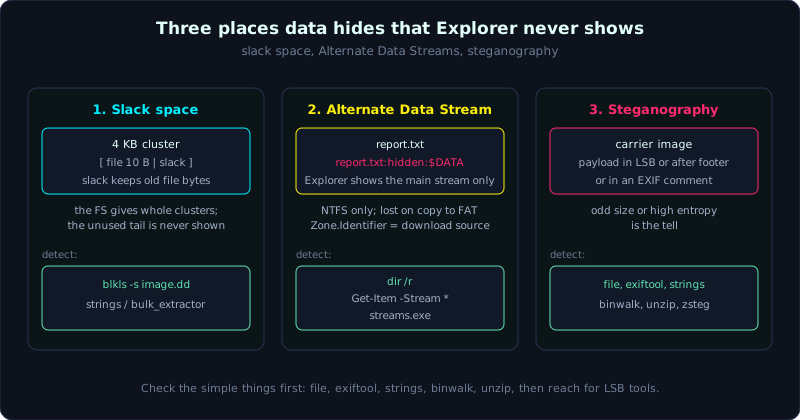 Three hiding places with three different mechanisms: slack space, NTFS Alternate Data Streams, and steganography.
Theory
Three hiding places, three different mechanisms
Hidden data in forensics is not just “a file with the hidden attribute set”. That is the beginner level, where turning on “show hidden files” is enough. The three hiding places worth discussing:
- Slack space: the leftover gap between the end of a file’s real data and the end of its cluster, which the operating system does not use.
- Alternate Data Stream (ADS): a secondary data stream attached to an NTFS file, with no visible size and no presence in Explorer.
- Steganography: hiding data inside another file (usually an image or audio) in a way the eye cannot see.
Each one exploits a property of how storage works. Understand the mechanism and you can detect it.
Slack space: the leftover tail of a cluster
A drive allocates by cluster (4KB, for example), not by byte. A 10-byte file still takes a whole 4KB cluster. The gap from byte 11 to the end of the cluster is slack space. There are two layers:
- RAM slack (file slack): from the end of the file’s data to the end of the current sector. Old Windows padded this area with zeros, but there was a time when it padded with RAM content, leaking data.
- Drive slack: from the next sector to the end of the cluster. This area usually keeps the old content of whatever file occupied that cluster before.
Why it is worth investigating: when a large file is deleted and a smaller file is written into the same cluster, the tail of the old file stays in the new file’s slack. This is where a fragment of “deleted” data survives. A sophisticated hider can also deliberately stuff data into slack, because a file explorer never displays this area.
Alternate Data Stream (ADS): an NTFS feature being abused
NTFS lets a file have multiple data streams. The main stream is the normal content you see. But you can attach extra streams named with the syntax filename:streamname. Explorer only shows the main stream, and dir usually counts only the main stream’s size, so a 2KB text file can hide a 2MB exe in an ADS while still looking like a 2KB text file on the surface.
ADS is a legitimate feature in itself (for example Windows uses the Zone.Identifier stream to mark files downloaded from the internet, which is the “mark of the web”). But it is also a classic place to hide malware. The good news: ADS only lives on NTFS. Copy the file to FAT, a FAT USB stick, or send it by email, and the ADS falls off, so it is not durable.
A related investigative artifact: the Zone.Identifier stream tells you where a file was downloaded from (the source URL), which is very useful for tracing a suspicious file back to its origin.
Steganography: hiding inside another file
Steganography (hiding information) differs from encryption. Encryption makes data unreadable but clearly reveals that secret data exists. Steganography makes people not know secret data exists at all. Common techniques:
- LSB (Least Significant Bit): change the lowest bit of each image pixel. The eye cannot tell a color is off by 1 unit, but gather the low bits together and you get the hidden data. Often used with PNG/BMP (lossless images).
- Append: stuff a whole file (usually a ZIP) right after an image’s footer. The image still opens normally because the viewer stops at the footer, but the tail is the hidden file. This is a classic CTF trick.
- Metadata: hide in the EXIF or comment field of an image.
- Dedicated tools: steghide (hide with a password into JPEG/BMP/WAV), OpenStego, and many variants.
Detecting steganography is generally hard (that is its purpose), but there are signs: a file size abnormally large compared to the visible content, abnormally high entropy, data after the footer, strange strings in the output of strings, or a steganalysis tool reporting a statistical anomaly in the low bits.
Demo
Slack space with TSK
1
2
3
4
5
6
7
# Extract all the slack of a file system to inspect it
blkls -s -o 2048 image.dd > slack.raw     # -s takes slack space only
strings -a slack.raw | less                # look for leftover fragments of old data
bulk_extractor -o slack_out slack.raw      # or scan for IOCs in slack

# Check the state of a specific block (allocated or not)
blkstat -o 2048 image.dd <block_number>
ADS on Windows
Create and detect an ADS:
1
2
3
4
5
6
7
8
9
10
11
12
13
14
15
16
17
18
19
20
# Create an ADS: stuff a "secret" into a secondary stream of a harmless text file
C:\> echo normal content > report.txt
C:\> echo SECRET DATA > report.txt:hidden
C:\> type report.txt                 (shows only the normal content)
C:\> dir report.txt                  (size looks like a normal text file)

# Detect: dir /r shows every stream
C:\> dir /r report.txt
#   ... report.txt
#        : report.txt:hidden:$DATA     <- the secondary stream is exposed

# Read the secondary stream's content
C:\> more < report.txt:hidden

# PowerShell lists and reads streams
PS> Get-Item report.txt -Stream *
PS> Get-Content report.txt -Stream hidden

# Sysinternals Streams scans a whole directory tree for ADS
C:\> streams.exe -s C:\Users\nghi
Check Zone.Identifier to trace a downloaded file:
1
2
3
4
5
PS> Get-Content installer.exe -Stream Zone.Identifier
# [ZoneTransfer]
# ZoneId=3
# ReferrerUrl=https://...
# HostUrl=https://.../installer.exe      <- this file was downloaded from here
On Linux, TSK still sees the ADS of an NTFS image: in fls/istat, a file has several $DATA attributes with different names; icat follows the exact attribute identifier to extract each stream.
Steganography: the basic inspection steps
1
2
3
4
5
6
7
8
9
10
11
12
13
14
15
16
17
18
19
20
21
22
# 1. Basic checks: file type, size, metadata
file suspicious.png
exiftool suspicious.png            # look at comments, odd fields, real size
ls -la suspicious.png              # abnormally large for the displayed image?

# 2. Is there an appended or embedded file? binwalk inspects signatures inside
binwalk suspicious.png
binwalk -e suspicious.png          # auto-extract embedded files (careful with unknown data)

# 3. strings finds odd sequences (sometimes exposes a flag or a ZIP header PK)
strings -a suspicious.png | grep -Ei "flag|password|PK\x03\x04"

# 4. Try to unzip if you suspect an appended ZIP
unzip suspicious.png               # sometimes drops out the hidden file

# 5. LSB and bit anomaly analysis (PNG/BMP images)
zsteg suspicious.png               # probes LSB, many encodings
# stegsolve (Java GUI): view each bit-plane, split color channels to expose a message

# 6. steghide (if you suspect steghide, you need the password)
steghide info suspicious.jpg
steghide extract -sf suspicious.jpg      # asks for a passphrase, drops the hidden file
Detection by entropy
Compressed or encrypted data has very high entropy (near 8 bits/byte). An abnormally high-entropy region inside a file that should be low-entropy is a sign of hidden data (or compression/encryption):
1
2
binwalk -E suspicious.png          # plot entropy against offset
# A sudden entropy jump at the end of a file is usually an embedded or compressed file.
Lab
A real, runnable lab (Linux, no root needed): labs/3.4/. Embed and extract a real secret with steghide (JPG and WAV), detect an appended ZIP with binwalk, read hidden metadata with exiftool, and real LSB on a PNG with python. Run bash make.sh then bash solve.sh (steghide password: haind).
Tasks with a runnable lab:
- Steghide: extract the secret from
stego.jpgandstego.wav. - Append:
appended.pnghas a ZIP appended; usebinwalkto detect it andunzipto extract it; explain why the image still opens normally. - Metadata:
exiftoolreads an Artist/Comment field holding a hidden note. - LSB: extract the message hidden in the LSB of
lsb_stego.pngwithlsb.py, and compare pixels against the original (only +/-1 changes, invisible to the eye).
Task as an exercise (needs Windows / NTFS): ADS hiding text and Zone.Identifier; extract slack with blkls -s (see Lesson 3.3).
Answers are in labs/3.4/solution.md, real output in labs/3.4/transcript.txt.
Common pitfalls
- Turning on “show hidden files” and thinking you have seen everything: slack, ADS, and steg do not show up that way.
- Forgetting ADS only exists on NTFS: looking for ADS on a FAT image is pointless.
- Skipping the simple steps on a suspected steg image and jumping straight to LSB tools when it is actually just an appended ZIP.
- Running
binwalk -eon an unknown file inside your own script directory: extract into a separate, empty directory and treat the extracted data as untrusted. - Taking high entropy as proof of steg: compressed or encrypted files are also high-entropy, so consider the context.
- Destroying slack by write-mounting or defragmenting the original instead of working on a read-only image.
Further reading
- Microsoft docs on NTFS Alternate Data Streams and Zone.Identifier (Mark of the Web).
- The Sleuth Kit docs on
blkls,blkstat, and slack space. - The steghide, zsteg, stegsolve, and binwalk documentation.
- Steganography writeups from picoCTF and HackTheBox to drill the order of checks.
Key takeaways
- Slack space keeps fragments of old files, Explorer never shows it, and you extract it with
blkls -s. - ADS attaches a secondary stream to an NTFS file; detect it with
dir /r,Get-Item -Stream *, and Streams.exe. Zone.Identifiertells you which URL a file was downloaded from (origin tracing).- Steganography: work in order, file, exiftool, strings, binwalk, unzip, then LSB tools.
- Abnormally high entropy or an abnormally large file is a sign of hidden data.
- ADS falls off when you copy to FAT or send over the network, so it is not durable.