Lesson 4.4: File and Folder Access Artifacts
This group of artifacts answers the question that Prefetch and the event log cannot: which documents a user opened, which folders they browsed into, which network share or USB they touched. The best feature is persistence. You delete the file, pull out the USB, remove the network share, yet the LNK and the Shellbag stay behind and keep telling the story. In internal data-theft cases, these are often the deciding evidence.
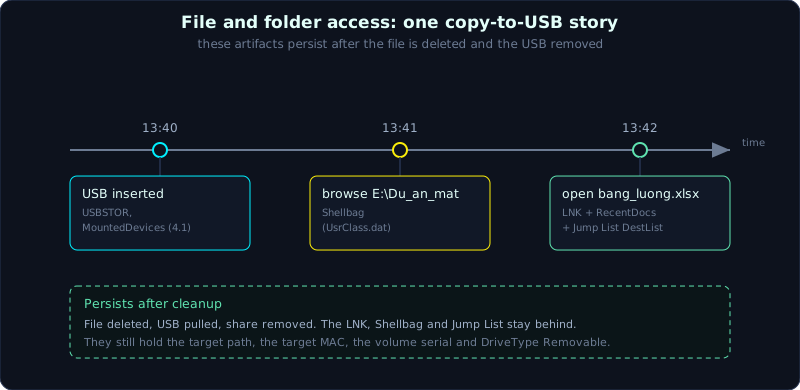 LNK, Jump List and Shellbag persist after the file is deleted and the USB is removed, and rebuild what a user opened.
| Part: 4 (Windows Forensics) | Time: about 70 minutes | Difficulty: advanced |
Prerequisites: read offline hives (Lesson 4.1), understand UTC timestamps and NTFS MACB (Lesson 1.5).
Tools: LECmd, JLECmd, SBECmd, RegRipper, ShellBags Explorer (Eric Zimmerman suite).
Goals
After this lesson you understand when a LNK is created and what it holds (target path, the target’s MAC times, the volume serial, the machine name). You can read a Jump List and map an AppID to the right application. You understand that a Shellbag proves a user browsed a folder, even a deleted folder or one on removable media. You can pull RecentDocs, OpenSaveMRU and LastVisitedMRU and state the investigative meaning of each.
1. Theory
1.1. LNK file (shortcut)
A LNK is a Windows shortcut file (the Shell Link format). The key point for forensics: Windows creates a LNK in the Recent folder every time a user opens a file, without the user creating a shortcut by hand.
1
2
C:\Users\<user>\AppData\Roaming\Microsoft\Windows\Recent\*.lnk
(and also on the Desktop and Start Menu for shortcuts made by the user or an installer)
A LNK holds more than people expect, about the target file at the moment it was last opened:
- The full path of the target.
- The target’s size.
- The three MAC times of the target (Created, Modified, Accessed) embedded directly in the LNK.
- The volume serial number and volume label of the volume holding the target.
- The drive type (fixed, removable, network).
- For a file on the network: the UNC path
\\server\share\.... - The NetBIOS machine name and MAC address (in a block called droid/tracker), which helps identify the machine the LNK was created on.
Because a LNK records the target’s MAC at the time it was opened, if the file is later deleted you still have its old size and timestamps, plus you know which drive it was on (fixed or removable). This is why a LNK is a close ally in a copy-to-USB case.
1.2. Jump List
A Jump List is the “recent files” and “tasks” list that appears when you right-click an icon on the taskbar. Windows stores them in two folders:
1
2
C:\Users\<user>\AppData\Roaming\Microsoft\Windows\Recent\AutomaticDestinations\<AppID>.automaticDestinations-ms
C:\Users\<user>\AppData\Roaming\Microsoft\Windows\Recent\CustomDestinations\<AppID>.customDestinations-ms
AutomaticDestinations: managed by the OS, an OLE compound file (the same format family as old Office files) holding many child LNK streams, plus a special stream calledDestListthat acts as an MRU: it records the access order, open count and timestamp. This is the most valuable part.CustomDestinations: defined by the application itself (for example pinned tasks).
The first part of the file name is the AppID, a hash that identifies the application (for example one AppID per version of Word, one AppID for Explorer quick access, 1b4dd67f29cb1962). There are public AppID lookup tables (EricZimmerman and forensicswiki keep lists), or let JLECmd map it for you. Thanks to the Jump List, even if the user cleared RecentDocs, you can still rebuild the list of files opened per application, with open counts and times.
1.3. Shellbag
A Shellbag remembers how each Explorer window was displayed (position, size, sort order) for every folder a user opened. The side effect for forensics: it is evidence that the user actually browsed into that folder with Explorer.
1
2
3
4
UsrClass.dat\Local Settings\Software\Microsoft\Windows\Shell\BagMRU   (the main source for Explorer)
UsrClass.dat\Local Settings\Software\Microsoft\Windows\Shell\Bags
NTUSER.DAT\Software\Microsoft\Windows\Shell\BagMRU                    (an older form, desktop)
NTUSER.DAT\Software\Microsoft\Windows\Shell\Bags
The strengths of Shellbag:
- It records folders on removable drives, network drives, and folders that have been deleted. The folder no longer exists but the Shellbag still holds the path, with a timestamp.
- It has timestamps (first/most recent browse depending on the entry), so you can infer when the user went in.
- It proves deliberate user behavior: no one accidentally creates a Shellbag for
E:\Du_an_mat\unless they opened it.
Note: the BagMRU structure is a nested tree and is very hard to read by hand, so you almost always use a tool (SBECmd or ShellBags Explorer).
1.4. RecentDocs, OpenSaveMRU, LastVisitedMRU
These keys in NTUSER.DAT are small but valuable:
1
2
3
4
5
6
7
8
9
10
11
12
13
14
15
# recently opened documents, grouped by file extension, with a Folder subkey
NTUSER.DAT\Software\Microsoft\Windows\CurrentVersion\Explorer\RecentDocs
    -> each value is a file, with an MRUListEx for order; child keys per .docx, .pdf, .zip...

# files opened/saved through the common dialog (Open/Save), grouped by extension
NTUSER.DAT\Software\Microsoft\Windows\CurrentVersion\Explorer\ComDlg32\OpenSavePidlMRU
    -> for example the .docx, .jpg branches hold files chosen in the Open/Save box

# maps an application to the folder it last opened through the common dialog
NTUSER.DAT\Software\Microsoft\Windows\CurrentVersion\Explorer\ComDlg32\LastVisitedPidlMRU
    -> for example notepad.exe -> C:\Users\An\Desktop, winword.exe -> \\server\hoso

# Office MRU (if Office is installed)
NTUSER.DAT\Software\Microsoft\Office\<ver>\<app>\File MRU
NTUSER.DAT\Software\Microsoft\Office\<ver>\<app>\Place MRU
Quick distinction:
- RecentDocs: what was opened recently (via Explorer double-click, or several other paths).
- OpenSaveMRU (OpenSavePidlMRU): files chosen in an application’s Open/Save dialog. Great for proving “the user opened an attachment from here” or “saved a file out to a USB”.
- LastVisitedMRU: which application last pointed to which folder. Combined with OpenSaveMRU it reconstructs the behavior “opened Word, browsed to E:, saved a file”.
All of them encode the path as a PIDL (the shell’s item identifier list), so again you need a tool. RegRipper has a plugin for each.
1.5. Why this group matters more than it looks
Prefetch says “the program ran”. The event log says “who logged in”. But to prove “user An opened bang_luong.xlsx from drive E (USB) at 2 pm, then copied it to the Desktop”, you need the LNK (with the USB volume serial and the file’s MAC), the Shellbag (browsed into E:), the OpenSaveMRU (chose that file), and RecentDocs (opened it). Combined with the USB history from Lesson 4.1 it is the full set. No artifact in the execution group can do this.
2. Demo
Work on a copy, record a hash first. Use the Eric Zimmerman suite.
2.1. LNK with LECmd
1
2
3
4
5
# one file
LECmd.exe -f "C:\evidence\Recent\bang_luong.xlsx.lnk"

# the whole Recent folder, export CSV
LECmd.exe -d "C:\evidence\Users\An\AppData\Roaming\Microsoft\Windows\Recent" --csv "C:\out" --csvf lnk.csv
Reading the result: the LocalPath or NetworkPath column (target), TargetCreated/Modified/Accessed (the target’s MAC at open time), VolumeSerialNumber, DriveType (Removable is USB), MachineID (machine name), MACAddress. Seeing DriveType = Removable and a volume serial matching the USBSTOR from Lesson 4.1 ties the copy-to-USB story together.
2.2. Jump List with JLECmd
1
2
3
JLECmd.exe -d "C:\evidence\Users\An\AppData\Roaming\Microsoft\Windows\Recent\AutomaticDestinations" --csv "C:\out" --csvf jumplist.csv

# JLECmd recognizes common AppIDs and fills in the app name
The AppId and AppIdDescription columns tell you the application, and the child rows are each file with LastModified taken from DestList (that is the open time). The Explorer quick-access Jump List shows which files/folders the user touched most.
2.3. Shellbag with SBECmd
1
2
# point at the folder holding the user's NTUSER.DAT and UsrClass.dat
SBECmd.exe -d "C:\evidence\Users\An" --csv "C:\out"
SBECmd finds both hives, rebuilds the tree of folders the user browsed, with FirstInteracted and LastInteracted. Filter by paths containing a removable drive letter (E:\, F:) or a UNC (\\…) to find USB and network share access. Deleted folders still show up here. For people who like a GUI, ShellBags Explorer shows the tree very clearly.
2.4. RecentDocs, OpenSaveMRU, LastVisited with RegRipper
1
2
3
rip.pl -r NTUSER.DAT -p recentdocs
rip.pl -r NTUSER.DAT -p comdlg32      # includes OpenSavePidlMRU and LastVisitedPidlMRU
rip.pl -r NTUSER.DAT -p officedocs    # if Office is present
Cross-check: a file that appears at the same time in RecentDocs, in OpenSaveMRU, and has a matching LNK, with the same name and on the same drive E, is a very tight chain of evidence.
2.5. Putting a story together
1
2
3
4
5
6
7
USBSTOR (SYSTEM)     : USB SanDisk serial 4C530..., first insert 2026-10-05 13:40, drive E:
Shellbag (UsrClass)  : user An browsed E:\Du_an_mat at 2026-10-05 13:41
LNK (Recent)         : bang_luong.xlsx.lnk, target E:\Du_an_mat\bang_luong.xlsx,
                       DriveType Removable, VolumeSerial matches the USB, target size 2.1 MB
OpenSaveMRU          : .xlsx -> bang_luong.xlsx
RecentDocs           : bang_luong.xlsx opened at 13:42
Jump List (Excel)    : bang_luong.xlsx, DestList time 13:42, open count 1
Six artifacts, one story: user An plugged in the SanDisk USB at 13:40, entered the Du_an_mat folder, and opened bang_luong.xlsx from the USB at 13:42. Clear and ordered.
3. Lab
The runnable lab is in labs/4.4/: make.py generates a benign .lnk (pylnk3) pointing to a file on drive E:, fetch.sh downloads a public Jump List CustomDestinations (from the LnkParse3 tests) and a UsrClass.dat (regipy, MIT), and solve.sh parses all three with LnkParse3 and regipy. All of these are data artifacts, no executables. transcript.txt is the real output. See labs/4.4/README.md.
1
2
3
4
cd labs/4.4
pip install LnkParse3 pylnk3 'regipy[cli]' tabulate libfwsi-python libfwps-python libolecf-python
bash fetch.sh
bash solve.sh
- Task (with a runnable lab):
- LNK: from the target IDList, rebuild the path
My Computer / E:\ / Du_an_mat / bang_luong.xlsx(the VolumeSerial/DriveType live in the LinkInfo of a real Windows LNK, read with LECmd in the exercise part). - Jump List: count the embedded LNKs inside (9), each pointing to
GettingStarted.exe. The key point: a Jump List is a container of many Shell Links + a DestList stream (MRU). - Shellbag (UsrClass.dat): list the folders the user browsed with their mtime (this hive has a
D:\AKMonitor\logs\pictree). A Shellbag proves the user opened that folder, even on removable media or a deleted folder.
- LNK: from the target IDList, rebuild the path
- Task as an exercise (needs real Windows): plug in a USB, open a file from the USB with Explorer and the Open dialog, save it to the Desktop; extract the Recent folder + NTUSER.DAT + UsrClass.dat. Parse the LNK with
LECmd.exeto readVolumeSerialNumber,DriveType,MachineID; link the volume serial to USBSTOR (Lesson 4.1) to confirm it is the same USB; build a 6-line timeline. - Answers: the “short answers” section in
labs/4.4/README.mdandlabs/4.4/transcript.txt.
4. Key takeaways
- A LNK in
Recent\is created automatically when a file is opened, and holds the target path, the target’s MAC, volume serial, DriveType and MachineID. - Jump Lists are in
AutomaticDestinations/CustomDestinations, DestList is the MRU with times, and the file name starts with the AppID. - The main Shellbag is in UsrClass.dat, and proves the user browsed a folder, even a deleted one or one on removable media.
- RecentDocs (opened recently), OpenSaveMRU (chosen in an Open/Save box), LastVisitedMRU (which app went to which folder), all in NTUSER.
- This group is persistent: the file is deleted, the USB removed, the share gone, but the traces remain.
5. Common pitfalls
- Looking for Shellbags in NTUSER.DAT and missing UsrClass.dat, where the main Explorer source lives.
- Reading the MAC timestamp in a LNK as the current file’s, when it is the target’s MAC at the most recent open time (which may be old, or the file may have been edited since).
- Concluding from a LNK that “the file still exists”. A LNK remains even long after the target has been deleted.
- Forgetting that some LNKs are created by the system or an application, not by a user double-click. Read them together with Jump List DestList and RecentDocs to distinguish deliberate behavior.
- Mistaking the DestList open count for a program’s run count. DestList counts how often a file was accessed through that app, which is different from an executable’s run count.
- Skipping the MachineID and MAC in a LNK when investigating across machines. A LNK created on machine A can be copied to machine B, and the MachineID helps detect that.
6. Further reading
- SANS FOR500, the “File and Folder Opening” table and the Shellbag section.
- The Eric Zimmerman tool docs: LECmd, JLECmd, SBECmd, ShellBags Explorer.
- Jump List AppID lookup tables (EricZimmerman/JumpList on GitHub, forensicswiki).
- The Shell Link (LNK) format and DestList specification from Microsoft (MS-SHLLINK).
- 13Cubed, the episodes on LNK and Shellbag.