Lesson 4.6: Volume Shadow Copy and Recovering Old Files
Volume Shadow Copy (VSS, a point-in-time snapshot of a volume) is one of the most underrated things in Windows forensics. Many people skip it because they think it is only for System Restore. For an investigator, VSS preserves the old state of files and the registry from days and weeks earlier. When an attacker deletes logs, edits files or timestomps the current state, the old versions of those files often sit untouched in a shadow copy. Knowing how to use VSS turns one static disk image into several slices in time.
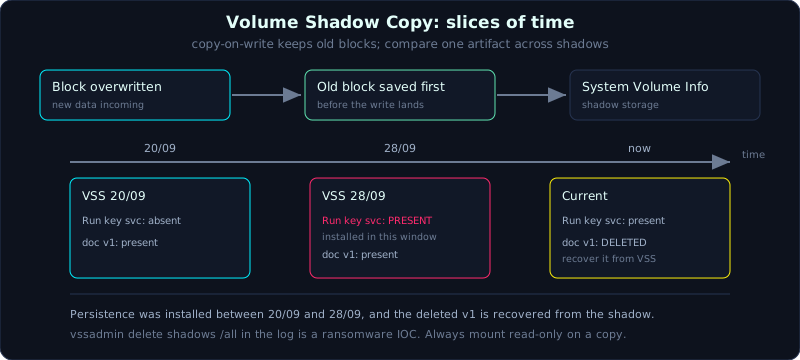 Copy-on-write snapshots keep old versions of files and hives, so you compare one artifact across several points in time.
| Part: 4 (Windows Forensics) | Time: about 65 minutes | Difficulty: advanced |
Prerequisites: know how to mount an image and work on a copy (Part 2), be familiar with the artifacts in Lessons 4.1 to 4.5.
Tools: vssadmin, libvshadow (vshadowinfo, vshadowmount), Arsenal Image Mounter, FTK Imager, ShadowExplorer, Eric Zimmerman suite, plaso.
Goals
After this lesson you understand what VSS is, when it is created, where it is stored, and the copy-on-write mechanism. You can list and mount shadow copies from a live machine and from an image. You can extract an old version of a specific file or hive from a shadow copy, and compare the same artifact across several VSS to build a multi-point timeline.
1. Theory
1.1. How VSS works
The Volume Shadow Copy Service is a Windows service that creates a consistent snapshot of a volume at a point in time. It does not copy the whole drive. The mechanism is copy-on-write: at snapshot time the system only marks the volume. Later, every time a block is about to be overwritten, the old block is copied into the shadow storage area before the new one is written. This way the shadow copy “sees” the drive as it was at snapshot time, while using space only for the parts that changed.
A shadow copy is stored in a hidden folder on the volume itself:
1
C:\System Volume Information\      (a hidden system folder holding the shadow data)
They are created when: System Restore makes a restore point, Windows Update installs a patch, some backup programs run, or an admin creates one by command. The count and retention depend on configuration and disk space, usually a few copies spread over a few weeks. Each volume has its own set of shadows.
1.2. Why VSS is valuable for investigation
- Recover the old version of a file deleted or edited in the present.
- Get a snapshot of a registry hive (SYSTEM, SOFTWARE, NTUSER.DAT) at several times, to see when a Run key, a service or a shellbag first appeared.
- Beat anti-forensics: an attacker deletes logs or timestomps the current state but usually does not touch the version in VSS. Comparing the VSS version against the current one is the main way to detect that cleanup.
- Build a multi-point timeline: the same artifact in the VSS of day 1, day 10 and day 20 shows how it changed.
Because it is so valuable for investigation, it is also a sabotage target: a lot of ransomware runs vssadmin delete shadows /all or wmic shadowcopy delete right before encrypting, so the victim cannot recover. Seeing that command in the history (4688, Sysmon event 1, PowerShell log) is a strong IOC.
1.3. Two approaches: live machine and image
There are two contexts:
- On a running Windows machine (or an image mounted as a Windows volume): use
vssadmin, access a shadow through the device path\\?\GLOBALROOT\Device\HarddiskVolumeShadowCopyN, or use ShadowExplorer (GUI) to browse and restore. - On a raw image (raw/E01) analyzed offline, usually on Linux: use
libvshadowto list and mount each shadow as a separate volume, then run forensic tools on it like any other drive. Or use Arsenal Image Mounter / FTK Imager on Windows to mount the image with VSS exposed.
The point to remember: each shadow copy, when mounted, behaves as an independent volume. You run PECmd, RegRipper, LECmd and so on against it exactly as you would against the original drive, except that the data is from the snapshot time.
2. Demo
Always work on a copy of the image, record a hash first. Never enable shadows on the original evidence drive itself.
2.1. On a live machine: list and access
1
2
3
4
5
6
7
8
9
10
# list every shadow copy, with creation time and device path
vssadmin list shadows

# example output (trimmed)
#   Shadow Copy Volume: \\?\GLOBALROOT\Device\HarddiskVolumeShadowCopy3
#   Creation Time: 2026-09-20 06:00:11

# create a symbolic link to browse a shadow's contents (note the trailing \)
mklink /d C:\vsc3 \\?\GLOBALROOT\Device\HarddiskVolumeShadowCopy3\
dir C:\vsc3\Users\An\Documents
ShadowExplorer (a free GUI) does this more visually: pick the drive, pick the date, browse the folder tree like Explorer and export files out.
2.2. On an offline image with libvshadow (Linux)
1
2
3
4
5
6
7
8
9
10
11
12
13
14
15
16
# 1) see how many shadows the image has, and when they were created
vshadowinfo /evidence/disk.raw

# if the image is a whole disk with several partitions, compute the partition offset and add -o
#   mmls /evidence/disk.raw           # get the partition offset (sectors)
#   vshadowinfo -o $((206848*512)) /evidence/disk.raw

# 2) mount all shadows as files vss1, vss2 ... under /mnt/vss
mkdir -p /mnt/vss
vshadowmount /evidence/disk.raw /mnt/vss
ls /mnt/vss          # vss1  vss2  vss3 ...

# 3) each vssN is an NTFS volume image, mount read-only to read files
mkdir -p /mnt/vss3_files
mount -o ro,loop,show_sys_files,streams_interface=windows /mnt/vss/vss3 /mnt/vss3_files
ls /mnt/vss3_files/Users/An/Documents
Now /mnt/vss3_files is the whole of drive C as it was at the time of shadow number 3. You run every forensic tool against it.
2.3. Extract an old version of a file or hive
1
2
3
4
5
6
7
8
9
# take user An's NTUSER.DAT at the time of shadow 3
cp /mnt/vss3_files/Users/An/NTUSER.DAT /work/An_NTUSER_vss3.dat
sha256sum /work/An_NTUSER_vss3.dat

# take the old SYSTEM hive to compare Run keys / services
cp /mnt/vss3_files/Windows/System32/config/SYSTEM /work/SYSTEM_vss3

# recover a document that was deleted in the current version
cp "/mnt/vss3_files/Users/An/Desktop/hopdong_v1.docx" /work/
On Windows you only need to copy from the C:\vsc3\... path, or export with ShadowExplorer.
2.4. Build a multi-point timeline
The idea: take the same artifact from every shadow plus the current version, then compare.
1
2
3
4
5
6
7
8
# example: compare the Run key of SOFTWARE across the shadows and the current version
for v in /mnt/vss/vss*; do
  n=$(basename "$v")
  mkdir -p /mnt/${n}_f && mount -o ro,loop "$v" /mnt/${n}_f 2>/dev/null
  echo "===== $n ====="
  rip.pl -r /mnt/${n}_f/Windows/System32/config/SOFTWARE -p run 2>/dev/null
done
# add the current version (from the mounted original image) to compare
Do the same with prefetch, shimcache, a scheduled task XML, or a document. The result gives you a timeline like: the Run key svc was not present in the shadow of 20/09, appeared in the shadow of 28/09, and is still in the current version. So the persistence was installed between 20 and 28/09, narrowing the incident window considerably.
To do this at scale, KAPE has a --vss option that handles every shadow during collection, and plaso/log2timeline has a flag to read VSS (--vss-stores) to pull artifacts from the shadows straight into one super timeline. The full super timeline is covered in Part 9; here you only need to know how to get data from several points in time.
2.5. Detecting shadow deletion
1
2
3
4
5
6
7
# look for shadow-deletion commands in the event log (process creation)
EvtxECmd.exe -f Security.evtx --csv out --csvf sec.csv   # find 4688 with vssadmin/wmic delete
# or in Sysmon event 1, PowerShell 4104
# the classic ransomware chain:
#   vssadmin.exe delete shadows /all /quiet
#   wmic shadowcopy delete
#   bcdedit /set recoveryenabled no
If vssadmin list shows no shadows left while System Restore is enabled on the machine, suspect that someone deleted them, and go find that deletion command in the log.
3. Lab
This is an exercise, not a runnable lab, because VSS needs a Windows image that HAS shadow copies plus libvshadow (or Windows vssadmin), which cannot be reproduced in a non-root Linux environment. The labs/4.6/ folder has check_tools.sh to check the environment (and run vshadowinfo if you feed it an image) along with a README.md listing the full commands. transcript.txt is the real output of that check (libvshadow is missing here). Do not fabricate output.
1
2
3
cd labs/4.6
bash check_tools.sh            # check libvshadow/TSK
bash check_tools.sh disk.raw   # if you have a VSS image + libvshadow: list shadows
- Task (an exercise, needs a VSS image or Windows):
- Create data on a Windows VM: enable System Protection, make document v1,
Checkpoint-Computer, edit it to v2 + add a Run key,Checkpoint-Computera second time, then delete the document and the Run key in the current version. Image the drive. vshadowinfo disk.rawlists the shadows;vshadowmountmounts each shadow as a separate volume (remember to add the partition offset if the image is a whole disk).- Recover v1 of the deleted document, and compare the Run key of SOFTWARE across the shadows and the current version to narrow the persistence-install window.
- Find the shadow-deletion command (
vssadmin delete shadows /all,wmic shadowcopy delete) in the log as a ransomware IOC.
- Create data on a Windows VM: enable System Protection, make document v1,
- The detailed commands (libvshadow, read-only mount, compare several points, detect shadow deletion) are in
labs/4.6/README.md.
4. Key takeaways
- VSS is a copy-on-write snapshot of a volume, stored in
System Volume Information, created by restore points, updates and backups. - Live machine:
vssadmin list shadows+ mklink or ShadowExplorer. Offline image: libvshadow (vshadowinfo, vshadowmount) or Arsenal Image Mounter. - Each mounted shadow is an independent volume; run every forensic tool against it like a normal drive.
- Compare the same artifact across several shadows to narrow the time window of a change.
- KAPE
--vssand plaso--vss-storespull artifacts from shadows into a timeline automatically. - The command
vssadmin delete shadows /allin the log is a ransomware IOC.
5. Common pitfalls
- Enabling or touching shadows on the original evidence drive. Always work on a copy, mount read-only.
- Forgetting to add the partition offset when the image is a whole disk, so vshadowinfo sees no shadows.
- Believing that no shadows left means there never were any. Shadows are pruned by disk space, or deleted on purpose. A missing shadow can be a lead in itself.
- Confusing the shadow creation time with the change time of a file inside it. The shadow captures the state at its Creation Time, while a file’s MAC inside is its own.
- Mounting a vssN read-write and dirtying the data. Always add
ro. - Looking only at the current version when investigating anti-forensics. The VSS version often still holds what was deleted or timestomped in the present; skipping it misses the key evidence.
6. Further reading
- The libvshadow docs (Joachim Metz) on GitHub, with vshadowinfo/vshadowmount.
- SANS FOR500/FOR508, the Volume Shadow Copy and timeline analysis section.
- Microsoft Docs on the Volume Shadow Copy Service and vssadmin.
- Arsenal Image Mounter, the guide to mounting E01 with VSS on Windows.
- plaso/log2timeline docs, the
--vss-storesoption to bring VSS into a super timeline (a preview of Part 9).