Lesson 6.3: Detecting code injection, process hollowing, and rootkits in RAM
Good malware does not run as its own process, which is easy to spot. It slips into a trusted process, explorer.exe, svchost.exe, lsass.exe, and runs its own code under that process’s name. On disk you see nothing, and in pslist you only see a normal explorer.exe. Only RAM reveals it: which memory region is executable with no file backing it, which PE sits in the heap, which DLL has disappeared from the books. This lesson is the toolkit for hunting those things.
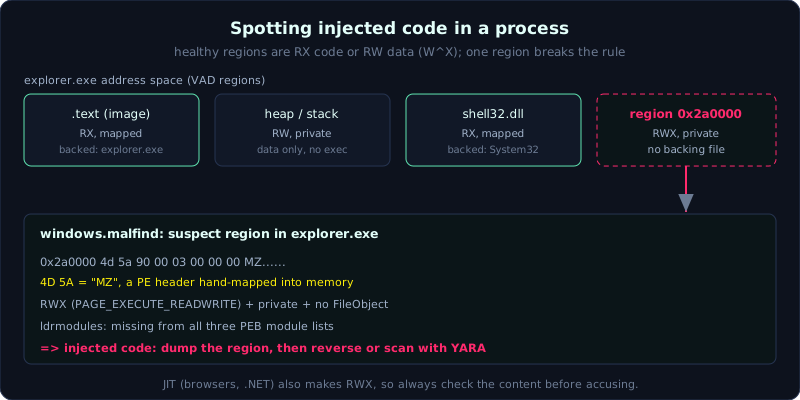 A region that is RWX, private, has no backing file, and starts with MZ is almost certainly injected code.
Level: advanced, about 75 minutes. Prerequisites: Lesson 6.2 (pslist/psscan, dlllist). Understanding the PE header and the VAD concept is an advantage. Tools: Volatility 3 (windows.malfind, windows.vadinfo, windows.ldrmodules, windows.ssdt), the community plugins hollowfind and apihooks.
Goals
You will understand why a RWX private memory region is a classic sign of injected code. You will use malfind to find suspect regions and recognize an MZ (PE) header inside them, distinguish classic DLL injection from process hollowing, use ldrmodules to detect a DLL unlinked from the three PEB lists, know what SSDT hooks and apihooks are and when to use them, and dump a suspect region to a file for further static analysis.
Theory
Why a RWX region is a red flag
The memory of a healthy process is cleanly divided: code is Execute-Read (RX), data is Read-Write (RW). It is very rare for a region to be both writable and executable (RWX, that is PAGE_EXECUTE_READWRITE). The reason: the W^X principle (write or execute, not both) is a security standard. But whoever injects code needs a region to both write the payload into and run it, so they often allocate exactly RWX.
On top of that, such a region is usually private (not mapped from any file on disk, not a legitimate DLL/EXE). Combine the two properties:
1
2
3
Memory region:  RWX (PAGE_EXECUTE_READWRITE) + private + no backing file
                + sometimes starting with 4D 5A (the "MZ" characters, a PE header)
--------->  almost certainly injected code (shellcode or a hand-mapped PE)
malfind is exactly the plugin that automatically scans every process for a VAD (Virtual Address Descriptor, which describes a virtual address region) with those traits, and prints a hexdump of the region’s start so you can see the MZ.
How classic injection and process hollowing differ
1
2
3
4
5
6
7
8
9
10
11
Classic DLL/code injection:
  Write the payload (DLL or shellcode) into a RUNNING process (VirtualAllocEx +
  WriteProcessMemory + CreateRemoteThread). The original process is still itself, with an extra strange region.
  -> malfind catches the strange RWX region; ldrmodules catches an unlinked DLL if it loaded reflectively.

Process hollowing (RunPE):
  Create a legitimate process in a SUSPENDED state (for example svchost.exe), UNMAP its original image,
  map a malicious PE into the same place, then resume. The shell is a trusted process, the insides are swapped.
  -> Signs: the image path on disk does not match the real PE in memory;
     the VAD of the image region lacks the file name it should have; the PEB reports this path
     but the executing code is in a different region.
The distinction matters because the hunting differs. Hollowing is harder to see because the process looks “clean” in pslist. The community plugin hollowfind (written for Vol2) specializes in cross-checking those inconsistencies; on Vol3 we combine malfind + vadinfo + dlllist to reach the same conclusion.
ldrmodules: three lists that must agree
Windows tracks a process’s loaded DLLs with three linked lists in the PEB, the same content ordered differently:
1
2
3
InLoadOrderModuleList        in load order
InMemoryOrderModuleList      in memory order
InInitializationOrderModuleList  in initialization order
A legitimately loaded DLL is present in all three. Malware that loads a DLL reflectively (self-mapping, bypassing the loader) or actively unlinks it will be missing from one or more lists. ldrmodules builds a table with three True/False columns (InLoad, InInit, InMem). A module with a blank path, or False in a column that should be True, is a sign of a hidden DLL:
1
2
3
Pid  Process      Base        InLoad  InInit  InMem  MappedPath
1820 explorer.exe 0x6ff00000  True    True    True   C:\Windows\System32\shell32.dll
1820 explorer.exe 0x2a0000    False   False   False  (blank)   <- hand-mapped DLL/PE, hidden
SSDT hooks and apihooks
A classic rootkit hooks the system service table to change the kernel’s behavior:
1
2
3
4
5
6
7
8
SSDT (System Service Descriptor Table): a table of pointers to the kernel's Nt* functions.
  A rootkit replaces one pointer to intercept, for example NtQueryDirectoryFile -> hide its own file.
  The plugin windows.ssdt prints the table; any pointer pointing outside the ntoskrnl/win32k region
  (into a strange driver) is a suspicious hook.

apihooks (Vol2 community): detects inline hooks in user space and kernel, for example the first 5 bytes
  of a function overwritten with a JMP to the malware's code. Used to catch userland rootkits,
  banking trojans that hook network/crypto APIs.
These two belong to the advanced tier and mainly appear with real rootkits. For most modern cases (userland, EDR) you use malfind/ldrmodules more, but you should still know SSDT so you do not miss a kernel rootkit.
Dump it out for further analysis
Once you catch a suspect region you must extract it to a file to reverse it. malfind can dump the region it finds on its own; there is also vadinfo/vaddump to dump by VAD, and windows.dumpfiles (Lesson 6.4) to extract a PE by process. Take the dump into IDA/Ghidra or scan it with YARA.
Demo
Case: explorer.exe (assume PID 1820) is suspected of being injected. Work on a copy of the dump.
malfind on the whole dump and on one process
1
2
3
4
5
# Scan everything to expose every process with a suspect RWX region, and dump the regions to a directory
vol -o /out/malfind -f /evidence/memory.raw windows.malfind --dump

# Narrow to explorer.exe
vol -f /evidence/memory.raw windows.malfind --pid 1820
A sample output:
1
2
3
PID   Process       Start      Protection                 Hexdump (region start)
1820  explorer.exe  0x2a0000   PAGE_EXECUTE_READWRITE      4d 5a 90 00 03 00 00 00  MZ......
                                                           ... (disasm: dec ebp / pop edx ...)
The region 0x2a0000 is RWX, has no file backing, and starts with 4d 5a (MZ). This is a hand-mapped PE inside explorer.exe. Caught.
Cross-check the VAD
1
vol -f /evidence/memory.raw windows.vadinfo --pid 1820 | grep -i "0x2a0000 -A2"
The VAD of this region will show it is private, protection RWX, and has no FileObject (no backing file), matching the malfind conclusion. If this were hollowing, you would also see the VAD of the main image region (explorer’s base) with an inconsistency in the file name.
ldrmodules to find an unlinked DLL
1
vol -f /evidence/memory.raw windows.ldrmodules --pid 1820
Look for a line with InLoad/InInit/InMem mixed with False, or a blank MappedPath. An entry at base 0x2a0000 in none of the lists confirms this module was loaded covertly, outside the official loader.
Dump the suspect region and inspect statically
1
2
3
4
5
6
7
# The file already dumped in step 2.1 is in /out/malfind
ls /out/malfind
# Scan the dumped region with YARA to identify the malware family
yara -r /rules/malware.yar /out/malfind/

# Or hash it and look it up on VirusTotal
sha256sum /out/malfind/*.dmp
SSDT and apihooks when a kernel rootkit is suspected
1
2
3
4
5
# Which SSDT pointer points outside ntoskrnl/win32k
vol -f /evidence/memory.raw windows.ssdt | grep -viE "ntoskrnl|win32k"

# apihooks is a Vol2 plugin; if you can use Vol2 with this dump:
# vol2.py -f memory.raw --profile=Win10x64 apihooks
If SSDT prints an Nt* function whose owner is a strangely named driver (not a system module), that is a rootkit hook, which you dig into further with windows.modules/windows.modscan.
Lab
There is a runnable lab under labs/6.3/: a process allocates an anonymous RWX region and places “fake shellcode” in it (bytes 4d 5a MZ + NOP + a marker, NEVER executed, entirely harmless). capture.py scans /proc/<pid>/maps to find that exact RWX region and carves it out; solve.sh detects the region and inspects the MZ header plus the marker. This is the local, runnable version of malfind. See labs/6.3/README.md, with the real output in labs/6.3/transcript.txt.
- Run locally:
1
2
3
cd labs/6.3
DUMPDIR=_dump python3 -I capture.py   # create the RWX region, carve it to a file
DUMPDIR=_dump bash solve.sh           # scan maps + inspect the MZ header/marker
Task: find the
rwxp ... anonymousline in maps, confirm the region starts with4d 5a(MZ), and explain why RWX + private + no backing file is a red flag (remember the JIT false positive from browsers/.NET). - Volatility branch (your own legitimate Windows RAM image): do NOT download sample images with malware. When you have a legitimate image, run exactly these commands:
vol -o out -f mem.raw windows.malfind --dumpto list every process with a RWX region and dump the regions to files.- For a suspect process, confirm the region starts with MZ and get the base address.
vol -f mem.raw windows.vadinfo --pid <PID>to confirm private, RWX, no backing file.vol -f mem.raw windows.ldrmodules --pid <PID>to see if any DLL is missing from the three lists.- Hash the dumped region, scan with YARA; write a conclusion of classic injection or hollowing.
- Hint: malfind can report a false positive with JIT (browsers and .NET generate legitimate RWX code). Do not rush to accuse Chrome/
dotnet; check whether the region starts with MZ and whether the content looks like a PE/shellcode.
Common pitfalls
- Treating every RWX region as malicious. Browser and .NET JIT generate legitimate RWX; you must look at the content.
- Skipping hollowing because the process looks clean in pslist. You must compare the path on disk with the PE in memory.
- Using Vol2 plugin names (a bare
malfind,apihooks) with Vol3. Vol3 iswindows.malfind;apihooks/hollowfindare Vol2 community plugins. - Forgetting
ldrmodulesreads from the PEB, so for a process with a corrupted PEB the result can be skewed; cross-check malfind. - Dumping a region but forgetting it may be a hand-mapped PE (a valid header but unmapped sections), so reversing it needs the base adjusted.
- Running SSDT on a userland-only dump (not enough kernel) then being annoyed at the missing data; you need a dump with full kernel space.
Further reading
- “The Art of Memory Forensics”, the chapter on code injection, rootkits, and malfind.
- Monnappa K A, “Learning Malware Analysis”, the memory injection section with Volatility (the author of hollowfind).
- The Volatility 3 documentation: windows.malfind, windows.vadinfo, windows.ldrmodules, windows.ssdt.
- MITRE ATT&CK: T1055.012 (Process Hollowing), T1055.001 (DLL Injection), T1014 (Rootkit), T1620 (Reflective Loading).
- 13Cubed, the video on malfind and detecting process injection.
Key takeaways
- RWX + private + no backing file equals suspected injected code; with an MZ at the start it is almost certain.
malfindis the first command to hunt injection;--dumpextracts the region to a file.- Classic injection: original process plus a strange region. Hollowing: a legitimate shell with its PE insides swapped and an inconsistent path.
ldrmodules: a DLL missing from one of the three PEB lists or a blank MappedPath equals hidden.- SSDT/apihooks are for kernel/userland rootkits; a pointer into a strange driver equals a hook.
- Always dump the suspect region for reversing/YARA, do not stop at “looks malicious”.