Lesson 7.2: Traffic analysis with Zeek and NetworkMiner
Wireshark is excellent when you already know which session to look at. But hand you a 2 GB pcap with no lead, and clicking packet by packet is a dead end. Zeek (formerly Bro) solves exactly this problem. It reads a pcap and produces a set of tabular log files, where each line is a network event already broken out into named fields. Instead of looking at bytes, you grep and filter logs the way you would with any dataset. NetworkMiner takes a different approach, presenting the pcap by host and pulling out files, credentials, and images on its own. The two tools complement each other well.
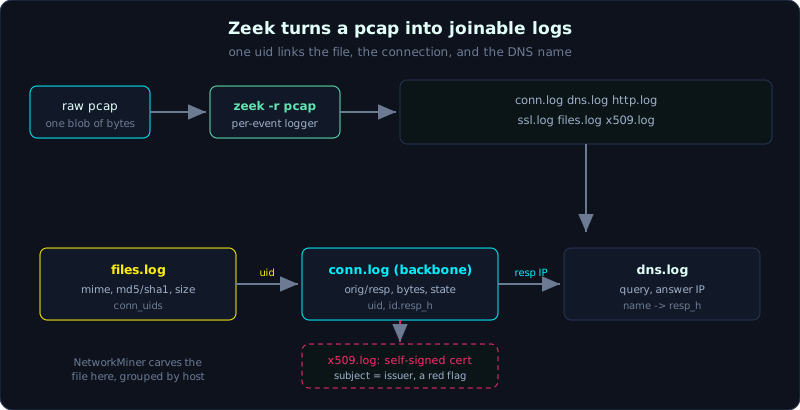 Zeek writes per-event logs, and the uid field joins files.log back to conn.log and on to dns.log.
Level: medium, about 75 minutes. Prerequisites: Lesson 7.1 (Wireshark), and the idea of a TCP session and common protocols (HTTP, DNS, TLS). Tools: zeek, zeek-cut, jq, NetworkMiner (free edition), ripgrep (rg).
Goals
After this lesson you can run zeek -r on a pcap and know where the logs it produces land. You can read conn.log, dns.log, http.log, ssl.log, files.log, x509.log and the meaning of their main fields. You can use zeek-cut and jq to filter logs quickly, and join data across logs through the uid field. You can use NetworkMiner to carve files, credentials, and hosts from a pcap, and rebuild the picture of a session from conn.log combined with dns.log.
Theory
What Zeek does differently from tcpdump and Wireshark
tcpdump captures packets. Wireshark dissects packets. Zeek interprets them. It tracks the state of each connection, and when a meaningful event happens (a connection ends, a DNS query, an HTTP request, a TLS handshake) it writes one line to the matching log file. The result is a set of logs you can read with your eyes and grep by hand, instead of a million packets.
By default the logs are TSV (tab separated) with a #fields header line that lists the column names. Many packaged builds (as in a SIEM) emit JSON. Both are fine, TSV suits zeek-cut, JSON suits jq.
The logs you must know
After it runs, Zeek drops a pile of .log files into the current directory. The most important group:
1
2
3
4
5
6
7
8
conn.log     Each line is one connection (4-tuple + statistics). The backbone of all analysis.
dns.log      Each DNS query: name asked, type (A/AAAA/TXT...), the answer.
http.log     Each HTTP request: method, host, uri, user_agent, status_code.
ssl.log      Each TLS handshake: server_name (SNI), version, cipher, JA3/JA3S (if enabled).
files.log    Each file transferred over the network: MIME type, size, MD5/SHA1 hash.
x509.log     TLS certificate detail: subject, issuer, validity.
weird.log    Anything Zeek found abnormal about a protocol.
notice.log   Alerts raised by a script or policy.
The first columns of many logs are ts (timestamp as epoch) and uid (the connection’s unique id). The uid is the key that joins logs: the same uid appearing in conn.log, http.log, and files.log means they belong to the same connection. This is how you go from “this file” (files.log) to “which connection carried it” (conn.log) to “what domain name” (dns.log).
Reading conn.log correctly
conn.log is the log you open first. The fields to remember:
1
2
3
4
5
6
7
8
9
10
11
ts                   when the connection started (epoch)
uid                  connection id, used to join to other logs
id.orig_h / id.orig_p   IP and port of the initiator (originator, usually the client)
id.resp_h / id.resp_p   IP and port of the responder (usually the server)
proto                tcp / udp / icmp
service              zeek's guess at the application protocol: http, dns, ssl, ssh...
duration             how long the session lasted
orig_bytes           payload bytes the client sent
resp_bytes           payload bytes the server returned
conn_state           connection state (see below)
history              a short string summarizing the packet sequence (S, h, A, D, F...)
conn_state says a lot. A few common values:
1
2
3
4
5
SF    connection set up and torn down normally
S0    SYN seen but no reply (closed port, dead host, or a scan)
REJ   rejected (RST)
RSTO / RSTR   one side reset mid-connection
OTH   matched no pattern (worth attention)
A burst of S0 from one IP to many different ports is a sign of a port scan. An SF connection with a long duration and very large resp_bytes is a large download. The reverse, a large orig_bytes, is a large upload (suspected exfiltration, covered in Lesson 7.3).
files.log and x509.log, the two logs people forget
files.log is one of the most useful logs. For every file transferred over HTTP, SMTP, FTP, SMB, Zeek records the true MIME type (guessed from content, not from the extension), the size, and the hash. The md5 and sha1 fields let you look it up on VirusTotal right away without having the file. The tx_hosts and rx_hosts fields say who sent and who received, and conn_uids joins back to conn.log.
x509.log breaks out the certificate from a TLS handshake: certificate.subject, certificate.issuer, validity. A self-signed certificate (subject equal to issuer), an unusually short validity, or a meaningless CN are signs of hastily built C2 infrastructure.
Demo
The running case: we have incident.pcap and need to rebuild one session, which host, what domain it asked for, where it connected, how long it lasted, how much it downloaded. Always work on a copy, hash first.
Run Zeek on the pcap
1
2
3
4
5
6
7
8
mkdir zeeklogs && cd zeeklogs
zeek -r ../incident.pcap
# Zeek drops the .log files into the current directory (run it in an empty directory to stay tidy)
ls
# conn.log dns.log http.log ssl.log files.log x509.log weird.log ...

# to enable JA3 (a hash for the TLS client/server) load the community script:
zeek -r ../incident.pcap /opt/zeek/share/zeek/site/ja3
Tip: to get logs as JSON for easy use with jq, add LogAscii::use_json=T:
1
zeek -r ../incident.pcap LogAscii::use_json=T
zeek-cut, selecting columns in TSV
zeek-cut reads the #fields header line and lets you call columns by name, no counting columns by hand.
1
2
3
4
5
6
7
8
9
10
# the 10 connections that downloaded the most, with destination IP and service
cat conn.log | zeek-cut -d ts id.orig_h id.resp_h id.resp_p service resp_bytes \
  | sort -t$'\t' -k6 -n -r | head
#   -d: show ts as a readable date instead of epoch

# every DNS query with its answer
cat dns.log | zeek-cut ts query qtype_name answers

# every HTTP request: host and uri and user agent
cat http.log | zeek-cut ts id.orig_h host uri user_agent status_code
jq, when the logs are JSON
1
2
3
4
5
# list the SNI (server name in TLS) and the client JA3
jq -r 'select(.server_name != null) | "\(.server_name) \(.ja3)"' ssl.log

# which file was transferred over the network, of what type, with what hash
jq -r '"\(.mime_type)\t\(.total_bytes)\t\(.md5)\t\(.filename // "-")"' files.log
Case: rebuild a session from conn.log + dns.log
Suppose in conn.log we notice a suspicious line: client 10.3.1.22 talking for a long time to an unfamiliar IP.
1
2
3
4
5
# step 1: find a long session that downloaded a lot, get the uid
cat conn.log | zeek-cut uid id.orig_h id.resp_h id.resp_p service duration resp_bytes \
  | sort -t$'\t' -k6 -n -r | head
# gives: CwABC1 10.3.1.22 203.0.113.77 443 ssl 3600.4 48211003
#     -> a TLS session to 203.0.113.77 lasting 1 hour, downloaded ~48MB
1
2
3
4
# step 2: which domain did this IP 203.0.113.77 come from? look up dns.log in reverse
cat dns.log | zeek-cut ts query answers | rg "203.0.113.77"
# gives: 2026-01-07T09:12:03 cdn-sync.telemetry-update.net 203.0.113.77
#     -> the client resolved this domain right before connecting
1
2
3
4
5
6
# step 3: this session is TLS, check whether the SNI and certificate match the domain
cat ssl.log | zeek-cut ts id.orig_h server_name version cipher | rg "10.3.1.22"
# server_name: cdn-sync.telemetry-update.net, version TLSv1.2 -> matches DNS

cat x509.log | zeek-cut certificate.subject certificate.issuer
# subject = issuer (self-signed certificate) -> red flag, hastily built infrastructure
Joining four lines from three logs, we have the whole story: at 09:12:03 UTC, host 10.3.1.22 asked DNS for cdn-sync.telemetry-update.net, received IP 203.0.113.77, then opened a TLS session to it, held the connection for an hour, and downloaded 48MB, with a self-signed certificate. A domain impersonating “telemetry”, a long connection, a self-signed certificate, that is enough to raise this to a suspected C2 or data staging and investigate further in Lesson 7.3. The good part is that we did not open a single packet in Wireshark, the whole thing was joined from logs.
NetworkMiner, viewing a pcap by host
NetworkMiner (runs on Windows, or on Linux through Mono) opens a pcap and organizes it by host: each IP is an entry, with the guessed OS, hostname, its sessions, and most importantly the tabs that carve automatically:
1
2
3
4
5
6
Hosts        each host: IP, MAC, OS fingerprint, hostname from DNS/NetBIOS
Files        every file carved from HTTP/SMB/FTP, saved straight to the AssembledFiles folder
Images       images split out for a quick look (good for content cases)
Credentials  username/password caught in clear text (HTTP basic, FTP, SMTP AUTH...)
DNS          the table of queries and answers
Parameters   HTTP POST/GET parameters (often leak form data)
The workflow: File > Open pcap, wait for the parse to finish, go to the Credentials tab to see what leaked in clear text, go to the Files tab to grab the carved files (NetworkMiner names them by host and reassembles them, more convenient than Wireshark’s Export Objects when a pcap has many files). The free edition is enough for most forensics cases; the Pro edition adds better OS fingerprinting and some detection features.
NetworkMiner is strong at “look at who”, and Zeek is strong at “filter and join events”. In practice you often use Zeek to locate the suspicious host and session, then open that same pcap in NetworkMiner to carve files and inspect credentials.
Lab
The lab runs for real and is 100% local: labs/7.2/. The environment has no zeek and no NetworkMiner, so the lab uses tshark to build tables EQUIVALENT to conn.log / dns.log / files.log. To be clear, this is a substitute, not real Zeek.
Run it:
1
2
3
cd labs/7.2
python3 -I make.py    # builds lab72.pcap (3 TCP connections, 2 DNS lookups, 2 workstations) + expected_payload.exe
./solve.sh            # emit equivalent conn.log/dns.log/files.log, join logs, verify hash
Mapping Zeek to tshark: conn.log uses -z conv,tcp; dns.log uses -T fields on DNS packets; files.log plus carving (NetworkMiner’s job) uses --export-objects http with file and sha256sum; Zeek’s uid is replaced by tcp.stream.
The core point is that tcp.stream is the join key. 10.0.0.50 resolves files.evil.test then downloads payload.exe (MZ) from it; while 10.0.0.51 connects straight to 10.0.0.99 by IP, so it appears in conn.log but is absent from dns.log (not going through DNS is a conclusion too). The hash of the carved file matches the original file exactly.
The real output is in labs/7.2/transcript.txt, with details in labs/7.2/README.md.
To go further: if you can install zeek, run zeek -r lab72.pcap then open conn.log/dns.log/files.log with zeek-cut and compare against the tshark table; if you have NetworkMiner, open the same pcap and compare the Files tab hash. Reuse the pcap from Lesson 7.1 or one from Malware-Traffic-Analysis.net to practice more.
Common pitfalls
- Running
zeek -rin a directory with data, so new logs mix with old files; always run in an empty directory. - Reading conn.log but forgetting
conn_state: a burst of S0 is not a network error, it may be a scan. - Confusing
orig_byteswithresp_bytes: orig is what the client sent (suspected upload/exfil), resp is what the server returned (download). - Trusting the file extension in http.log; the
mime_typein files.log is the real type. - Forgetting that JA3/JA3S is not enabled by default in every Zeek build and needs a script loaded; without it, ssl.log has no such column.
- Using NetworkMiner to carve a file from a TLS session and being surprised to get garbage: TLS is encrypted, you must decrypt first (Lesson 7.3).
- Mixing up time zones: the
tsfield is epoch UTC; when reporting, state UTC clearly and do not let Zeek and other artifacts drift apart in time.
Further reading
- The official Zeek documentation (docs.zeek.org), especially the Log Files section and each field of conn.log.
- The zeek-cut man page and the community script store (zeek/zeek-packages, the ja3 repo).
- NetworkMiner (netresec.com), the file carving guide and the list of supported protocols.
- Malware-Traffic-Analysis.net to practice joining logs on real traffic.
- Richard Bejtlich, “The Practice of Network Security Monitoring” (the NSM mindset built on Zeek).
Key takeaways
zeek -r pcapproduces conn/dns/http/ssl/files/x509.log as tables, one line per event.- conn.log is the backbone: read id.orig/id.resp, service, resp_bytes, duration, conn_state.
uidjoins the logs together; go from files.log back to conn.log back to dns.log by uid and IP.- files.log gives the true MIME type and the MD5/SHA1 hash to look up even without the file.
- x509.log exposes a self-signed certificate, a meaningless CN, signs of C2 infrastructure.
- zeek-cut calls columns by name on TSV; jq handles logs when they are JSON.
- NetworkMiner organizes by host and carves files, credentials, and images automatically.