Lesson 7.3: Detecting C2, DNS tunneling, and exfiltration
This is the hardest network forensics lesson in the part, because the attacker is trying to hide. Modern malware does not make its C2 connection obvious. It blends into HTTPS to look like normal traffic, or uses DNS because DNS is open almost everywhere, or spreads data out in small pieces so nobody sees one large upload. Your job is to spot the abnormal inside what looks normal, such as a rhythm that is too even, a domain name that is too random, or a traffic direction that is clearly lopsided. This lesson teaches those three signals and how to decrypt TLS when you have the key.
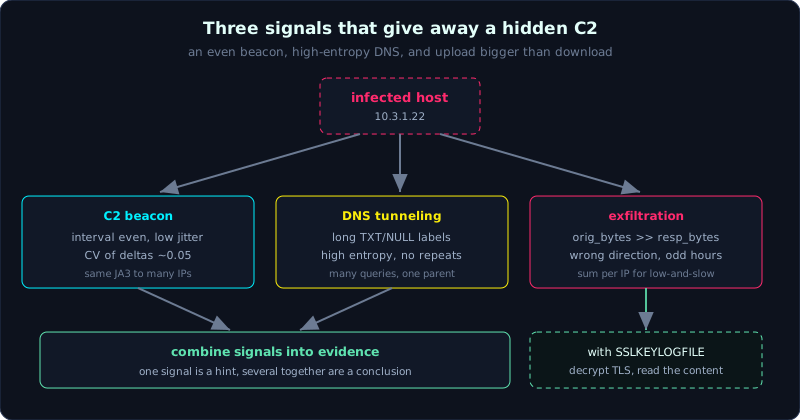 Each signal is a hint on its own; combining the even beacon, the high-entropy DNS, and the lopsided upload is what makes a conclusion.
Level: advanced, about 80 minutes. Prerequisites: Lesson 7.1 (Wireshark), Lesson 7.2 (Zeek and NetworkMiner). Tools: zeek, tshark, Wireshark (for TLS decryption), RITA, a small Python script for entropy and interval.
Goals
After this lesson you understand the C2 beacon mechanism and can detect it through interval, jitter, and JA3/JA3S. You can detect DNS tunneling through query length, the TXT/NULL record type, domain entropy, and the number of queries per domain. You can locate exfiltration through a lopsided upload/download ratio and an unusual channel. You can decrypt HTTPS in Wireshark when you have an SSLKEYLOGFILE, and combine signals into a conclusion backed by evidence, not just a hunch.
Theory
What a C2 beacon is and why it stands out
After infection, malware needs to “call home” (call back) to receive commands. The common pattern is a beacon: after each interval of time, the agent sends a small request to the C2 server asking “any commands”, and the server returns a command or nothing. This very regularity gives it away. A real person browsing the web produces messy, irregular traffic, while a beacon repeats on a fixed schedule.
Three parameters shape a beacon:
- Interval: the gap between two call-backs, for example once every 60 seconds.
- Jitter: a random percentage added to the interval to avoid detection. A jitter of 20% means a 60 s beacon actually lands between 48 and 72 seconds. Cobalt Strike lets you configure both.
- Request size: usually small and similar each time (same URI, same length).
Even with jitter, the distribution of times between call-backs still clusters around one value, very different from the scattered distribution of human traffic. That is what we measure.
JA3 and JA3S, a fingerprint of the TLS handshake
When a beacon slips into HTTPS, you cannot read the content, but you can still read the TLS handshake (the ClientHello/ServerHello parts are not encrypted). JA3 is an MD5 hash computed from the parameters in the client’s ClientHello (TLS version, cipher list, extension list, elliptic curve). The idea is that the same library or malware tends to build the same ClientHello, so it has the same JA3, regardless of where it connects. JA3S is the equivalent for the server’s ServerHello.
The forensic use: filter on an unfamiliar JA3 and find it appearing regularly to many IPs, which is one piece of client software (possibly malware) calling home. The JA3 of Cobalt Strike agents, Metasploit, and some RATs has been cataloged by the community. Note that JA3 is not absolute (TLS 1.3 and randomized extensions make it less stable than before), so use it as a signal, not as nailed-down proof.
DNS tunneling, hiding data inside the domain question
DNS is almost always allowed outbound, which makes it an ideal covert channel. The technique encodes data into the queried domain name itself. The client asks MRZGS3TLEBWW64TF.tunnel.evil.com, where MRZGS3TLEBWW64TF is the encoded data (base32/base64/hex). The attacker’s DNS server (authoritative for tunnel.evil.com) receives it, decodes it, and returns data in the answer, usually using TXT or NULL records because they can hold many bytes.
Signs of DNS tunneling:
1
2
3
4
5
6
7
8
- Unusually long queries (a label near 63 characters, a full name near 253 characters).
- Many long TXT / NULL / CNAME records, instead of normal A/AAAA.
- High entropy: the subdomain part looks random (because it is encoded data), unlike a
  human-chosen name. The Shannon entropy of an encoded string is much higher than a real domain.
- A very large number of queries to the SAME parent domain (thousands), because each chunk
  of data is a new query.
- No duplicate queries (people often ask the same name again; a tunnel carries different
  data in each query so there are almost no duplicates).
Exfiltration, when data flows the wrong way
A normal enterprise network downloads more than it uploads (browsing the web, pulling updates). Exfiltration reverses that: an internal host suddenly uploads a large amount outward. Signs:
1
2
3
4
5
- orig_bytes (client sent) abnormally large compared to resp_bytes, on an outbound connection.
- An upload to a service/destination the host has never used before (an unknown cloud storage,
  an IP in an unusual country).
- An upload during off-hours when nobody is working (2 to 4 in the morning).
- Going over an illogical channel: large data over DNS, over ICMP, over a nonstandard port.
Exfil can be done in one shot (one giant POST) or spread out in small pieces (low and slow) to stay under alerting thresholds. The small-piece kind is harder to see and must be summed per IP pair across a long time window, which is exactly what Zeek conn.log does well.
Decrypting HTTPS when you have an SSLKEYLOGFILE
You cannot break TLS by force, but if you have the session keys you can decrypt it. Browsers (Chrome, Firefox) and many apps using common TLS libraries will write session keys to a file if the environment variable SSLKEYLOGFILE is set before they run. This file holds key lines (CLIENT_RANDOM …) that are enough for Wireshark to decrypt the content. In forensics, you have this file when the capture was done on the same machine that set the variable (for example a malware analysis sandbox), or you obtained the key file together with the pcap. Without the key, HTTPS stays a black box, and only the metadata (SNI, JA3, size, rhythm) is left to reason from.
Demo
Case: an endpoint 10.3.1.22 suspected of being infected. We have a pcap and need to answer two questions, is there a C2 beacon, and is there a DNS tunnel. Work on a copy, hash first.
Measure the beacon rhythm from Zeek conn.log
1
2
3
4
5
zeek -r incident.pcap

# take the time of every connection from 10.3.1.22 to a suspect destination, sorted by time
cat conn.log | zeek-cut ts id.orig_h id.resp_h id.resp_p service \
  | rg "10.3.1.22" | rg "203.0.113.77" | sort -n > beacon_ts.txt
Compute the gaps between call-backs with a small script (keep it in its own directory and run with -I for safety):
1
2
3
4
5
6
7
8
9
10
# interval.py  (run: python3 -I interval.py beacon_ts.txt)
import sys
ts = [float(line.split('\t')[0]) for line in open(sys.argv[1])]
deltas = [round(b - a, 1) for a, b in zip(ts, ts[1:])]
print("number of call-backs:", len(ts))
print("gaps (seconds):", deltas[:20])
# a rhythm even around one value (for example 55-65s) with small variation = a beacon with jitter
mean = sum(deltas) / len(deltas)
print("mean:", round(mean, 1),
      "min:", min(deltas), "max:", max(deltas))
If the result shows gaps clustered around 60 seconds, min 48 max 72, that is a beacon with a 60 s interval and about 20% jitter. A real person does not call one destination this evenly for hours. This is the first piece of beacon evidence.
Strengthen it with JA3
1
2
3
4
5
6
# run Zeek with the JA3 script loaded (see Lesson 7.2), then group by JA3
zeek -r incident.pcap /opt/zeek/share/zeek/site/ja3
cat ssl.log | zeek-cut id.orig_h id.resp_h server_name ja3 \
  | rg "10.3.1.22"
# if the same ja3 appears on every connection to 203.0.113.77 (and a few other IPs),
# this is one piece of client software calling many destinations -> a sign of a C2 agent
Compare the JA3 value against public lists (abuse.ch SSLBL, the ja3er store). A JA3 matching a known Cobalt Strike sample is a strong confirmation. Combining an even interval, a matching JA3, and a self-signed certificate (x509.log, Lesson 7.2) is enough basis to conclude C2.
RITA (Real Intelligence Threat Analytics) automates exactly this work: load the Zeek logs into it, and it scores beacons by how even the interval and size are, producing a ranked table of suspicious connections. Use it to sweep over large data before inspecting by hand.
Hunt DNS tunneling
1
2
3
4
5
6
7
8
9
10
11
# query length: filter the abnormally long names
cat dns.log | zeek-cut query qtype_name \
  | awk 'length($1) > 50 {print length($1), $0}' | sort -n -r | head

# count queries per parent domain (last 2 labels), find a domain asked too many times
cat dns.log | zeek-cut query \
  | rev | cut -d. -f1,2 | rev | sort | uniq -c | sort -n -r | head
#  -> one parent domain with thousands of queries is very suspicious

# count the ratio of TXT / NULL records (tunnels like to use these) versus A
cat dns.log | zeek-cut qtype_name | sort | uniq -c | sort -n -r
Compute the entropy of the subdomain part to separate “random because encoded” from “a human-chosen name”:
1
2
3
4
5
6
7
8
9
10
11
12
# entropy.py  (python3 -I entropy.py)
import math, sys
def entropy(s):
    if not s: return 0.0
    probs = [s.count(c) / len(s) for c in set(s)]
    return -sum(p * math.log2(p) for p in probs)
for line in sys.stdin:
    name = line.strip()
    label = name.split('.')[0]          # the outermost subdomain
    e = entropy(label)
    if e > 3.5 and len(label) > 20:     # high and long = suspicious
        print(round(e, 2), len(label), name)
1
2
3
cat dns.log | zeek-cut query | python3 -I entropy.py | sort -n -r | head
# result: many lines under the same parent domain, subdomains 30-60 characters long,
# entropy ~4.5+, record type TXT  -> DNS tunneling almost certain
Putting it together: one parent domain tunnel.evil.com receives thousands of queries, each query has a long random subdomain with high entropy, mostly TXT, and no query repeats. That is the textbook signature of DNS tunneling (tools like iodine and dnscat2 produce exactly this pattern). The amount of data smuggled out equals the total length of the subdomains, which you can estimate to report the exfil volume.
Locate exfiltration from conn.log
1
2
3
4
5
6
7
8
9
# find OUTBOUND connections with orig_bytes (upload) larger than resp_bytes (download)
cat conn.log | zeek-cut id.orig_h id.resp_h id.resp_p orig_bytes resp_bytes service \
  | awk -F'\t' '$4+0 > 1000000 && $4+0 > $5+0 {print}' | sort -t$'\t' -k4 -n -r | head
#  -> an internal host uploading MB out to an external IP, more than it downloads = suspected exfil

# sum per IP pair (to catch low-and-slow exfil spread out in small pieces)
cat conn.log | zeek-cut id.orig_h id.resp_h orig_bytes \
  | awk -F'\t' '{sum[$1" -> "$2]+=$3} END{for(k in sum) print sum[k], k}' \
  | sort -n -r | head
Decrypt HTTPS in Wireshark with SSLKEYLOGFILE
When you have the key file (for example a sandbox capture that set export SSLKEYLOGFILE=/path/keys.log before running the sample):
1
2
3
Wireshark > Edit > Preferences > Protocols > TLS
  > (Pre)-Master-Secret log filename: point it at keys.log
Press OK. Wireshark re-decrypts every TLS session that matches a key.
After that everything shows up like plain HTTP: Follow HTTP Stream reads the request/response, Export Objects pulls the file that was inside TLS, and the http2 or http filter works on the now-decrypted traffic. On the command line:
1
2
tshark -r incident.pcap -o tls.keylog_file:keys.log \
  -Y "http.request" -T fields -e http.host -e http.request.uri
This is when an HTTPS beacon is fully exposed. You can read the URI it calls, the command the server returns, and the data it sends up. Without the key you stop at metadata, so in a malware analysis case always try to capture the key from the start.
Lab
The lab runs for real and is 100% local: labs/7.3/. The pcap is built with scapy (fixed seed, so it is reproducible). Tools: scapy, tshark, python3 (interval, Shannon entropy, base32 decode). No Zeek needed.
Run it:
1
2
3
cd labs/7.3
python3 -I make.py     # builds lab73.pcap (12 beacons ~60s + jitter, a base32 DNS tunnel, benign DNS) + expected_secret.txt
python3 -I solve.py    # measure the beacon rhythm + detect the tunnel + decode the smuggled data
solve.py does three things: (1) filter TCP SYN to C2:443, compute the mean interval and jitter (stdev), and from the low coefficient of variation conclude it is a beacon; (2) group DNS by parent domain, compute the Shannon entropy of the label and count queries, and show that t.evil-tunnel.test is a tunnel (long labels, high entropy, many queries) while the benign domain has low entropy; (3) join the base32 labels in order then decode them back to the exact smuggled secret.
The core point: a beacon gives itself away because its rhythm is too even (a coefficient of variation around 0.05). A real beacon always has jitter, so look for a clustered distribution rather than expecting perfect evenness. High entropy alone is not enough (a CDN like d1a2b3c4.cloudfront.net is also high), so combine it with the query count, the label length, and the record type.
The real output is in labs/7.3/transcript.txt, with details in labs/7.3/README.md.
To go further: JA3/JA3S and TLS decryption with SSLKEYLOGFILE need real TLS traffic and a key, which is outside this offline lab; if you have a key, load the SSLKEYLOGFILE into Wireshark to read the content of one HTTPS session. Download a public “C2” or “DNS tunnel” pcap from Malware-Traffic-Analysis.net to practice more.
Common pitfalls
- Concluding C2 from a single connection to an unknown IP: you need an even rhythm that repeats, not one call.
- Treating JA3 as absolute proof; TLS 1.3 and randomized extensions make JA3 less stable and prone to benign collisions.
- Raising a DNS tunnel alert on a high-entropy CDN domain (cloudfront, akamai, fastly); you must add the query count and the record type.
- Looking at only one connection when hunting exfil and missing the small-piece kind; you must sum per IP pair across the whole window.
- Thinking that capturing HTTPS means reading its content; without the key you cannot, so do not promise your boss you will decrypt it.
- Forgetting to set SSLKEYLOGFILE before running the sample in the sandbox, losing a chance to decrypt TLS that you cannot redo.
- Mixing local time and UTC when measuring interval, which distorts the time distribution; normalize to epoch/UTC before computing.
Further reading
- The Cobalt Strike Malleable C2 profile (to understand interval, jitter, and how a beacon disguises itself).
- John Althouse, the original JA3/JA3S article (Salesforce Engineering) and the abuse.ch signature store.
- RITA (Active Countermeasures) and the companion “Threat Hunting” book on beacon scoring.
- Palo Alto Unit42 and the SANS reading room on DNS tunneling (iodine, dnscat2, DNSCat).
- The Wireshark documentation on TLS decryption and the SSLKEYLOGFILE environment variable.
Key takeaways
- A beacon gives itself away because its rhythm is too even; measure interval and jitter from the connection timestamps.
- JA3/JA3S is a client/server TLS fingerprint; the same one to many destinations is one piece of software.
- DNS tunnel: long queries, TXT/NULL records, high entropy, very many queries to one parent domain, no repeats.
- Exfil: orig_bytes (upload) clearly exceeds resp_bytes; remember to sum to catch low-and-slow.
- Without the key, HTTPS leaves only metadata (SNI, JA3, size, rhythm).
- With an SSLKEYLOGFILE, load it into Wireshark/tshark to decrypt and read the TLS content.
- Every signal is a hint, and you must combine several of them to reach a conclusion.