Lesson 8.2: Email forensics and tracing the sender
Email is the easiest thing to forge and the starting point of most attacks (phishing, BEC). The useful part is that an email carries its own record of travel in the header, because every server it passes through adds its own line to it. The sender controls the displayed “From”, but cannot easily fake the whole Received chain that the intermediate servers add. The work here is to read that chain from the bottom up and compare it with SPF, DKIM, and DMARC to tell what is real from what is fabricated.
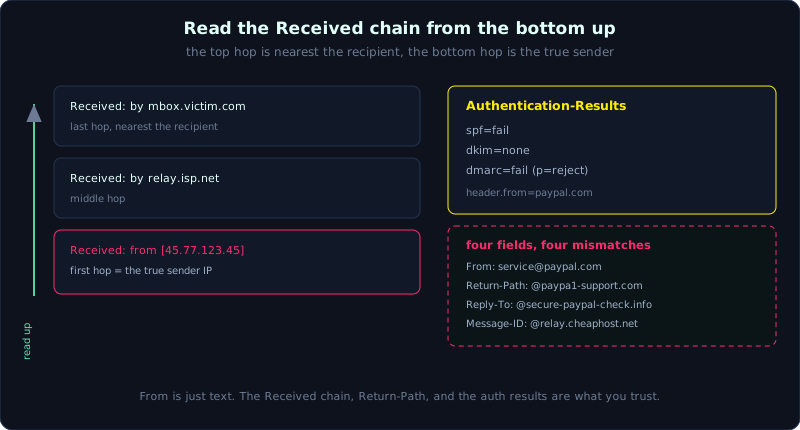 Read the Received chain from the bottom up: the bottom hop holds the true sender IP, while SPF, DKIM, and DMARC score authenticity.
Level: medium, about 70 minutes. Prerequisites: basic DNS (A, MX, TXT records), and the workflow on a copy from Part 2. Tools: libpff (pffexport), readpst, an EML viewer, dig/nslookup, the Python email module.
Goals
After this lesson you can read an email header: the Received chain, Message-ID, Return-Path, From/Reply-To. You understand what SPF, DKIM, and DMARC check and what their results mean. You can open mailbox formats PST/OST (Outlook) with libpff/readpst, and MBOX/EML. You can trace the original server that sent an email, and analyze a phishing email, pointing to the forged parts with evidence from the header.
Theory
Headers are the travel record, read from the bottom up
An email has a header (lines of name: value) and a body. The header stores the whole journey. The core fields:
1
2
3
4
5
6
7
8
9
10
From         the DISPLAYED sender (easy to fake, just text)
To / Cc      recipients
Subject      the subject
Date         the compose time (set by the sender's client, may be wrong/faked)
Message-ID   the email's unique id, in the form <string@sending-host-domain>
Return-Path  the bounce address (this is MAIL FROM in SMTP, more important than From)
Reply-To     the address a Reply goes to (phishing often sets this different from From)
Received     each server on the way adds ONE line, at the TOP
Authentication-Results   the SPF/DKIM/DMARC result scored by the receiving server
DKIM-Signature           the digital signature of the sending domain
The key point is that each MTA (Mail Transfer Agent, mail relay server) that receives an email inserts a Received: line at the TOP of the header. So the top Received line is the hop nearest the recipient, and the bottom line is the first hop (nearest the sender). To trace the origin, read from the BOTTOM up.
1
2
3
Received: from mx.victim.com by mbox.victim.com ...      <- last hop (nearest the recipient)
Received: from relay.isp.net by mx.victim.com ...        <- middle hop
Received: from [45.77.x.x] by relay.isp.net ...          <- FIRST hop, the true sender IP
The bottom Received line usually exposes the real IP of the sending machine, with the hostname it claims for itself (from evil-host) and the hostname the ISP resolves in reverse (([45.77.x.x])). When those two disagree, or the IP is from an unusual range, that is a signal.
SPF, DKIM, and DMARC, three layers against forgery
These three mechanisms were created precisely to stop sender forgery. Understanding them is understanding where phishing is exposed:
- SPF (Sender Policy Framework): a domain publishes in a DNS TXT record the list of IPs allowed to send mail on its behalf. The receiving server checks whether the sending IP (taken from Received/Return-Path) is in the SPF list of the domain in MAIL FROM. Results are
pass,fail,softfail,neutral,none. - DKIM (DomainKeys Identified Mail): the sending domain signs some headers plus the body with a private key; the public key is in DNS. The receiving server checks the signature.
passmeans the content was not modified and is from the signing domain. Thed=field in DKIM-Signature says which domain signed. - DMARC: the policy a domain publishes (TXT at
_dmarc.domain): what to do if SPF or DKIM fails (none/quarantine/reject), and importantly it requires “alignment”, meaning the domain in From must match the domain authenticated by SPF/DKIM. Phishing often passes SPF for the sender’s own domain while From impersonates a different domain, and DMARC catches that mismatch.
The Authentication-Results field records the result the receiving server scored:
1
2
3
4
Authentication-Results: mx.victim.com;
  spf=fail (sender IP is 45.77.x.x) smtp.mailfrom=paypa1-support.com;
  dkim=none;
  dmarc=fail (p=reject) header.from=paypal.com
Read this line: SPF fail, no DKIM, DMARC fail because From claims paypal.com but cannot be authenticated. Almost certainly a forgery.
The mailbox formats
Email is stored several ways depending on the client/server:
1
2
3
4
5
6
EML      a single email, plain text (header + body + MIME attachment). Open with a text editor or mail client.
MSG      a single Outlook email (OLE binary format).
MBOX     many emails one after another in one text file, each starting with a "From " line.
         (Thunderbird and many Unix mail servers use it).
PST      an Outlook offline/archive mailbox (Personal Storage Table), binary.
OST      the offline cache of an Exchange/Office365 mailbox, in the PST family.
PST/OST is Microsoft’s proprietary format and cannot be opened by hand. Use libpff (the pffexport, pffinfo tools) or readpst (the libpst package) to extract it into readable EML/MBOX. OST can be read with the same tools but sometimes needs converting to PST first.
Message-ID and cross-checking
Message-ID has the form <random-part@domain>. The domain part usually reveals the system that generated the email (for example @mail.gmail.com, @amazonses.com). If From claims paypal.com but Message-ID is @sendgrid.net or a junk domain, that is a sign the email did not come from that brand’s infrastructure. Message-ID is also used to thread emails in a conversation (the In-Reply-To, References fields).
Demo
Case: a victim receives a “PayPal” email saying the account is locked, and we need to determine the real server that sent it and prove it is a forgery. Work on a copy of the email file, do not click any link, and do not open the attachment on the real machine.
Extract the raw header
In a mail client, use “Show Original” (Gmail), “View Source”, or “Properties > Internet Headers” (Outlook). Or if you have a .eml file, open it directly in an editor. To script it:
1
2
3
4
5
6
7
# print the whole header, keep the original order
python3 -I - "phish.eml" <<'PY'
import sys, email
msg = email.message_from_file(open(sys.argv[1]))
for k, v in msg.items():
    print(f"{k}: {v}")
PY
Trace the Received chain from the bottom up
1
2
# list only the Received lines (keep original order: top is the last hop)
grep -n "^Received:" phish.eml
Read the BOTTOM Received line. Suppose it is:
1
2
3
Received: from paypa1-support.com (unknown [45.77.123.45])
          by relay.cheaphost.net with ESMTP id ...;
          Tue, 07 Jan 2026 14:01:55 +0000
This pins it down: the real sending IP is 45.77.123.45, the name it claims for itself is paypa1-support.com (note the digit 1 in place of the letter l), and the first intermediate server is relay.cheaphost.net, not PayPal infrastructure. This is the origin server.
Compare the IP against the SPF of the impersonated domain
1
2
3
4
5
6
7
# how does PayPal's real domain publish SPF?
dig +short TXT paypal.com | grep spf
# v=spf1 include:... -all   (PayPal's list of valid IPs)

# is the sending IP 45.77.123.45 in that range? (check whois/ASN)
whois 45.77.123.45 | grep -iE "orgname|netname|country"
# for example: netname = VULTR, a VPS provider -> not PayPal
The IP belongs to a VPS provider, not in the SPF of paypal.com. Combined with the Authentication-Results: spf=fail ... dmarc=fail already present in the header (section SPF, DKIM, and DMARC), the forgery evidence is solid.
Inspect the remaining mismatches
1
2
3
4
5
grep -iE "^(From|Return-Path|Reply-To|Message-ID):" phish.eml
# From: "PayPal Service" <service@paypal.com>        <- a nice display
# Return-Path: <bounce@paypa1-support.com>            <- the real MAIL FROM, a different domain
# Reply-To: <verify@secure-paypal-check.info>         <- a reply would go to a strange domain
# Message-ID: <9f3a@relay.cheaphost.net>              <- not PayPal infrastructure
Four fields, four mismatches: From looks right, but Return-Path, Reply-To, and Message-ID all point to unfamiliar domains. This is classic phishing, showing one thing while really being another. We also check the link in the body (without clicking):
1
2
3
# extract href in the body to see where the real link goes (do NOT open it in a browser)
grep -oiE 'href="[^"]+"' phish.eml | head
# href="https://secure-paypal-check.info/login"   <- a fake domain, not paypal.com
Expand a PST/OST when you need to search the whole mailbox
If the evidence is a whole PST file (for example taken from the victim’s machine), expand it to find the needed email:
1
2
3
4
5
6
7
8
# readpst: export to MBOX (default) or EML per mail (-e)
readpst -e -o mailout/ archive.pst
#  -e: one .eml file per email;  -o: destination directory
ls mailout/

# libpff: view metadata and export the folder tree
pffinfo archive.pst            # overview, item count
pffexport -t out archive.pst   # export all items to the out.export/ directory
After expanding to EML, use grep/ripgrep to search by sender, subject, or an IOC string across the whole mailbox, then go back and analyze the header of each suspicious email as above. OST is handled the same way; if the tool refuses, convert OST to PST with a helper tool then expand.
Case, the conclusion
Putting it together: the email claims From service@paypal.com but the bottom Received line gives IP 45.77.123.45 belonging to a VPS (whois resolves to Vultr), not in the SPF of paypal.com; Authentication-Results records spf=fail, dkim=none, dmarc=fail; Return-Path, Reply-To, Message-ID, and the link in the body all point to unfamiliar domains (paypa1-support.com, secure-paypal-check.info). The origin server is relay.cheaphost.net, which received from the VPS IP above. Conclusion: a forged PayPal email, not sent by PayPal infrastructure, originating from IP 45.77.123.45. Every claim rests on a specific header field, which is how you write an email forensics conclusion that holds up.
Lab
The runnable lab lives under labs/8.2/: make_artifacts.py builds phish.eml (a multi-hop Received chain, From/Return-Path/Reply-To mismatch, Authentication-Results spf=fail/dkim=none/dmarc=fail, a Message-ID with a strange domain, a phishing link) and legit.eml as a control; solve.py uses the email module to parse the header, trace Received from the bottom up to the original sending IP, inspect the mismatches, and conclude. transcript.txt is the real output. See labs/8.2/README.md.
1
2
3
cd labs/8.2
python3 -I make_artifacts.py mail
python3 -I solve.py mail/phish.eml mail/legit.eml
- Build your own (optional): send yourself a few real emails from Gmail to read a real header; if you have Outlook, create a small PST then
readpstto expand it to EML; you can use a public phishing sample from PhishTank/APWG (read only, do not click the link). - Tasks:
- Get the raw header of a real email, identify the Received chain, and point to the original sending IP on the bottom line.
- Read Authentication-Results, and explain whether SPF/DKIM/DMARC passed or failed and why.
- For a suspected phishing email: compare From, Return-Path, Reply-To, Message-ID; look up the sending IP with whois; compare against the SPF of the impersonated domain (
dig TXT). - Use readpst to expand a PST to EML and find one email by subject.
- Write a short conclusion: which origin server sent it, and which fields make up the forgery evidence.
- Hint: read Received from the BOTTOM up. Return-Path (MAIL FROM) matters more than the displayed From. If there is no Authentication-Results (an old email or a server that did not score it), check SPF yourself by comparing the sending IP against the SPF record.
- Answer: the “Short answer” section in
labs/8.2/README.mdandlabs/8.2/transcript.txt. Main points: Received is read bottom up to the origin IP; SPF/DKIM/DMARC score authentication; From is easy to fake, Return-Path/Message-ID are harder; readpst/libpff expand PST/OST.
Common pitfalls
- Reading the Received chain top down and thinking the top server is the origin (it is the opposite, that is the last hop).
- Trusting the From field to decide the sender; From is only text and the attacker can set anything.
- Trusting the Date in the header as the real time; the sender’s client sets Date, which can be wrong or deliberately faked.
- Clicking a link or opening an attachment on the analysis machine; always view the source, extract links with grep, and open in an isolated environment.
- Forgetting that Received can be fabricated at the bottom (near the sender): an attacker who controls the first server can insert a fake Received; only trust the lines added by MTAs you trust.
- Assuming SPF pass means a real email: it only confirms the IP is allowed to send for the domain in MAIL FROM, and MAIL FROM can be the attacker’s own domain. You must check DMARC alignment against From.
- Mixing time zones across the Received timestamps; normalize to UTC when building a timeline.
Further reading
- RFC 5321 (SMTP) and RFC 5322 (message format), to understand the standard header.
- RFC 7208 (SPF), RFC 6376 (DKIM), RFC 7489 (DMARC).
- The libpff and libpst documentation (pffexport, readpst) on GitHub.
- The “Analyzing email headers” guides from CERTs and the M3AAWG best practices.
- MxToolbox and online header analysis tools (for reference, do not send sensitive data to them).
Key takeaways
- Received is read from the BOTTOM up; the bottom line usually exposes the original sending IP.
- From is text and easy to fake; Return-Path (MAIL FROM) and Message-ID are more trustworthy.
- SPF checks the sending IP; DKIM checks the content signature; DMARC checks From alignment and sets the policy.
- Authentication-Results records the result the receiving server already scored, read it first.
- PST/OST is Microsoft binary: expand it with readpst (libpst) or pffexport (libpff).
- MBOX is many mails in one file; EML/MSG is a single mail.
- Compare the sending IP against the SPF of the impersonated domain with
dig TXTand whois on the IP.