Lesson 8.1: Browser forensics and reconstructing web activity

A browser is the most detailed diary of a person at a computer: what they searched for, which pages they visited at what time, what they downloaded, which services they logged into. Almost every modern browser stores this data in SQLite files, so once you can read SQLite the whole browsing history opens up. Finding the files is the easy part. Reading the timestamp correctly is the hard part, because Chrome counts time in a very unusual way and reading it wrong puts you off by hundreds of years.
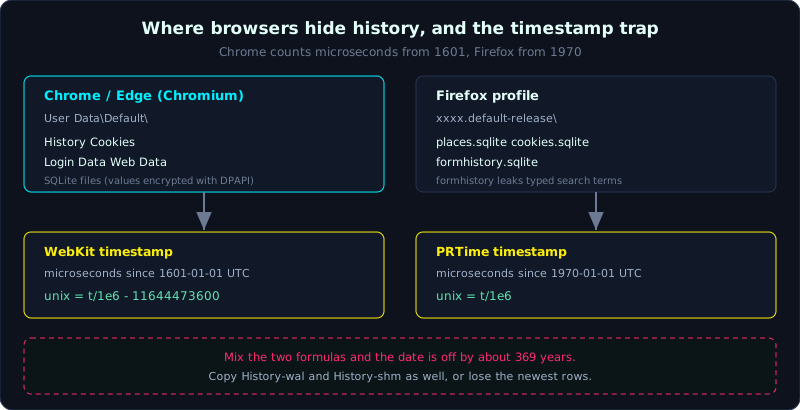 Chrome stores WebKit timestamps (microseconds from 1601) and Firefox stores PRTime (microseconds from 1970), and mixing them is the classic error.
Level: medium, about 75 minutes. Prerequisites: basic SQLite (tables, SELECT), and the workflow on a copy from Part 2. Tools: sqlite3, DB Browser for SQLite, hindsight (Ryan Benson), DCode (timestamp conversion).
Goals
After this lesson you know the User Data path for Chrome/Edge and the profile for Firefox, and the important SQLite files in each. You can query History, Cookies, Login Data, Downloads with sqlite3, and read WebKit/Chrome and Firefox (PRTime) timestamps correctly and convert them to UTC. You can use hindsight to parse a whole profile automatically, and reconstruct a suspect’s browsing activity from the artifacts joined together.
Theory
Where Chrome/Edge stores data
Chrome and Edge share the same engine (Chromium), so the structure is almost identical, only the root folder differs. The data lives in the User Data folder, with one subfolder per profile (Default, Profile 1…):
1
2
3
4
5
6
7
8
Windows (Chrome):
  C:\Users\<user>\AppData\Local\Google\Chrome\User Data\Default\
Windows (Edge):
  C:\Users\<user>\AppData\Local\Microsoft\Edge\User Data\Default\
macOS (Chrome):
  ~/Library/Application Support/Google/Chrome/Default/
Linux (Chrome):
  ~/.config/google-chrome/Default/
The valuable files in the Default folder (all SQLite, except Cache):
1
2
3
4
5
6
7
8
History          URL history, visit count, timestamps; also downloads
Cookies          cookies, with host, created and expiry time (values are encrypted)
Login Data       saved usernames; passwords encrypted (DPAPI on Windows)
Web Data         autofill data (forms), saved payment cards
Top Sites        most visited pages
Favicons         favicons with URLs (hints at visited pages)
Bookmarks        (a JSON file, not SQLite)
Cache\           cached content, Chromium's own format (needs a tool to read)
Key tables and fields in History
The History file is SQLite, and opening it shows several tables. Two core tables:
1
2
3
urls        id, url, title, visit_count, typed_count, last_visit_time
visits      id, url (foreign key to urls.id), visit_time, from_visit, transition
downloads   id, target_path, tab_url, total_bytes, start_time, end_time
The transition field in visits says how the user reached a page (typed, clicked a link, bookmark, redirect), which is valuable for telling “intentionally visited” from “redirected to”. The from_visit field lets you trace the navigation chain backward (which page led to which).
WebKit/Chrome timestamp, the fatal trap
This is where mistakes happen most. Chrome does NOT use Unix epoch. It uses the WebKit timestamp: the number of MICROseconds (10^-6 seconds) since 1601-01-01 00:00:00 UTC (the same base as Windows FILETIME). A value like 13350312000000000 looks meaningless if you think it is Unix.
The formula to convert WebKit to Unix epoch (seconds):
1
unix_seconds = webkit_value / 1000000 - 11644473600
The number 11644473600 is the number of seconds between 1601-01-01 and 1970-01-01. In SQLite you can do it directly:
1
SELECT datetime(last_visit_time/1000000 - 11644473600, 'unixepoch') FROM urls;
If you forget to subtract 11644473600, the timestamp jumps all the way to the 24th century, a clear sign you read the epoch wrong.
Firefox, a different structure
Firefox does not use “User Data” but a profile in a randomly named folder:
1
2
3
Windows:  C:\Users\<user>\AppData\Roaming\Mozilla\Firefox\Profiles\<xxxx>.default-release\
macOS:    ~/Library/Application Support/Firefox/Profiles/<xxxx>.default-release/
Linux:    ~/.mozilla/firefox/<xxxx>.default-release/
The SQLite files:
1
2
3
4
5
6
places.sqlite       history (moz_places, moz_historyvisits) and bookmarks (moz_bookmarks)
cookies.sqlite      cookies (moz_cookies)
formhistory.sqlite  data typed into forms (moz_formhistory) -> often leaks search terms
downloads           newer Firefox merges downloads into places.sqlite (moz_annos / moz_places)
key4.db + logins.json   saved passwords (encrypted)
favicons.sqlite     favicons
Firefox’s timestamp is also different from Chrome: it uses PRTime, the number of MICROseconds since the Unix epoch (1970-01-01), not from 1601. Convert:
1
SELECT datetime(last_visit_date/1000000, 'unixepoch') FROM moz_places;
Note: Firefox divides by 1000000 (microseconds) but subtracts NOTHING, because the base is already 1970. Mixing up the Chrome and Firefox formulas is a classic mistake.
SQLite WAL, data may not be written to the main file yet
Browsers open SQLite in WAL mode (Write-Ahead Logging), so some of the newest data sits in the companion file History-wal (and History-shm) and has not merged into History yet. When collecting, you must copy all three files History, History-wal, History-shm at once. Leaving out -wal loses the most recent records, which are often the most important ones in an investigation. (More on WAL in Lesson 8.3.)
Demo
Case: a suspect’s machine, and we need to reconstruct what the person searched for, which pages they visited, and what they downloaded during the window of the incident. Always copy to a read-only copy, hash first, and do not open the browser on the original.
Open History and list the most visited pages
1
2
sha256sum History History-wal History-shm   # record the hash first
sqlite3 History
1
2
3
4
5
6
7
8
.headers on
.mode column
-- the most visited pages, with the last visit time (converted to UTC)
SELECT url, title, visit_count,
       datetime(last_visit_time/1000000 - 11644473600, 'unixepoch') AS last_utc
FROM urls
ORDER BY visit_count DESC
LIMIT 20;
Build the visit chain over time (important for the timeline)
1
2
3
4
5
6
7
8
9
-- every actual visit, in true time order, with the transition type
SELECT datetime(v.visit_time/1000000 - 11644473600, 'unixepoch') AS visit_utc,
       u.url, u.title, v.transition
FROM visits v
JOIN urls u ON u.id = v.url
WHERE v.visit_time/1000000 - 11644473600
      BETWEEN strftime('%s','2026-01-07 00:00:00')
          AND strftime('%s','2026-01-07 23:59:59')
ORDER BY v.visit_time;
Filtering to the incident window, you see each step: the suspect typed into Google by hand (transition typed), searched a keyword, clicked a result (transition link), downloaded a file. The transition distinguishes “typed the URL” from “was redirected”, a detail often overlooked.
Search terms leak in the URL itself
Search terms usually sit right in the URL of the result page:
1
2
3
4
5
6
SELECT datetime(last_visit_time/1000000 - 11644473600,'unixepoch') AS t, url
FROM urls
WHERE url LIKE '%google.com/search?q=%'
   OR url LIKE '%bing.com/search?q=%'
   OR url LIKE '%duckduckgo.com/?q=%'
ORDER BY last_visit_time;
The part after q= is the keyword (URL-encoded, decode %20 to a space). This is often the clearest evidence of intent (for example searching “how to wipe tracks”, “how to wipe usb”).
Downloads, know what was fetched and where
1
2
3
4
SELECT datetime(start_time/1000000 - 11644473600,'unixepoch') AS started,
       target_path, tab_url, total_bytes
FROM downloads
ORDER BY start_time DESC;
target_path is the path where the file was saved on disk, and tab_url is the page that started the download, giving you “downloaded file X from page Y at time Z”.
Cookies and Login Data
1
2
3
4
5
6
7
# in the Cookies file: know which service was logged into/visited (values are encrypted)
sqlite3 Cookies "SELECT host_key, name,
  datetime(creation_utc/1000000 - 11644473600,'unixepoch') AS created
  FROM cookies ORDER BY creation_utc DESC LIMIT 20;"

# in Login Data: saved usernames (password_value is a BLOB encrypted with DPAPI)
sqlite3 'Login Data' "SELECT origin_url, username_value FROM logins;"
Cookie and password values are encrypted (DPAPI on Windows, tied to the user account and the machine), so they come out as raw BLOBs. Decrypting them needs that user’s privilege and key (tools like DonPAPI or DPAPI scripts), and only with proper authorization. Still, the list of host_key and username_value alone tells you which services the user has accounts on.
Firefox: formhistory leaks typed keywords
1
2
3
4
5
6
sqlite3 places.sqlite "SELECT datetime(last_visit_date/1000000,'unixepoch') AS t,
  url, title FROM moz_places ORDER BY last_visit_date DESC LIMIT 20;"

# keywords typed into any form field (including the search bar)
sqlite3 formhistory.sqlite "SELECT fieldname, value, timesUsed,
  datetime(firstUsed/1000000,'unixepoch') AS first_utc FROM moz_formhistory;"
moz_formhistory stores everything the user typed into a form and that autocomplete remembered, even if they never pressed Enter. In many cases this is where you find a keyword that history did not record.
hindsight, parse a whole profile automatically
Typing SQL by hand is good for understanding, but for a whole profile hindsight (by Ryan Benson) is much faster: it reads all the artifacts of a Chromium profile, normalizes timestamps, and outputs a unified timeline (XLSX, SQLite, or JSONL).
1
2
3
4
5
# point it at the profile folder (Default), output as xlsx
hindsight.py -i "/evidence/User Data/Default" -o browsing_timeline -f xlsx

# run the web UI to browse interactively
hindsight_gui.py
The result merges history, downloads, cookies, cache, autofill into one time-ordered table, with WebKit timestamps already decoded. Use it for the overview, then go back to sqlite3 to inspect the suspicious spots in detail.
Case, joined into a story
Joining the four queries above within the incident window, the picture emerges: at 14:02 UTC the suspect typed Google and searched “usb wiping tool” (from the search URL), at 14:03 clicked a download page (transition link), at 14:05 downloaded eraser-setup.exe into C:\Users\...\Downloads (the downloads table), at 14:20 visited a webmail page (cookie host_key + Login Data username). Each point has a specific source artifact, a timestamp normalized to UTC, and can be traced back with from_visit. That is a browsing timeline usable in a report, not guesswork.
Lab
The lab runs for real and is in labs/8.1/: make_artifacts.py builds a Chrome-style History (tables urls/visits/downloads with WebKit timestamps) and Firefox-style places.sqlite/formhistory.sqlite (PRTime); solve.sh queries with sqlite3, converts both timestamp bases correctly, extracts search terms, and builds a timeline. transcript.txt is the real output. See labs/8.1/README.md.
1
2
3
cd labs/8.1
python3 -I make_artifacts.py profile
bash solve.sh profile
To build more yourself (optional): on a VM, install Chrome and Firefox, browse a scenario you set up (search a few keywords, visit a few pages, download a file), close the browser, copy the profile folder (including the -wal, -shm files), then apply the same queries.
The tasks:
- Open Chrome’s
History, list the most visited pages, and convertlast_visit_timeto UTC correctly. - Extract the search queries from the URLs and URL-decode them into keywords.
- List downloads with
target_pathand the originating page. - Do the same with Firefox
places.sqliteandformhistory.sqlite, paying attention to the timestamp formula, which differs from Chrome. - Run hindsight on the Chrome profile and compare the timeline it produces with your manual SQL results (the timestamps must match).
Hints: if you are missing the newest records, check whether you copied the History-wal file. If a timestamp jumps to the 24th century, you forgot to subtract 11644473600 (you are treating Chrome like Firefox).
Answers: the “Short answer” section in labs/8.1/README.md and labs/8.1/transcript.txt. Main point: Chrome = WebKit epoch (1601, subtract 11644473600), Firefox = PRTime (1970, only divide by 1e6); you must copy the WAL; transition and from_visit build the navigation chain.
Common pitfalls
- Using the Unix epoch formula for Chrome, getting a date in year 1600 or year 2300; Chrome is WebKit epoch.
- Mixing up the Chrome formula for Firefox (subtracting 11644473600 for Firefox shifts it 369 years into the past).
- Forgetting to copy
-wal/-shm, losing exactly the records closest to the incident. - Opening the browser on the original “just to look quickly”, which makes Chrome clean up and overwrite, damaging the evidence.
- Thinking you can read raw cookies/passwords: they are encrypted with DPAPI and need the right user’s key and authorization.
- Ignoring
transitionand concluding the user “intentionally visited” a page they were actually redirected to or pushed to by an ad. - Incognito/Private mode does not write to these files; the absence of traces here does not prove no access (there are still DNS, proxy logs, RAM).
Further reading
- The hindsight documentation (github.com/obsidianforensics/hindsight) and Ryan Benson’s blog on Chrome artifacts.
- SANS FOR500, the browser forensics section and the timestamp conversion table.
- The “Chrome History” pages from forensics vendors (Magnet, Belkasoft) on the schema per version.
- The SQLite documentation on WAL mode (sqlite.org/wal.html).
- DCode (Digital Detective) to quickly convert timestamp formats by hand.
Key takeaways
- Chrome/Edge: the User Data\Default folder; History, Cookies, Login Data, Web Data are SQLite.
- Firefox: a random profile; places.sqlite, cookies.sqlite, formhistory.sqlite.
- Chrome timestamp = WebKit: microseconds from 1601, convert with
/1e6 - 11644473600. - Firefox timestamp = PRTime: microseconds from 1970, only
/1e6, no subtraction. - Copy the
-waland-shmfiles too, or lose the newest records. transitionandfrom_visitin visits rebuild the navigation chain and tell typed from redirect.- formhistory (Firefox) and the search URL leak the keywords the user typed.
- hindsight parses a whole profile automatically and normalizes the timestamps for you.