Lesson 8.3: Mobile forensics with Android and iOS backups
A phone holds more of a person’s private life than almost anything else, which makes it the richest and most sensitive source of evidence. But it is harder than a computer, because storage is encrypted, the bootloader is locked, and every vendor does it differently. This lesson does not touch jailbreak or chip-off. It goes into what is doable with common tools and lawful authority, which is a logical backup. A backup does not get everything, but it gets app data, and app data is mostly SQLite, so once it is unpacked the work becomes reading SQLite again.
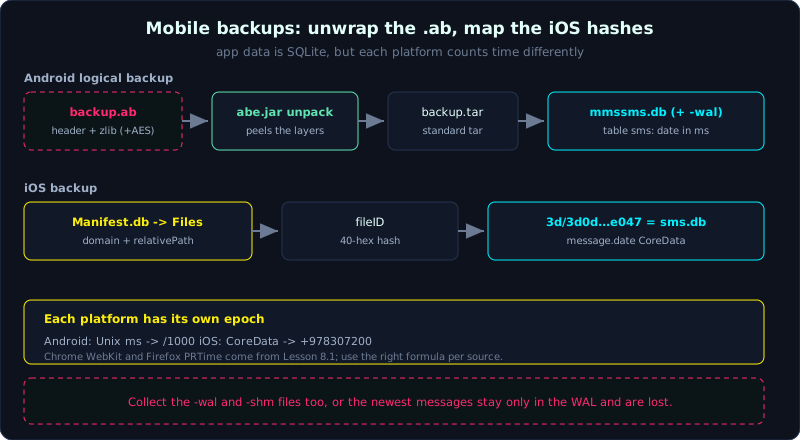 An Android .ab unwraps through abe.jar into app SQLite; an iOS backup maps domain and relativePath through Manifest.db to a hashed file.
Level: advanced, about 80 minutes. Prerequisites: Lesson 8.1 (browser forensics, for SQLite and timestamps), and the workflow on a copy from Part 2. Tools: adb (platform-tools), Android Backup Extractor (abe.jar), sqlite3, iOS backup tools (iLEAPP, iphone-backup-tools), DB Browser for SQLite.
Goals
After this lesson you can tell logical, file system, and physical acquisition apart on mobile. You can create an ADB backup and decode the .ab with abe.jar into a readable tar, find and read the SQLite of Android apps (SMS in mmssms.db, WhatsApp in msgstore.db), and understand the iOS backup structure, where Manifest.db maps a domain plus relativePath to a hashed file name. You can handle SQLite WAL so you do not lose the newest records, and extract the message history from an Android backup.
Theory
Three levels of acquisition
On mobile, how much data you get depends on the acquisition level:
- Logical: get what the OS allows to be exported through a lawful channel (ADB backup, iTunes/Finder backup, an API). Fast, no root/jailbreak needed, but limited: no deleted files, no unallocated space, and many apps block backup.
- File system: get a fuller file tree (needs higher privilege: root on Android, or an exploit agent on iOS). You see more databases and caches than logical.
- Physical: get a bit-by-bit image of the whole flash, including unallocated space and deleted data. It recovers the most but is the hardest to do. Modern devices encrypt everything (FBE/FDE), and without the key a physical image is just meaningless bytes. It usually needs advanced techniques (chip-off, JTAG, a bootrom flaw such as checkm8 for older iPhones).
This lesson focuses on logical because it is the most feasible with common tools. Always state clearly in the report which level you acquired at, because it decides whether “not seen” means “not present” or only “this level could not get it”.
Android, ADB backup and the .ab file
ADB (Android Debug Bridge) lets you export a backup when the device has USB debugging on and the user agrees on screen:
1
adb backup -apk -shared -all -f backup.ab
The .ab file is NOT a plain tar. It is: a short text header, then the rest is a tar stream DEFLATE (zlib) compressed, and possibly encrypted if the user set a password at backup time. The header says the version and whether it is encrypted:
1
2
3
4
ANDROID BACKUP
5                 <- format version
1                 <- compression flag (1 = zlib compressed)
none              <- encryption algorithm (none, or AES-256 if a password is set)
Because of this structure, you cannot tar xf it directly, you must peel off the zlib layer first. That is abe.jar’s job.
One important practical note: adb backup is being deprecated by Google, many apps set android:allowBackup="false" so they are not in the backup, and Android 12+ restricts it further. So ADB backup gets whatever apps it can, not everything. Even so, it is still the most common non-root way to get SMS and the data of many older apps.
Where Android app data lives, which SQLite matters
Each app’s private data lives under /data/data/<package>/. In the backup (after unpacking) it is under the tree apps/<package>/. The classic databases:
1
2
3
4
5
6
7
8
9
10
11
12
13
14
15
16
SMS/MMS:
  com.android.providers.telephony -> databases/mmssms.db
  table "sms": address, body, date (epoch milliseconds), type (1=received, 2=sent)

Contacts:
  com.android.providers.contacts -> databases/contacts2.db

WhatsApp:
  com.whatsapp -> databases/msgstore.db   (messages)
                  databases/wa.db          (contacts)
  table "messages" / "message": key_remote_jid, data, timestamp, key_from_me
  (note: newer WhatsApp usually encrypts msgstore.db.crypt14/crypt15, needing the key from
   /data/data/com.whatsapp/files/key to decrypt; a logical backup without this key cannot)

Call log:
  com.android.providers.contacts -> calls (in contacts2.db or calllog.db)
The Android timestamp in these databases is usually Unix epoch in MILLIseconds (divide by 1000 for seconds). It differs from Chrome (microseconds from 1601) and Firefox (microseconds from 1970), so again mind the formula.
iOS backup, hashed file names and Manifest.db
An iTunes/Finder backup (and a backup via idevicebackup2) is stored on the computer in a folder named by the device UDID:
1
2
macOS:   ~/Library/Application Support/MobileSync/Backup/<UDID>/
Windows: C:\Users\<user>\AppData\Roaming\Apple Computer\MobileSync\Backup\<UDID>\
Inside it you see a pile of files named as 40-character hex hashes, split into two-character subfolders by the first two characters (ab/ab1234...). The original name of each file is hashed away, so you cannot tell what a file is by its name. The map to decode it is in Manifest.db (SQLite):
1
2
3
4
5
Manifest.db -> table "Files":
  fileID        40-hex hash = the file name on disk
  domain        logical area (for example HomeDomain, AppDomain-com.apple.MobileSMS)
  relativePath  the original path inside the domain (for example Library/SMS/sms.db)
  flags, file   (file is a plist blob with metadata: size, mtime...)
To find a file, query Manifest.db by domain plus relativePath to get the fileID, then open the matching hashed file. Common targets:
1
2
3
4
5
6
7
8
iMessage/SMS messages:
  domain = HomeDomain, relativePath = Library/SMS/sms.db
  table "message": text, date (CoreData epoch!), handle_id; "chat", "handle"

Contacts:  HomeDomain / Library/AddressBook/AddressBook.sqlitedb
Call log:  HomeDomain / Library/CallHistoryDB/CallHistory.storedata
Notes:     HomeDomain / NoteStore.sqlite
WhatsApp:  AppDomainGroup-group.net.whatsapp.WhatsApp.shared / ChatStorage.sqlite
The iOS timestamp trap is that many databases use CoreData/Mac Absolute Time, counting seconds from 2001-01-01 00:00:00 UTC, not from 1970. Convert: unix = coredata_value + 978307200. An encrypted backup (if the user turned on “Encrypt local backup”) encrypts Manifest.db and everything, needing the backup password to decrypt, but in return an encrypted backup holds MORE data (keychain, health, call history) than an unencrypted one.
SQLite WAL, why the newest messages go missing
As Lesson 8.1 touched on, SQLite in WAL mode keeps the newest changes in the companion -wal file, not yet checkpointed into the main db. On mobile this matters especially: a message just received may sit only in sms.db-wal or msgstore.db-wal. If you copy only the main db file and leave out -wal and -shm, you lose exactly the newest messages, which are often the most important in a case. Always collect all three, and when analyzing let sqlite3 merge them for you (open the db normally and SQLite reads the wal too), or checkpoint in a controlled way on the copy.
Demo
Case: extract the message history from an Android backup of a test device. Work on a copy, hash the .ab first, and only operate on a device/data you have authority over.
Create an ADB backup
1
2
3
4
adb devices                     # confirm the device is connected and debug is allowed
adb backup -apk -shared -all -f /evidence/backup.ab
#  on the phone screen: confirm, you can set a backup password
sha256sum /evidence/backup.ab   # record the hash right after creating it
Unpack .ab with abe.jar
Android Backup Extractor (abe.jar) peels the header plus zlib layers (and decrypts if there is a password) to produce a standard tar file:
1
2
3
4
5
6
7
8
# syntax: java -jar abe.jar unpack <input.ab> <output.tar> [password]
java -jar abe.jar unpack /evidence/backup.ab backup.tar
# if the backup has a password:
# java -jar abe.jar unpack /evidence/backup.ab backup.tar "password"

# now backup.tar is standard tar, extract into its own directory (untrusted data)
mkdir backup_extracted && tar -xf backup.tar -C backup_extracted
ls backup_extracted/apps/
If you do not have abe.jar, the manual way also shows the true nature (drop the 24-byte header then decompress zlib):
1
2
3
# only to UNDERSTAND the format, abe.jar is safer and more complete
dd if=/evidence/backup.ab bs=1 skip=24 | zlib-flate -uncompress > backup.tar 2>/dev/null
# (zlib-flate is in the qpdf package; or a small python zlib.decompress script)
Find and open the message SQLite
1
2
3
4
5
6
# find the SMS db in the extracted tree
find backup_extracted -name "mmssms.db*" -o -name "msgstore.db*"
# for example: backup_extracted/apps/com.android.providers.telephony/db/mmssms.db
#        (with mmssms.db-wal if present)

sqlite3 backup_extracted/apps/com.android.providers.telephony/db/mmssms.db
1
2
3
4
5
6
7
8
9
.headers on
.mode column
-- read SMS messages: convert date (milliseconds) to UTC, type 1=received 2=sent
SELECT datetime(date/1000, 'unixepoch') AS time_utc,
       address AS phone_number,
       CASE type WHEN 1 THEN 'received' WHEN 2 THEN 'sent' ELSE type END AS direction,
       body
FROM sms
ORDER BY date;
Note the date/1000: Android stores milliseconds, divide by 1000 for unixepoch. Forget to divide and the timestamp jumps far into the future.
WhatsApp (if the db is not encrypted)
1
2
find backup_extracted -name "msgstore.db*"
sqlite3 backup_extracted/apps/com.whatsapp/db/msgstore.db
1
2
3
4
5
6
7
8
-- the WhatsApp schema changes by version; newer versions use table "message" + "jid"
SELECT datetime(timestamp/1000,'unixepoch') AS t,
       key_remote_jid AS contact,
       CASE key_from_me WHEN 1 THEN 'sent' ELSE 'received' END AS direction,
       data AS content
FROM messages
ORDER BY timestamp
LIMIT 50;
If you only see msgstore.db.crypt14 / crypt15, the db is encrypted and needs the key file at /data/data/com.whatsapp/files/key (only obtainable with root or a file system acquisition). A logical backup usually does not have this key, so state that limitation clearly in the report.
Handle WAL correctly
1
2
3
4
5
6
# all three files must be side by side for sqlite3 to read the records in the wal
ls -la .../mmssms.db .../mmssms.db-wal .../mmssms.db-shm

# on the COPY, checkpoint to merge the wal into the main db (if you want a "flat" db)
sqlite3 mmssms.db "PRAGMA wal_checkpoint(TRUNCATE);"
# then recount the records and compare against before the checkpoint to see what the wal held
Read an iOS backup (quick reference)
1
2
3
4
5
6
7
8
# query Manifest.db to find the fileID of sms.db
sqlite3 "<UDID>/Manifest.db" \
  "SELECT fileID, domain, relativePath FROM Files
   WHERE relativePath='Library/SMS/sms.db';"
# gives fileID = 3d0d7e5fb2ce288813306e4d4636395e047a3d28 (example)

# the file is under the directory of the first 2 characters of the fileID
sqlite3 "<UDID>/3d/3d0d7e5fb2ce288813306e4d4636395e047a3d28"
1
2
3
4
5
-- iOS messages: date is CoreData epoch (seconds/nanoseconds from 2001), add 978307200
SELECT datetime(date/1000000000 + 978307200, 'unixepoch') AS t, text
FROM message
ORDER BY date LIMIT 20;
-- (newer iOS stores date as nanoseconds; older versions as seconds, then drop /1000000000)
Tools like iLEAPP do all the Manifest.db mapping and timestamp normalization for you and produce an HTML report; use it to be fast, use SQL by hand to understand and to verify.
Case, the result
From backup.ab: hash it, decode with abe.jar to tar, extract, find mmssms.db (with its -wal), open with sqlite3 using date/1000 to UTC, filter by the relevant phone number and the incident window, and get a table of sent/received messages in true time order: who messaged whom and when. Because the -wal was kept, the newest messages before the backup are present too. The report states clearly that this is a logical acquisition over ADB, so deleted messages and backup-blocking apps are out of scope here.
Lab
The runnable lab lives under labs/8.3/: make_artifacts.py builds mmssms.db Android-style (with a real -wal file holding the newest un-checkpointed messages), msgstore.db WhatsApp-style, and an iOS backup (Manifest.db mapping domain/relativePath to a hashed fileID plus an sms.db with CoreData); solve.py opens read-only, converts each platform’s time unit correctly, and demonstrates the WAL trap (dropping -wal loses the newest messages). transcript.txt is the real output. See labs/8.3/README.md.
1
2
3
cd labs/8.3
python3 -I make_artifacts.py backup
python3 -I solve.py backup
- Build your own (optional): on your own test Android device, turn on USB debugging, send/receive a few SMS,
adb backup, decode withabe.jar, then read the realmmssms.db; if you have a test iPhone, create a Finder/iTunes backup to practice reading Manifest.db. - Tasks:
- Hash the
.abfile, decode with abe.jar, extract the tar into its own directory. - Find
mmssms.db, read thesmstable, convertdateto UTC correctly (milliseconds), and list messages by time and send/receive direction. - Check whether a
-walfile exists; try counting the messages before and afterwal_checkpointon the copy, and explain the difference. - For the iOS backup: query Manifest.db for the fileID of
sms.db, open the hashed file, read a few messages, and convert the CoreData timestamp to UTC. - Write a one-line conclusion about the acquisition level and the scope (what is not in a logical backup).
- Hash the
- Hint: Android SMS is epoch milliseconds (
/1000); iOS is CoreData (+978307200, and newer dbs divide an extra 1e9 for nanoseconds). If a timestamp jumps to year 54000 or 2050, you have the time unit wrong. Encrypted WhatsApp needs the key, which a logical backup does not have. - Answer: the “Short answer” section in
labs/8.3/README.mdandlabs/8.3/transcript.txt. Main points:.ab= header + zlib (+ AES if there is a password), decode with abe.jar; app data is SQLite underapps/<package>; keep the WAL; iOS hashes the file names, Manifest.db is the map, CoreData epoch from 2001.
Common pitfalls
- Running
tar xfstraight on the.abfile and reporting it as corrupt; you must peel the header plus decompress zlib (abe.jar) first. - Forgetting the
-walfile and losing exactly the newest messages, often the key evidence. - Using the wrong time unit: Android milliseconds, Chrome microseconds-from-1601, Firefox microseconds-from-1970, iOS CoreData-from-2001. Each platform has its own formula.
- Concluding “that message does not exist” from a logical backup, while an app blocks backup or the message was deleted and only physical would show it.
- Thinking you can open WhatsApp msgstore when it is
.crypt14/15; it needs the separate key, and without it you stop and state so clearly. - Opening an encrypted backup without the password and thinking the data is corrupt; it actually needs the backup password to decrypt Manifest.db.
- Operating directly on the original device (powering it on, opening apps) which changes data; work on the backup copy, and use airplane mode or a write blocker when you must touch the device.
- Ignoring the legal angle: mobile data is extremely private, so only do this with clear authority and keep the chain of custody.
Further reading
- Android Backup Extractor (abe.jar) on GitHub, which describes the
.abformat. - The adb documentation (developer.android.com) on backup, and the deprecation note.
- iLEAPP / ALEAPP (Alexis Brignoni) to parse iOS/Android artifacts automatically.
- SANS FOR585 (Advanced Smartphone Forensics), the iOS domain table and the sms.db schema.
- The SQLite WAL documentation (sqlite.org/wal.html) and the material on recovering records from the WAL/freelist.
- Sarah Edwards (mac4n6) on CoreData timestamps and iOS artifacts.
Key takeaways
- Tell logical / file system / physical apart; state the level you acquired at in the report.
.abis not tar: header + a zlib stream (+ AES if a password is set); decode it with abe.jar.- Android app data is under
/data/data/<package>/, mostly SQLite; SMS is inmmssms.db. - Android timestamp = Unix epoch MILLIseconds (
/1000); do not confuse it with Chrome/Firefox/iOS. - An iOS backup hashes the file names;
Manifest.dbmaps domain plus relativePath to the fileID. - iOS timestamps are often CoreData (from 2001): add
978307200to get Unix. - Always collect the
-waland-shmfiles; the newest messages may be in the WAL only. - Newer WhatsApp is encrypted (crypt14/15) and needs the key; a logical backup usually lacks it.