Lesson 9.2: Reconstructing the Attack Chain with MITRE ATT&CK
You now have a pile of artifacts and a super timeline. Your manager, your client, and the court will all ask the same thing, which is what the attacker did, in what order, and for what purpose. ATT&CK gives you a shared vocabulary to answer that without rambling. Instead of saying “it ran some strange commands”, you say “Execution via T1059.001 PowerShell”, and everyone in the field understands at once.
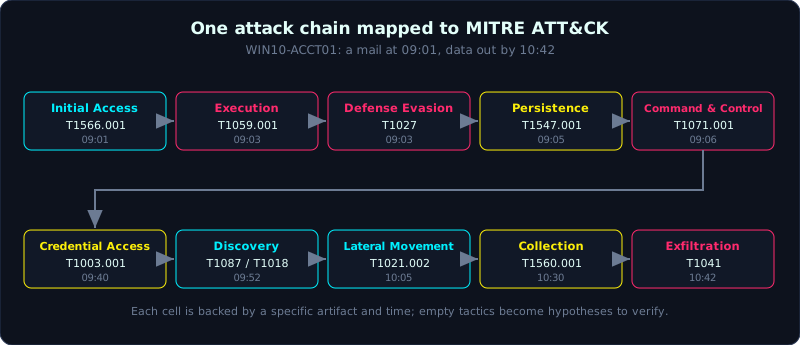 Each artifact maps to one technique; the techniques line up into a chain from initial access to exfiltration.
| Part: 9 (Timeline and IR) | Time: about 75 minutes | Difficulty: advanced |
Prerequisites: you have built a super timeline (Lesson 9.1), you know the event log (Lesson 4.2), program execution (Lesson 4.3) and persistence (Lesson 4.5).
Tools: MITRE ATT&CK Navigator, an artifact mapping table, the super timeline from Lesson 9.1, pen and paper to draw the chain.
Goals
After this lesson you understand the structure of ATT&CK: tactic (the purpose), technique and sub-technique (the method), procedure (the specific way a group does it). You can map the artifacts you learned to their matching technique (for example 4688 with a command line maps to T1059). You can assemble an attack chain covering all the stages from initial access to exfiltration. You can state a hypothesis about a missing step and then go find evidence to confirm or reject it. And you can draw the chain on ATT&CK Navigator to present it.
1. Theory
1.1. Three layers: tactic, technique, procedure
ATT&CK (Adversarial Tactics, Techniques, and Common Knowledge) by MITRE is a knowledge matrix of attacker behavior, distilled from real cases.
1
2
3
4
Tactic        the PURPOSE of a step, answers "what for". Examples: Execution, Persistence, Exfiltration.
Technique     the METHOD to reach that purpose, has a code Txxxx. Example T1059 Command and Scripting Interpreter.
Sub-technique a more specific method, code Txxxx.00y. Example T1059.001 PowerShell, T1059.003 cmd.
Procedure     how a group (an APT) actually runs that technique in practice, described in words.
There are 14 tactics for enterprise (the Enterprise matrix), laid out roughly in the order of an attack:
1
2
3
4
5
6
7
8
9
10
11
12
13
14
Reconnaissance        Scouting the target (usually before entering the network)
Resource Development  Preparing infrastructure (buying domains, setting up C2)
Initial Access        The first step inside (phishing, a public vulnerability)
Execution             Running code on the victim machine
Persistence           Surviving reboot, surviving logout
Privilege Escalation  Gaining higher privilege
Defense Evasion       Avoiding detection (clearing logs, obfuscation, timestomp)
Credential Access     Taking passwords, hashes, tickets
Discovery             Looking around (users, machines, shares)
Lateral Movement      Jumping to another machine
Collection            Gathering the data they want to take
Command and Control   The control channel (C2)
Exfiltration          Taking data out
Impact                Destruction (ransomware encryption, deletion, DoS)
Note: this order is a thinking framework, not a law. In reality the steps interleave, repeat, or are skipped. An attacker using valid credentials may skip unusual Execution entirely.
1.2. What ATT&CK is used for in forensics
- As a checklist: for each tactic, ask yourself “do I have evidence for this stage yet”. If Persistence is missing, go find it, do not jump to the conclusion that there is none.
- As a shared language when writing reports and talking with the team.
- As a lookup index: each technique page on attack.mitre.org lists data sources and detection methods, suggesting where to find the artifact.
1.3. The artifact to technique mapping table
This is the core of the lesson. Below are the most common artifact and technique pairs on Windows, the very things you learned in Part 4 and Part 6:
1
2
3
4
5
6
7
8
9
10
11
12
13
14
15
16
17
18
19
20
ARTIFACT / EVIDENCE                            TACTIC                TECHNIQUE
Email with .xlsm attachment, Zone.Identifier    Initial Access        T1566.001 Spearphishing Attachment
4688 EXCEL.EXE -> powershell.exe                Execution             T1059.001 PowerShell
4104 script block decoded                       Execution             T1059.001 (payload readable)
mshta.exe / wscript.exe running a script        Execution             T1059.005 / T1059.007
New scheduled task (4698, Tasks\)               Persistence           T1053.005 Scheduled Task
Run key HKCU...\Run                             Persistence           T1547.001 Registry Run Keys
New service (7045, strange ImagePath)           Persistence/Lateral   T1543.003 Windows Service
Token manipulation, UAC bypass in 4104          Priv Escalation       T1548.002 Bypass UAC
Security log cleared (1102)                      Defense Evasion       T1070.001 Clear Windows Event Logs
$SI earlier than $FN (timestomp)                 Defense Evasion       T1070.006 Timestomp
powershell -enc, base64 strings                  Defense Evasion       T1027 Obfuscated Files
Sysmon 10: handle opened to lsass.exe           Credential Access     T1003.001 LSASS Memory
whoami, net user, nltest in 4688                Discovery             T1087 / T1018 / T1016
4648 + 4624 type 3 to another machine           Lateral Movement      T1021.002 SMB/Admin Shares
PsExec leaves 7045 + ADMIN$ file                Lateral Movement      T1570 / T1021.002
rar.exe / Compress-Archive packing a folder     Collection            T1560.001 Archive via Utility
Sysmon 3/22: connection out to C2 IP/domain     Command and Control   T1071.001 Web Protocols
Unusual DNS traffic, long TXT records           Command and Control   T1071.004 / T1572 Tunneling
Large file upload out over the C2 channel       Exfiltration          T1041 Exfil Over C2 Channel
A fuller table lives in tai-nguyen/artifact.md. The goal is not to memorize the codes, but to build a reflex: see an artifact and know which stage of the attack it belongs to.
2. Hands-on (demo): building a complete attack chain
Continuing the WIN10-ACCT01 case from Lesson 9.1. We have the super timeline and a set of artifacts. The task: arrange them into an ATT&CK chain and close the gaps with hypothesis plus verification.
2.1. Place the evidence you have into tactics
1
2
3
4
5
6
08:58  Outlook downloads Invoice_0314.xlsm, has Zone.Identifier  -> Initial Access  T1566.001
09:03  4688: EXCEL.EXE spawns powershell.exe -enc                -> Execution       T1059.001
09:03  4104: script decoded, command to fetch http://185.x.x.x/a.dll -> Defense Evasion T1027
09:04  MFT+Prefetch: C:\Users\Public\svc_host.exe created and run -> Execution
09:05  Run key HKCU...\Run\Updater = svc_host.exe                 -> Persistence     T1547.001
09:06  Sysmon 3: svc_host.exe -> 185.x.x.x:443                    -> C2             T1071.001
Looking at this, we have Initial Access, Execution, Persistence, C2. But Credential Access, Discovery, Lateral Movement, Collection, Exfiltration are still empty. An attack that stops at C2 is unusual: either it really stopped (blocked early), or we have not found the rest yet. This is the moment to form hypotheses.
2.2. Form a hypothesis and verify it
A hypothesis is a testable statement, with a place to look for evidence. A few examples:
1
2
3
4
5
6
7
8
9
10
11
12
13
14
15
16
17
18
19
20
H1: "The attacker dumped credentials from LSASS."
   Verify: look for Sysmon event 10 with TargetImage=lsass.exe, or a dump file
   (lsass.dmp) in the MFT, or 4688 with procdump/comsvcs.dll MiniDump.
   Result: found 4688 at 09:40 running
     rundll32 comsvcs.dll MiniDump <pid> C:\Users\Public\l.dmp full
   -> CONFIRMED Credential Access T1003.001.

H2: "After getting credentials, the attacker scanned the network and moved machines."
   Verify: 4688 with net.exe / nltest / ping scanning; 4648 (explicit creds)
   and 4624 type 3 to another machine; on the target machine a 7045 PsExec.
   Result: at 09:52 see "net view", "nltest /dclist"; at 10:05 a 4648 to
   WIN10-ACCT02 then a 4624 type 3; on ACCT02 a 7045 service with a random name.
   -> CONFIRMED Discovery T1087/T1018 and Lateral Movement T1021.002.

H3: "The data was gathered and taken out."
   Verify: 4688/4104 with rar/7z/Compress-Archive; a large .rar file in the MFT;
   a large upload out to the C2 IP (see the pcap, Part 7).
   Result: at 10:30 "Compress-Archive -Path \\ACCT02\Finance -Dest C:\Users\Public\x.zip";
   at 10:42 upload of 420 MB out to 185.x.x.x:443.
   -> CONFIRMED Collection T1560.001 and Exfiltration T1041.
The key point about method is that every hypothesis must be refutable. If you look for H1 and find no sign of an LSASS dump, you write “no evidence of Credential Access via LSASS found” rather than silently skipping it. Not finding something is also a conclusion, and it steers the next step.
2.3. The complete chain
Put together, the full attack chain of the case:
1
2
3
4
5
6
7
8
9
10
11
T1566.001  Phishing .xlsm             09:01   Initial Access
T1059.001  Macro -> PowerShell -enc    09:03   Execution
T1027      base64 obfuscation          09:03   Defense Evasion
   (drop svc_host.exe)                 09:04
T1547.001  Run key persistence         09:05   Persistence
T1071.001  C2 to 185.x.x.x:443          09:06   Command and Control
T1003.001  Dump LSASS via comsvcs       09:40   Credential Access
T1087/1018 net view, nltest            09:52   Discovery
T1021.002  SMB/PsExec to ACCT02         10:05   Lateral Movement
T1560.001  Compress-Archive            10:30   Collection
T1041      Exfil 420 MB over C2         10:42   Exfiltration
From a mail at nine in the morning to data leaving the network is under two hours. This chain is the backbone of the report (Lesson 11.3) and the map for hunting IOCs (Lesson 9.3).
2.4. Drawing it on ATT&CK Navigator
ATT&CK Navigator is a web app that colors the matrix. You create a layer, color the observed techniques yellow, and add comments noting the time and the source artifact:
1
2
3
4
# in Navigator, each technique cell:
#   score/color = level of certainty (confirmed / suspected)
#   comment     = "09:40, 4688 rundll32 comsvcs MiniDump, l.dmp in MFT"
# export a JSON layer to attach to the report, or a PNG to present
A Navigator picture colored from Initial Access to Exfiltration tells the reader more than ten pages of text: it shows the attacker walked the whole kill chain, not just poked around.
3. Lab
This is an EXERCISE (a thinking task), not an automatic detection lab: mapping an artifact to a technique is the analyst’s job, no tool runs the answer for you. The labs/9.2/ folder provides a reference mapping table (based on labs 2.2 / 7.1 / 7.2 / 7.3 / 9.1) and a helper script.
- Run (the helper part):
1
2
cd labs/9.2
python3 -I build_layer.py    # print the mapping table, show the empty tactics, write navigator_layer.json
- The script takes the prepared mapping table (artifact to Txxxx per tactic) and exports an ATT&CK Navigator layer (
navigator_layer.json, import directly into mitre-attack.github.io/attack-navigator), and it also lists the seven empty tactics for you to go find. The full mapping table is inlabs/9.2/README.md, and the real output is inlabs/9.2/transcript.txt. - The exercise task:
- For each empty tactic (reconnaissance, resource-development, privilege-escalation, credential-access, discovery, lateral-movement, impact), write a hypothesis with a place to verify it.
- Add techniques as you find more evidence; edit
MAPPINGinbuild_layer.pyand run again. - Open the layer in Navigator, comment each cell with the source artifact and time (from the 9.1 timeline).
- Write a five-sentence paragraph retelling the attack chain in exact chronological order.
- Hint: a missing recording tool is not the same as a missing behavior. Not seeing Credential Access does not prove there was none, it may just be that the right logging was off; “not found” is also a conclusion, but you must state the reason.
Extension: download an HTB Sherlock or a CyberDefenders case with a ready attack chain to map on richer data.
4. Key takeaways
- A tactic is the purpose, a technique is the method, a sub-technique is more specific, a procedure is how one group does it.
- The 14 tactics line up roughly in attack order, but in reality they interleave.
- Every artifact should map to a specific technique.
- Use ATT&CK as a checklist: any empty tactic means go find it, do not skip it.
- A hypothesis must be refutable, and “not found” is also a conclusion.
- Use Navigator to present the chain as a picture.