Lesson 9.3: IOCs and YARA for Bulk Artifact Scanning
Once the attack chain is built, the next question is always which other machines are affected. You cannot open every machine and investigate it by hand. You need something that describes the attacker’s fingerprint and then scans at scale. That is the IOC, and the tool that writes fingerprints for files is YARA.
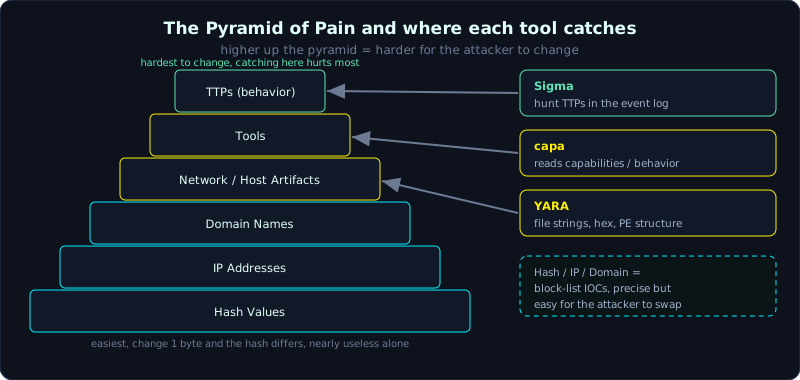 IOCs sit on the Pyramid of Pain; YARA catches files, capa reads behavior, Sigma catches log traces.
| Part: 9 (Timeline and IR) | Time: about 80 minutes | Difficulty: advanced |
Prerequisites: you already have the attack chain and a malware sample in hand (Lesson 9.2), you know hex and magic bytes (Lesson 1.1), and you know the event log for writing Sigma (Lesson 4.2).
Tools: yara, yarGen, capa, Sigma plus sigmac/pySigma, strings, FLOSS, PEstudio.
Goals
After this lesson you can classify IOCs and understand which are durable and which change easily (the Pyramid of Pain). You can write a YARA rule with meta, strings (text, hex, regex) and a condition. You can scan files, folders and memory dumps with yara. You can use capa to read a binary’s capabilities (its behavior) and map them to ATT&CK. And you can write a Sigma rule to hunt the same behavior in the event log.
1. Theory
1.1. What an IOC is, and the Pyramid of Pain
An IOC (Indicator of Compromise, a sign that a machine has been breached) is an observable piece of data that, if you see it, means the machine is probably affected. The common types:
1
2
3
4
5
6
7
8
9
Hash (MD5/SHA256)   the exact fingerprint of a file. Change 1 byte and the hash changes.
IP address          a C2 address, an attack source.
Domain / URL        a C2 domain name, a phishing link.
Mutex name          a mutex the malware creates to avoid running twice (for example "Global\\M8x9").
Named pipe          a pipe name used for internal communication.
Registry key/value  a persistence path (Run\Updater...).
File path / name    C:\Users\Public\svc_host.exe.
Email sender/subject the phishing source.
Certificate         the signing certificate of a malicious binary.
David Bianco arranges IOCs on the “Pyramid of Pain”, which measures how much it hurts the attacker when you block them:
1
2
3
4
5
6
         TTPs (behavior)       <- hardest for the attacker to change, catching here hurts the most
      Tools
    Network/Host Artifacts
  Domain Names
 IP Addresses
Hash Values                    <- easiest, change 1 byte and the hash differs, nearly useless alone
The lesson here is that a hash is very precise but easy to dodge, useful only for that exact sample. To catch a whole malware family even when it changes a few bytes, you need to describe it at a higher level: a characteristic string, a structure, a behavior. YARA lives at the Tools/Artifacts level, Sigma lives at the TTPs level.
1.2. YARA: writing a fingerprint for a file
YARA is a pattern language for identifying files. A rule has three blocks:
1
2
3
4
5
rule RuleName {
    meta:        descriptive information (author, date, description, reference)
    strings:     the strings/bytes to find, each named as a variable starting with $
    condition:   the logic that combines the strings and decides when the rule matches
}
A string has three kinds:
1
2
3
4
$a = "CreateMutexA"             text, case sensitive by default
$b = "mozilla" nocase wide      wide = Unicode UTF-16 (often used for Windows API strings)
$c = { 6A 40 68 00 30 00 00 }   hex, a byte sequence; use ?? for any byte, [4-8] for a range
$d = /https?:\/\/[a-z0-9]{6}\.top/   regex
The condition is where the skill shows. Too few strings and you get false positives, too many and the rule is brittle and misses a changed sample.
1.3. capa: reading behavior instead of strings
capa (Mandiant) does not look for strings, it identifies capabilities: what this binary is able to do. It analyzes the disassembly and maps it to ATT&CK and the Malware Behavior Catalog. For example capa says “create a process”, “hash data via CRC32”, “communicate over HTTP”, “persist via Run key”. It is very useful when you do not yet know what a sample does, or when you want a behavior description to attach to Lesson 9.2.
1.4. Sigma: YARA for logs
Sigma is a common rule format for logs (like YARA for files). You write it once in YAML, then sigmac/pySigma translates it into the query language of the platform you use (Elastic, Splunk, or with Chainsaw/Hayabusa as in Lesson 4.2). Sigma catches at the behavior level: “process EXCEL.EXE spawns powershell with -enc” is one rule, whatever the hash of powershell is.
2. Hands-on (demo): writing a rule to catch a family from a sample
Continuing the WIN10-ACCT01 case. We have the sample svc_host.exe (internally named the “AcctLoader” family). The task: extract characteristics, write YARA to catch the whole family, then scan the whole fleet.
2.1. Extract characteristics from the sample
Work in an isolated VM, with no network. Get the strings and PE information:
1
2
3
4
5
6
7
8
9
10
11
12
# hash for reference
sha256sum svc_host.exe

# ASCII and Unicode strings
strings -a svc_host.exe | sort -u > s_ascii.txt
strings -a -e l svc_host.exe | sort -u > s_wide.txt

# hidden strings, use FLOSS to decode stack/obfuscated strings
floss svc_host.exe > s_floss.txt

# PE information: imports, sections, compile time, whether it is signed
pestudio svc_host.exe      # or: python -c "import pefile; ..." / PE-bear
Suppose we find the valuable characteristics:
1
2
3
4
5
6
Mutex:   "Global\\AcctLdr_7f3a"          (unique, unlikely to clash with clean software)
String:  "Updater" and "\\Public\\svc_host.exe"   (the persistence path)
PDB:     "C:\\build\\acctldr\\loader.pdb" (reveals the author's project name)
Config:  "cfg::" followed by base64       (the C2 config marker)
Odd UA:  "Mozilla/5.0 (AcctL)"            (the User-Agent when calling C2)
Hex:     E8 ?? ?? ?? ?? 83 C4 0C 68 ...   (the config decode code, stable across builds)
The selection principle is to prefer rare strings that act as the author’s “signature” (PDB, mutex, marker), and to avoid common strings present in every binary (standard API names, “This program cannot be run in DOS mode”).
2.2. Write the YARA rule
1
2
3
4
5
6
7
8
9
10
11
12
13
14
15
16
17
18
19
20
21
22
23
24
25
rule AcctLoader_Family {
    meta:
        author      = "dfir-lab"
        date        = "2024-03-15"
        description = "Catch the AcctLoader family from case WIN10-ACCT01"
        reference   = "case-2024-0314"
        hash        = "e3b0c442... (sha256 of the original sample)"
        tlp         = "amber"

    strings:
        $mutex  = "Global\\AcctLdr_" ascii
        $pdb    = "acctldr\\loader.pdb" ascii nocase
        $cfg    = "cfg::" ascii
        $ua     = "Mozilla/5.0 (AcctL)" ascii
        $path   = "\\Public\\svc_host.exe" ascii nocase
        $dec    = { E8 ?? ?? ?? ?? 83 C4 0C 68 }

    condition:
        uint16(0) == 0x5A4D and      // must be a PE file (starts with "MZ")
        filesize < 2MB and
        (
            $pdb or $mutex or         // strong signature, one alone is enough
            (2 of ($cfg, $ua, $path, $dec))   // weak signatures, need at least two
        )
}
A few points in this condition worth noticing:
uint16(0) == 0x5A4Dlimits scanning to PE files only, which cuts false positives and speeds it up.- The PDB and mutex are strong signatures (a clean binary rarely has them), so one is enough.
- The weaker strings (config marker, UA, path, hex snippet) must match at least two before they count, so that if the attacker changes one string the rule still catches it through the others. This is how you write a rule that catches the whole family rather than one exact sample.
You can use yarGen to auto-generate a draft rule from several samples, but you must always read it back and trim the junk strings. Machine-generated rules usually have too many strings and false positive easily.
2.3. Scan files and memory with yara
1
2
3
4
5
6
7
8
9
10
11
# recursively scan the collected fleet (triage folders from several machines)
yara -r AcctLoader_Family.yar /evidence/fleet_triage/ > hits.txt

# print the matched strings too, to verify (do not trust a rule blindly)
yara -r -s AcctLoader_Family.yar /evidence/fleet_triage/

# scan a memory dump: catch the running copy in RAM even if it was deleted on disk
yara AcctLoader_Family.yar WIN10-ACCT02.mem

# live scan of several processes (when triaging a running machine)
yara --scan-list AcctLoader_Family.yar pids.txt
The result: the rule matches svc_host.exe on ACCT01, matches inside the memory dump of ACCT02 (even though the file was deleted on ACCT02’s disk, the running copy is still in RAM), and matches no other machine. So the infection scope is narrowed to two machines. Note that detailed memory forensics is in Part 6; here we only scan strings.
2.4. capa reads the behavior
1
capa svc_host.exe
The shortened output attaches the ATT&CK codes directly, which is handy to fold into Lesson 9.2:
1
2
3
4
5
6
7
8
9
10
11
ATT&CK Tactic        ATT&CK Technique
Execution            Command and Scripting Interpreter: PowerShell T1059.001
Persistence          Registry Run Keys T1547.001
Defense Evasion      Obfuscated Files or Information T1027
Command and Control  Application Layer Protocol: Web T1071.001

capability                                    namespace
create a process                              host-interaction/process/create
set registry value                            host-interaction/registry
connect to HTTP server                        communication/http/client
encode data using Base64                      data-manipulation/encoding/base64
2.5. A Sigma rule for the log
The same behavior, but caught in the event log to detect it on a machine that does not yet have the file sample:
1
2
3
4
5
6
7
8
9
10
11
12
13
14
15
16
17
18
19
20
21
22
title: AcctLoader macro spawns encoded PowerShell
id: 7c2f1a90-0314-4b2a-9e11-acctloader01
status: experimental
logsource:
    product: windows
    category: process_creation
detection:
    sel_parent:
        ParentImage|endswith: '\EXCEL.EXE'
    sel_child:
        Image|endswith: '\powershell.exe'
        CommandLine|contains:
            - ' -enc '
            - ' -EncodedCommand '
    condition: sel_parent and sel_child
fields:
    - ParentImage
    - CommandLine
level: high
tags:
    - attack.execution
    - attack.t1059.001
Translate and run:
1
2
3
4
5
# translate to a query (for example Chainsaw uses a Sigma rule folder directly)
chainsaw hunt /evidence/winevt/Logs -s sigma/ -r rules/acctloader.yml --csv

# or translate to Splunk/Elastic with pySigma
sigma convert -t splunk acctloader.yml
The three complement each other: YARA catches the file, capa explains the behavior, Sigma catches the trace in the log. A malware family should have all three to cover every place it leaves a mark.
3. Lab
The lab runs for real, fully local: labs/9.3/, using yara-python (import yara, compile the rule, match). The “malware” sample is a completely harmless file generated by make.py (a fake PE holding a few characteristic strings), and NO real malware is downloaded.
- Run:
1
2
3
cd labs/9.3
python3 -I make.py    # create samples/ (1 fake sample + a clean file + 1 benign file containing the word "malware")
python3 -I scan.py    # compile rules.yar and scan samples/, print the matched strings
rules.yarhas two rules:LAB_marker_weakwith only a common string ("malware") andLAB_BADGER_strongcombining magicMZ+ filesize + a rare string (Global\LAB_BADGER_) + C2 evidence +2 of ($api*).- The core point (see the transcript): the sample
invoice_2026.exematches both rules; the benign fileit_report.txt(an IT note) matches the WEAK rule because it contains the word “malware” so it is a false positive, but the STRONG rule does not match it;setup.exehas weak API strings but lacks the strong marker so the STRONG rule skips it. Mixing strong strings (one is enough) with weak strings (need several) is how you catch the whole family with few false positives. If a rule matches wrongly, use the detail fromyara -s(scan.py already prints it) to see which string caused the match. - The real output is in
labs/9.3/transcript.txt, with details inlabs/9.3/README.md.
Extension: use strings/FLOSS to extract more characteristics; run capa to cross-check the capabilities; write a Sigma rule for the sample’s behavior and run it through Chainsaw on the lab log. If you need a real sample, only do it in a snapshotted, network-isolated VM.
4. Key takeaways
- IOCs sit on the Pyramid of Pain: a hash is easy to dodge, behavior is the hardest to dodge.
- A YARA rule has meta, strings and condition; choose rare strings as the signature.
- The condition should mix strong strings (one is enough) and weak strings (need several) to catch a whole family.
- Limit with magic bytes and filesize to be fast and have few false positives.
- yara scans both files and memory dumps.
- capa reads behavior and attaches ATT&CK; Sigma catches the trace in the log.