Lesson 1.4: Dangerous C Functions and Buffer Overflows
Most stack vulnerabilities you will exploit start from a handful of familiar C functions used wrongly. This lesson goes through them one by one, what each does, why it is unsafe, what it looks like in source, and how to recognize it when you only have a binary. This is reconnaissance, since finding a dangerous function means finding an entry point.
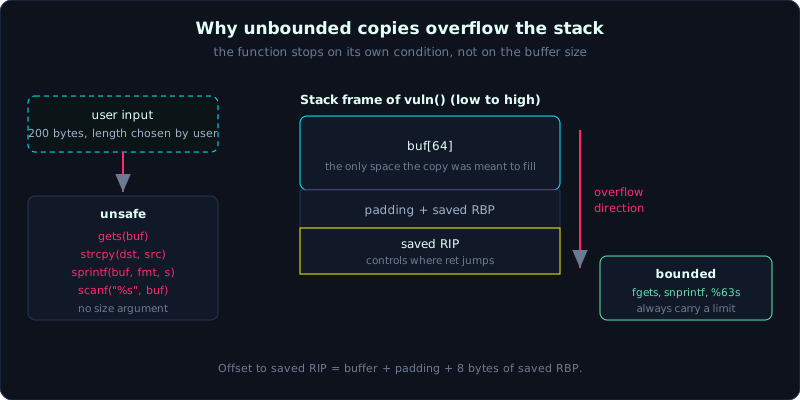 Functions without a size argument let the attacker’s input length, not the buffer size, decide how far the write goes.
Prerequisites: Lesson 1.2 (how an overflow reaches saved RIP), Lesson 1.3 (recognizing functions through the PLT).
Tools: gcc, gdb + pwndbg, objdump, grep.
Goals
After this lesson you know exactly why gets, strcpy, sprintf, and scanf(“%s”) cause buffer overflows. You can separate a function that is hopeless by design (gets) from one that is only dangerous when used carelessly (strcpy). You can spot them in source by eye, recognize them in a binary from a PLT call and other telltale signs, and look at an unfamiliar function and estimate whether it could overflow.
1. Theory
The root cause: the function does not know how big the buffer is
A buffer in C is just a fixed-size array, and a pointer to it carries no length information. When you hand the pointer buf to a copying function, that function has no way to know how many bytes buf can hold. If the function keeps copying until it meets its own stopping condition, a newline, a null byte, and that condition depends on user-controlled data, then the user decides how much gets copied, not the buffer size. Data past the buffer’s edge spills out and overwrites whatever sits after it: other local variables, saved RBP, then saved RIP (recall Lesson 1.2). That is the whole mechanism of a buffer overflow.
Group them for memory. Some functions are hopeless by design and cannot be used safely (gets). Others are safe if you pass a limit but dangerous if you forget (strcpy, sprintf, scanf %s). Let’s go through each.
gets(): hopeless by design
1
char *gets(char *s);
gets reads from stdin into s until it meets a newline or runs out of input. It does NOT take a length parameter. There is no way to use gets safely, because you cannot tell it how big the buffer is. If the user types 1000 characters, it writes all 1000 bytes, straight through the boundary.
gets is dangerous enough that the C11 standard removed it from the language, and gcc warns every time you use it. Seeing gets in a challenge is almost always a sign that this is the overflow point, go in. The correct replacement is fgets(s, size, stdin), which takes a size parameter.
strcpy() and strcat(): dangerous when the source is longer than the destination
1
char *strcpy(char *dst, const char *src);
strcpy copies from src to dst until it meets the terminating null byte \0. It does not check whether dst has enough room. If src (often user input, or a variable that already holds long data) is longer than dst, it overflows. strcat is worse because it appends to the end of an existing string, which makes it easy to miss how close you are to the boundary.
Unlike gets, strcpy can be used safely IF you guarantee the source is never longer than the destination (for example, a short constant string as the source). So when you see strcpy, ask where the source comes from, whether the user controls its length, and how big the destination is. The bounded version is strncpy(dst, src, n), but strncpy has its own trap (it does not add a null terminator if the source is exactly n bytes long).
sprintf(): formatting into an unlimited buffer
1
int sprintf(char *str, const char *format, ...);
sprintf writes a formatted string into str with no length limit. If one of the arguments is a user-controlled string (for example sprintf(buf, "Hello %s", name) where name is user input), and that string is long, the result overflows buf. This one gets overlooked often because it looks like harmless string concatenation. The safe version is snprintf(str, size, format, ...), which takes a limit.
(Note: if the format string itself is user-controlled, you also have a format string vulnerability, a separate topic in part 7. Here we only cover the overflow angle.)
scanf(“%s”, buf): reading a string without a bound
1
scanf("%s", buf);
%s in scanf reads until it meets whitespace, with no length limit, exactly as risky as gets. A user typing one long word overflows it. The safe way is a field width, scanf("%63s", buf) for a 64-byte buffer (leaving 1 byte for the null terminator). Note the number must be exactly 1 less than the buffer size. The %[...] variants carry the same risk if a field width is missing.
Another group worth knowing
Besides the four main ones, stay alert for memcpy/read/fread with a wrong or user-controlled length argument, vsprintf, realpath (PATH_MAX buffer), and hand-written loops that copy characters into an array without checking the index. The vulnerability is not limited to library functions; a hand-written while loop that copies characters without a bound check overflows the same way.
One idea underlies all of this: a missing bound kills you
Looking at the whole group, the common thread is a missing length limit parameter, or one that exists but the programmer did not use it. A safe function always carries an n or a field width alongside it: fgets (has size), strncpy/snprintf (have n), scanf("%63s") (has width). When scanning a binary, you are looking exactly for the places where that limit is missing.
2. Demo
Spotting it in source
Here is a typical piece of challenge code. Practice pointing out where it is dangerous.
1
2
3
4
5
6
7
8
9
10
11
12
13
14
15
16
17
18
#include <stdio.h>
#include <string.h>

void handle(char *input) {
    char name[32];
    char msg[64];
    strcpy(name, input);                 // (1) input can be longer than 32 -> overflows name
    sprintf(msg, "Hello %s, welcome!", name);  // (2) long name -> overflows msg
    puts(msg);
}

int main(void) {
    char line[256];
    printf("Your name: ");
    gets(line);                          // (3) the classic gets -> overflows line
    handle(line);
    return 0;
}
Three dangerous spots: gets(line) at (3) is the clearest entry point (no limit, overflows line). strcpy(name, input) at (1) overflows name[32] if input is long. sprintf(msg, ...) at (2) overflows msg[64] if name is long. A short snippet with three holes. When reading challenge source, scan for this exact group of names first.
Scan quickly with grep when the source is large:
1
2
grep -nE "\b(gets|strcpy|strcat|sprintf|scanf|vsprintf)\b" *.c
# lists the line number of each call -> a checklist to inspect
Build it and watch it overflow
1
2
3
4
5
6
7
8
#include <stdio.h>
void vuln(void) {
    char buf[64];
    printf("Input: ");
    gets(buf);          // or: scanf("%s", buf);
    printf("You entered: %s\n", buf);
}
int main(void){ vuln(); puts("back in main"); return 0; }
1
2
3
4
gcc -fno-stack-protector -no-pie -o danger danger.c
# gcc warns right away: warning: the 'gets' function is dangerous and should not be used.
python3 -c 'print("A"*200)' | ./danger
# -> Segmentation fault: 200 bytes overflow buf[64], overwriting saved RIP, ret jumps into garbage
The line “back in main” does not print, exactly as in Lesson 0.1: the function cannot return because saved RIP is corrupted.
Recognizing it in a binary (no source)
Most challenges only hand you the binary. You spot the dangerous function through the PLT call (recall Lesson 1.3):
1
2
objdump -d -M intel danger | grep -E "call.*(gets|strcpy|sprintf|__isoc99_scanf|__isoc99_sscanf)@plt"
# -> ... call  <gets@plt>
A few notes for reading a binary:
In modern binaries, scanf is usually named __isoc99_scanf (and sscanf becomes __isoc99_sscanf), so do not be surprised when the exact string scanf is not there. To know whether it uses an unbounded %s or a field width, look at the format string loaded into rsi (the second argument, per System V, Lesson 1.2): lea rsi, [rip+0x...] points to a string, read it with x/s in gdb or with strings. A bare "%s" is dangerous, "%63s" is already bounded.
List the external functions the binary uses, a fast way to check off dangerous functions:
1
2
3
4
objdump -R danger | grep -E "gets|strcpy|sprintf|scanf|strcat"   # from the relocation table
# or:
nm -D danger            # dynamic symbols (external functions)
readelf --dyn-syms danger
In gdb, stop at the call to see the real arguments:
1
2
3
4
5
gdb -q ./danger
pwndbg> break gets
pwndbg> run
pwndbg> p $rdi          # first argument of gets = address of the destination buffer
pwndbg> vmmap $rdi      # buffer is on the stack -> confirms it writes into the stack
Seeing gets receive a stack pointer in rdi tells you for certain that user data is about to be written straight into the stack, with no limit. The entry point is exposed.
3. Lab
- Task: for the three-hole source in part 2 (or write something similar yourself), work out for each function how long the input must be to start overflowing its target buffer, and point out which spot can lead to control of saved RIP.
- Goal: look at code and scope out the vulnerability, without running it, by reasoning alone.
- Hints, in steps:
- Hint 1: for each copying function, write down the size of the destination buffer. Input longer than that starts spilling into the next region. But reaching saved RIP requires going all the way to (buffer + padding + 8), measured with gdb as in Lesson 1.2.
- Hint 2: build the binary, then use
objdump -Randobjdump -d -M intelto find all three dangerous calls yourself without looking at the source. Compare against the source to check you identified them correctly. - Hint 3: rewrite each function with its safe version (
getstofgets(buf, sizeof buf, stdin),strcpyto a checkedstrncpy,sprintftosnprintf,scanf("%s")toscanf("%31s")). Rebuild, send long input, confirm there is no overflow anymore. Understand why the limit parameter fixes it.
- Self-check, can you answer these?
- Why can
getsnever be used safely whilestrcpysometimes can? - In a binary, how do you tell
scanf("%s")apart fromscanf("%63s")? - Of the three holes in the demo, which is the easiest entry point to take over saved RIP?
- Why can
4. Key takeaways
- Overflow happens because the copying function does not know how big the buffer is; the user decides the length.
- gets: hopeless, no size parameter; seeing gets means seeing the entry point.
- strcpy/strcat: overflow when the source is longer than the destination; safe only if the source is controlled.
- sprintf: overflows when a string argument is long; use snprintf with a size.
- scanf(“%s”): unbounded like gets; needs a field width %Ns.
- A safe function always carries an n or a field width: fgets, strncpy, snprintf, scanf(“%63s”).
- In a binary: look for a call to …@plt, remember scanf shows up as __isoc99_scanf, and read the format string through rsi.
5. Common pitfalls
- Only looking for
getsand missingstrcpy/sprintf/scanf, which means missing the vulnerability. Scan the whole group, including hand-written copy loops. - Searching a binary for the literal string
scanf, finding nothing, and concluding there is no scanf. The real name is__isoc99_scanf. Remember the variant names. - Seeing
scanf("%s")but not reading the actual field width, so wrongly assuming it is safe or unsafe. You have to read the real format string (through rsi at the call, or with strings) before concluding anything. - Assuming any overflow immediately gives control of RIP. Overflowing is only the first step; you need to overflow far enough to reach saved RIP and control those 8 bytes (Lesson 1.2). Many overflows only reach a neighboring local variable, not RIP yet.
- Forgetting the null terminator when sizing a payload: strcpy copies up to
\0, and scanf %s appends a trailing\0. These null bytes affect the payload, which is why input containing a null byte often gets cut short. - Using
strncpyand assuming it is fully safe.strncpydoes not add a null terminator if the source is exactly n bytes, which can cause a later over-read. Safety needs both a limit and a guaranteed null terminator.
6. Further reading
man 3 gets,man 3 strcpy,man 3 sprintf,man 3 scanf: the BUGS and NOTES sections state the risks plainly, short and worth reading.- CWE-121 (Stack-based Buffer Overflow) and CWE-120 (Buffer Copy without Checking Size), the standard classification for these bugs.
- “Secure Coding in C and C++” (Robert Seacord), the chapter on strings and buffers is the canonical reference for why these functions fail and what to use instead.
- ROP Emporium and the picoCTF “Binary Exploitation” category, almost every challenge opens with one of the functions in this lesson. Good practice for recognizing them on sight.