Lesson 3.1: Reflected XSS and Choosing Payloads by Context
By the end of this lesson you understand what reflected XSS is, you can recognize the three common output contexts (HTML body, attribute, JS string), and you see why the same vulnerability needs a different payload in each place.
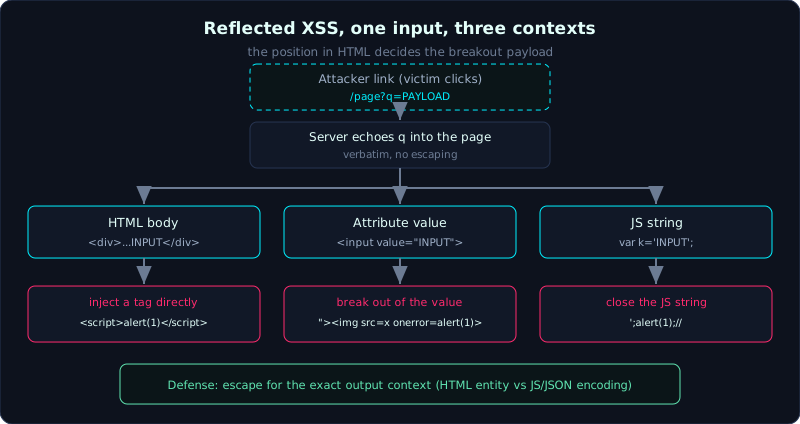 The same reflected parameter needs a different breakout payload in HTML body, attribute, and JS string context.
| Part: 3 (Cross-Site Scripting) | Time: about 40 minutes | Difficulty: basic |
Prerequisites: you can read HTTP requests and responses and basic HTML.
Tools: a browser with DevTools, curl, Python requests.
Goals
After this lesson you understand XSS (Cross-Site Scripting, injecting script that runs in a victim’s browser) and the reflected variant in particular. You can tell the three output contexts apart and know how the browser treats each one. You can pick the right payload (the attack string) to break out of a context and run JS. You can confirm that a payload lands in a dangerous context without even opening an alert box.
1. Theory
XSS in short
XSS is a flaw that lets an attacker inject JavaScript into a page, and that JS then runs in someone else’s browser under the victim page’s own origin (the triple of scheme, host, and port). Because it runs in that origin, the script can do almost anything the user can do. It can read document.cookie, read the page content, and send requests on the user’s behalf. The root of every XSS is one idea. User data enters the page without correct handling, so the browser misreads the data as code.
There are three families of XSS: reflected (echoed straight back in the response to the request that carried the payload), stored (saved and served later, Lesson 3.2), and DOM-based (the flaw lives in client-side JS, Lesson 3.3). This lesson covers reflected, the most common one.
What reflected means
Reflected means the input you send is echoed straight back in the returned page. The classic example is a search page. You type t-shirt, and the page returns “Results for: t-shirt”. If the server drops the search term verbatim into the HTML, you try typing <script>alert(1)</script>, the page returns that exact script tag, and the browser runs it.
Because the payload sits in the URL (or in the request body), reflected XSS is usually exploited by tricking a victim into clicking a link with the payload already attached. The victim opens the link, the request carries the payload up, the server echoes it back, and the script runs in the victim’s session.
The context decides the payload
This is the part many people learning XSS skip, and then they struggle to pop it. The same input lands in different positions in the HTML, and the position decides what the payload looks like. Three common contexts:
HTML body (between tags):
<div>Results for: INPUT</div>. Here you can inject a new tag directly, for example<script>...</script>or<img src=x onerror=...>. The browser sees<as the start of a tag and treats it as markup at once.Attribute value (inside an attribute’s value):
<input value="INPUT">. Now your<script>sits inside thevalue="..."string, and the browser treats it as plain text and does not run it. You have to break out first, closing the quote and the tag with">, and only then insert a new element:"><img src=x onerror=alert(1)>.JS string (inside a JavaScript string):
<script>var k='INPUT';</script>. Here you are already inside JS, so you only close the string and end the statement:';alert(1);//. The//comments out the rest of the code so there is no syntax error.
There are harder contexts too: inside the URL of an href or src attribute (using javascript:), inside an HTML comment, inside a tag name. But the three above are enough for most situations.
Why correct defense is context-aware escaping
The direct consequence is that the defender must also escape (encode special characters) for the exact context. HTML body and attribute call for HTML entity encoding (< to <, " to "). A JS string calls for JavaScript or JSON style encoding. Using the wrong escaping for the context still leaves a hole. This is why the context view matters for both attack and defense.
2. Demo
The lab labs/3.1/ sets up three endpoints that reflect the same parameter q into three contexts. Start the app, then try it by hand:
1
2
3
4
5
6
7
8
9
10
11
12
13
14
15
16
17
# Terminal 1: run the app (listens on 127.0.0.1:8031)
python3 labs/3.1/app.py

# Terminal 2: HTML body, inject a script tag directly
curl -s "http://127.0.0.1:8031/html?q=<script>alert(document.domain)</script>"
# ...<div id=greeting>Ket qua tim kiem cho: <script>alert(document.domain)</script></div>...
#    => the <script> tag sits verbatim in the body, the browser will run it

# Attribute: you must break out of value="..." first
curl -s 'http://127.0.0.1:8031/attr?q=%22%3E%3Cimg%20src%3Dx%20onerror%3Dalert(1)%3E'
# ...<input name=q value=""><img src=x onerror=alert(1)>" placeholder="tu khoa">...
#    => the "> closes the value and the input tag, and <img onerror> becomes a new element

# JS string: close the single quote, end the statement, comment out the rest
curl -s 'http://127.0.0.1:8031/js?q=%27%3Balert(String.fromCharCode(88%2C83%2C83))%3B%2F%2F'
# ...<script>var keyword = '';alert(String.fromCharCode(88,83,83));//';...
#    => the string is closed early, and alert(...) becomes a statement that runs
Notice that in the JS string I use String.fromCharCode(88,83,83) instead of 'XSS'. Once the payload is already inside quotes, sometimes you do not want (or the filter does not allow) another quote, so building a string from character codes is a common trick.
For comparison, the /safe endpoint escapes correctly, so the same payload becomes <script> and is harmless:
1
2
curl -s "http://127.0.0.1:8031/safe?q=<script>alert(1)</script>"
# ...<div id=greeting>Ket qua tim kiem cho: <script>alert(1)</script></div>...
3. Lab
- Vulnerable app:
labs/3.1/(the lab README explains the setup, runs locally on port 8031). - Task: for each of the three endpoints
/html,/attr,/js, find a payload that makesalertrun, and explain why that payload fits the context. - Hint: before writing a payload, view the raw HTML source (curl or Ctrl+U) to see exactly where your input lands, what quotes it is inside, and what tag it is inside.
- How to grade yourself without opening a browser: check whether the breakout string (the string that breaks the context) appears verbatim in the response. If
<script>is not turned into<script>, or your">closes the tag, then the browser will certainly parse it as markup or JS. - Solution:
labs/3.1/exploit.pyautomatically checks all three contexts plus the/safecomparison;labs/3.1/transcript.txtis the real output of a run (all three PASS).
4. Common pitfalls
- Firing
<script>alert(1)</script>everywhere and then wondering why it does not run. In an attribute or JS string context it will not run, you have to break out of the context first. - Forgetting that modern browsers block some ways of injecting
<script>through certain paths; the<img src=x onerror=...>payload is often more reliable because it relies on an event handler. - Confusing “I see the payload in the response” with “the payload runs”. You have to check whether the payload is escaped into entities, and whether it is in a dangerous context.
- The
#(fragment) in a URL is not sent to the server, so it does not cause reflected XSS; that belongs to DOM XSS (Lesson 3.3).
5. Further reading
- PortSwigger Web Security Academy, the Cross-site scripting section (has reflected labs by context).
- OWASP WSTG, Testing for Reflected Cross Site Scripting.
- OWASP XSS Prevention Cheat Sheet (context-aware escaping rules).
6. Key takeaways
- XSS is user data that the browser misreads as code, running in the victim’s origin.
- Reflected means the payload is echoed back in the response; it is exploited with a link that carries the payload.
- Three contexts: HTML body (inject a tag directly), attribute (break out with
">), JS string (close with';...//). - Always view the source to see which context the input lands in before choosing a payload.
- Defense: escape for the exact output context, and never drop input straight into HTML.