Lesson 0.2: HTTP and HTTPS Methods, Headers, Status Codes and Cookies
By the end of this lesson you can read an HTTP request and response line by line, you understand what methods, headers, status codes and cookies are for, and you can inspect a whole exchange byte by byte with curl -v and with a proxy. This is the foundation, and every later lesson builds on it.
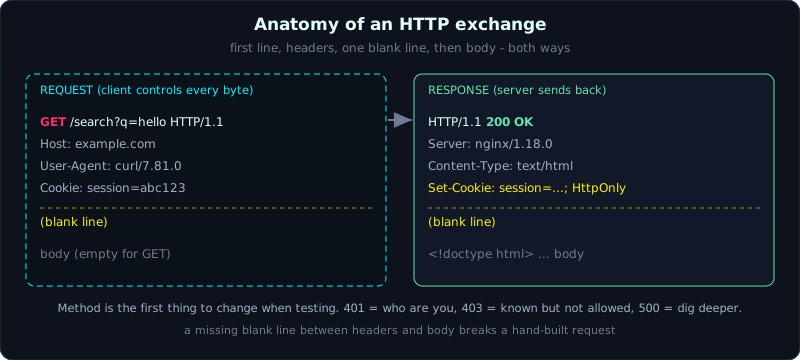 An HTTP request and response are both text, a first line, headers, one blank line, then the body.
| Part: 0 (Intro to Web Hacking) | Time: about 45 minutes | Difficulty: easy |
Prerequisites: Lesson 0.1 (What web hacking is).
Tools: curl, Python 3 with Flask (for the lab), and a proxy such as Burp Suite (introduced in Lesson 0.4).
Goals
After this lesson you can read the structure of an HTTP request and response line by line, tell the HTTP methods apart and know what each means, recognize the headers and status codes that matter during testing, understand how a cookie is set and sent back, and inspect a full HTTP exchange with curl -v while understanding the role of a proxy.
1. Theory
1.1. HTTP is a text conversation
HTTP (HyperText Transfer Protocol) is, at its core, a client (usually a browser) sending a block of text called a request to a server, and the server returning a block of text called a response. The whole “web” you see is a long series of such request and response pairs.
A request has a fixed structure:
1
2
3
4
5
6
7
GET /search?q=hello HTTP/1.1      <- first line: METHOD  PATH  VERSION
Host: example.com                 <- headers, one Name: Value pair per line
User-Agent: curl/7.81.0
Accept: */*
Cookie: session=abc123
                                  <- one blank line separates headers from body
<body, may be empty for GET>
The response is the same:
1
2
3
4
5
6
HTTP/1.1 200 OK                   <- first line: VERSION  STATUS_CODE  REASON
Server: nginx/1.18.0              <- headers
Content-Type: text/html; charset=utf-8
Set-Cookie: session=abc123; HttpOnly
                                  <- blank line
<!doctype html>...                <- body: the actual returned content
Once you have this layout, the rest is just detail. Note that between the headers and the body there is one blank line. Many mistakes when building a request by hand come from forgetting this blank line.
1.2. How HTTPS differs from HTTP
HTTPS is HTTP running inside a TLS (Transport Layer Security) encryption layer. The request and response content is identical to HTTP, the only difference is that on the wire it is encrypted, so someone in the middle cannot read it. For a tester, this means that to inspect HTTPS you need a proxy in the middle and a CA (Certificate Authority) certificate that the browser trusts. The proxy decrypts, shows you the content, then encrypts it again and sends it on. Installing the CA for Burp is covered in Lesson 0.4.
1.3. HTTP methods
The method on the first line of the request tells the server what you want to do:
- GET: fetch data. Parameters go on the URL (query string). It should not change data.
- POST: send data up, usually to create something or perform an action. The data is in the body.
- PUT: replace an entire resource.
- PATCH: modify part of a resource.
- DELETE: delete a resource.
- HEAD: like GET, but the server returns only headers, no body. Useful when you only need to inspect headers.
- OPTIONS: ask the server which methods this endpoint allows, often used in CORS (Lesson 9.3).
When testing, the method is the first thing you try changing. Many access control vulnerabilities appear when an endpoint forgets to check the method, for example it blocks POST but forgets to block PUT.
1.4. Headers that matter
Headers carry the metadata of the request and response. Some you will meet constantly:
On the request side:
Host: the domain you want to reach. One IP can serve many sites, and Host distinguishes them.Cookie: sends back a cookie the server set earlier.Authorization: carries authentication data, for exampleBearer <token>or Basic auth.Content-Type: the format of the body being sent, for exampleapplication/jsonorapplication/x-www-form-urlencoded.User-Agent,Referer,Origin: respectively the client software, the referring page, and the origin (important for CORS and CSRF).X-Forwarded-For: the original IP added by a proxy, often trusted by mistake.
On the response side:
Content-Type: the format of the returned body. Getting this header wrong is the source of many XSS bugs.Set-Cookie: asks the client to store a cookie.Location: the redirect target, sent with a 3xx status.Server,X-Powered-By: leak the underlying technology (Lesson 1.4 exploits this).Content-Security-Policy: a policy against XSS (Lesson 3.4).
1.5. Status codes
A status code is the three-digit number on the first line of the response, grouped by range:
- 1xx: informational, rarely seen during testing.
- 2xx: success.
200 OK,201 Created,204 No Content. - 3xx: redirect.
301(permanent),302and307(temporary), sent with aLocationheader. - 4xx: client error.
400 Bad Request,401 Unauthorized(not authenticated),403 Forbidden(authenticated but not allowed),404 Not Found,429 Too Many Requests. - 5xx: server error.
500 Internal Server Error(very interesting, often near a vulnerability),502,503.
Telling 401 from 403 matters a lot when testing access control. 401 means “who are you”, 403 means “I know who you are but I will not let you”. And 500 is a signal that you just made the app hit a case it did not expect, so dig further.
1.6. Cookies, how the web remembers you
HTTP is stateless by nature, each request is independent and the server does not remember the previous one. Cookies exist to solve this. The server sends Set-Cookie in a response, the browser stores it, and it automatically attaches Cookie to every later request to the same domain. This is how the server knows that separate requests come from the same person.
A session cookie is therefore the thing that proves “I am logged in”. Anyone who gets your session cookie can enter your account without the password. This is why XSS (Lesson 3.5) is dangerous. Cookie attributes such as HttpOnly, Secure and SameSite are covered closely in Lesson 0.3.
2. Demo
We will inspect HTTP with curl. The -v (verbose) flag prints every request line (marked >) and response line (marked <), exactly as in the theory above. The commands below run against the lab app in section 3 (Flask, port 8010). The output is real, captured from a running session.
See the whole exchange, including headers in both directions:
1
2
3
4
5
6
7
8
9
10
11
12
13
14
15
16
17
18
$ curl -v http://127.0.0.1:8010/ -o /dev/null
*   Trying 127.0.0.1:8010...
* Connected to 127.0.0.1 (127.0.0.1) port 8010 (#0)
> GET / HTTP/1.1
> Host: 127.0.0.1:8010
> User-Agent: curl/7.81.0
> Accept: */*
>
< HTTP/1.1 200 OK
< Server: Werkzeug/3.1.8 Python/3.11.9
< Date: Sun, 18 Oct 2026 10:17:36 GMT
< Content-Type: text/html; charset=utf-8
< Content-Length: 679
< Server: Lab0.2/Flask
< Connection: close
<
{ [679 bytes data]
* Closing connection 0
The > lines are the request curl sent, the < lines are the response the server returned. You immediately recognize the structure from section 1.1, the first line, the headers, the blank line.
Change the method and watch the app reflect your own request back (the /echo endpoint returns JSON describing the request):
1
2
3
4
5
6
7
8
9
10
11
12
13
14
15
16
17
18
19
20
21
22
23
24
25
$ curl -s "http://127.0.0.1:8010/echo?q=hello&lang=vi" -H "X-Custom: demo"
{
  "method": "GET",
  "path": "/echo",
  "query": {
    "q": "hello",
    "lang": "vi"
  },
  "headers": {
    "Host": "127.0.0.1:8010",
    "User-Agent": "curl/7.81.0",
    "Accept": "*/*",
    "X-Custom": "demo"
  },
  "cookies": {},
  "body_raw": "",
  "form": {},
  "remote_addr": "127.0.0.1"
}

$ curl -s -X DELETE http://127.0.0.1:8010/echo
{
  "method": "DELETE",
  ...
}
Notice that the query string ?q=hello&lang=vi is split by the server into two parameters, and the X-Custom header I set by hand also arrives. The fact that a client can set any header it wants is exactly why you must never trust a header.
Log in and observe Set-Cookie. The -i flag prints the response headers too:
1
2
3
4
5
6
7
8
9
10
$ curl -i -s -X POST -d "user=admin&pass=admin" http://127.0.0.1:8010/login
HTTP/1.1 200 OK
Server: Werkzeug/3.1.8 Python/3.11.9
Date: Sun, 18 Oct 2026 10:17:36 GMT
Content-Type: application/json
Content-Length: 45
Set-Cookie: session=s3ss10n-demo-abc123; HttpOnly; Path=/; SameSite=Lax
Connection: close

{"msg":"dang nhap thanh cong","status":"ok"}
The server returns Set-Cookie: session=...; HttpOnly; Path=/; SameSite=Lax. A real browser would store this cookie. With curl, we send it back ourselves using the -b flag to prove “I am the person who just logged in”:
1
2
$ curl -s -b "session=s3ss10n-demo-abc123" http://127.0.0.1:8010/whoami
{"user":"admin","via":"cookie session"}
Finally, observe status codes through two endpoints. /secret requires an Authorization header, and returns 401 when it is missing:
1
2
3
4
5
6
7
8
9
10
11
12
13
14
$ curl -i -s http://127.0.0.1:8010/secret
HTTP/1.1 401 UNAUTHORIZED
Server: Werkzeug/3.1.8 Python/3.11.9
Content-Type: application/json
Content-Length: 37
WWW-Authenticate: Basic realm="lab02"
Connection: close

{"error":"can header Authorization"}

$ curl -i -s http://127.0.0.1:8010/secret -H "Authorization: Bearer demo-token"
HTTP/1.1 200 OK
...
{"got":"Bearer demo-token","secret":"co header roi, day la noi dung bi mat"}
How a proxy differs from curl
curl -v lets you inspect one request at a time. A proxy (such as Burp Suite, covered in Lessons 0.4 and 1.1) sits between the browser and the server, captures every request from a real browser, lets you view and edit it before it is sent (intercept), resend it many times with different parameters (Repeater), and keeps a history. In short, curl fits when you already know the exact request to send, and a proxy fits when you want to observe and intervene in the flow of a complex application. You need both.
3. Lab
- The app (here a practice app, with no vulnerability):
labs/0.2/is a small Flask app for inspecting HTTP. Build it following the instructions inlabs/0.2/README.md, and run it locally on port 8010. - Quick start:
1
2
3
cd labs/0.2
python3 app.py
# open another terminal and try the curl commands
- Tasks:
- Use
curl -vto fetch/and point out the first line, the headers, and the body. - Send a POST request to
/loginwith the wrong password, and observe how the status code differs from a correct login. - Capture the session cookie after logging in, then call
/whoamiwith and without the cookie, and compare the results. - Call
/redirectwith and without the-Lflag (follow redirects), and observe theLocationheader and the302status.
- Use
- Hints:
-iprints response headers,-Iuses the HEAD method,-Hadds a header,-bsends a cookie,-dsends a form body,-Lfollows redirects. - Answers: the real commands and output are in
labs/0.2/transcript.txt.
4. Key takeaways
- Request and response are both text, a first line, headers, one blank line, then the body.
- The method is the first thing to try changing when testing (GET, POST, PUT, PATCH, DELETE, HEAD, OPTIONS).
401is “not authenticated”,403is “not allowed”,500is a signal to dig further.- The session cookie proves identity, losing it means losing the account.
- A client can set any header, so never trust data from a header.
curl -vto inspect one request, a proxy to observe and intervene in the whole flow.
5. Common pitfalls
- Forgetting the blank line between headers and body when building a request by hand, which makes the server misread it.
- Confusing the
-Iflag (HEAD, headers only) with-i(GET plus printing headers). They are very different. - Assuming
302follows itself to the target. Curl does not follow a redirect unless you pass-L. - Sending a JSON body but forgetting to set
Content-Type: application/json, so the server cannot parse it. - Thinking HTTPS is “perfectly safe”. With rights on your own machine and a trusted proxy CA, HTTPS content is still inspectable as usual.
6. Further reading
- MDN HTTP overview: https://developer.mozilla.org/en-US/docs/Web/HTTP
- MDN HTTP status codes: https://developer.mozilla.org/en-US/docs/Web/HTTP/Status
- curl manual: https://curl.se/docs/manpage.html