Lesson 10.1: Timestomp, Wiping and Log Clearing Detection
Anti-forensics is the other half of the job. The attacker knows you will read timestamps, logs and prefetch, so they try to wipe them. There is good news for the investigator. Almost no trace-removal technique is perfectly clean. Covering one trace creates another, and the anomaly itself (a spot that is too clean, two sources that contradict each other) is the clue. This lesson goes in pairs, where each attack technique comes with the way to detect it.
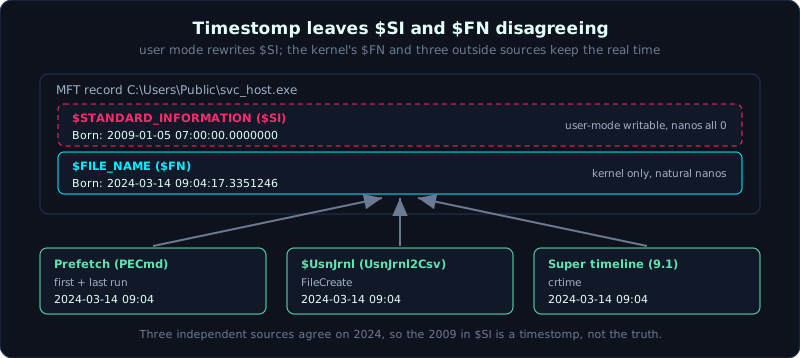 $SI is easy to change in user mode, $FN is set by the kernel, so the two disagree after a timestomp.
| Part: 10 (Anti-Forensics) | Time: about 75 minutes | Difficulty: advanced |
Prerequisites: a firm grasp of NTFS, the MFT, $SI/$FN, $UsnJrnl, $LogFile (Lesson 1.5), the event log (Lesson 4.2) and program execution (Lesson 4.3).
Tools: MFTECmd, analyzeMFT, EvtxECmd, UsnJrnl2Csv, PECmd, Timeline Explorer, istat (TSK).
Goals
After this lesson you understand timestomp on NTFS and why $SI is easy to change while $FN is hard. You can detect a timestomp by comparing $SI with $FN and by looking at the nanoseconds. You understand secure wipe / sdelete and the signs it leaves. You can detect log clearing through event 1102/104 and unusual gaps. And you know how an attacker deletes $UsnJrnl and prefetch, and how to recognize it.
1. Theory
1.1. Timestomp: changing a timestamp on NTFS
Every NTFS file has two sets of timestamps sitting in two different attributes in its MFT record:
1
2
$STANDARD_INFORMATION ($SI)   the timestamp set that Explorer, "dir" and the API usually display
$FILE_NAME ($FN)              the timestamp set tied to the file name, updated by the kernel, untouched by user-mode APIs
Both have all four MACB marks (Modified, Accessed, Changed, Born). The key fact is that a timestomp tool (from Metasploit, or PowerShell setting attributes, or the SetFileTime API) changes $SI easily, but $FN is only updated by the kernel when the file is created, renamed or moved, so user mode can almost never change it directly. The consequence:
1
2
Normal:     $SI and $FN are close (a few seconds apart from file operations).
Timestomp:  $SI is pushed back into the past (for example 2009) while $FN is still the real time (2024).
A second, subtler sign: many timestomp tools only write the seconds and leave the nanoseconds at 0. Windows timestamps have 100-nanosecond resolution. A naturally created file almost always has nonzero sub-second digits. Seeing a perfectly round 2009-01-05 07:00:00.0000000 is very suspicious.
1.2. Secure wipe and sdelete
A normal delete (del, Recycle Bin) only removes the pointer, the data is still there and can be carved back (Part 3). A secure wipe overwrites the data area with zeros or junk several times, making carving useless. Common tools: sdelete (Sysinternals), cipher /w, BleachBit, shred on Linux.
But wiping content usually does not delete the metadata silently. When sdelete “securely deletes”, it also renames the file several times and truncates the size to 0 before deleting, leaving a trace in $UsnJrnl and $LogFile: a strange rename chain (for example AAAA.AAA, BBBB.BBB) then a delete. That “overwrite the name then delete” pattern is sdelete’s signature.
1.3. Log clearing
Clearing logs is Defense Evasion T1070.001. The methods and their traces:
1
2
3
4
5
wevtutil cl Security        wipes one channel. Leaves event 1102 (Security) or 104 (other channels)
                            written RIGHT INTO the channel just cleared, with the account that cleared it.
Clear-EventLog (PowerShell) similar, with a trace in PowerShell Operational.
Stop the EventLog service then
delete the .evtx file on disk  subtler, generates no 1102, but the .evtx file disappears or is oddly small.
There is a useful paradox here. The act of clearing a log itself creates a log event (1102/104). The attacker usually cannot remove that mark because it is created after the clearing happened. A log whose oldest event matches the time of the 1102 means the log was refreshed.
1.4. Deleting the USN journal and prefetch
1
2
3
4
$UsnJrnl (\$Extend\$UsnJrnl:$J)   the file change journal. fsutil usn deletejournal deletes it.
Prefetch (C:\Windows\Prefetch)    evidence that a program ran. Delete the .pf files or disable prefetch
                                   via the registry (EnablePrefetcher = 0).
Amcache / Shimcache               also targets, but harder to wipe cleanly.
There are a few signs. A brand-new $UsnJrnl (holding only changes from the last few minutes) on a machine used for a long time is abnormal. A Prefetch folder that is empty or holds only very recent files, while the machine has clearly run many programs, is abnormal. The registry value EnablePrefetcher = 0 is a red flag.
2. Hands-on (demo): detecting a changed timestamp
Case: on WIN10-ACCT01, the file C:\Users\Public\svc_host.exe shows a $SI Creation of 2009, but every other artifact (prefetch, Run key, super timeline) says it first appeared on 2024-03-14. Suspect a timestomp. We verify.
2.1. Compare $SI with $FN using MFTECmd
1
2
3
4
5
6
7
# parse $MFT to CSV, including both $SI and $FN
MFTECmd.exe -f "C:\evidence\$MFT" --csv "C:\out" --csvf mft.csv

# in the CSV, for svc_host.exe read the columns:
#   Created0x10  = $SI Born    -> 2009-01-05 07:00:00.0000000
#   Created0x30  = $FN Born    -> 2024-03-14 09:04:17.3351246
#   LastModified0x10 vs 0x30 differ in the same way
Two things show at once:
- $SI Born (2009) is far earlier than $FN Born (2024): the classic sign of a timestomp.
- $SI has all-zero nanoseconds (
.0000000), while $FN has natural nanoseconds (.3351246). The timestomp tool forgot, or could not write, the sub-second part.
MFTECmd has a SI<FN column that pre-marks records where $SI is earlier than $FN. Filter that column in Timeline Explorer and the suspect list appears at once.
2.2. Confirm with istat (TSK)
1
2
3
4
5
# find the file's inode
fls -r -o 2048 WIN10-ACCT01.E01 | grep svc_host

# read the detail of both timestamp sets
istat -o 2048 WIN10-ACCT01.E01 <inode>
istat prints “$STANDARD_INFORMATION Times” and “$FILE_NAME Times” separately. When these two blocks differ by years, the timestomp conclusion is solid. Always confirm with a second tool, do not rely on just one.
2.3. Anchor against an independent time source
$FN can also be changed if the attacker moves the file cleverly, so we anchor to sources outside the MFT as well:
1
2
3
Prefetch SVC_HOST.EXE-XXXX.pf    first run / last run = 2024-03-14 09:04  (PECmd)
$UsnJrnl                         FileCreate for svc_host.exe = 2024-03-14 09:04  (UsnJrnl2Csv)
Super timeline (Lesson 9.1)      crtime matches 09:04
Three independent sources all point to 09:04/2024, while $SI says 2009. The real timestamp is 2024, the $SI was timestomped. This is how you detect it for certain. Do not trust a single number, find several sources and point out the contradiction.
2.4. Detecting sdelete and log clearing
1
2
3
4
5
6
7
8
9
10
# the sdelete trace in USN: a strange rename chain then delete
UsnJrnl2Csv.exe -f "C:\evidence\$Extend\$UsnJrnl:$J" --csv out
#   filter by Reason containing FileRename + FileDelete, with file names like "AAAA.AAA"

# cleared log: find 1102 (Security) and 104 (other channels)
EvtxECmd.exe -d "C:\evidence\winevt\Logs" --csv out --csvf evtx.csv
#   filter EventId 1102 or 104. Read the user that ran the clear command.

# compare the oldest event of each channel against the time of 1102:
#   if Security.evtx holds only events after 10:15 and has a 1102 at 10:15 -> the log was refreshed
For deleted prefetch and USN:
1
2
3
4
# Prefetch almost empty, only a few very recent files, the machine ran for a long time -> suspect deletion
# Check the registry: SYSTEM\CurrentControlSet\Control\Session Manager\Memory Management\PrefetchParameters
#   EnablePrefetcher = 0  -> prefetch was disabled on purpose
# $UsnJrnl holds changes only from 10:10 onward on a machine used for a year -> the journal was deleted/truncated
Case summary: $SI timestomped to 2009, the Security log cleared at 10:15 (event 1102, by the very account that was compromised), $UsnJrnl truncated. These three anti-forensics moves hide nothing. Instead they expose the Defense Evasion stage of the ATT&CK chain (Lesson 9.2) and confirm all the more that this was a deliberate intrusion, not a random incident.
3. Lab
The real lab is in labs/10.1/: make.py builds an ext4 image with e2fsprogs (mke2fs + debugfs) in user mode, with no mount, no sudo, and nobody’s real data; it timestomps a file (pushing mtime back to 2009 while keeping crtime at 2026) and simulates log clearing. solve.py detects it by comparing mtime/atime with crtime, anchoring with an independent source, and finding the log gap. transcript.txt is the real output. The NTFS $SI/$FN part is explained as a concept, and the ext4 lab illustrates the same principle. See labs/10.1/README.md.
1
2
cd labs/10.1
bash solve.sh      # builds case_disk.img then analyzes it
Why ext4 can illustrate it: on ext4 there is crtime (inode birth) and ctime kept by the kernel, and touch -d can only change mtime/atime. A file with mtime < crtime (modified before it was created) is impossible, which is the equivalent of the $SI-earlier-than-$FN sign on NTFS.
- Task (with a real lab):
- Scan the timestamps of every file, find the one with
mtime < crtime(herereport_q4.pdf, mtime 2009, crtime 2026). - Anchor the truth with
upload_server.log(the server audit records the file uploaded at 2026-10-15), proving the mtime of 2009 is fake. - Detect log clearing on
auth.log: the last log line only reaches 02:11 but the inode mtime is 03:05 (someone overwrote it later); cross-checkwtmp_last.txtand see that the 02:45 session was removed from auth.log.
- Scan the timestamps of every file, find the one with
- Task as an exercise (the Windows equivalent): on a VM, timestomp
$SIthen parse$MFTwithMFTECmd.exe, filter theSI<FNcolumn, point out both the year gap and the zero nanoseconds; confirm withistat. Find event 1102/104 and the account that cleared the log. sdelete leaves a rename-then-delete pattern in$UsnJrnl(UsnJrnl2Csv). - Answers: the “Short answers” section in
labs/10.1/README.mdandlabs/10.1/transcript.txt.
4. Key takeaways
- $SI is easy to change (user mode), $FN is hard (kernel), so comparing the two reveals a timestomp.
- All-zero nanoseconds in $SI is a sign of timestomp.
- Anchor the real time with several independent sources (prefetch, USN, timeline).
- Log clearing leaves 1102 (Security) or 104 right inside the channel just cleared.
- sdelete leaves a rename-then-delete pattern in $UsnJrnl.
- An empty Prefetch or EnablePrefetcher = 0 is a red flag.
- A spot that is “too clean” is an anomaly that needs explaining, not a harmless absence.