Lesson 5.2: macOS artifacts behind a suspicious auto-start app

macOS is a Unix with Linux-like bones but its own complications. The logs are no longer text files but a binary unified log. The configuration files are plists, half XML and half binary. And Apple ships a few SQLite databases (KnowledgeC, TCC) that happen to be a rich source for an investigator. This lesson follows one concrete question: a strange process keeps starting after every login, what is it and how did it get on the machine. This is exactly the kind of work you meet when investigating adware, stalkerware, or a backdoor on a Mac.
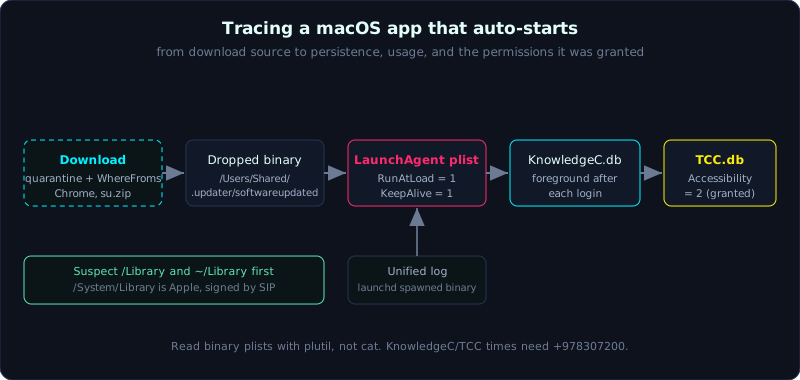 From download source to LaunchAgent persistence, usage times, and the permissions it was granted.
Level: advanced, about 70 minutes. Prerequisites: the concept of persistence (Lesson 4.5) and knowing how to mount an image read-only. Tools: log, plutil, defaults, mdls, xattr, sqlite3, FSEventsParser (Nicole Ibrahim), mac_apt.
Goals
You will list the four LaunchAgents/LaunchDaemons directories and read plists with plutil. You will query the unified log with log show and a predicate to see which process launchd spawned. You will read the com.apple.quarantine flag to learn which URL a file came from, and pull kMDItemWhereFroms from Spotlight with mdls. You will query KnowledgeC.db to learn when an app ran and how long it was in the foreground, and read TCC.db to see which sensitive permissions an app was granted (accessibility, full disk).
Theory
The macOS artifact map
1
2
3
4
5
6
7
8
9
10
Artifact            Location                                             Answers the question
LaunchDaemons       /Library/LaunchDaemons, /System/Library/...          System-level persistence (root)
LaunchAgents        /Library/LaunchAgents, ~/Library/LaunchAgents        Per-user persistence (at login)
Unified log         /var/db/diagnostics/*.tracev3 (binary)               Process spawns, errors, system activity
plist               everywhere, .plist (XML or binary)                   App config, login items
Quarantine xattr    extended attr com.apple.quarantine on a file         Where a file came from, when, by which app
Spotlight metadata  the Spotlight index, read through mdls               WhereFroms (download URL), date added
FSEvents            /.fseventsd/ at the volume root (binary)             Files created/modified/deleted in a folder
KnowledgeC.db       ~/Library/Application Support/Knowledge/              When an app ran, how long in foreground
TCC.db              /Library/.../com.apple.TCC/TCC.db and the user copy   Apps granted camera/mic/accessibility
Mind the boundary: anything under /System/Library/... is Apple’s, signed by SIP, so do not accuse it wrongly. Persistence dropped by an attacker almost always lives under /Library/... or ~/Library/....
LaunchAgents and LaunchDaemons
This is the main autostart mechanism on macOS, the equivalent of systemd on Linux. launchd reads these plists and runs the command inside them:
1
2
3
4
/Library/LaunchDaemons/       run at boot, as root, with no one logged in
/Library/LaunchAgents/        run when a user logs in, applied to every user
~/Library/LaunchAgents/       run when this user logs in (the most common for userland malware)
/System/Library/Launch*/      Apple's own, skip unless you suspect it was tampered with
Each plist has a few key keys:
1
2
3
4
5
6
Label            the identifier, malware often poses as com.apple.xxx
ProgramArguments array: the binary path plus arguments  <- this is what actually runs
RunAtLoad        true = run as soon as it is loaded (at login/boot)
KeepAlive        true = if it dies, launchd restarts it (very persistent)
StartInterval    run again every N seconds
WatchPaths       run when a given path changes
A quick tell: a Label like com.apple.softwareupdated whose ProgramArguments points at /Users/Shared/.updater/softwareupdated is certainly a problem. Apple never leaves a binary in /Users/Shared.
The unified log
Since macOS Sierra, Apple dropped the text /var/log/system.log and replaced it with a binary unified log stored under /var/db/diagnostics/ (.tracev3 files) and /var/db/uuidtext/. You cannot read it directly, you have to go through the log command. This log is very detailed: it records which process launchd spawned, XPC service activity, code signing errors, and what Gatekeeper blocked.
The drawback for an investigator: the unified log has a short lifetime (usually only a few days to a few weeks depending on space), so for an older incident it may already have rotated away. The sooner you collect it, the better.
Quarantine and Spotlight WhereFroms
When you download a file with Safari, Chrome, Mail, or AirDrop, macOS attaches an extended attribute com.apple.quarantine to that file. This is the Gatekeeper mechanism, but for an investigator it is provenance evidence:
1
2
3
4
The quarantine value has the form:  flags;timestamp_hex;agent_name;event_UUID
Example:                            0083;650e4a1f;Safari;F1B2...-UUID
                                    timestamp_hex -> convert to the download time
                                    agent_name    -> which app downloaded it (Safari, Chrome, curl...)
In parallel, Spotlight stores the metadata kMDItemWhereFroms: the exact URL the file was downloaded from. Joining the two sources tells you “this file was downloaded from http://… with Chrome at…”. That is the first link in the infection chain.
KnowledgeC.db and TCC.db
KnowledgeC is a SQLite database Apple uses for Siri and Screen Time that happens to record app usage in fine detail:
1
2
3
4
5
6
7
User:   ~/Library/Application Support/Knowledge/knowledgeC.db
System: /private/var/db/CoreDuet/Knowledge/knowledgeC.db

In table ZOBJECT, column ZSTREAMNAME gives the event type:
  /app/inFocus   -> which app is in the foreground, from when to when
  /app/usage     -> how long an app was used
Times are stored as Mac absolute time (seconds since 2001-01-01); add 978307200 to get a Unix epoch.
TCC (Transparency, Consent, and Control) is the privacy permissions database. Every time an app requests camera, mic, accessibility, or full disk access, it is recorded here:
1
2
3
4
5
6
7
8
System: /Library/Application Support/com.apple.TCC/TCC.db
User:   ~/Library/Application Support/com.apple.TCC/TCC.db

In table access:
  client       the bundle id or path of the app requesting the permission
  service      the permission type, for example kTCCServiceAccessibility, kTCCServiceSystemPolicyAllFiles
  auth_value   0 denied, 2 allowed (newer builds)
  last_modified when it was granted
A strange app with kTCCServiceAccessibility = 2 is almost always a red flag: accessibility allows reading keystrokes and controlling windows, exactly what a keylogger and stalkerware need.
FSEvents
Each volume has a /.fseventsd/ directory recording the history of file changes (create, modify, rename, delete) at the directory level. It does not give an exact per-file timestamp but it gives the order of events and shows which directory just saw activity, which is a good fit for pinning down when malware dropped its files to disk. Parse it with Nicole Ibrahim’s FSEventsParser or the module in mac_apt.
Demo
Assume the macOS image is mounted read-only at /mnt/mac (or you are running directly on a copy). Work on the copy, and record the hash first.
Inspect every autostart and read the plists
1
2
3
4
5
6
7
# List all system-level and user login items
ls -la /mnt/mac/Library/LaunchDaemons/ \
       /mnt/mac/Library/LaunchAgents/ \
       /mnt/mac/Users/*/Library/LaunchAgents/

# A binary plist does not read as text, use plutil to print it nicely
plutil -p /mnt/mac/Users/an/Library/LaunchAgents/com.apple.softwareupdated.plist
In the case, that plist prints:
1
2
3
4
5
6
{
  "Label" => "com.apple.softwareupdated"
  "ProgramArguments" => [ "/Users/Shared/.updater/softwareupdated" ]
  "RunAtLoad" => 1
  "KeepAlive" => 1
}
The binary sits in /Users/Shared/.updater, with RunAtLoad and KeepAlive both on: it runs itself at every login and revives itself if it is killed. This is the culprit.
Get the download source: quarantine plus WhereFroms
1
2
3
4
5
6
7
8
9
# The quarantine flag on the strange binary
xattr -p com.apple.quarantine "/mnt/mac/Users/Shared/.updater/softwareupdated"
# For example it returns: 0081;650e4a1f;Google Chrome;A1B2C3D4-....
# -> downloaded with Chrome, timestamp 650e4a1f (convert the hex to an epoch)

# The download URL from Spotlight metadata
mdls -name kMDItemWhereFroms -name kMDItemDateAdded \
     "/mnt/mac/Users/Shared/.updater/softwareupdated"
# kMDItemWhereFroms = ("http://cdn-update.example[.]bad/su.zip")
Just two commands give you: the file was downloaded from http://cdn-update.example.bad/su.zip with Chrome. That is a network IOC to pivot on.
Unified log: what launchd ran
If you have the machine’s log archive (collected with log collect), read it offline:
1
2
3
4
5
6
7
8
9
# Read from a collected logarchive
log show --archive /mnt/mac/evidence/system_logs.logarchive \
  --predicate 'process == "launchd" AND eventMessage CONTAINS "softwareupdated"' \
  --info --debug --style syslog

# On a live machine: filter by time window
log show --last 7d \
  --predicate 'eventMessage CONTAINS[c] "updater" OR subsystem == "com.apple.xpc.launchd"' \
  --info
Look for launchd lines recording a spawn of the binary in /Users/Shared/.updater, with the PID and time, and add them to the timeline.
KnowledgeC: when the app ran, how long in the foreground
1
2
3
4
5
6
7
8
sqlite3 "/mnt/mac/Users/an/Library/Application Support/Knowledge/knowledgeC.db" "
SELECT
  ZOBJECT.ZVALUESTRING AS app,
  datetime(ZOBJECT.ZSTARTDATE + 978307200, 'unixepoch') AS start,
  datetime(ZOBJECT.ZENDDATE   + 978307200, 'unixepoch') AS end
FROM ZOBJECT
WHERE ZSTREAMNAME = '/app/inFocus'
ORDER BY start DESC LIMIT 20;"
Add 978307200 to convert Mac absolute time to a Unix epoch. The result shows the strange app in the foreground during the exact window after each login, matching the RunAtLoad in the plist.
TCC: which permissions the app requested
1
2
3
4
5
sqlite3 "/mnt/mac/Library/Application Support/com.apple.TCC/TCC.db" "
SELECT client, service, auth_value,
  datetime(last_modified,'unixepoch') AS granted
FROM access
ORDER BY last_modified DESC;"
Case: you see client = /Users/Shared/.updater/softwareupdated, service = kTCCServiceAccessibility, auth_value = 2. The strange app was granted accessibility, enough to log keystrokes. A clear red flag, raising the incident from adware to possible stalkerware.
FSEvents: pin down when files were dropped
1
2
3
# Use FSEventsParser to extract the .fseventsd records to CSV
python3 FSEventsParser.py -s "/mnt/mac/.fseventsd" -o /tmp/fsevents_out -t folder
# Then filter the records touching /Users/Shared/.updater to see the order of file creation
Lab
The runnable lab lives under labs/5.2/, SIMULATING the macOS structure on Linux: make_artifacts.py builds a fake binary in /Users/Shared/.updater (with quarantine and WhereFroms), a binary LaunchAgent plist, a knowledgeC.db and a TCC.db; solve.py reads all of it with plistlib/os.getxattr/sqlite3 (standing in for plutil/xattr/mdls) and concludes how the app got on the machine, how it autostarts, and which permissions it has. transcript.txt is the real output. See labs/5.2/README.md.
1
2
3
cd labs/5.2
python3 -I make_artifacts.py mac
python3 -I solve.py mac
On a real Linux machine you can use setfattr -n user.com.apple.quarantine ... and getfattr for the xattr part; on a machine without setfattr the script falls back to os.setxattr/os.getxattr.
- Build your own (optional): on a real macOS machine or VM, create a harmless script in
/Users/Shared/.updater/, a LaunchAgent withRunAtLoadpointing at it,launchctl loadit, download the script through a browser to generate a real quarantine, collectlog collect, and compare with the lab. - Tasks:
- Find the persistence plist and extract
ProgramArguments,RunAtLoad,KeepAlive. - Get the download URL and the downloading app from quarantine plus
kMDItemWhereFroms. - From KnowledgeC, count how many times and in which windows the app was in the foreground.
- Check TCC for any permission granted to this binary.
- Write a short conclusion: how the app got on the machine, by which autostart mechanism, with which permissions.
- Find the persistence plist and extract
- Hint: a binary plist needs
plutil -porplutil -convert xml1 -o - fileto read;catprints garbage. Remember KnowledgeC uses Mac absolute time, so add 978307200. - Answer: the “Short answer” section in
labs/5.2/README.mdandlabs/5.2/transcript.txt.
Common pitfalls
- Wrongly suspecting things in
/System/Library/...: that is Apple’s, signed by SIP. Inspect/Libraryand~/Libraryfirst. cat-ing a binary plist into garbage and assuming the file is broken. You must useplutil.- Forgetting Mac absolute time in KnowledgeC/TCC, giving times off by 31 years (missing 978307200 seconds).
- Thinking the unified log lasts forever. It rotates by space, so an older incident may be gone.
- Looking only at LaunchAgents and missing other login item kinds (legacy cron,
~/Library/Preferenceslogin items, MDM profiles). - Ignoring the quarantine flag as unimportant. It is one of the few sources that states directly which URL a file came from.
- Reading TCC.db on a new build but forgetting there is both a system copy and a user copy, each holding different permissions.
Further reading
- The
mac_aptdocumentation (Yogesh Khatri): a parser that covers nearly every artifact above. - Sarah Edwards (mac4n1x), the series on KnowledgeC.db, APOLLO, and the unified log.
- Nicole Ibrahim, FSEventsParser and the posts on FSEvents.
man log,man plutil,man mdls,man xattr.- MITRE ATT&CK: T1547.011 and T1543.001 (Launch Agent/Daemon), T1222 (permissions), T1555 (credentials on macOS).
Key takeaways
- Userland persistence often sits in
~/Library/LaunchAgents/, system level in/Library/LaunchDaemons/. - The keys to read in a plist:
ProgramArguments,RunAtLoad,KeepAlive,StartInterval. - Read a binary plist with
plutil -p, notcat. - Read the unified log with
log show(and--archivewhen offline); it rotates fast, so collect it early. com.apple.quarantinegives the downloading app and a timestamp;kMDItemWhereFromsgives the URL.- KnowledgeC.db gives app foreground times; remember to add 978307200 to convert the time.
- TCC.db:
kTCCServiceAccessibilityorAllFilesfor a strange app is a red flag.