Lesson 0.1: What Web Hacking Is, Attack Surface and Ethics
By the end of this lesson you understand what web hacking actually is, you can look at a web application and spot the places it can be attacked (its attack surface), you know the OWASP Top 10 2021 framework well enough to use it as a map, and most important of all you know the legal and ethical limits that keep you out of trouble.
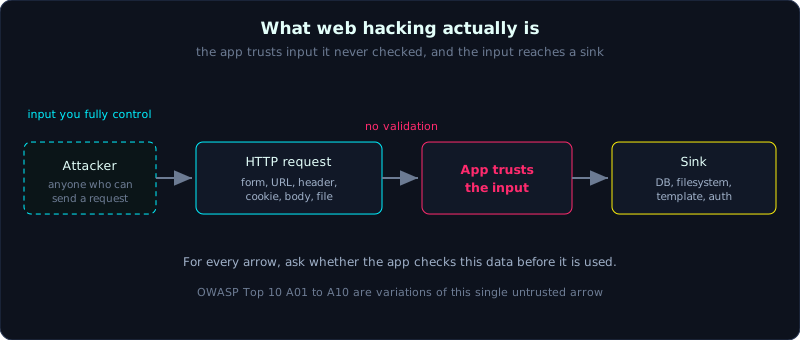 Almost every web vulnerability is the application trusting input it never checked, and that input reaching a sink.
| Part: 0 (Intro to Web Hacking) | Time: about 30 minutes | Difficulty: easy |
Prerequisites: none. You only need to use a browser and type basic commands in a terminal.
Tools: nothing to install yet. This lesson is about mindset rather than tooling. The later lessons list the tools you will prepare.
Goals
After this lesson you can explain what web hacking is and how it differs from the movie version, you can list the components that make up an app’s attack surface, you can read the OWASP Top 10 2021 framework and use it as a study map, and you can state the limit correctly: only test what is yours or what you are allowed to test.
1. Theory
1.1. What web hacking actually is
Web hacking (exploiting web application vulnerabilities) means finding the places where a web application handles data incorrectly, then using those mistakes to do something the developer never allowed, such as reading other people’s data, running commands on the server, impersonating a user, or taking over the administrator account.
There is one idea to understand from the very start. Almost every web vulnerability comes from the same old story, an application trusting the data a user sends up (user input) when it should not. The user here is not only the person typing at a keyboard, it is anyone who can send an HTTP request to the server. And anyone can build an HTTP request by hand, with no browser required. This is why throughout this series you will constantly build requests by hand instead of clicking buttons in the interface.
Web hacking is not typing a few lines and watching green text scroll down the screen. In practice it is reading carefully how the application responds, forming a hypothesis of the form “what if I send this instead of that”, trying it, observing, and repeating. Most of the time is spent observing and reasoning, not typing.
1.2. Attack surface
The attack surface is the set of all points where an attacker can put data in or interact with the system. For a typical web app, the attack surface includes:
- Input points: form fields, URL parameters (query string), the request body, HTTP headers, cookies, uploaded files, and content entered by other people that you view later (for example comments).
- Endpoints (a URL path the server handles): display pages, REST or GraphQL APIs, admin pages, hidden routes with no link pointing to them.
- Authentication and session mechanisms: login, session cookies, JWT tokens, OAuth flows, password reset.
- Server-side processing: database queries, filesystem calls, calls out to external services, template rendering, deserializing data.
- Dependencies: the web server, framework, libraries, old versions with a CVE (Common Vulnerabilities and Exposures, a public vulnerability identifier).
A good habit when you meet a new app is to list on paper every point where you can send data in, because each one is a place the app may have forgotten to check.
1.3. OWASP Top 10 2021 as a study map
OWASP (Open Worldwide Application Security Project) is a non-profit focused on application security. Every few years they publish the OWASP Top 10, a list of the ten most common and most serious web risk categories. This is not a list of 10 vulnerabilities, it is 10 risk categories used as a thinking framework. The latest version is 2021:
| Code | Risk category | Main idea | Covered in |
|---|---|---|---|
| A01 | Broken Access Control | A user can do something they should not be allowed to (IDOR, privilege escalation) | Part 5 |
| A02 | Cryptographic Failures | Sensitive data not encrypted or weakly encrypted, leaked over HTTP | Part 4 |
| A03 | Injection | User data is misread as a command (SQLi, command, XSS) | Parts 2, 3 |
| A04 | Insecure Design | Wrong by design, missing a control step (logic flaws) | Parts 4, 5 |
| A05 | Security Misconfiguration | Wrong configuration, defaults left on, debug enabled, files exposed | Parts 1, 7 |
| A06 | Vulnerable and Outdated Components | Using libraries or frameworks with known vulnerabilities | Parts 1, 9 |
| A07 | Identification and Authentication Failures | Auth errors, weak passwords, broken sessions, bad JWT | Part 4 |
| A08 | Software and Data Integrity Failures | Trusting data or updates without an integrity check (deserialization) | Part 8 |
| A09 | Security Logging and Monitoring Failures | No logging, no way to detect an attack | Part 11 |
| A10 | Server-Side Request Forgery (SSRF) | Forcing the server to send a request to a place the attacker chooses | Part 6 |
Looking at the table, you see this whole series tracks the OWASP Top 10 fairly closely. When you learn each specific vulnerability, ask yourself which category it falls into, because in bug bounty work and in writing reports people talk to each other in this language.
1.4. The most important part of this lesson, scope and ethics
Every technique in this series is a double-edged tool. Used on your own systems it is study. Used on someone else’s system without permission it is a crime, and there is no gray area here.
In Vietnam, unauthorized access to, interference with, or alteration of someone else’s information system is governed by the Penal Code (the articles on crimes in information technology and telecommunications networks) and the Law on Cybersecurity. “I just wanted to see if I could get in” is not a defense. Simply sending an exploit request to a system that is not yours can already constitute a violation, even if you take no data.
You are allowed to test when, and only when, one of these is true:
- The system is one you built yourself on your own machine (every lab in this series is of this kind).
- A learning environment designed to be attacked, such as DVWA, OWASP Juice Shop, PortSwigger Web Security Academy, machines on HackTheBox, TryHackMe, and CTF competitions.
- A bug bounty program or a pentest contract, and you attack strictly within the published scope, using only the allowed kinds of techniques.
A few rules of conduct that stay with you for your whole career:
- Read the scope carefully before you type the first key. Outside the scope you touch nothing, no matter how tempting the vulnerability looks.
- Do not destroy, do not take down the service, do not delete or change real data to “prove” something.
- Collect just enough proof of concept to demonstrate the vulnerability, then stop. Do not dig into real user data.
- If you accidentally touch sensitive data, stop and report it, do not download it.
- Responsible disclosure, tell the system owner, give them time to patch, do not publish early.
A simple self-test is this. If you would be uncomfortable letting the system owner know what you are doing, you probably should not be doing it.
2. Demo
This lesson does not attack anything yet, but we practice the single most important habit of a web security practitioner right away, seeing the attack surface. Open any website you have the right to (for example the lab app you will build in Lesson 0.2) and answer the question sheet below for yourself. This is a thinking exercise, not yet a typing one.
1
2
3
4
5
6
7
8
9
10
11
12
13
14
15
16
17
18
19
20
21
Attack surface mapping checklist

[ ] Where does this page take data from?
    - Query string on the URL?            e.g. /search?q=...
    - Forms (input fields, submit buttons)?
    - Any notable headers or cookies?
    - Is there a file upload?
    - Does it display content entered by other people? (comments, display names)

[ ] What endpoints does this page have?
    - Is there an API? (often /api/..., /rest/..., /graphql)
    - Is there a login page, an admin page?
    - Any path leaked in the HTML source or in JS files?

[ ] How does this page authenticate the user?
    - Login with what? A cookie or a token?
    - After login, what proves "I am me"?

[ ] What is the underlying technology?
    - What do the Server and X-Powered-By headers say? (learn to read them in Lesson 1.4)
    - What framework do the cookie names hint at?
Write down your answers for every app you meet. This habit matters more than any payload, because payloads can be looked up, while the ability to see “the app is trusting my data here” has to be trained.
3. Lab
This lesson has no attack lab (the later lessons do). Your task is to prepare your mindset and environment:
- Task 1: pick 3 websites you are certain you have the right to use (your own app, or Juice Shop and DVWA which you will build in Lesson 0.4). For each one, fill in the full attack surface mapping sheet from section 2.
- Task 2: read through the OWASP Top 10 2021 page once (link in section 6). You do not need deep understanding yet, just recognize the 10 names.
- Hint: do not try to memorize. The goal is that when you study SQLi in Part 2, you can connect it yourself, “ah, this is A03 Injection”.
- No fixed answer: this is a thinking exercise, there is no exploit script.
4. Key takeaways
- Nearly every web vulnerability comes from the application trusting user data without checking it.
- A “user” is anyone who can send an HTTP request, not necessarily through a browser.
- Attack surface = every point that brings data in, plus every endpoint, plus authentication mechanisms, plus dependencies.
- OWASP Top 10 2021 is a map, not a list of specific vulnerabilities. Use it to orient yourself.
- Only test systems that are yours or that you have clear permission for, and always respect the scope.
5. Common pitfalls
- Thinking only form fields are input. In practice cookies, headers, and the URL are all input, and they are the ones most often forgotten.
- Mistaking the OWASP Top 10 for “10 vulnerabilities to learn”. It is 10 risk categories, each containing many vulnerabilities.
- Being careless with public labs. Juice Shop is yours when it runs on your machine, but a Juice Shop someone deployed publicly is not yours.
- Testing “just to see” on someone else’s real site. A single request is enough to be a violation, do not make that trade.
- Rushing into payloads and skipping the attack surface mapping step, which leads to aimless guessing.
6. Further reading
- OWASP Top 10 2021: https://owasp.org/Top10/
- OWASP Web Security Testing Guide (WSTG): https://owasp.org/www-project-web-security-testing-guide/
- PortSwigger Web Security Academy (free, hands-on labs): https://portswigger.net/web-security