Lesson 4.2: Event Log Forensics with evtx Files
The registry stores the settled state of a machine. The event log records events in time order: every logon, every service install, every log clear, Windows writes one line for it. The problem is that by default Windows writes hundreds of thousands to millions of lines, most of them noise. The skill is knowing which Event ID is worth reading and using tools to filter fast, because scrolling by hand in Event Viewer never finishes.
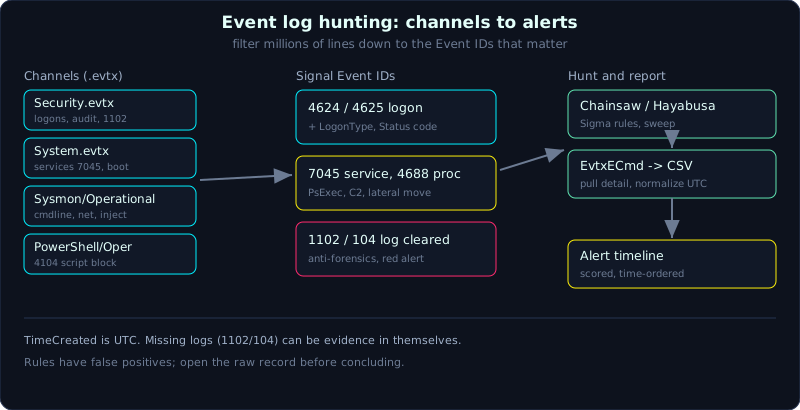 The .evtx channels, the Event IDs worth knowing, and the Sigma tools that cut millions of lines down to a few.
| Part: 4 (Windows Forensics) | Time: about 70 minutes | Difficulty: medium |
Prerequisites: know logon types and the concept of a Windows account (Lesson 4.1), understand the workflow of working on a copy (Part 2).
Tools: EvtxECmd (Eric Zimmerman), Chainsaw, Hayabusa, Sysmon, wevtutil, Get-WinEvent, python-evtx.
Goals
After this lesson you know where the .evtx files live, the channel structure, and the important log channels beyond Security/System/Application. You know the Event ID groups for logon, process creation, services and log clearing, and you can read the key fields (LogonType, Status code). You understand what Sysmon adds over the default audit. You can parse .evtx to CSV with EvtxECmd and run detection rules with Chainsaw and Hayabusa.
1. Theory
1.1. The .evtx file and the channels
From Windows Vista onward, the event log is in the binary .evtx format (binary XML), located at:
1
C:\Windows\System32\winevt\Logs\*.evtx
Each file is one channel. A few channels you have to recognize on sight:
1
2
3
4
5
6
7
8
9
10
11
Security.evtx                                                      # logons, privileges, audit
System.evtx                                                        # services, drivers, boot/shutdown
Application.evtx                                                   # application errors
Microsoft-Windows-Sysmon%4Operational.evtx                         # Sysmon (if installed)
Microsoft-Windows-PowerShell%4Operational.evtx                     # script block logging
Windows PowerShell.evtx                                            # old PowerShell
Microsoft-Windows-TaskScheduler%4Operational.evtx                  # scheduled tasks
Microsoft-Windows-TerminalServices-LocalSessionManager%4Operational.evtx   # RDP, session side
Microsoft-Windows-TerminalServices-RemoteConnectionManager%4Operational.evtx # RDP, connection side
Microsoft-Windows-WinRM%4Operational.evtx                          # remoting
Microsoft-Windows-Windows Defender%4Operational.evtx               # Defender detections
The %4 in the file name is a / that has been escaped (for example Sysmon/Operational). Each record has an EventID, a time, a source (Provider), and an EventData block holding name-value fields. The same EventID under a different Provider is a different thing, so when you look one up, say “4688 in Security”, not just the number.
1.2. The default audit does not record enough
This is what trips up beginners: many useful events are not on by default. For example:
- Event 4688 (process creation) only exists if the “Audit Process Creation” policy is on. To see the command line too, you also have to enable “Include command line in process creation events” (GPO), otherwise the
CommandLinefield is empty. - Logon auditing is usually on, but the level of detail depends on configuration.
So when a machine has no Sysmon and no command-line auditing, do not expect to see the full command chain. At that point you have to pivot to program execution artifacts (Lesson 4.3).
1.3. Event ID groups to memorize
Security.evtx (logon and accounts):
1
2
3
4
5
6
7
8
9
10
11
12
13
14
15
16
17
18
19
4624  Successful logon           -> check the LogonType field
4625  Failed logon               -> check Status / Sub Status for the reason
4634  Logoff
4647  User-initiated logoff
4648  Logon with explicit credentials (runas, common in lateral movement)
4672  Special privileges assigned (sign of an admin-level logon)
4688  New process created (NewProcessName, CommandLine, ParentProcessName)
4689  Process ended
4697  Service installed (Security version, needs audit)
4720  New user created
4722  Account enabled
4724  Password reset
4728 / 4732 / 4756  Member added to a group (global / local / universal)
4726  User deleted
4768  Kerberos TGT requested     4769  Service ticket requested     4771  Pre-auth failed
4776  NTLM authentication
4698  Scheduled task created     4702  Scheduled task updated
4616  System time changed        (anti-forensics sign)
1102  Security log cleared       (red alert)
LogonType in 4624/4625 (memorize this, most reasoning depends on it):
1
2
3
4
5
6
7
8
9
2   Interactive        local logon (at the machine keyboard)
3   Network            access over the network (shares, PsExec uses this)
4   Batch              scheduled task
5   Service            service starting
7   Unlock             screen unlock
8   NetworkCleartext   password sent in cleartext (common with IIS basic auth)
9   NewCredentials     runas /netonly
10  RemoteInteractive  RDP
11  CachedInteractive  logon with cached credentials (DC not reachable)
Status / Sub Status in 4625 (why the logon failed):
1
2
3
4
5
6
0xC000006A  Wrong password (the user exists)
0xC0000064  User does not exist          -> sign of username guessing
0xC0000234  Account locked out
0xC0000072  Account disabled
0xC0000071  Password expired
0xC000006F  Logon outside allowed hours
A burst of 4625 with 0xC0000064 across many different usernames is account enumeration. A burst of 0xC000006A on one account is a password brute force. A 4625 followed immediately by a 4624 from the same source is a successful brute force.
System.evtx (services and the machine lifecycle):
1
2
3
4
5
6
7
8
9
10
7045  New service installed       -> malware and PsExec leave many traces here
7034  Service crashed unexpectedly
7036  Service changed state (start/stop)
7040  Service changed start type (e.g. disabled -> auto)
6005  Event Log service started (roughly the boot time)
6006  Event Log service stopped (roughly a clean shutdown)
6008  Unexpected shutdown (power loss, crash)
1074  A process/user ordered a shutdown/restart
104   A (particular) log channel was cleared
41    Kernel-Power, machine rebooted without a clean shutdown
7045 is one of the most valuable events for hunting. PsExec, many C2 frameworks and ransomware all install a temporary service to run their payload as SYSTEM, and leave a 7045 line with an odd ImagePath (a random service name, a path in ADMIN$, a cmd/powershell command).
1.4. Sysmon, why you want it
The default audit is thin. Sysmon (System Monitor, from Sysinternals) is a driver plus service that logs very detailed behavior into the Microsoft-Windows-Sysmon/Operational channel, configured with an XML file (the well-known configs from SwiftOnSecurity or Olaf Hartong are a good starting point). The Sysmon events worth remembering:
1
2
3
4
5
6
7
8
9
10
11
12
13
1   Process create     -> full command line, hash, ParentImage, OriginalFileName
2   File creation time changed   -> sign of timestomp
3   Network connection          -> which process opened a connection to which IP/port
5   Process terminated
7   Image loaded (DLL)          -> detect a foreign DLL being loaded
8   CreateRemoteThread          -> classic for code injection
10  ProcessAccess               -> who opened a handle into lsass.exe (credential dump)
11  FileCreate
12/13/14  Registry (create key, set value, rename)
15  FileCreateStreamHash        -> an Alternate Data Stream (ADS) was created
22  DNS query                   -> the domain the process queried
23  FileDelete
25  ProcessTampering            -> process hollowing / herpaderping
If the machine has Sysmon, look at it before even Security, because Sysmon event 1 gives the command line and hash without depending on whether the admin remembered to enable 4688 command line.
1.5. RDP and PowerShell
RDP (Remote Desktop) leaves traces in several places, not only 4624 LogonType 10:
1
2
3
4
TerminalServices-LocalSessionManager/Operational   21  Session logon succeeded (has source IP)
                                                    24  Session disconnected
                                                    25  Session reconnected
TerminalServices-RemoteConnectionManager/Operational 1149 User authenticated (not necessarily fully logged on yet)
PowerShell:
1
2
3
Windows PowerShell.evtx                          400/403  engine start/stop
Microsoft-Windows-PowerShell/Operational         4103  module logging (pipeline)
                                                 4104  script block logging (records the WHOLE script block; even obfuscated it is readable after decode)
Event 4104 is a strong source against fileless malware: even if the attacker packs or encodes the command, Windows still records the script block after decoding, so you read the real payload.
2. Demo
Work on a copy of the winevt\Logs folder. Record a hash first.
2.1. Fast filtering on Windows itself (live triage)
1
2
3
4
5
6
7
8
9
10
11
12
13
# the 10 most recent successful logons, with LogonType
Get-WinEvent -FilterHashtable @{LogName='Security'; Id=4624} -MaxEvents 10 |
  Format-List TimeCreated, Message

# every newly installed service in System
Get-WinEvent -FilterHashtable @{LogName='System'; Id=7045} |
  Format-List TimeCreated, Message

# has anyone cleared the Security log yet (1102 is the alarm)
Get-WinEvent -FilterHashtable @{LogName='Security'; Id=1102}

# read an extracted .evtx file directly
Get-WinEvent -Path .\Security.evtx -FilterXPath "*[System[EventID=4625]]"
On classic CMD, wevtutil qe Security /c:5 /f:text also works.
2.2. EvtxECmd, turning .evtx into clean CSV
EvtxECmd (Eric Zimmerman) uses map files to pull the important fields into tidy columns, normalizes time to UTC, and fits well into a timeline or Timeline Explorer.
1
2
3
4
5
6
7
8
# one file
EvtxECmd.exe -f "C:\evidence\Security.evtx" --csv "C:\out" --csvf security.csv

# a whole log folder, merged into one CSV for the timeline
EvtxECmd.exe -d "C:\evidence\winevt\Logs" --csv "C:\out" --csvf all_evtx.csv

# export JSON to push into a SIEM/Elastic
EvtxECmd.exe -d "C:\evidence\winevt\Logs" --json "C:\out"
Open the CSV in Timeline Explorer (same author) to filter by EventID, by map description, by time very quickly.
2.3. Chainsaw, hunting with Sigma rules
Chainsaw (WithSecure, written in Rust, very fast) scans a whole evtx folder and applies Sigma rules to surface suspicious events.
1
2
3
4
5
6
7
8
9
10
# hunt with the bundled Sigma set
chainsaw hunt /evidence/winevt/Logs \
  -s sigma/ \
  --mapping mappings/sigma-event-logs-all.yml \
  -r rules/ \
  --output chainsaw_hits.csv --csv

# search by keyword / regex, no rules needed
chainsaw search -t 'Event.System.EventID: =4688' /evidence/winevt/Logs
chainsaw search -e "psexec|cobaltstrike|mimikatz" /evidence/winevt/Logs
Chainsaw is strong because it maps field names for Sigma already and prints readable tables. Use it to “sweep everything” first, then narrow down.
2.4. Hayabusa, a scored alert timeline
Hayabusa (Yamato Security) also builds on Sigma but leans toward producing an alert timeline with severity levels (critical/high/medium) and statistics, which fits reporting well.
1
2
3
4
5
6
7
8
# build an alert timeline from a whole log folder
hayabusa.exe csv-timeline -d C:\evidence\winevt\Logs -o hayabusa_timeline.csv

# only high and above, with detailed fields
hayabusa.exe csv-timeline -d C:\evidence\winevt\Logs -o hits.csv -m high -p super-verbose

# quick stats on which EventIDs are present and how often
hayabusa.exe metrics -d C:\evidence\winevt\Logs -o metrics.csv
A common real workflow: Hayabusa or Chainsaw to find the hotspots, EvtxECmd to pull the detail around that point and merge it into a shared super timeline with the other artifacts.
3. Lab
The runnable lab is in labs/4.2/: fetch.sh downloads a public Security .evtx file (from EVTX-ATTACK-SAMPLES, GPL), and solve.sh uses python-evtx to filter the important Event IDs and point out suspicious events. The .evtx is an event record (data), not an executable. transcript.txt is the real output. See labs/4.2/README.md.
1
2
3
4
cd labs/4.2
pip install python-evtx
bash fetch.sh
bash solve.sh
- Task (with a runnable lab):
- Count the Event ID distribution (this sample has 4672, 4624, 4634, 4688, 1102).
- Read 4624: all are LogonType 3 (Network), account
Administrator, from IP192.168.1.219, over Kerberos. - Read 4688:
notepad.exewas spawned byWmiPrvSE.exe, that is remote execution over WMI (for example wmiexec). This is the main suspicious event. - See that the CommandLine field is empty: the machine has not enabled “include command line in 4688” (exactly as in section 1.2).
- Find 1102: the Security log was cleared at 04:40:18 by the account
admin(anti-forensics).
- Task as an exercise (needs a Windows VM): enable Audit Process Creation with command line, install Sysmon, log in wrong a few times (generates 4625), run
powershell -enc,sc createa service (generates 7045), thenwevtutil cl Application. Extractwinevt\Logs, rerun the solver; if CommandLine is still empty, pivot to Sysmon event 1. Also run Chainsaw/Hayabusa to compare rules. - Answers: the “short answers” section in
labs/4.2/README.mdandlabs/4.2/transcript.txt.
4. Key takeaways
- .evtx lives in
C:\Windows\System32\winevt\Logs; a name with%4is a/in the channel. - 4624/4625 only mean something read together with LogonType and Status code.
- 4688 needs audit to exist, and a separate GPO to carry the command line.
- 7045 (System) is a hotspot for PsExec, ransomware and C2.
- 1102 (Security) and 104 (another channel) mean someone cleared a log.
- Sysmon events 1/3/8/10/22 cover what the default audit misses.
- Use Chainsaw/Hayabusa to sweep, EvtxECmd to pull detail for the timeline.
5. Common pitfalls
- Expecting a command line in 4688 on a machine that has not enabled audit, then concluding “no commands were run”.
- Looking only at 4624 LogonType 10 for RDP and forgetting the TerminalServices channels and events 1149/21.
- Mixing up times: EventData sometimes carries the provider’s local time, but the standard mark for the timeline is TimeCreated (UTC). Normalize to UTC before you merge.
- Believing that not seeing an event means it did not happen. Logs can roll over (full logs overwrite), be size-limited, or be cleared. Missing logs are sometimes evidence in themselves (look for 1102/104).
- Skipping PowerShell 4104 on an encoded command, when that is exactly where you read the decoded payload.
- Running Sigma rules and trusting the output absolutely. Rules have false positives and false negatives; always open the raw record before concluding.
6. Further reading
- Microsoft, “Appendix L: Events to Monitor” and the per-event-ID description pages for Security.
- SANS “Hunt Evil” poster and FOR508, the lateral movement via event log section.
- Sysmon docs on Sysinternals, with the configs from SwiftOnSecurity and Olaf Hartong.
- The Chainsaw (WithSecure) and Hayabusa (Yamato Security) repos, read the README and bundled rules.
- The Sigma project (SigmaHQ) to understand how detection rules are written.